1. Destpêk
Thank you for choosing the Taiahiro Bk6301 Wireless Mechanical Gaming Keyboard and Mouse Combo. This manual provides detailed instructions for setting up, operating, and maintaining your new peripheral devices. This combo offers versatile connectivity options including 2.4G wireless, Bluetooth 5.0, and wired USB-C, ensuring compatibility with various devices.
2. Naveroka pakêtê
Ji kerema xwe piştrast bikin ku hemî tişt di pakêta we de hene:
- Taiahiro Bk6301 Wireless Mechanical Gaming Keyboard
- Taiahiro Wireless Gaming Mouse
- USB 2.4G Receiver (stored in mouse battery compartment)
- USB-C ber USB-A Kabloya Barkirinê/Daneyê
- Manual Bikarhêner
- 1 AA Battery (for mouse, may be pre-installed or included separately)

Image 2.1: Contents of the Taiahiro Bk6301 Keyboard and Mouse Combo package, including the keyboard, mouse, USB receiver, and USB-C cable.
3. Hilbera Serîview
3.1 Taybetmendiyên Klavyeyê
- Rêzkirina 98-Kilîtan: Compact design with a full numeric keypad.
- Guhêrbarên Şîn ên Mekanîkî: Provide tactile and audible feedback for typing.
- Ronahîkirina Paşve ya RGB: Bandorên ronîkirinê yên xwerû.
- Adjustable Keyboard Stand: Allows for ergonomic positioning.
- Girêdana Pir-Mode: Supports 2.4G wireless, Bluetooth 5.0, and wired USB-C.
- Battery Rechargeable: Built-in 2000mAh battery for wireless operation.
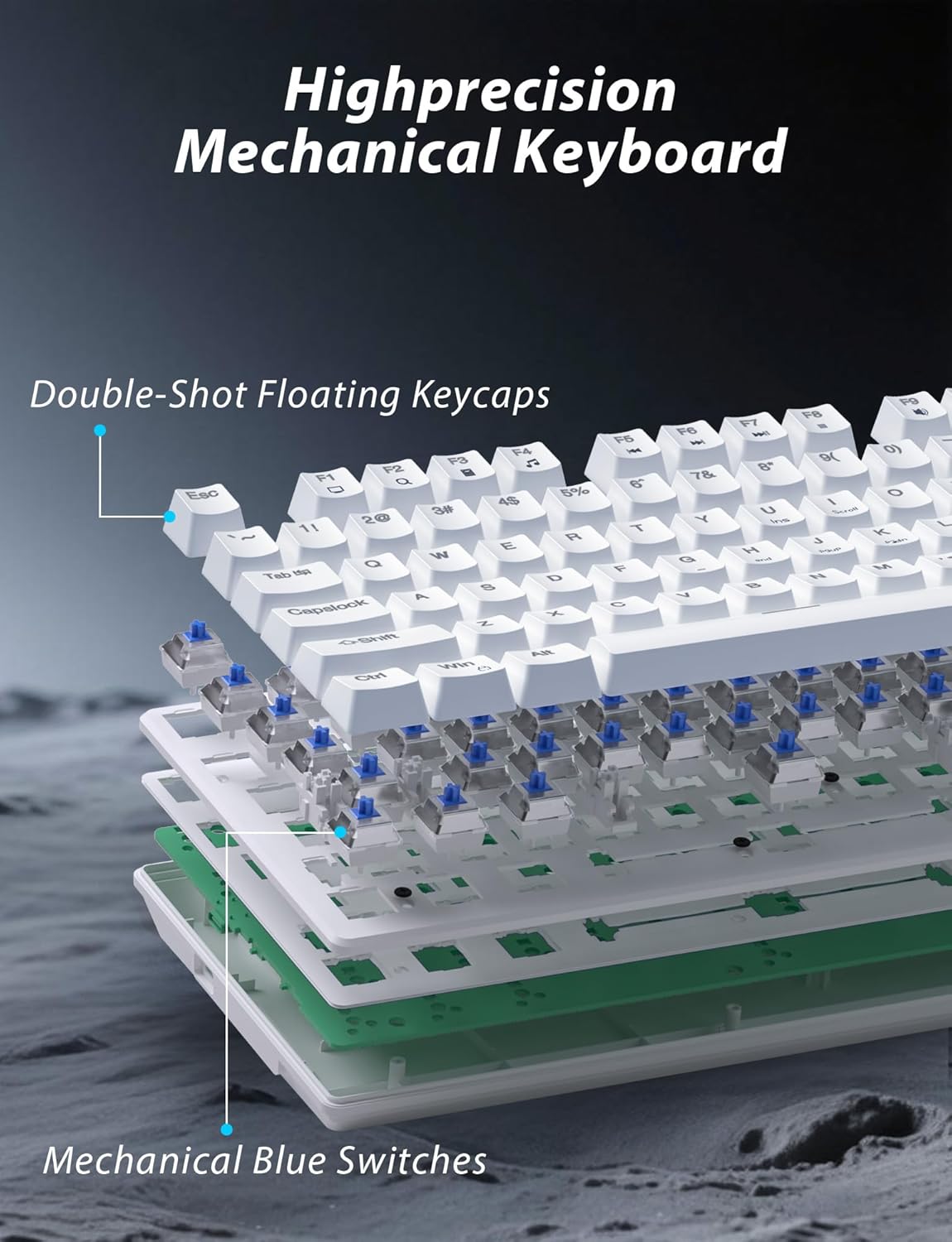
Wêne 3.1: Teqiyayî view illustrating the internal structure of the mechanical keyboard, highlighting the double-shot floating keycaps and mechanical blue switches.

Wêne 3.2: Aliyê view of the keyboard demonstrating its ergonomic design and adjustable stand for comfortable use.
3.2 Taybetmendiyên Mişkê
- Sêwirana Ergonomîk: Shaped for comfortable grip.
- DPI-ya birêkûpêk: Four levels (800/1600/2400/3200) for precision control.
- Bişkokên Pêş/Paş: Convenient side buttons for navigation.
- Girêdana Dual-Mode: Supports 2.4G wireless and Bluetooth.

Image 3.3: The wireless gaming mouse, highlighting its ergonomic shape and four adjustable DPI levels.
4. Rêwerzên Sazkirinê
4.1 Keyboard Connection
The keyboard supports three connection modes: 2.4G wireless, Bluetooth, and wired USB-C.

Image 4.1: The keyboard displaying its three connectivity options: Bluetooth, 2.4GHz wireless, and USB-C wired connection.
2.4G Moda Wireless:
- Locate the USB 2.4G receiver, typically stored in the mouse's battery compartment.
- Destûra USB-ê têxe portek USB-ya berdest a li ser komputera xwe.
- On the keyboard, slide the mode switch (usually located on the top edge or bottom) to the '2.4G' position.
- Divê klavyeyê bixweber ve girêdayî bibe.
Moda Bluetooth:
- Slide the mode switch on the keyboard to the 'BT' (Bluetooth) position.
- Ronahiya nîşander a klavyeyê dê bibiriqe, ku nîşan dide ku ew di moda cotkirinê de ye.
- On your device (computer, laptop, smartphone), open Bluetooth settings and search for new devices.
- Select "Taiahiro Bk6301" or a similar name from the list of available devices to pair.
- Piştî hevberdanê, ronahiya nîşangir dê zexm bibe.
Moda USB-C ya bi kabloyê:
- Kabloya USB-C ya ku hatiye dayîn bi porta USB-C ya klavyeyê ve girêdin.
- Connect the other end (USB-A) to an available USB port on your computer.
- The keyboard will function as a wired device and will charge simultaneously.
4.2 Mouse Connection
The mouse supports 2.4G wireless and Bluetooth connectivity.

Image 4.2: The underside of the mouse, illustrating the battery compartment for one AA battery and the storage slot for the tiny USB receiver.
Sazkirina Pîlê:
- Open the battery compartment on the underside of the mouse.
- Insert one AA battery, ensuring correct polarity.
- Cihê pîlê bigire.
2.4G Moda Wireless:
- Ensure the USB 2.4G receiver is plugged into your computer.
- Guhêrbarê modê yê li binê mişkê ber bi pozîsyona '2.4G' ve bizivirînin.
- Divê mişk bixweber ve girêbide.
Moda Bluetooth:
- Guhêrbarê modê yê li binê mişkê bizivirînin pozîsyona 'BT' (Bluetooth).
- The mouse will enter pairing mode.
- On your device, open Bluetooth settings and search for new devices.
- Select "Taiahiro Mouse" or a similar name from the list to pair.
5. Telîmatên Operating
5.1 Fonksiyonên Klavyeyê
Kontrola ronahiya paşerojê:
The keyboard features customizable RGB backlighting.
- Moda Ronahîkirina Paşîn Biguherîne: Rojnamevanî Fn + Mal ji bo çerxerêkirinê di navbera 18 bandorên ronahîkirinê yên cûda de.
- Ronahîyê eyar bikin: Rojnamevanî Fn + ↑ (Tîra Jor) or Fn + ↓ (Tîra Ber bi Jêr) to adjust between 5 brightness levels.
- Lezê eyar bikin: Rojnamevanî Fn + ← (Tîra Çepê) or Fn + → (Tîra Rastê) to adjust between 5 lighting speed levels.

Image 5.1: Keyboard layout highlighting the function key combinations for controlling backlight modes, brightness, and speed.
Fonksiyonên Multimedia:
Access multimedia controls by pressing the Fn key in combination with the designated F-keys (F1-F12).
- Fn+F1: Media Player
- Fn+F2: Volume Down
- Fn+F3: Volume Up
- Fn+F4: Bêdeng
- Fn+F5: Rawestan
- Fn+F6: Previous Track
- Fn+F7: Play/Pause
- Fn+F8: Next Track
- Fn+F9: Email
- Fn+F10: Web Browser
- Fn+F11: My Computer
- Fn+F12: Hesabker
5.2 Fonksiyonên Mişkê
Guhertina DPI:
Bitikîne Bişkojka DPI (located behind the scroll wheel) to cycle through the four DPI settings: 800, 1600, 2400, and 3200. Each press changes the sensitivity, allowing you to adjust cursor speed to your preference.
6. Maintenance
6.1 Paqijkirin
- Kilawye: Use a soft, dry cloth to wipe the surface. For deeper cleaning, use compressed air to remove debris from between keys. Avoid using harsh chemicals or abrasive materials.
- Mişk: Rûyê mişkê bi nermî û hinekî hişk paqij bike.amp cloth. Ensure no liquid enters the internal components.
6.2 Management Pîlê
- Kilawye: The keyboard has a built-in rechargeable battery. Connect the USB-C cable to a power source (e.g., computer USB port, USB wall adapter) to charge. The indicator light will show charging status.
- Mişk: The mouse uses one AA battery. Replace the battery when the mouse performance degrades or it stops responding. Ensure proper polarity when inserting a new battery.
7. Destpêkirin
If you encounter issues with your Taiahiro keyboard and mouse combo, please refer to the following solutions:
| Pirsegirêk | Çareseriya gengaz |
|---|---|
| Keyboard/Mouse not responding (2.4G) |
|
| Klavyeyê/Mişkê ve girêdayî nîne (Bluetooth) |
|
| Keyboard backlight not working or stuck |
|
| Bişkok bersiv nadin an jî du caran dinivîsin |
|
8. Specifications
| Taybetî | Hûrî |
|---|---|
| Hejmara Model | Bk6301 |
| Têkilî | Bluetooth 5.0, Bêtêl 2.4G, Bi Kabloya USB-C |
| Tîpa Klavyeyê | Keyboard Gaming mekanîkî |
| Key Layout | 98 Keys (with Numeric Keypad) |
| Switch Type | Switches Blue Mekanîk |
| Ronahiya Klavyeyê | RGB (18 modes, 5 brightness, 5 speed levels) |
| Klavyeya Pîl | 2000mAh Rechargeable |
| Astên DPI yên Mişkê | 800 / 1600 / 2400 / 3200 |
| Battery Mişk | 1 x Battery AA |
| Amûrên Lihevhatî | Personal Computer, Laptop, Smartphone |
| Babetê Weight | 2.72 pound (tevlihev) |
| Mezinahiyên pakêtê | 15 x 5.59 x 3.11 inches |
9. Garantî û Piştgirî
9.1 Agahî Garantî
Taiahiro products are covered by a limited warranty from the date of purchase. Please refer to the warranty card included in your package or visit the official Taiahiro website for detailed warranty terms and conditions. This warranty typically covers manufacturing defects and material faults under normal use.
9.2 Piştgiriya Mişterî
For technical assistance, troubleshooting, or any questions regarding your Taiahiro Bk6301 combo, please contact our customer support team. You can find contact information on the Taiahiro official website or through your purchase platform. When contacting support, please have your product model number (Bk6301) and purchase details ready.


