Pêşkêş
The 1Mii SafeFly Pro is a versatile Bluetooth 5.3 audio adapter designed to transmit and receive audio wirelessly. It features an OLED screen for clear status display and supports advanced audio codecs for high-quality sound. This device allows you to connect your wireless headphones to non-Bluetooth audio sources or stream audio from your Bluetooth-enabled devices to wired audio systems.
Di Box çi ye

This image displays all items included in the 1Mii SafeFly Pro package. You will find the SafeFly Pro Bluetooth Audio Adapter, a USB-C Charging Cable, a 3.5mm Female to Female Audio Adapter, and a Keychain.
- SafeFly Pro Bluetooth Audio Adapter
- Kabloya barkirinê ya USB-C
- 3.5mm Female to Female Audio Adapter
- Keychain
- Manual Bikarhêner (ev belge)
Product Overview

Ev wêne hûrgulî pêşkêş dike view of the 1Mii SafeFly Pro, highlighting its key components. These include the flexible audio cable with a 3.5mm audio connection, an audio plug protector, the OLED display screen, the 'M' key, the 'OK' key, the TX/RX sliding switch, a one-click reset button, and the USB-C charging port.
Pêkhat û fonksiyonên:
- Têkiliya Dengê 3.5mm: Connects to audio source (TX mode) or audio receiver (RX mode).
- Audio Plug Protector: Protects the 3.5mm audio plug when not in use.
- OLED Display Screen: Shows battery level, volume, paired device names, and active audio codecs.
- 'M' Key: In pairing mode, press once to select the connected device. In TX mode, press twice to switch the Bluetooth decoding format.
- 'OK' Key: Power ON/OFF (long press for 1 second). Long press for 2 seconds to enter pairing mode. Also functions as Play/Pause.
- TX/RX Sliding Switch: Selects Transmitter (TX) or Receiver (RX) mode.
- Bişkojka Vegerandinê: Ji bo 3 çirkeyan pêl dirêj bike da ku amûrê ji nû ve were vegerandin.
- Porta barkirinê ya USB-C: Ji bo şarjkirina bataryaya navxweyî.
Damezirandin
1. Barkirina Amûrê
Before first use, fully charge the SafeFly Pro using the provided USB-C charging cable. Connect the cable to the USB-C port on the device and a standard USB power adapter (not included). The OLED screen will indicate charging status.
2. Hêzdarkirina / Off
- Hêzdarkirin: Long press the 'OK' button for 1 second.
- Ji bo Veqetandinê: Long press the 'OK' button for 1 second.
3. Selecting Operating Mode (TX/RX)
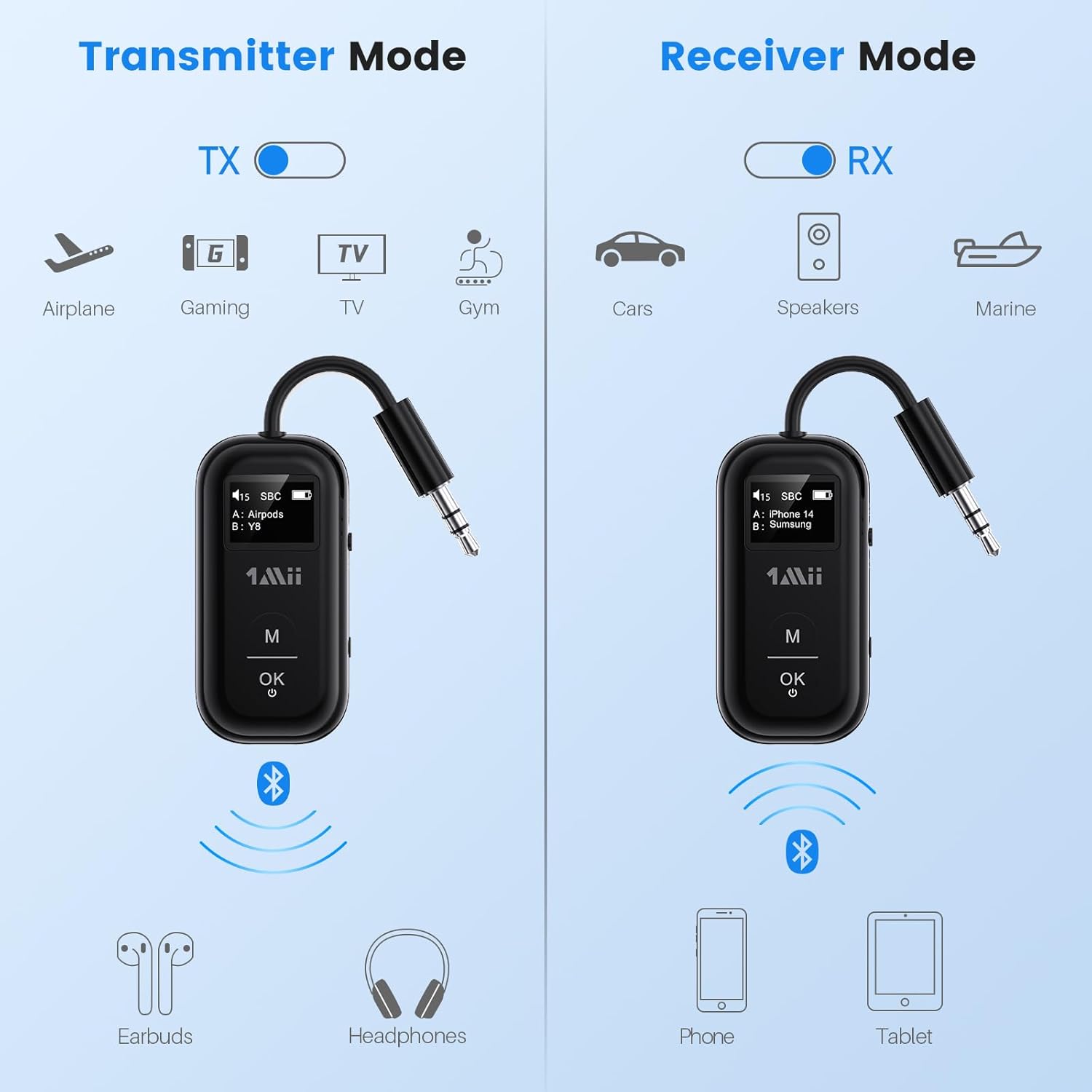
This image illustrates the two operating modes: Transmitter (TX) and Receiver (RX). TX mode is used for devices like airplanes, gaming consoles, TVs, and gym equipment to transmit audio to earbuds or headphones. RX mode is used for cars, speakers, and marine systems to receive audio from phones or tablets.
Use the TX/RX sliding switch on the side of the device to select the desired mode:
- Moda TX (Veguhezkar): For sending audio from non-Bluetooth devices (e.g., airplane entertainment, TV, gym equipment) to Bluetooth headphones or speakers.
- Moda RX (Wergir): For receiving audio from Bluetooth-enabled devices (e.g., smartphones, tablets) to wired audio systems (e.g., car stereo, home speakers).
4. Pairing in TX Mode (Connecting to Headphones)

- Set the SafeFly Pro to TX mode using the sliding switch.
- Plug the 3.5mm audio connection into your audio source (e.g., airplane entertainment system, TV headphone jack). If needed, use the dual-prong airplane adapter.
- Long press the 'OK' button on the SafeFly Pro for 2 seconds to enter pairing mode. The screen will display "Searching".
- Put your Bluetooth headphones or speakers into pairing mode. Refer to your headphone's manual for specific instructions.
- The SafeFly Pro will automatically search for and connect to nearby Bluetooth devices. Once connected, the device name will appear on the OLED screen.
- To connect a second pair of headphones: After the first device is connected, long press the 'OK' button again for 2 seconds to enter pairing mode for the second device. Put the second pair of headphones into pairing mode. Both devices will then be connected simultaneously.

This image shows the 1Mii SafeFly Pro connected to an airplane's in-flight entertainment system, enabling wireless audio streaming to a user's Bluetooth headphones.
5. Pairing in RX Mode (Connecting to Smartphones/Tablets)
- Set the SafeFly Pro to RX mode using the sliding switch.
- Plug the 3.5mm audio connection into your wired audio system's AUX input (e.g., car stereo, home speaker).
- Long press the 'OK' button on the SafeFly Pro for 2 seconds to enter pairing mode. The screen will display "Searching".
- On your smartphone or tablet, go to Bluetooth settings and select "1Mii SafeFly Pro" from the list of available devices to connect.
- Once connected, the device name will appear on the OLED screen.
- To connect a second smartphone/tablet: After the first device is connected, long press the 'OK' button again for 2 seconds to enter pairing mode for the second device. Connect the second smartphone/tablet via its Bluetooth settings.

This image shows the 1Mii SafeFly Pro in RX mode, connected to a car's audio system, receiving audio wirelessly from a smartphone.
Telîmatên Operating
Nîşana ekrana OLED

Ev wêne nêzîkatiyekê pêşkêş dike view of the OLED screen, indicating the power status, audio format (e.g., SBC), volume level, battery level, and the names of the two currently paired devices (A and B).
The OLED screen provides real-time information:
- Asta Pîlê: Şarjiya pîlê ya mayî nîşan dide.
- Asta Volume: Displays the current audio output volume.
- Amûra Hevgirtî: Shows the name(s) of the connected Bluetooth headphones or smartphones.
- Kodeka Deng: Displays the active audio codec (e.g., aptX LL, aptX HD, aptX Adaptive, aptX, AAC, SBC).
Functions Button
- Bişkoka 'Baş e': Short press to Play/Pause audio.
- Bişkoka 'M': In TX mode, press twice to cycle through available audio codecs (aptX LL, aptX HD, aptX Adaptive, AAC, SBC) if supported by your connected headphones.
Lênerrînî
To ensure the longevity and optimal performance of your 1Mii SafeFly Pro, follow these maintenance guidelines:
- Paqijî: Amûrê bi qumaşek nerm û hişk paqij bikin. Paqijkerên şilemenî an jî madeyên aşınker bikar neynin.
- Embarkirinî: Amûrê li cîhek sar û hişk, dûr ji tîrêjên rojê yên rasterast û germahiyên zêde hilînin.
- Lênêrîna Pîl: Avoid fully discharging the battery frequently. Charge the device regularly, even if not in use, to maintain battery health.
- Handling: Amûrê bi baldarî bikar bînin. Nehêlin ew bikeve xwarê an jî rastî lêdanên bihêz were.
Çareserkirina pirsgirêkan
If you encounter issues with your SafeFly Pro, try the following steps:
- Cîhaz Nakeve: Ensure the device is fully charged. Connect it to a power source using the USB-C cable.
- Nekare were hevberkirin:
- Ensure the SafeFly Pro is in the correct TX or RX mode.
- Make sure both the SafeFly Pro and your target Bluetooth device are in pairing mode.
- Amûran nêzîkî hev bikin.
- Turn off and on both devices, then try pairing again.
- Deng tune ye/Kalîteya Deng xirab e:
- Check that the 3.5mm audio cable is securely connected to both the SafeFly Pro and the audio source/receiver.
- Ensure the volume on both the SafeFly Pro and the connected device is turned up.
- Verify that the correct audio codec is selected (in TX mode, press 'M' twice to cycle).
- Test with a different audio cable or source/receiver if possible.
- Device Frozen/Unresponsive: Long press the Reset Button (small hole on the side) for 3 seconds using a thin object (e.g., paperclip) to restart the device.
Specifications
| Mezinahiya Hilberê | 2.24 x 1.18 x 0.51 inches |
| Babetê Weight | 0.64 onsan |
| Hejmara Modela Babetê | SafeFly Pro |
| Batteries | 1 Battery Lithium Polymer (tevî) |
| Teknolojiya Girêdanê | AUX, Bluetooth 5.3 |
| Çavkaniya Hêzê | Battery Powered |
| Mal | Acrylonitrile Butadiene Styrene (ABS) |
| Taybetmendiyên Taybet | AptX LL/HD/Adaptive, Bluetooth Transmitter & Receiver, Built-in Battery, Connect 2 Devices, with Screen |
Agahiyên Ewlekariyê
Ji bo rêgirtina li zirara li cîhazê an birîndarbûna kesane, ji kerema xwe van rêbernameyên ewlehiyê bixwînin û bişopînin:
- Avoid exposure to extreme temperatures (hot or cold).
- Handle the battery with care. Do not puncture, disassemble, or expose to fire.
- Be aware of potential interference with other wireless devices.
- Amûrê ji av û şilekên din dûr bigirin.
- Hewl nedin ku cîhazê bi xwe tamîr bikin an biguherînin. Ji bo alîkariyê bi piştgiriya xerîdaran re têkilî daynin.
Garantî û Piştgirî
1Mii products are designed for reliability and performance. For warranty information, technical support, or customer service inquiries, please refer to the official 1Mii website or contact their customer support team directly. Keep your purchase receipt as proof of purchase for warranty claims.