Product Overview
The Carlinkit MINI SE Wireless CarPlay Adapter is designed to convert your vehicle's existing wired CarPlay system into a wireless one. This compact device offers a stable and reliable connection, enhancing your driving experience by eliminating the need for cables.
Taybetmendiyên sereke hene:
- Seamless conversion from wired to wireless CarPlay.
- Equipped with both USB-A and USB-C ports for broad compatibility.
- Compact and discreet design for a clutter-free dashboard.
- Provides stable and reliable wireless connectivity.
- Supports hands-free navigation, music streaming, and voice control.

Image: The Carlinkit MINI SE adapter, highlighting its small form factor and versatile USB-A and USB-C connectivity options.
Di Box çi ye
Upon unboxing your Carlinkit MINI SE Wireless CarPlay Adapter, you will find the following items:
- Blister Packing (packaging material)
- Carlinkit MINI SE Wireless CarPlay Adapter (product)
Compatibility û Setup
Pêdiviyên Hevgirtinê
Before proceeding with the setup, ensure your vehicle and smartphone meet the following compatibility criteria:
- Erebok: Must have a built-in factory wired CarPlay system.
- Nîşeya Girîng: Ev adapter e NOT lihevhatî with wired Android Auto cars and does NE piştgirî wireless Android Auto.
- Smartphone: iPhone 6 or above, running iOS 10 or above.
- Nîşeya Girîng: Ev adapter e NE guncaw e for Android phones. Video and mirroring functions are not supported.

Image: Visual guide to compatible car brands and iPhone models, emphasizing the requirement for factory wired CarPlay.
Pêngavên Sazkirinê
Follow these steps to set up your Carlinkit MINI SE adapter:
- Adapterê girêdin: Plug the Carlinkit MINI SE adapter into your car's USB-A or USB-C port. Ensure the port is the one typically used for wired CarPlay.
- CarPlay Interface Activation: Your car's infotainment system should automatically detect the adapter and display the CarPlay interface. Some car models may require you to manually select the CarPlay function on the screen.
- iPhone-a xwe amade bikin: Li ser iPhone-ya xwe, biçin Settings, then enable both Wi-Fi û Bluetooth.
- Pair with Adapter: In your iPhone's Bluetooth settings, locate and select the Bluetooth signal name of the Carlinkit adapter (e.g., "VehiConn_DC8A"). Confirm the pairing request on your iPhone.
- Giring: Ensure your iPhone is disconnected from your car's original Bluetooth signal to prevent interference and connection failures.
- Authorize CarPlay: Follow any prompts on your car's screen to authorize the use of CarPlay.

Image: The adapter being connected to the car's USB port, demonstrating the dual USB-A and USB-C compatibility.
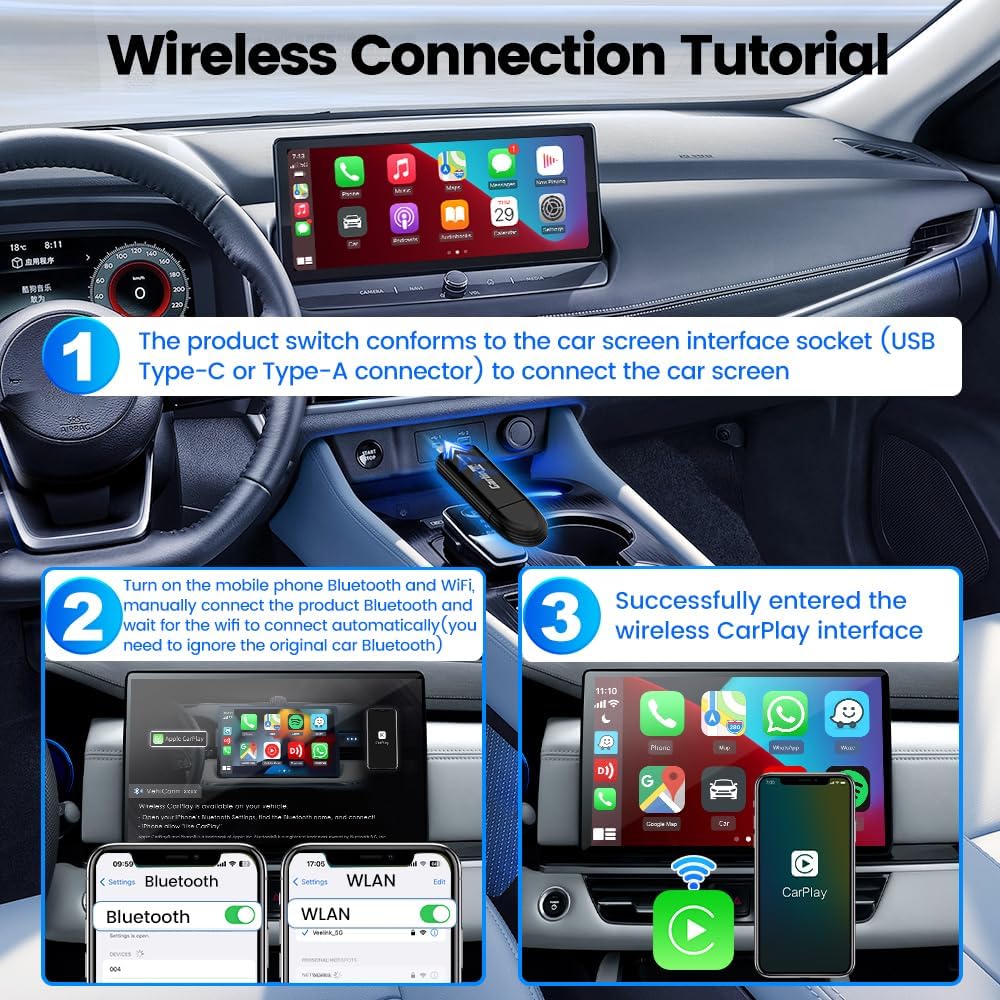
Image: A visual tutorial demonstrating the wireless connection process, from plugging in the adapter to pairing with an iPhone.
Vîdyoya Perwerdehiyê
For a detailed visual guide on setup and connection, please watch the official instruction manual video:
Video: Official instruction manual for the Carlinkit MINI SE, covering unboxing and connection steps.
Telîmatên Operating
Girêdana Otomatîk
After the initial successful pairing, the Carlinkit MINI SE adapter will automatically connect to your iPhone within 5-10 seconds each time you start your car, providing a seamless wireless CarPlay experience.

Image: The Carlinkit MINI SE automatically connecting to CarPlay upon car startup.
Using CarPlay Features
Once connected, you can access all standard CarPlay functionalities wirelessly:
- Rêserbirinî: Utilize integrated map services and real-time traffic information for optimal route planning and guidance.
- Muzîk û Deng: Stream music, podcasts, and audiobooks with original sound quality.
- Bangên Telefonê: Make and receive calls using the car's interface or Siri.
- Kontrola Deng: Use Siri for hands-free commands, such as making calls or getting directions.
- Original Car Operation: Retain the use of your car's original controls, including steering wheel buttons and touch screen.

Image: The CarPlay interface on a car's display, demonstrating various app functionalities.
Video: Demonstrates the Carlinkit MINI SE in use, showcasing music playback, navigation, and Siri voice control through the car's infotainment system.
Lênerrînî
Lênêrîna Giştî
To ensure the longevity and optimal performance of your Carlinkit MINI SE adapter:
- Amûra xwe paqij û ji toz û çopê paqij bikin.
- Avoid exposing the adapter to extreme temperatures or direct sunlight for prolonged periods.
- Do not attempt to disassemble or modify the device, as this may void the warranty.
Over-The-Air (OTA) Updates
The Carlinkit MINI SE supports OTA updates to improve performance and add new features. To update your device:
- Plug the product into the USB port of the car.
- On your iPhone, turn on Wi-Fi and connect to the car's signal (the adapter's Wi-Fi network).
- Open your iPhone's browser and enter the URL "192.168.50.100".
- Enter the background setting interface and click "Upgrade" to check for and install updates.

Image: Steps for performing an Over-The-Air (OTA) firmware update.
Çareserkirina pirsgirêkan
If you encounter issues with your Carlinkit MINI SE adapter, consider the following common solutions:
- Têkçûna Girêdanê:
- Ensure your car has factory wired CarPlay.
- Verify your iPhone's Wi-Fi and Bluetooth are enabled.
- Confirm your iPhone is disconnected from the car's original Bluetooth.
- Try unplugging and replugging the adapter.
- Restart your iPhone and the car's infotainment system.
- Pirsgirêkên Deng:
- Check the car's volume settings.
- Piştrast bike ku tu cîhazên din ên Bluetooth-ê destwerdanê nakin.
- Perform an OTA update to ensure the latest firmware is installed.
- Slow Connection:
- Ensure your iPhone is running the latest iOS version.
- Check for and install any available OTA updates for the adapter.
Heke pirsgirêk berdewam bikin, ji kerema xwe ji bo agahdariya têkiliyê li beşa piştgiriyê binêrin.
Specifications
| Taybetî | Hûrî |
|---|---|
| Mezinahiya Hilberê | 3.2 x 0.83 x 0.41 înç (81.28 x 20.99 x 10.5 mm) |
| Babetê Weight | 0.422 onsan (12 gram) |
| ASIN | B0D7V9P3H1 |
| Hejmara Modela Babetê | 762763565553-MINI5 |
| Amûrên Lihevhatî | iPhones with Lightning connector and CarPlay support (iPhone 6 and above, iOS 10 and above) |
| Type Connector | USB Type C (also compatible with USB-A via included adapter) |
| Reng | Reş |
| Çêker | Carlinkit |
| Têkiliya Wireless | Wi-Fi 2.4G + 5G |

Image: Dimensions and weight of the Carlinkit MINI SE adapter.
Agahiyên Ewlekariyê
Ji kerema xwe rêwerzên ewlehiyê yên jêrîn bişopînin:
- Avoid placing the device near other wireless devices to prevent potential signal interference.
- Dispose of the device and its battery (if applicable) in accordance with local recycling regulations.
- Amûrê li ber avê an jî şilbûna zêde nehêlin.
- Dûr negihêjin zarokan.
Garantî û Piştgirî
Carlinkit is committed to providing professional after-sales service and customer satisfaction. If you have any questions, concerns, or require technical assistance, please contact the seller directly.
Têkiliya Piştgiriyê
To contact the seller, QuTu Official Store, through Amazon:
- Biçin rûpela hilberê li ser Amazonê.
- Under the "Add to Cart" and "Buy Now" buttons, find "Sold by QuTu Official Store" and click on the store name.
- On the seller's page, click "Ask a question".
- Select "Something else" or "Other" if prompted.
- Enter your question, including the product name (Carlinkit MINI SE Wireless CarPlay Adapter) or ASIN (B0D7V9P3H1) for quicker assistance.
Video: Guide on how to contact Carlinkit's official store for after-sales support via Amazon.


