1. Hilbera Serîview
The VDIAGTOOL V200 Pro and VD30 Pro are advanced automotive diagnostic tools designed to assist in identifying and resolving electrical and engine-related issues in vehicles. The V200 Pro is a versatile power circuit probe tester and breaker finder, while the VD30 Pro is a comprehensive OBD2 scanner.
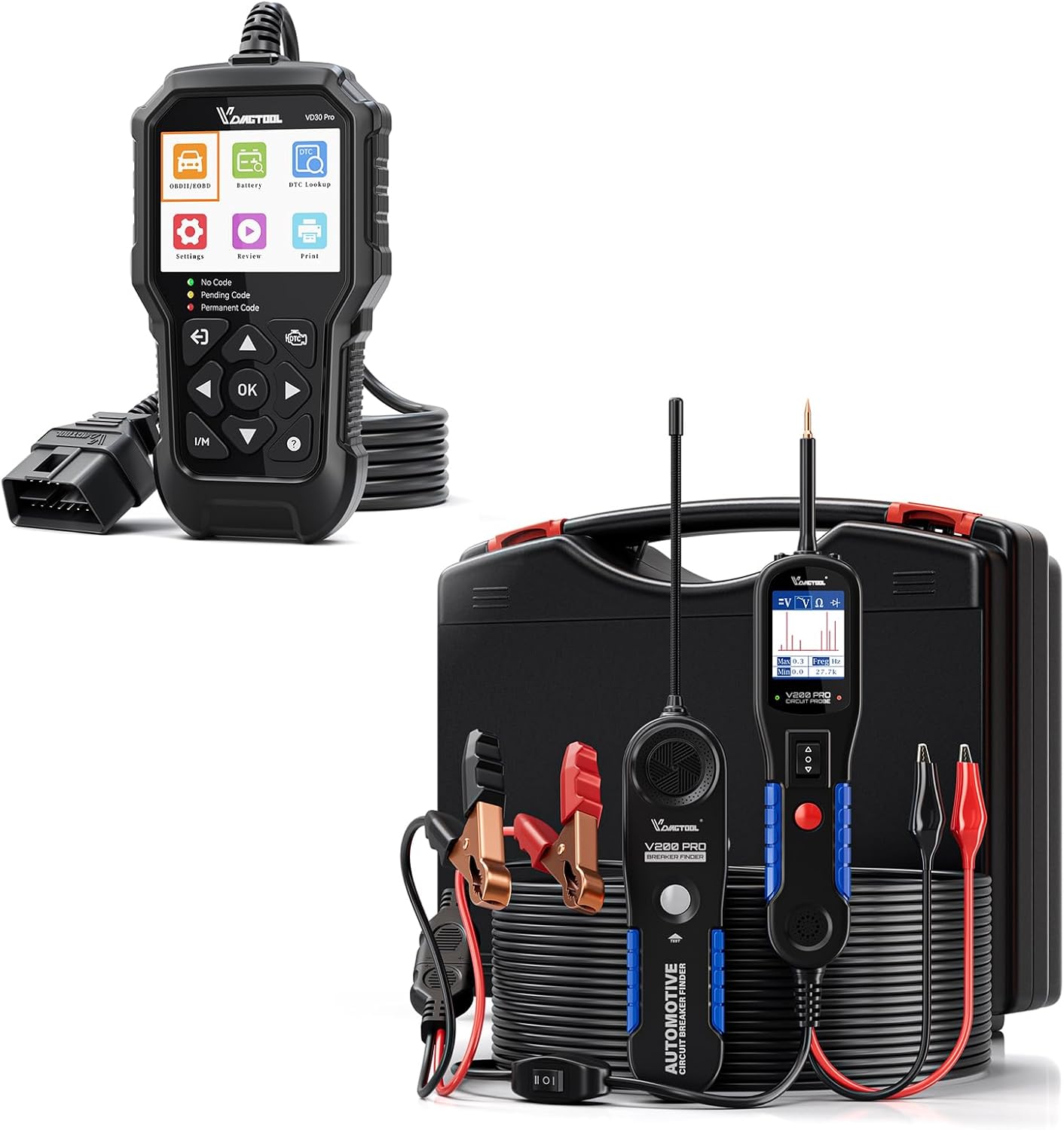
Image 1.1: The VDIAGTOOL V200 Pro Automotive Power Circuit Probe Tester and VD30 Pro OBD2 Scanner Diagnostic Tool.
Taybetmendiyên sereke:
- V200 Pro: Comprehensive circuit testing including open circuits, tracing wires, AC/DC voltage, diode, resistance, polarity, continuity, ground, component activation, signal circuit, relay, fuse, and trailer light tests.
- VD30 Pro: Full OBD2 diagnostic capabilities including reading/clearing fault codes, live data graphing, freeze frame, I/M readiness, O2 sensor tests, and vehicle information.
- User-friendly interfaces for efficient operation.
- Durable construction for reliable performance.
2. V200 Pro Automotive Power Circuit Probe Tester
2.1 Components and Accessories
The V200 Pro kit includes the main circuit probe tester unit and a comprehensive set of accessories for various testing scenarios.

Image 2.1: The VDIAGTOOL V200 Pro kit, including the circuit probe, breaker finder, and various connectors.
- V200 Pro Circuit Tester Unit
- 30 PCS Back Probe Kit: Includes 15 back probe pins, 5 banana plug to alligator clip circuit test wires, 5 wire piercing probes, and 5 nickel-plated copper alligator clips.
- Extension Cables (20FT + 20FT)
2.2 Functions and Capabilities
The V200 Pro is designed for a wide range of electrical diagnostic tasks:

Wêne 2.2: Serview of the V200 Pro's multifunctional automotive circuit testing capabilities.
- Circuit Open Test
- Tracing Wire
- AC/DC Voltage Test
- Testa Diode
- Testa Berxwedanê
- Test Polarity
- Testa Berdewamî
- Ground Test
- Çalakkirina Pêkhatan
- Testa Çerxeya Sînyalê
- Relay, Fuse, Trailer Light Test
It effectively locates short circuits, broken wires, and helps trace electrical paths within the vehicle's system.

Image 2.3: The V200 Pro power probe circuit tester effectively diagnosing electrical problems.
3. VD30 Pro OBD2 Scanner Diagnostic Tool
3.1 Functions and Capabilities
The VD30 Pro is designed to provide comprehensive diagnostic information for OBD2 compliant vehicles, helping users understand and resolve engine-related issues.

Image 3.1: The VD30 Pro's powerful OBD2 scanner diagnostic tool interface and key features.
- Turn off Check Engine Light (CEL)
- Read/Clear Fault Codes (DTCs)
- Live Data (4-In-1 Graphing)
- Daneyên Çarçoveyê cemidand
- One-Click I/M Readiness (Smog Check)
- On-Board Monitor Test (Mode 06)
- Test Component
- Test Sensor O2
- Vehicle Information (VIN, CIN, CVN)
- Module Present
- Voltage Test
- DTC Lookup Library
- Data Playback & Printing

Image 3.2: The VD30 Pro's capability to clear fault codes and turn off the Check Engine Light (MIL).
4. Sazkirin
4.1 V200 Pro Setup
- Têkiliya Hêzê: Connect the V200 Pro to the vehicle's 12V or 24V battery using the provided alligator clips or cigarette lighter adapter. Ensure correct polarity (red to positive, black to negative).
- Tool Activation: The device will power on automatically once connected.
- Pêveka Aksesûaran: Attach the appropriate back probe pins, test wires, or piercing probes to the V200 Pro's main probe for specific testing needs.
4.2 VD30 Pro Setup
- Locate OBD2 Port: Identify the 16-pin OBD2 diagnostic port in your vehicle, typically located under the dashboard on the driver's side.
- Connect Scanner: Plug the VD30 Pro's OBD2 cable into the vehicle's OBD2 port.
- Hêzdarkirin: The scanner will power on automatically from the vehicle's electrical system.
- Destpêkkirina pergalê: The scanner will perform a system initialization and attempt to link to the vehicle's ECU. Follow on-screen prompts.
5. Telîmatên Operating
5.1 V200 Pro Operation
- Hilbijartina Modê: Use the navigation buttons on the V200 Pro to select the desired test mode (e.g., Voltage Test, Continuity Test, Component Activation).
- Performing Tests:
- Voltage Test: Touch the probe tip to the circuit point. The display will show the voltage xwendin.
- Testa Berdewamî: Connect the probe to one end of the circuit and the ground clip to the other. An audible tone and display indication confirm continuity.
- Çalakkirina pêkhatê: Select the activation mode, then touch the probe to the component's power input. Use the power switch on the V200 Pro to apply positive or negative voltage.
- Tracing Wires/Breaker Finding: Utilize the breaker finder unit in conjunction with the probe to locate breaks or shorts in wiring.
- Encamên şîrovekirinê: Observe the display for numerical readings, polarity indicators (red/green LED), and audible alerts.
5.2 VD30 Pro Operation
- Menuya sereke: Once connected and linked, navigate the main menu using the directional buttons.
- Kod bixwînin: Select "Read DTC" to retrieve current, pending, and permanent diagnostic trouble codes.
- Kodên Paqij Bikin: After addressing the issue, select "Clear DTC" to erase codes and turn off the Check Engine Light. Note: Ensure the underlying problem is fixed before clearing codes to prevent recurrence.
- Daneyên Zindî: Choose "Live Data" to view real-time sensor data. Use the graphing function for visual analysis of parameters.
- Amadebûna I/M: Select "I/M Readiness" to check the status of emission-related monitors, useful for smog checks.
- Lêgerîna DTC: Use the built-in DTC Lookup function to get detailed descriptions of retrieved fault codes.
6. Maintenance
- Paqijî: Wipe the tools with a soft, damp cloth. Do not use abrasive cleaners or solvents. Ensure the tools are dry before storage.
- Embarkirinî: Store the V200 Pro and VD30 Pro in their original case or a protective pouch in a cool, dry place, away from direct sunlight and extreme temperatures.
- Lênêrîna Kabloyê: Avoid sharp bends or kinks in the cables. Store them neatly coiled to prevent damage.
- Serişteya lêpirsînê: Keep the V200 Pro's probe tip clean and free of debris for accurate readings.
7. Destpêkirin
7.1 V200 Pro Troubleshooting
- Hêz tune: Ensure the power clips are securely connected to the vehicle battery terminals with correct polarity. Check the vehicle's battery voltage.
- Xwendinên nerast: Verify the probe tip is making good contact with the circuit. Ensure the ground clip has a solid connection to a clean metal ground point on the vehicle chassis.
- Nîşaneya Berdewamiyê Tune ye: Check if the circuit is truly continuous. Ensure connections are secure.
7.2 VD30 Pro Troubleshooting
- Link Error/No Communication:
- Verify the OBD2 cable is firmly connected to both the scanner and the vehicle's OBD2 port.
- Ensure the vehicle's ignition is in the ON position (engine off or running, depending on the test).
- Voltaja bataryayê ya wesayîtê kontrol bikintage; dengê nizmtage can prevent communication.
- Try the scanner on another OBD2 compliant vehicle to rule out scanner malfunction.
- Cannot Clear Codes: Codes cannot be cleared if the underlying fault is still present. Address the issue first, then attempt to clear codes.
- Screen Freezes: Disconnect the scanner from the vehicle, restart it, and reconnect.
8. Specifications
| Taybetmendî | Hûrî |
|---|---|
| Nîşan | VDIAGTOOL |
| Hejmarên Model | VDIAGTOOL-V200-Pro, VDIAGTOOL-VD30-Pro |
| Çavkaniya Hêzê | Battery Powered (via vehicle's battery) |
| Reng | Reş |
| Tîpa Pîvan | Voltmeter, Ohmmeter, Ammeter (V200 Pro) |
| Dîroka Yekem Berdest | 21 Hezîran 2024 |
9. Garantî û Piştgirî
VDIAGTOOL offers comprehensive support for its products:
- Libersekînîn: 1 Year Warranty from the date of purchase.
- Piştgiriya Teknîkî: 24/7 Lifetime technical support is available.
- Vegerandin/Paşvegerandin: 60 Days No-Question-Asked NEW REPLACEMENT OR REFUND policy.
For any questions or concerns, please reach out to VDIAGTOOL customer support via email: vdiagtool2@outlook.com.


