1. Hilbera Serîview
The Neumann MT 48 U is a high-precision desktop 12x12 USB-C audio/MIDI interface designed for serious musicians, engineers, and producers. Developed in partnership with Merging Technologies, it ensures pristine sound quality from input to output, optimizing the performance of Neumann microphones, monitors, and headphones, as well as other professional audio equipment.
Key features include a staggering 136 dB-A dynamic range from its AD converters, two premium mic/line preamps, and two line/instrument inputs with 78 dB of gain. The device features a high-resolution color touchscreen for intuitive control, eliminating the need to switch between hardware and software for settings adjustments. It also incorporates a built-in digital mixing console with DSP processing, including EQ, dynamics, and reverb, and supports unique Pre-FX and Post-FX recording capabilities.

Figure 1.1: The Neumann MT 48 U Audio Interface, showcasing its compact design and integrated touchscreen display.
2. Setup û Girêdanên
This section details the initial setup and various connection options for your MT 48 U interface.
2.1 Hêzkirina Amûrê
The MT 48 U is powered via a dedicated USB-C port using the included universal AC power adapter. This adapter supports worldwide use. Alternatively, the device can be powered via Power-over-Ethernet (PoE+) with compatible switches.
2.2 Ketin û Derketinên Analog
The MT 48 U features four analog inputs and eight analog outputs, configured as stereo pairs.
- Mic/Line Inputs 1+2: Located on the rear as combo jacks (XLR for microphones, 1/4" TRS for line sources). +48V phantom power is available.
- Instrument/Line Inputs 3+4: 1/4" connectors on the front for convenience, suitable for guitars, basses, or line signals.
- Main Outs 1+2: XLR connectors on the rear, typically for studio monitor loudspeakers.
- Line Outs 3+4: 1/4" TRS connectors on the rear, usable for secondary monitors or external headphone amplifiers.
- Headphone Outputs 1 & 2: Two independent stereo headphone outputs on the front panel.

Figure 2.1: Front panel of the MT 48 U, showing headphone and instrument/line inputs.

Figure 2.2: Rear panel of the MT 48 U, displaying XLR and TRS outputs, combo inputs, and digital connectivity ports.
2.3 Digital Inputs and Outputs
- Girêdana Hostê: Provided via a dedicated USB-C port.
- ADAT / S/PDIF: Optical connectors allow for up to eight input/output channels via dedicated converters. Channel count varies with sampling rate (e.g., 8 channels up to 48 kHz). Can also be used in S/PDIF mode for stereo I/O up to 96 kHz.
- AES67 / RAVENNA: Uses Ethernet connectivity for high channel counts, supporting double and quad sampling rates. The AES67 port is bidirectional, allowing simultaneous input and output device connections via a standard Ethernet switch. The MT 48 U includes a converter for USB to AES67/Ravenna.
2.4 GPIO/MIDI I/O
Two 1/4" TRS connectors on the back panel can function in GPIO mode for switching (e.g., footswitch, recording light indicator) or in MIDI mode as MIDI in and out using separate TRS to DIN5 adapter cables.
3. Operating the MT 48 U
The MT 48 U is designed for intuitive operation, primarily through its integrated touchscreen.
3.1 Touchscreen User Interface
All settings and adjustments can be made directly on the device via the high-resolution color touchscreen. This includes adjusting pan pots, channel faders, and other parameters without requiring computer software interaction.
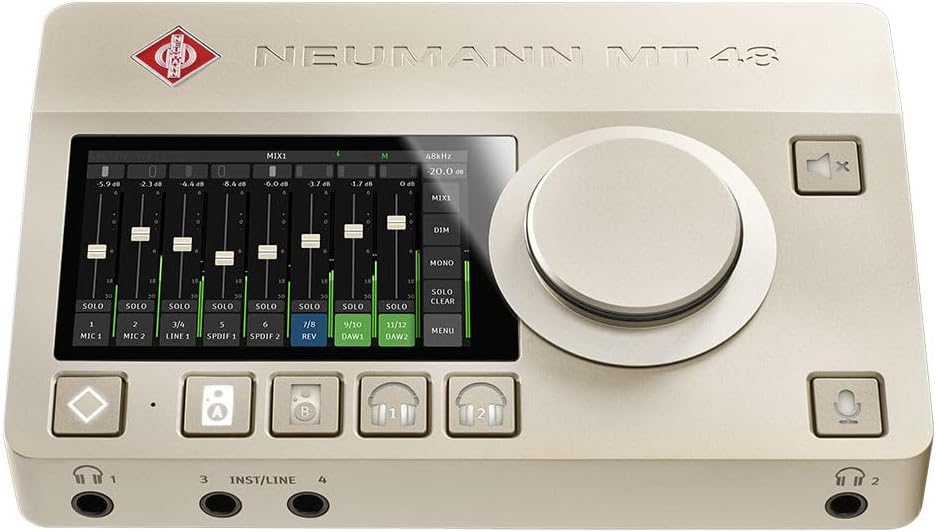
Figure 3.1: The MT 48 U's touchscreen displaying mixer controls.
3.2 Digital Mixing Console and DSP
The built-in digital mixing console offers four separate monitor mixes with integrated talkback. Onboard DSP provides a fully parametric 4-band EQ and a 3-way dynamics processor (gate/compressor/limiter) per channel, along with a high-quality reverb for inspiring monitor mixes.
- Talkback Mic: A built-in talkback microphone facilitates communication from the control room to the live room.
- Operasyona serbixwe: The MT 48 U can function as a standalone mixing console.
3.3 Recording with Effects (Dual Output Technology)
The MT 48 U allows for flexible recording workflows:
- Monitoring Only: DSP processing can be applied solely for monitoring purposes without affecting the recorded signal.
- Printing Effects: Effects can be recorded directly onto the signal.
- Simultaneous Recording (Dual Output Technology): Unique to the MT 48 U, both post-FX (wet) and pre-FX (dry) signals can be recorded simultaneously via separate driver channels. This provides an unprocessed backup signal if needed.
4. Specifications
Detailed technical specifications for the Neumann MT 48 U.
| Taybetî | Giranî |
|---|---|
| Babetê Weight | 3.46 lîre |
| Mezinahiyên pakêtê | 14.41 x 6.61 x 3.74 inches |
| Hejmara Model | 700260 |
| Amûrên Lihevhatî | Desktop 12x12 reference USB-C audio/MIDI interface |
| Compatibility System Operating | macOS 10.15 to 13, Windows 10 |
| Teknolojiya Girêdanê | Cable USB-C |
| Hejmara kanalan | 4 (Analog Inputs) |
| Bersiva Frequency | Up to 96 KHz (ADAT/S/PDIF) |
| AD Converter Dynamic Range | 136 dB-A |
| Preamplifier Gain | 78 dB |
5. Naverokên Sindoqê
The following items are included in the Neumann MT 48 U package:
- Neumann MT 48 U Desktop 12x12 USB-C Audio/MIDI Interface
- 1 x USB-C Data Cable
- 1 x USB-A Data Cable
- 1 x Universal Power Supply with USB-C Cable
- 1 x Set of International AC Plugs
- 1 x Soft Case

Figure 5.1: The Neumann MT 48 U securely stored within its included soft case.
6. Destpêkirin
This section provides general troubleshooting tips for common issues. For more detailed support, please refer to the official Neumann support resources.
- Hêz tune: Ensure the universal power supply is correctly connected to the MT 48 U's dedicated USB-C power port and plugged into a functional power outlet. Verify that the power indicator light on the unit is on. If using PoE+, confirm your Ethernet switch supports PoE+ and the cable is properly connected.
- Tunebûna Têketin/Derketina Deng:
- Check all cable connections (XLR, TRS, USB-C) for secure fit.
- Verify input gain levels on the MT 48 U's touchscreen.
- Ensure phantom power (+48V) is enabled for condenser microphones.
- Confirm correct input/output routing within the MT 48 U's digital mixing console and your Digital Audio Workstation (DAW) software.
- Check headphone volume levels and ensure headphones are properly connected.
- Pirsgirêkên Nermalav/Ajokar:
- Ensure you have the latest drivers installed for the MT 48 U from the official Neumann website.
- Verify that your operating system (macOS 10.15 to 13, Windows 10) is compatible and up to date.
- Restart your computer and the MT 48 U.
- Dengê Xerab:
- Reduce input gain to prevent clipping (indicated by red peak lights on the touchscreen).
- Check sample rate and buffer size settings in your DAW and the MT 48 U's control panel.
- Ensure cables are not damaged or faulty.
7. Garantî û Piştgirî
Warranty information for the Neumann MT 48 U is typically provided with the product documentation at the time of purchase. Please refer to the warranty card or the official Neumann webmalper ji bo şert û mercên berfireh, di nav de heyama garantiyê û vegirtinê.
For technical support, driver downloads, firmware updates, and additional resources, please visit the official Neumann support website. Contact information for customer service is also available on their website.
Official Neumann Webmalper: www.neumann.com
8. Agahdariya Ewlekariya Girîng
Please read and follow all safety instructions to prevent damage to the device or injury to yourself.
- Amûrê li ber baran, şilbûn, an germahiyên zêde nehêlin.
- Ji danîna cîhazê li nêzî çavkaniyên germê an di tîrêja tavê ya rasterast de xwe dûr bixin.
- Use only the power supply provided with the unit or a compatible PoE+ source.
- Hewl nedin ku cîhazê bi xwe vekin an jî tamîr bikin. Hemû tamîrkirin ji karmendên pispor re bişînin.
- Amûrê ji qadên magnetîkî yên xurt dûr bixin.
- Clean the device only with a dry, soft cloth. Do not use liquid cleaners.


