Pêşkêş
Thank you for choosing the Havit Gaming Mouse MS955. This optical gaming mouse features a USB interface, adjustable DPI settings, and RGB backlighting, designed to enhance your gaming experience. This manual provides essential information for setting up, operating, and maintaining your mouse.
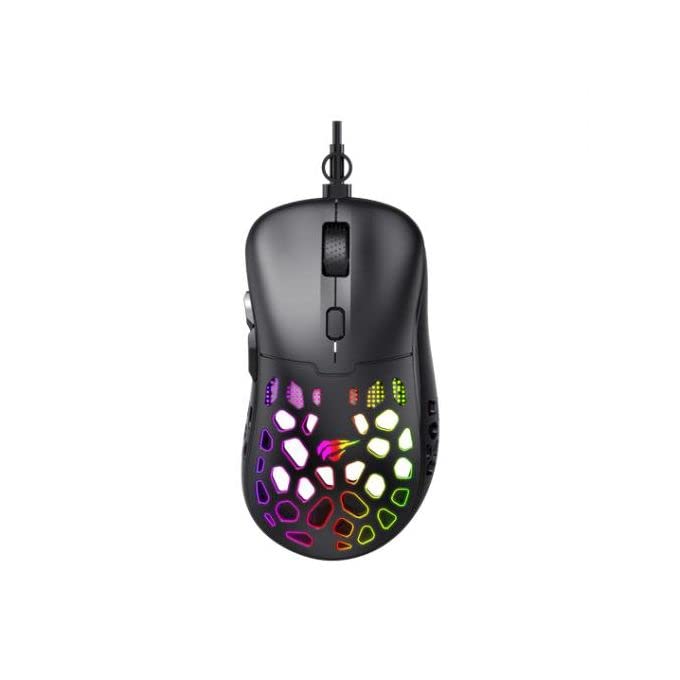
Wêne: Ji jor ber bi jêr ve view of the Havit Gaming Mouse MS955, showcasing its ergonomic design and vibrant RGB lighting through the honeycomb shell.
Damezirandin
- Mişkê ji pakêtê veke: Carefully remove the Havit Gaming Mouse MS955 from its packaging.
- Girêdana bi Komputerê: Locate an available USB port on your computer. Insert the USB connector of the mouse into the USB port.
- Sazkirina ajokar: The mouse is plug-and-play. Your operating system (Windows XP, Windows 7, Linux, etc.) will automatically detect and install the necessary drivers. No additional software installation is typically required for basic functionality.
- Fonksiyona testê: Once connected, move the mouse and click the buttons to ensure it is working correctly.
Telîmatên Operating
The Havit Gaming Mouse MS955 features 6 programmable buttons and adjustable DPI settings for precise control.

Wêne: Alî view of the Havit Gaming Mouse MS955, highlighting the left-side buttons and scroll wheel.
- Bişkoka Klîkkirina Çepê: Primary button for selection and interaction.
- Bişkoka Klîkkirina Rastê: Secondary button for context menus and alternative actions.
- Tekera Scroll: Ji bo gerandina belgeyan û web pages. It also functions as a clickable middle button.
- Bişkoka Sererastkirina DPI: Located behind the scroll wheel. Press this button to cycle through different DPI sensitivity levels (800-1200-2400-3200 DPI). Each press changes the sensitivity, allowing you to adapt to various gaming or work scenarios.
- Bişkokên alî: Two buttons are located on the left side of the mouse. These are typically used for 'forward' and 'backward' navigation in web gerok an jî dikarin ji bo çalakiyên di lîstikê de werin bernamekirin.
Ronahîkirina RGB
The Havit Gaming Mouse MS955 features an integrated RGB backlight system. The lighting effects are typically automatic and may change with DPI settings or cycle through various colors. There are no dedicated buttons for controlling the RGB lighting directly on the mouse.
Lênerrînî
- Paqijî: To clean the mouse, disconnect it from your computer. Use a soft, dry cloth to wipe the surface. For stubborn dirt, a slightly damp qumaş dikare were bikar anîn, da ku piştrast bike ku şilek nakeve nav mişk. Kîmyewiyên dijwar an paqijkerên aşınker bikar neynin.
- Embarkirinî: Store the mouse in a clean, dry environment away from extreme temperatures and direct sunlight.
- Lênêrîna Kabloyê: Ji bo rêgirtina li zirarê, zêde netewînin an jî kabloya USB-ê nezivirînin.
Çareserkirina pirsgirêkan
- Mişk bersivê nade:
- Piştrast bike ku kabloya USB bi ewlehî bi porta USB-ya xebitî ya li ser komputera te ve girêdayî ye.
- Biceribînin ku mişkê bi porta USB-ya cûda ve girêdin.
- Komputera xwe ji nû ve bidin destpêkirin.
- DPI Not Changing:
- Press the DPI button firmly. Ensure you are pressing the correct button.
- The mouse cycles through fixed DPI settings; there is no visual indicator other than cursor speed change.
- Roniyên RGB Nexebitin:
- Verify the mouse is properly connected to your computer.
- The RGB lighting is automatic; if the mouse is functioning otherwise, the lighting should also be active.
Specifications
| Taybetî | Hûrî |
|---|---|
| Nîşan | Havit |
| Cins | MS955 |
| Cureyê Navrûyê | USB |
| Dimensions | 115.2 x 63 x 37.6 mm |
| Hejmara Keys | 6 |
| Chipset | NST5311 |
| Çareserkirina DPI | 800-1200-2400-3200 DPI |
| Operating Voltage | 5V |
| Jiyana Sereke | 3,000,000 bitikîne |
| Cable Length | 1.5 m |
| Tespîtkirina Tevgera | Berçav |
| Orientation Hand | Rast |
| Bikaranîna Pêşniyar kirin | Gaming |
| Pergalên Xebatê | Linux, Windows 7, Windows XP |
| Reng | Reş |
Garantî û Piştgirî
For warranty information or technical support, please refer to the documentation included with your purchase or visit the official Havit webmalper. Delîla kirîna xwe ji bo îdiayên garantiyê biparêzin.