1. Destpêk
This manual provides detailed instructions for the ANBERNIC RG351MP Handheld Game Console. Please read this manual thoroughly before using the device to ensure proper operation and to maximize your gaming experience. Keep this manual for future reference.
2. Agahiyên Ewlekariyê
- Amûrê li ber germahiyên zêde, tîrêjên rojê yên rasterast, an jî şilbûna zêde nehêlin.
- Dûr nexin an jî amûrê ji bandorên xurt re nehêlin.
- Amûrê ji av û şilekên din dûr bigirin.
- Hewl nedin ku cîhazê bi xwe ji hev veqetînin an jî tamîr bikin. Ji bo alîkariyê bi karmendên karûbarê yên destûrdar re têkilî daynin.
- Tenê kabloya şarjê û adaptora ku bi destan hatiye dayîn bikar bînin.
- Di dema karanîn û şarjkirinê de hewakirina guncaw peyda bikin.
- This product contains a Lithium Polymer battery. Dispose of batteries responsibly according to local regulations.
3. Naveroka pakêtê
Piştrast bike ku hemî tişt di pakêtê de hene:
- 1 x RG351MP Game Console
- 1 x WIFI Module
- 1 x 64G SD Card
- 1 x Cable Charging USB
- 1 x Manual Bikarhêner
- 1 x Screen Protector
- 1 x Wipes
4. Hilbera Serîview
Familiarize yourself with the various components and controls of your ANBERNIC RG351MP console.
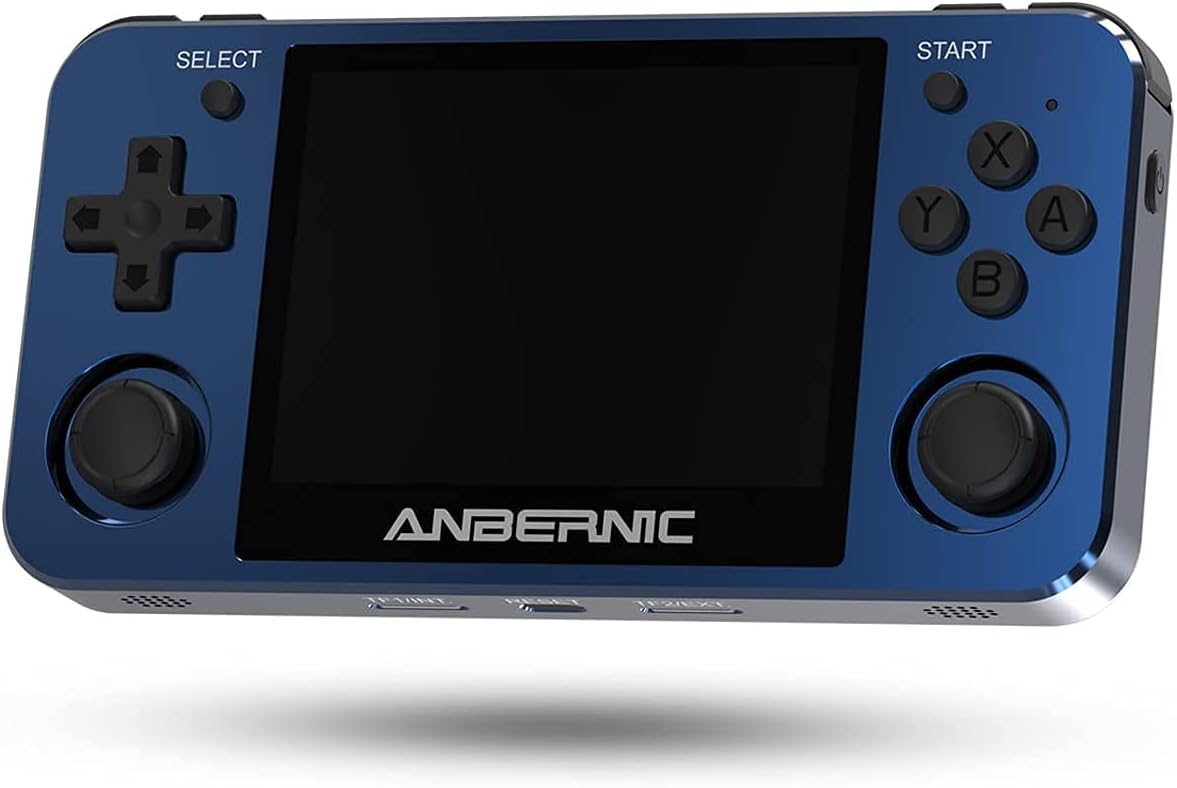
Wêne 4.1: Pêşî View. This image displays the front of the ANBERNIC RG351MP console, featuring the 3.5-inch IPS screen, D-pad, action buttons (X, Y, A, B), SELECT and START buttons, and dual analog joysticks.

Figure 4.2: Console Layout. This image provides various angles of the console, highlighting the L1/L2/R1/R2 shoulder buttons, OTG and DC ports on the top, volume controls on the side, and TF/EXT, Reset, and TF2/EXT slots on the bottom.

Wêne 4.3: Paş View. The rear of the console is shown, displaying the ANBERNIC logo, model number RG351MP, and regulatory markings. This view also indicates the location of the internal Li-Po battery.

Figure 4.4: Screen Display. This image emphasizes the console's 3.5-inch IPS screen with OCA full lamination and 640x480 resolution, providing a clear visual experience.
5. Sazkirin
5.1 Barkirina Amûrê
Before initial use, fully charge the console. Connect the provided USB charging cable to the DC port on the top of the console and the other end to a compatible USB power adapter (maximum load 2A). A full charge typically takes approximately 4 hours.
5.2 Danîna Karta TF
The console supports dual TF card slots. The primary TF1/EXT slot is for the operating system and pre-installed games. The TF2/EXT slot can be used to expand storage up to 256GB for additional games.
- Locate the TF1/EXT slot on the bottom of the console.
- Gently insert the pre-installed 64GB TF card into the slot until it clicks into place.
- If using an additional TF card for games, insert it into the TF2/EXT slot.

Figure 5.1: TF Card Insertion. This image illustrates the process of inserting a TF card into the console's expansion slot, demonstrating how to properly seat the card.
5.3 Hêzdarkirin/Off
- Hêzdarkirin: Press and hold the Power button (located on the side) for a few seconds until the screen illuminates.
- Ji bo Veqetandinê: Press and hold the Power button until the power-off menu appears, then select "Shutdown" or "Power Off". Alternatively, a quick press of the Power button may put the device into sleep mode, depending on system settings.
5.4 Connecting the WIFI Module
The console supports an external WIFI module for network connectivity. Insert the provided WIFI module into one of the OTG USB ports (located on the top of the console). Once connected, you can configure network settings within the system menu.
6. Telîmatên Operating
6.1 Navîgasyon Bingehîn
- D-pad / Analog Joysticks: Use these to navigate through menus and control in-game characters.
- Bişkokek: Confirm selection or perform primary action.
- Bişkojka B: Go back or perform secondary action.
- X / Y Buttons: Perform specific in-game actions as defined by the game.
- Bişkojka DESTPÊKÊ: Pause game, open in-game menus, or confirm selections.
- Bişkojka Hilbijartinê: Access system menus or perform specific in-game functions.
- L1/L2/R1/R2 Buttons: Shoulder buttons for various in-game controls.
6.2 Game Selection and Launching
From the main menu, navigate to the desired game system (e.g., PS1, GBA, NES). Select a game from the list using the D-pad or analog stick and press the A button to launch it.
6.3 Tomarkirin û Barkirina Rewşên Lîstikê
Most emulators support "save states" which allow you to save your progress at any point in a game, independent of the game's internal save system. Refer to the specific emulator's hotkey combinations (often a combination of SELECT + L1/R1 or similar) for saving and loading states.
6.4 Mîhengên Sîstemê
Access the system settings menu (usually via the SELECT button or a dedicated menu option) to adjust:
- Ziman: Change the system language.
- Pêşkêşî: Adjust screen brightness, aspect ratio, and video filters.
- Rengdan: Control volume levels and audio output.
- Tor: Configure Wi-Fi settings (requires external Wi-Fi module).
- Mîhengên Kontrolker: Map buttons or calibrate joysticks.
6.5 Adding New Games
To add new games, you will need to transfer game ROMs to the TF2/EXT card. Ensure the ROMs are in a format supported by the console's emulators. Connect the TF2/EXT card to a computer using a card reader and copy the game files to the appropriate system folders on the card. After reinserting the card into the console, refresh the game list in the system menu.
7. Maintenance
7.1 Paqijkirina Amûrê
Use a soft, dry, lint-free cloth to clean the console's exterior. For the screen, use a screen-specific cleaning solution and a microfiber cloth. Do not use abrasive cleaners or solvents.
7.2 Lênêrîna Pîl
- Ji valakirina tevahî ya bateriyê pir caran dûr bisekinin.
- Dema ku amûrê ji bo demek dirêj neyê bikar anîn, li cîhekî sar û hişk hilînin.
- Ger amûr demek dirêj neyê bikaranîn, berî hilanînê wê heta %50 şarj bikin.
7.3 Nûvekirinên Nermalavê
Periodically check the official ANBERNIC website or community forums for firmware updates. Updates can improve performance, add features, or fix bugs. Follow the provided instructions carefully when performing any software updates.
8. Destpêkirin
| Pirsegirêk | Sedema gengaz | Çare |
|---|---|---|
| Cîhaz pê naçe. | Low battery; TF card not properly inserted; System crash. | Charge the device for at least 30 minutes. Ensure TF1/EXT card is correctly inserted. Press the Reset button (located on the bottom of the console) with a thin object. |
| Games are not loading or crashing. | Corrupt game file; Incorrect emulator settings; TF card issue. | Verify game file integrity. Check emulator settings (e.g., core, video driver). Reinsert or try a different TF card. |
| Ekran vala ye an jî dibiriqe. | Software issue; Hardware malfunction. | Amûrê ji nû ve bidin destpêkirin. Ger pirsgirêk berdewam bike, bi piştgiriya xerîdar re têkilî daynin. |
| Deng tune. | Volume too low; Muted; Headphone jack issue. | Increase volume using the side buttons. Check system sound settings. Ensure no headphones are partially inserted. |
9. Specifications
| Taybetî | Hûrî |
|---|---|
| Cins | RG351MP |
| Mal | Aluminum alloy shell, CNC process |
| Parêzî | Ekrana IPS a 3.5 înç, laminasyona tevahî ya OCA, çareseriya 640*480 |
| CPU | RK3326 çar-core 1.5 GHz |
| GPU | Mali-G31 MP2 |
| BERAN | DDR3L 1GB |
| Bîra Navxweyî | 16GB (for system) |
| Sîstem | Sîstema Linuxê ya çavkaniya vekirî |
| Game Support | Vibrating motor, supports 20+ game formats. Users can download relevant game formats. |
| Gotevan | Axaftvana stereo ya duqat a bi kalîteya bilind |
| Pîl | Li-polymer 3500 mAh, lasting approximately 6 hours |
| Charging | 1.3A charging, matching maximum load 2A, USB charging cable, 4 hours for full charge |
| Piştgiriya Karta TF | Supports TF card max to 256GB (dual TF card slots) |
| Fonksiyonên din | Support external network card WIFI, Double OTG, Double 3D rocker, Support 3.5mm stereo earphones. |
| Dimensions | 6.6 x 3.8 x 1.9 înç (Dîmenên pakêtê) |
| Babetê Weight | 15.2 onsan |
10. Garantî û Piştgirî
10.1 Agahî Garantî
ANBERNIC products are covered by a limited warranty. Please refer to the warranty card included in your package or visit the official ANBERNIC webji bo şert û mercên garantiyê yên berfireh malperê bibînin. Delîla kirîna xwe ji bo îdiayên garantiyê biparêzin.
10.2 Piştgiriya Mişterî
If you encounter any issues or have questions not covered in this manual, please contact ANBERNIC customer support. You can usually find contact information on the official ANBERNIC webmalper an jî bi rêya firoşkarê ku we berhem lê kirî.