1. Destpêk
The Midea Cube 35 Pint Dehumidifier is designed to efficiently remove moisture from your home, creating a more comfortable environment. Its unique lift-and-twist design offers flexibility in operation and storage, while smart controls provide convenient management of humidity levels. This manual provides essential information for the safe and effective use of your dehumidifier.

Figure 1: Midea Cube Dehumidifier in operation, demonstrating multi-directional air flow.
2. Taybetmendiyên Hilberê
- Lift-and-Twist Design: Offers unparalleled flexibility, allowing the unit to operate in extended or nested form for compact storage.
- Kapasîteya Tankek Avê ya Mezin: Features a 4.2-gallon (15.9L) removable bucket, providing up to 3 times more capacity than traditional dehumidifiers, reducing the frequency of emptying.
- Vebijarka Avdana Berdewam: Includes a drain hose for continuous moisture removal without needing to empty the bucket.
- Kontrola Smart: Wi-Fi enabled for remote control via the Midea SmartHome app (iOS/Android) and voice commands through Alexa or Google Assistant.
- Vegerandina Xweser: Automatically resumes operation with previous settings after a power outage.
- Otomatîk-Definkirin: Prevents collected water from freezing, protecting the machine.
- Parzûna şuştinê: Maintains air quality and is easy to clean, eliminating the need for expensive replacements.

Figure 2: The dehumidifier's large 4.2-gallon water tank capacity.
3. Naveroka pakêtê
Dema vekirina pakêtê, piştrast bikin ku hemî tişt li wir in:
- Midea Cube 35 Pint Dehumidifier Unit
- Water Bucket (integrated)
- Hose Drain
- Manual Bikarhêner (ev belge)
4. Sazkirin
4.1 Vekirin
Carefully remove the dehumidifier and all packaging materials from the box. Inspect the unit for any damage during transit. Keep packaging for future storage or transport.
4.2 Girêdana Çerxan
The dehumidifier comes with optional wheels for easy mobility. To attach, carefully tilt the unit and insert each wheel into the designated slots on the bottom of the water bucket until they click securely into place. Ensure all four wheels are firmly attached before placing the unit upright.
4.3 Positioning the Dehumidifier
Place the dehumidifier on a level, stable surface. Ensure there is at least 8 inches (20 cm) of space around the unit for proper air circulation. Avoid placing it near heat sources, in direct sunlight, or in areas where it could be exposed to splashing water.
4.4 Girêdana Hêzê
Kabloya elektrîkê bi priza elektrîkê ya erdî ve girêdin. Amûr niha ji bo xebatê amade ye.

Figure 3: The dehumidifier's flexible extended and nested forms.
5. Telîmatên Operating
5.1 Panela Kontrolê Serview
The control panel is located on the top of the unit and features several buttons and a digital display:
- Bişkojka Hêzê: Turns the unit ON/OFF. Press and hold for 3 seconds to connect to Wi-Fi.
- Tîrên Jor/Jêr: Adjust humidity levels or timer settings.
- Bişkoka Fanê: Selects fan speed (Low/High). Press and hold for 3 seconds to reset the filter indicator.
- Bişkojka Modê: Cycles through operation modes (Set, Continuous, Max).
- Bişkojka Asta Dagirtin: Sets the desired water fill level (1-4) for the bucket.
- Bişkojka Timer: Demjimêra VEKIRIN/GIRTINÊ ya 24 saetan destnîşan dike.
- Digital Display: Şilbûna niha, şilbûna hedef, an mîhengên demjimêrê nîşan dide.
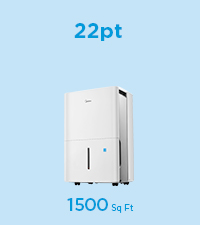
Figure 4: Midea Cube Dehumidifier Control Panel.
5.2 Danîna Şilbûna Xwestî
Press the 'Mode' button until 'Set' mode is active. Use the Up/Down arrows to select your desired humidity level (e.g., 35% to 85%). The unit will operate until the room humidity reaches the set level, then cycle ON/OFF to maintain it.
5.3 Rêkxistina Leza Fanê
Press the 'Fan' button to toggle between Low and High fan speeds.
5.4 Modên Operasyonê
- Mode Set: Maintains a user-defined humidity level.
- Moda Berdewam: Bêyî ku asta şilbûnê li ber çavan bigire, bi berdewamî dixebite.
- Moda Max: Operates at the highest fan speed continuously for maximum moisture removal.
5.5 Fonksiyona Timer
Press the 'Timer' button and use the Up/Down arrows to set a desired ON/OFF time (up to 24 hours). The unit will automatically turn ON or OFF after the set time has elapsed.
5.6 Serlêdana Jîr û Kontrola Deng
The Midea Cube is Wi-Fi enabled for smart control. Download the Midea SmartHome app on your iOS or Android device. Follow the in-app instructions to connect your dehumidifier. Once connected, you can monitor humidity levels, adjust settings, receive full-water alerts, and integrate with Alexa or Google Assistant for voice control.

Figure 5: App and voice control functionality.
6. Avê avêtin
6.1 Manual Bucket Drainage
When the water bucket is full, the unit will automatically stop operating and send a notification via the SmartHome app. To empty:
- Lift the top unit from the water bucket using the integrated handle.
- Carefully carry the water bucket to a sink or drain.
- Ava berhevkirî birijînin.
- Return the empty bucket and top unit to their original position.
You can also use the 'Fill Level' button on the control panel to set a lower fill level (1-4) if you prefer to empty the bucket more frequently when it's less heavy.
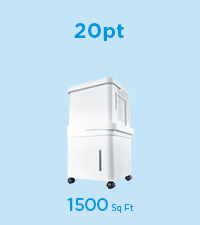
Figure 6: Emptying the water tank.
6.2 Avêtina Berdewam
For continuous operation without manual emptying, use the included drain hose:
- Şûşeya avê ji yekîneyê derxînin.
- Connect one end of the drain hose to the drainage port on the back of the unit.
- Route the other end of the hose to a suitable floor drain or sink, ensuring a continuous downward slope for gravity drainage.
- Place the unit above the sink or drain, or position it over a floor drain.
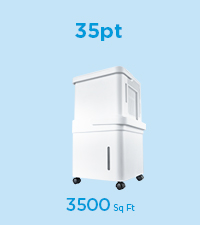
Figure 7: Connecting the drain hose for continuous drainage.
7. Maintenance
7.1 Paqijkirina Parzûna Hewayê
The dehumidifier features a washable filter to maintain optimal performance and air quality. Clean the filter regularly (approximately every 250 hours of operation or when the filter indicator light illuminates):
- Yekîneyê ji dergeha elektrîkê vekin.
- Fîltera hewayê ji pişta yekîneyê derxînin.
- Fîlterê bi ava germ û sabûnî bişo. Bi tevahî bişo.
- Berî ku fîlter ji nû ve têxin cihê xwe, bila bi temamî di hewayê de hişk bibe.
- Press and hold the 'Fan' button for 3 seconds to reset the filter indicator.
7.2 Paqijkirina Yekîneyê
To keep your dehumidifier looking new and functioning properly:
- Always unplug the unit before cleaning to prevent electric shock.
- Derve bi nermî paqij bike, damp çît.
- Clean the water bucket regularly to prevent mold or mildew growth.
7.3 Storage
When not in use for extended periods, empty the water bucket, clean the filter, and store the unit in its nested form for compact storage. Ensure the unit is dry before storing.
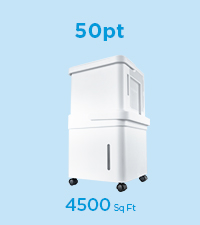
Figure 8: Lift-and-twist design for easy access and storage.
8. Destpêkirin
If your dehumidifier is not operating as expected, consult the following common issues:
- Unit does not turn ON: Check if the power cord is securely plugged into a grounded outlet. Ensure the water bucket is correctly seated and not full.
- Dehumidifier is not collecting water: Verify that the ambient temperature and humidity are within the operating range (e.g., above 41°F/5°C and 30% relative humidity). Ensure the air filter is clean and not blocked.
- Yekîneya dengdar e: Check for any obstructions in the fan or air intake/outlet. Ensure the unit is on a level surface.
- Water bucket is full but unit continues to run: This model is designed to stop when the bucket is full. If it continues, ensure the float switch in the bucket is not obstructed.
- Pirsgirêkên girêdana sepanê: Ensure your Wi-Fi network is active and the dehumidifier is within range. Follow the app's troubleshooting steps for re-pairing.
9. Specifications
| Taybetî | Specification |
|---|---|
| Nîşan | Midea |
| Navê Model | Midea Cube Dehumidifier |
| Hejmara Model | MAD35S1QWT |
| Kapasîteya şilbûnê | 35 Pints per Day (50 PT-2012 DOE equivalent) |
| Qada Vegirtinê | Heta 3,500 Sq. Ft. |
| Volume Tank | 4.2 Galon (15.9L) |
| Mezinahiyên hilberê (D x W x H) | 14" x 15" x 15" |
| Hejmara Leza | 3 |
| Wattage | 314 watt |
| Operasyona Mode | Continuous, Set Humidity, Max |
| Taybetmendiyên Taybet | SmartPhone Compatible (Midea Cube Air app), Wi-Fi, Alexa, Google Assistant, Auto Restart, Auto-Defrost, Washable Filter, Drain Hose Included |
10. Garantî û Piştgirî
10.1 Agahî Garantî
The Midea Cube 35 Pint Dehumidifier comes with a 1 Sal Parçe & Garantiya KedêJi kerema xwe delîla kirînê ji bo îdiayên garantiyê biparêzin.
10.2 Piştgiriya Mişterî
For technical assistance, troubleshooting, or warranty inquiries, please contact Midea Customer Support. Refer to the contact information provided on the Midea website or your product registration materials.