Pêşkêş
The Epson EpiqVision Mini EF11 Laser Projector delivers a versatile and immersive viewing experience. Designed for portability and ease of use, this projector features advanced 3LCD technology for vibrant Full HD 1080p images up to 150 inches. With 1000 lumens of color and white brightness, a built-in dual-speaker audio system, and flexible connectivity options, it's ideal for various entertainment and presentation needs.
Taybetmendiyên sereke hene:
- Qalîteya Wêneyê ya Ecêb: Enjoy immersive Full HD 1080p images up to 150 inches.
- Ronahîya Bilind: Delivers 1000 lumens of color and white brightness for clear visuals.
- Integrated Dual-Speaker Audio System: Features a high-quality internal speaker system for rich audio.
- Elegant Compact Design: Portable and modern design allows for easy placement and transport.
- Epson MicroLaser Array Technology: Provides exceptional brightness and enhanced black density.
- Advanced Scene Adaptive Color Correction: Automatically adjusts color for a natural picture.
- True 3-Chip Projector Design: Ensures outstanding color accuracy and brightness without "rainbowing."
- Auto Picture Skew Correction: Automatically corrects vertical image geometry for optimal viewing.
- Single HDMI Input: Standard HDMI port for video and audio connections.
Di Box çi ye
Upon unboxing your Epson EpiqVision Mini EF11 Laser Projector, ensure all the following items are present:
- Projektora Lazerê ya Epson EF-11
- Cord Power
- Kontrola ji dûr ve bi bataryayên AAA
- Rêbernameya Damezrandina Quick

Image: Contents of the Epson EpiqVision Mini EF11 box, including the projector, remote, power cord, and quick setup guide.
Damezirandin
- Cihkirin: Position the projector on a stable, flat surface. Ensure there is adequate space around the projector for ventilation. The projector can be placed in front of the screen or wall, or mounted on a ceiling.
- Têkiliya Hêzê: Connect the provided power cord to the projector's power input and then to an electrical outlet.
- Amûrên Têkilî:
- HDMI: Connect your streaming device (e.g., Apple TV, Roku, Amazon Fire TV, Android TV, game console) to the projector's HDMI port using an HDMI cable.
- USB: The projector features a USB Type-A port (5V/2A power supply) for connecting compatible devices.
- Hêzdarkirin: Press the power button on the projector or the remote control to turn on the device. The projector will automatically perform initial setup and image adjustments.
- Rêzkirina wêneyê: The projector features Auto Picture Skew Correction to automatically adjust the vertical geometry of the picture. Manual adjustments for focus and keystone can be made via the projector's settings menu if needed.

Image: The Epson EpiqVision Mini EF11 Projector showcasing its compact design and projected image quality.
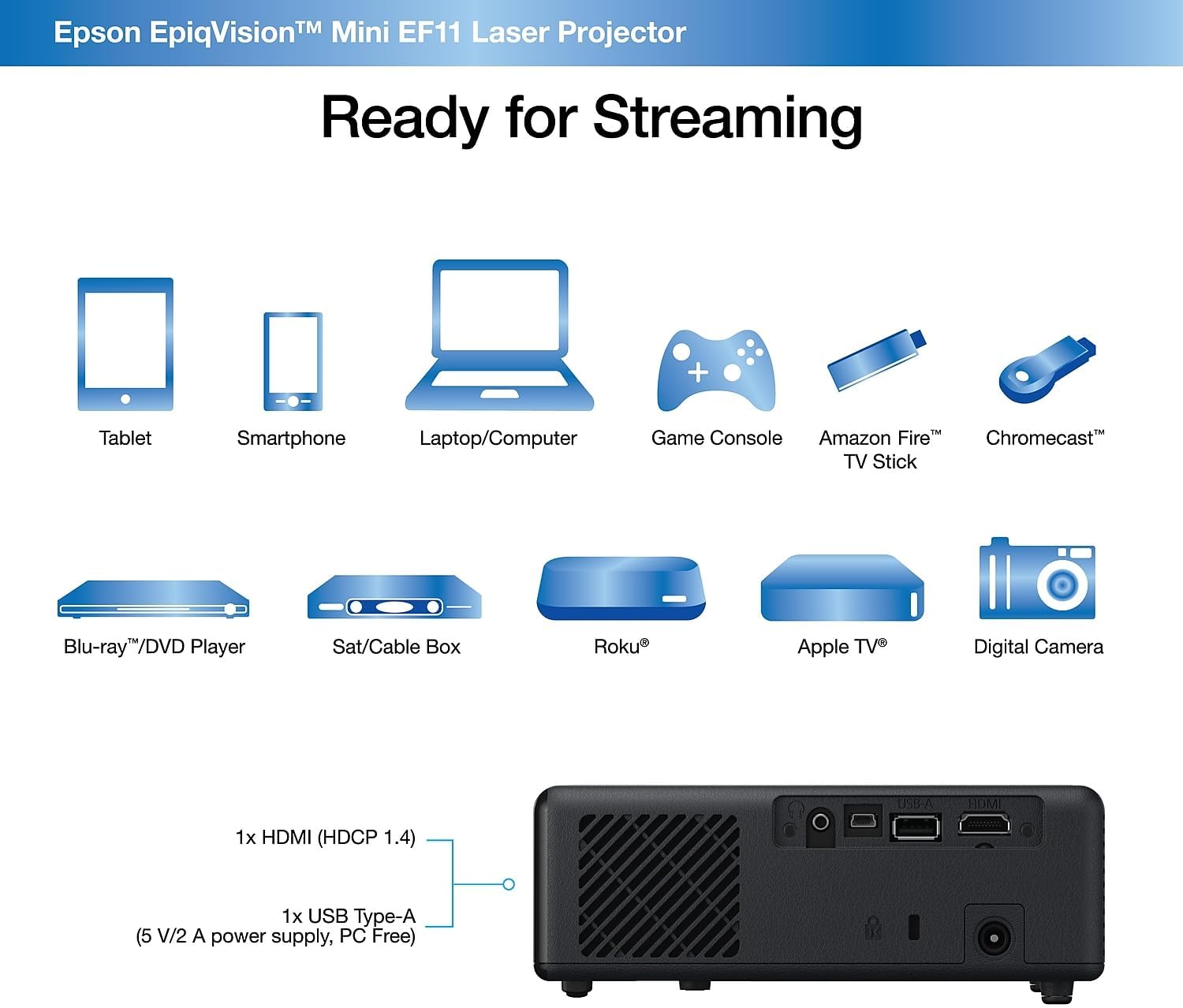
Wêne: Paş view of the Epson EpiqVision Mini EF11 Projector, highlighting the HDMI and USB ports for connecting various devices.
Operating
- Power On / Off: Press the power button on the projector's top panel or the remote control to turn on the device.
- Hilbijartina Çavkaniyê: Use the "Source" button on the remote or projector to cycle through available input sources (e.g., HDMI).
- Kontrolkirina Volume: Adjust the volume using the '+' and '-' buttons on the remote control or the projector's top panel.
- Gihîştina naverokê:
- If using an external streaming device, navigate its interface using its remote.
- The projector is compatible with various streaming solutions like Apple TV, Roku, Amazon Fire TV, or Android TV.
- Mîhengên Wêne: Access the projector's menu to adjust picture settings such as color mode, light output, scene adaptive gamma, color temperature, dynamic contrast, and noise reduction.
- Mîhengên Deng: Customize your audio experience through sound settings, including sound mode (e.g., Theatre, TV, Studio), virtual surround, clear voice, auto loudness, and bass extension.

Image: The Epson EpiqVision Mini EF11 Laser Projector displaying a high-quality, vibrant image on a wall.

Image: A visual representation of the Epson EpiqVision Mini EF11 Projector's capability to project images at different sizes, from 70 inches to 150 inches.
Entegrasyona Medyayê
Official Product Video: EF12 Plug and Play
Video: This official video from Epson America Inc. demonstrates the "Plug and Play" functionality of the EpiqVision Mini EF12 (similar to EF11), highlighting its ease of setup and immediate use for various media content.
Specifications
| Taybetî | Hûrî |
|---|---|
| Mezinahiya Hilberê | 6.89 x 6.89 x 2.28 inches |
| Babetê Weight | 2.7 lîre |
| Hejmara Modela Babetê | EF11 |
| Nîşan | Epson |
| Bikaranîna Pêşniyar kirin | Gaming |
| Taybetmendiyên Taybet | Axaftvanek çêkirî, sivik |
| Teknolojiya Girêdanê | HDMI |
| Resolution Display | 1920 x 1080 (Tevahiya HD) |
| Brightness | 1000 Lumens (Color and White Brightness) |
| Technology Projection | 3LCD, Laser |
Lênerrînî
Parastina rast temenê dirêj û performansa çêtirîn a projektorê we misoger dike:
- Paqijkirina Lensê: Use a soft, dry, lint-free cloth to gently wipe the projector lens. Avoid using abrasive cleaners or solvents.
- Cleaning Air Vents: Regularly check and clean the air vents to prevent dust buildup, which can lead to overheating. Use a soft brush or a vacuum cleaner with a brush attachment.
- Embarkirinî: Dema ku hûn ji bo demek dirêj projektorê bikar neynin, li cîhek sar û hişk, dûr ji tîrêjên rojê yên rasterast û germahiyên zêde hilînin.
Çareserkirina pirsgirêkan
If you encounter issues with your projector, try the following common troubleshooting steps:
- Hêz tune:
- Ensure the power cord is securely connected to both the projector and the electrical outlet.
- Verify the electrical outlet is functioning by plugging in another device.
- Bê wêne:
- Check that the correct input source is selected on the projector.
- Ensure the HDMI cable (or other video cable) is securely connected to both the projector and the source device.
- Piştrast bike ku cîhaza çavkaniyê vekiriye û sînyalek derdixe.
- Wêneyê Blurry:
- Adjust the focus using the projector's settings menu.
- Ensure the projector is placed at an appropriate distance from the screen or wall.
- Li pêşiya lensê astengiyan bibînin.
- Deng tune:
- Dengê hem li ser projektorê û hem jî li ser cîhaza çavkaniyê zêde bikin.
- Mîhengên derana deng li ser cîhaza çavkaniya xwe kontrol bike da ku ew deng bi rêya HDMI dişîne.
- Ger hûn hoparlêrên derveyî bikar tînin, pê ewle bin ku ew bi rêkûpêk ve girêdayî ne û vekirî ne.
Garantî û Piştgirî
The Epson EpiqVision Mini EF11 Laser Projector comes with a standard 2-year limited warranty, including full-unit replacement. Free technical phone support is available for the life of the product.
For further assistance or to explore other Epson products, please visit the Dikana Epson.


