1. Destpêk
This manual provides detailed instructions for the installation, operation, and maintenance of your ESX VN715-E39-DAB In-Car Navigation and Multimedia System. Please read this manual thoroughly before using the device to ensure proper functionality and to prevent damage. Keep this manual for future reference.
2. Hilbera Serîview û Taybetmendî
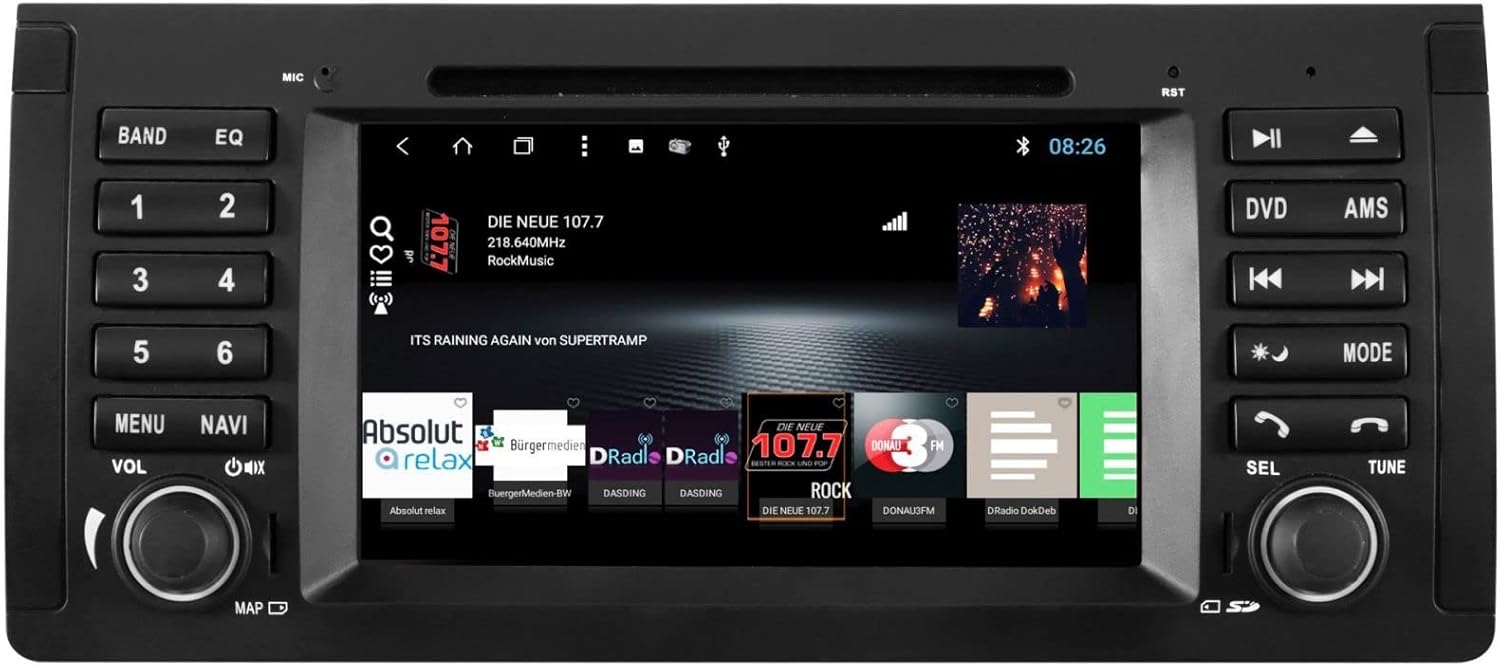
The ESX VN715-E39-DAB is an advanced in-car multimedia system designed to enhance your driving experience with navigation, entertainment, and connectivity features. It integrates seamlessly into compatible BMW vehicles.
Taybetmendiyên sereke:
- High-Resolution 8-inch Touchscreen: Provides clear visuals and intuitive control.
- Advanced Android i15 Operating System: Offers a familiar and customizable user interface.
- Google Maps Navigation: Supports both online and offline navigation for reliable route guidance.
- Mobile Internet Connectivity: Connects via Wi-Fi hotspot for online services.
- Radyoya Dîjîtal a DAB+: Includes a DAB antenna for high-quality digital radio reception with station logos.
- AM/FM Radio with RDS: Standard analog radio reception with Radio Data System functionality.
- Multi-format DVD Player: Supports DVD, DVD-R/RW, DVD+R/RW, VCD, CD, CD Text, CD-R/RW, and MP3 formats.
- Bluetooth Hands-Free Kit: Enables safe phone calls and audio streaming with an internal microphone and optional external microphone connection.
- Yekbûna Smartphone: Connect iPhone or Android smartphones via USB for various functions.
- Kontrola Deng: Utilize voice commands through a connected smartphone.
- Derketinên Deng: pêş-amplifier outputs for front, rear, subwoofer, and center channels.
- Ketina kamerayê: One adjustable camera input for reverse cameras.
- Têketin/Derketinên Alîkar: One AUX video input, two audio/video outputs, and one AUX audio input.
- Portên USB: Two USB ports for media and connectivity.
- Slota Qerta Micro SD: Dedicated slot for navigation data and media files.
- Xweserkirin: Personalize with customizable logos and wallpapers.
- Authenticity Certificate: Included with the product.
3. Sazkirin û Sazkirin
Installation of the ESX VN715-E39-DAB system requires technical knowledge and should ideally be performed by a qualified professional. Incorrect installation can lead to damage to the device or vehicle electrical system.
Lihevhatî:
This unit is compatible with specific BMW models and connector types:
- BMW 5 Series E39 (1996-2001) with 17-pin system connector.
- BMW 5 Series E39 (2002-2003) with 40-pin system connector.
- BMW X5 E53 (2000-2001) with 17-pin system connector.
- BMW X5 E53 (2002-2007) with 40-pin system connector.
- BMW M5 (1996-2003) with 17/40-pin system connector.
Gavên Giştî yên Sazkirinê (Sazkirina Pispor tê Pêşniyarkirin):
- Pîlê qut bikin: Berî destpêkirina her xebata elektrîkê, her gav pîlê wesayîtê veqetînin.
- Yekîneya Heyî Rake: Carefully remove the factory radio or navigation system from the dashboard.
- Girêdana Têlgirêdan: Connect the appropriate wiring harness (17-pin or 40-pin) to the vehicle's electrical system and the ESX unit. Ensure all connections are secure.
- Girêdana Antên: Connect the GPS antenna, DAB antenna, and radio antenna to their respective ports on the unit. Position the antennas for optimal reception.
- Girêdana Peripheral: Connect any optional accessories such as a reverse camera, external microphone, USB devices, or auxiliary inputs/outputs.
- Yekîneyê bixin: Securely mount the ESX unit into the dashboard opening.
- Pîl ji nû ve girêdin: Pîla wesayîtê ji nû ve girêbide û pergalê biceribîne.

4. Telîmatên Operating
Familiarize yourself with the touchscreen interface and physical buttons for optimal use.
4.1 Operasyona bingehîn
- Power On / Off: Press and hold the power button (usually the VOL knob) to turn the unit on or off. A short press typically mutes or unmutes the audio.
- Kontrolkirina Volume: Rotate the VOL knob to adjust the audio volume.
- Navbera ekrana destikê: Navigate through menus and applications by tapping, swiping, and pinching on the 8-inch touchscreen.

4.2 Navîgasyon
Access the navigation application (e.g., Google Maps) from the home screen. Input your destination, and the system will provide turn-by-turn directions. Ensure GPS antenna is properly connected for accurate positioning.

4.3 Radio (DAB+/AM/FM)
- Mode Hilbijêre: Tap the 'Radio' or 'DAB+' icon on the home screen or press the 'BAND' button.
- Îstasyonên Skenkirinê: Use the 'AMS' (Auto Memory Store) button or on-screen controls to scan and save available stations.
- Destkêberdan: Manually tune using the 'TUNE' knob or on-screen frequency controls.
- Pêşbirk: Save your favorite stations to preset buttons (1-6) for quick access.

4.4 Girêdana Bluetoothê
- Hevgirtin: Go to the Bluetooth settings on the unit and your smartphone. Search for available devices and select 'ESX VN715-E39-DAB'. Enter the PIN if prompted (usually '0000' or '1234').
- Banga Bê Dest: Piştî hevberkirinê, hûn dikarin rasterast bi rêya yekîneyê bangan bikin û bistînin.
- Streaming Audio: Play music from your smartphone via Bluetooth A2DP.
4.5 Media Playback (DVD/USB/SD)
- DVD: Insert a DVD into the disc slot. The system will automatically switch to DVD mode or prompt you to select it.
- USB/SD: Insert a USB drive into a USB port or an SD card into the Micro SD slot. Access media files through the 'Media' or 'File Explorer' application.
5. Maintenance
Regular maintenance ensures the longevity and optimal performance of your ESX VN715-E39-DAB system.
- Paqijkirina ekranê: Ji bo paqijkirina ekrana destavê bi nermî qumaşek nerm û bê lîf bikar bînin. Ji bo lekeyên dijwar, hinekîampQumaşê bi av an jî paqijkerek ewle ji bo ekranê bişon. Ji kîmyewiyên dijwar dûr bisekinin.
- Nûvekirinên Nermalavê: Periodically check for software updates from the manufacturer's official website or through the unit's system settings (if available) to ensure you have the latest features and bug fixes.
- Disc Drive Care: Keep the DVD slot free of dust and debris. Avoid inserting damaged or non-standard discs.
6. Destpêkirin
Heke hûn bi yekîneya xwe re rastî pirsgirêkan werin, li gavên çareserkirina pirsgirêkên hevpar ên jêrîn binêrin:
| Pirsegirêk | Sedema gengaz | Çare |
|---|---|---|
| Hêz tune | Girêdana elektrîkê sist, fîyûz teqiyaye, pirsgirêka bataryaya wesayîtê. | Check power cables and fuse. Ensure vehicle battery is charged. Consult a professional if issues persist. |
| Deng tune | Volume muted, speaker wires disconnected, incorrect audio source. | Check volume level and mute status. Verify speaker connections. Select the correct audio source. |
| Sînyala GPS-ê Winda Bû | GPS antenna improperly connected or obstructed, unit in an area with poor satellite reception. | Piştrast bike ku antenna GPS bi ewlehî ve girêdayî ye û xwedî axek zelal e. view of the sky. Move to an open area. |
| Têkçûna Çêkirina Bluetoothê | Bluetooth not enabled on device, incorrect PIN, device out of range. | Ensure Bluetooth is active on both devices. Re-enter PIN. Bring devices closer. Restart both devices. |
| Touchscreen Bê bersiv | Cemidîna sîstemê, qirêjî li ser ekranê. | Perform a soft reset (refer to device settings or power cycle). Clean the screen. |
If these steps do not resolve the issue, please contact customer support or a qualified service technician.
7. Specifications
Detailed technical specifications for the ESX VN715-E39-DAB unit:
- Nîşan: ESX
- Cins: VN715-E39-DAB
- Mezinahiya ekranê: 8 Inches
- Tîpa Nîşandanê: LCD
- Pergala Xebatê: Android i15
- Teknolojiya Têkiliyê: Bluetooth, USB, Wi-Fi (via hotspot)
- Tîpa medyayê: DVD, DVD-R/RW, DVD+R/RW, VCD, CD, CD Text, CD-R/RW, MP3, USB, Micro SD
- Radyo Tuner: DAB+, AM/FM with RDS
- Rêserbirinî: Google Maps (online/offline)
- Lihevhatî: BMW 5 Series E39 (1996-2003), BMW X5 E53 (2000-2007), BMW M5 (1996-2003)
- Reh: çîn
8. Garantî û Piştgirî
For warranty information, please refer to the documentation provided with your purchase or contact your retailer. For technical support, please visit the official ESX website or contact their customer service department. Ensure you have your model number (VN715-E39-DAB) and proof of purchase available when seeking support.


