1. Destpêk
Spas ji bo kirînêasing the GPX PDB1077B Portable DVD Player. This device offers versatile entertainment with its 10.1-inch display, DVD/CD playback capabilities, and built-in Bluetooth wireless transmitter for audio streaming to compatible headphones. This manual provides detailed instructions for setup, operation, and maintenance to ensure optimal performance and longevity of your device.
2. Agahdariya Ewlekariya Girîng
Please read all safety warnings and instructions carefully before using this product. Retain this manual for future reference.
- Çavkaniya hêzê: Use only the specified power adapter. Incorrect voltage dibe ku amûrê zirarê bike û ermanî betal bike.
- Av û Nem: Do not expose the device to rain, moisture, or immerse it in water.
- Germa: Amûrê ji çavkaniyên germê yên wekî radyator, tomarên germê, sobe, an amûrên din (di nav de ampgiyandar) ku germê çêdikin.
- Perwanekirin: Hewakirina guncaw misoger bike. Tu vebûnên hewakirinê negirin.
- Paqijî: Tenê bi qumaşê hişk paqij bikin. Paqijkerên şil an paqijkerên aerosolê bikar neynin.
- Xizmetkirin: Hewl nedin ku hûn vê hilberê bixwe xizmet bikin. Hemî servîskirinê bişînin karmendên karûbarê jêhatî.
- Ewlehiya Pîl: The device contains a rechargeable battery. Do not expose to excessive heat or direct sunlight. Dispose of batteries properly according to local regulations.
- Parastina bihîstinê: Ji bo demên dirêj ji guhdarîkirina bi astên dengek bilind dûr bixin da ku pêşî li zirara bihîstinê bigirin.
3. Naveroka pakêtê
Piştrast bike ku hemû tiştên ku li jêr hatine navnîş kirin di pakêta te de hene:
- GPX PDB1077B Portable DVD Player
- Headphones Bluetooth Wireless
- Remote Control
- AC / DC Power Adapter
- Car Power Adapter
- Cable AV
- Manual Bikarhêner (ev belge)
4. Hilbera Serîview
Familiarize yourself with the components of your GPX PDB1077B Portable DVD Player.
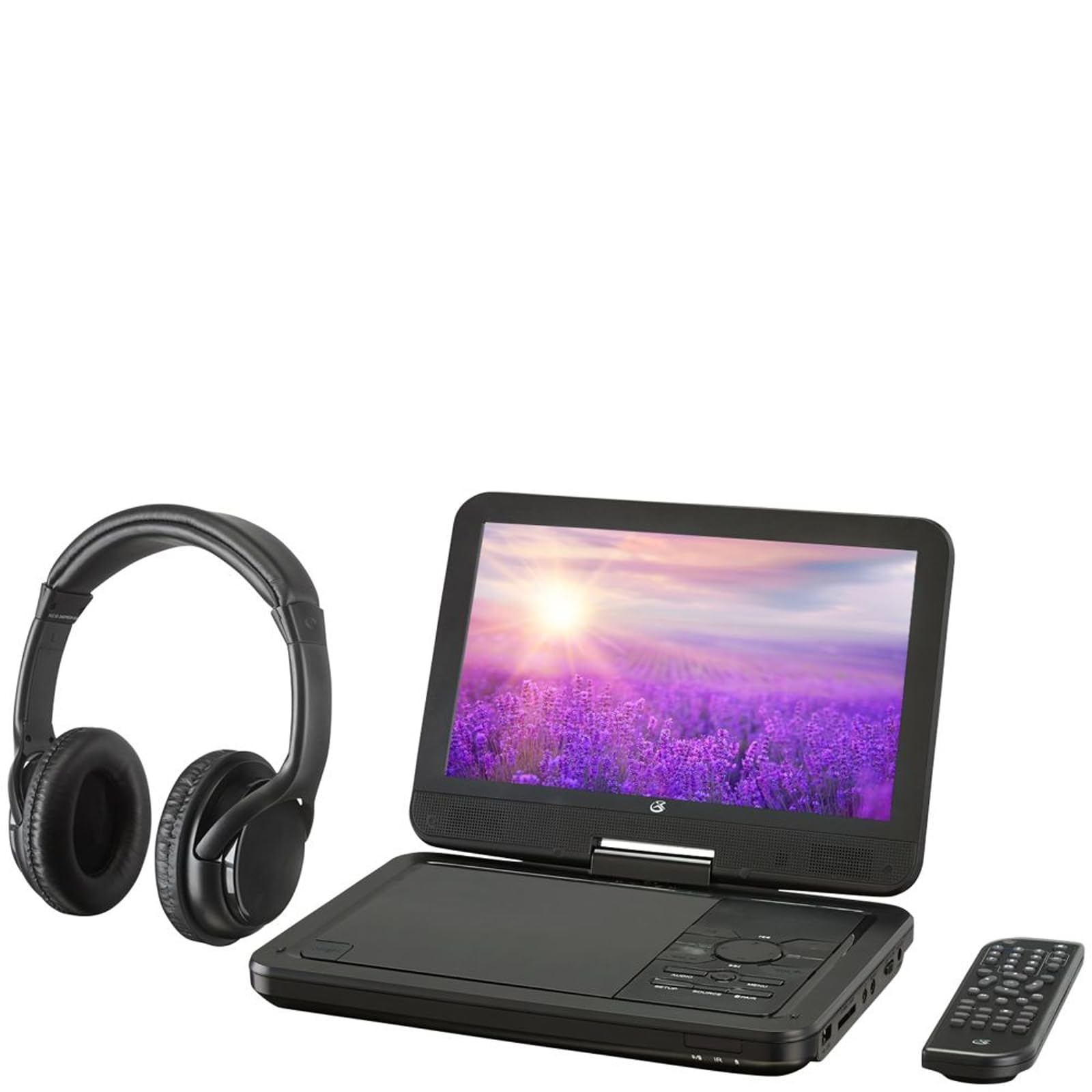
jimar 4.1: The GPX PDB1077B Portable DVD Player, showing the 10.1-inch screen, control panel, wireless Bluetooth headphones, and remote control.
4.1 Portable DVD Player Unit
The main unit features a swivel screen, disc tray, and control buttons. Key components include:
- Display LCD 10.1-inch: Bo viewing video content.
- Tray Dîskê: For inserting DVDs and CDs.
- Panela Kontrolê: Buttons for playback, menu navigation, volume, and source selection.
- Port: USB, SD card slot, AV out, headphone jack, DC in.
- Axaftvan: Axaftvanên stereo yên entegre.
4.2 Wireless Bluetooth Headphones
The included headphones connect wirelessly to the DVD player via Bluetooth for private listening.
jimar 4.2: Nêzîk-up view of the black wireless Bluetooth headphones, featuring padded earcups and an adjustable headband.
4.3 Kontrolkirina Dûr
Kontrola ji dûr ve gihîştina hemî fonksiyonan ji dûr ve bi hêsanî peyda dike.
jimar 4.3: Nêzîk-up view of the compact black remote control with various buttons for playback, menu navigation, and volume adjustment.
5. Guide Setup
5.1 Barkirina Amûrê
- Connect the AC/DC power adapter to the DC IN port on the DVD player.
- Adapterê têxin nav dergehek dîwarê standard.
- Çira nîşana şarjê dê vêkeve. Ji bo şarjkirineke tevahî bi qasî 3-4 saetan bisekinin.
- For in-car use, connect the car power adapter to the DC IN port and your vehicle's 12V power outlet.
5.2 Hêzdarkirin/Off
- To power on, slide the POWER switch to the ON position. The screen will light up.
- Ji bo vemirandinê, guhêrka POWERê ber bi pozîsyona OFFê ve bizivirînin.
5.3 Connecting Bluetooth Headphones
- Ensure the DVD player is powered on.
- Turn on the Bluetooth headphones and put them into pairing mode (refer to headphone manual if needed).
- On the DVD player, navigate to the Bluetooth settings menu.
- Select "Scan for Devices" or similar option.
- Choose your headphones from the list of available devices to pair.
- Once paired, audio will automatically transmit to the headphones.
5.4 Connecting to an External Display (Optional)
Use the included AV cable to connect the DVD player to a TV or monitor.
- Connect one end of the AV cable to the AV OUT port on the DVD player.
- Connect the other end to the AV IN ports (Yellow for Video, White for Left Audio, Red for Right Audio) on your external display.
- Select the correct AV input on your external display.
6. Telîmatên Operating
6.1 Playing DVDs and CDs
- Bi nermî rakirina ekranê tepsiya dîskê vekin.
- Place a DVD or CD onto the spindle with the label side facing up.
- Gently close the disc tray.
- Lîstikvan dê bixweber dîskê tesbît bike û dest bi lêxistinê bike an jî menûya dîskê nîşan bide.
- Use the navigation buttons (Up, Down, Left, Right, Enter) on the control panel or remote to navigate menus.
- Bitikîne LÊZIN / PAUSE bişkojka ji bo destpêkirin an sekinandina lîstikê.
- Bitikîne RAWESTAN bişkok ji bo rawestandina playback.
6.2 Using USB and SD Card Media
- Ajokereke USB-ê têxin porta USB-ê an jî qerta SD-ê têxin hêlîna qerta SD-ê.
- Bitikîne KANÎ button on the control panel or remote to select "USB" or "SD".
- Bi rêya xwe bigerin files using the control buttons.
- Hilbijêre a file (e.g., MP3, JPEG) and press DERBASBÛN lîstin an jî view.
6.3 Eyarkirina Mîhengan
Access the system settings to customize your viewtecrubeya guhdarî û guhdarîkirinê.
- Bitikîne DAMEZIRANDIN button on the remote or control panel.
- Use the navigation buttons to select options such as:
- Mîhengên Nîşandanê: Adjust brightness, contrast, color.
- Mîhengên Deng: Adjust volume, equalizer.
- Mîhengên Ziman: Select OSD language, audio language, subtitle language.
- Kontrola dêûbav: Set rating levels for disc playback.
- Rojnamevanî DERBASBÛN ji bo piştrastkirina hilbijandinan û DAMEZIRANDIN dîsa derketin.
6.4 Bikaranîna Kontrola Dûr
The remote control provides full functionality. Ensure batteries are correctly inserted (2 x AAA, not included).
| Pişkov | Karkirin |
|---|---|
| ERK | Lîstikvanê vedike an jî digire. |
| DAMEZIRANDIN | Digihîje pêşeka sazkirina pergalê. |
| KANÎ | Switches between DVD, USB, SD, and AV input modes. |
| LÊZIN / PAUSE | Lîstinê dest pê dike an rawestîne. |
| RAWESTAN | Playback disekine. |
| VOL + / VOL- | Asta dengdanê eyar dike. |
| NAVIGATE (Up/Down/Left/Right/ENTER) | Di menuyan de digere û hilbijartinan piştrast dike. |
| QERTA XÛREKÊ | Accesses the disc menu during DVD playback. |
7. Maintenance
7.1 Paqijkirina Amûrê
- Beriya paqijkirinê pê ewle bin ku amûrê veqetandî ye û ji pêvekê veqetandî ye.
- Use a soft, dry, lint-free cloth to wipe the exterior surfaces.
- For the screen, use a screen-specific cleaning solution and a microfiber cloth, applying gentle pressure.
- Paqijkerên aşınker, mûm, an çareserkeran bikar neynin.
7.2 Lênihêrîna Dîskê
- Ji bo ku şopa tiliyan nemînin, dîskan ji qiraxên wan bigirin.
- Dema ku dîskan nayên bikaranîn, di qutiyên wan de hilînin da ku rê li ber xêzikandinê bigirin.
- Dîskên qirêj bi qumaşek nerm û bêlîf paqij bikin, ji navendê ber bi derve ve paqij bikin.
7.3 Lênêrîna Pîl
- To prolong battery life, fully charge the device before first use.
- Ger amûrê ji bo demek dirêj hilînin, her çend mehan carekê wê bi qasî %50 şarj bikin.
- Dûr nehêlin amûrê ji germahiya zêde.
8. Destpêkirin
If you encounter issues with your GPX PDB1077B, refer to the following common problems and solutions.
| Pirsegirêk | Sedema gengaz | Çare |
|---|---|---|
| Hêz tune | Battery drained; Power adapter not connected properly; Power switch off. | Charge the device; Ensure power adapter is securely connected; Slide power switch to ON. |
| No Disc Playback | Dîsk bi şaşî hatiye danîn; Dîsk qirêj an jî xêzkirî ye; Formata dîskê nayê piştgirîkirin. | Reinsert disc label-side up; Clean or replace disc; Check supported media types in specifications. |
| Deng tune | Volume too low; Mute function active; Headphones not connected/paired correctly. | Increase volume; Deactivate mute; Reconnect or re-pair headphones. |
| Bluetooth Headphones Not Pairing | Headphones not in pairing mode; Player not in Bluetooth scan mode; Interference. | Ensure headphones are in pairing mode; Activate Bluetooth scan on player; Move closer to player, away from other devices. |
| Remote Control Nexebite | Batteries are dead or inserted incorrectly; Obstruction between remote and player; Remote sensor blocked. | Replace batteries, check polarity; Remove obstructions; Ensure remote sensor on player is clear. |
9. Specifications
Technical specifications for the GPX PDB1077B Portable DVD Player.
| Taybetî | Hûrî |
|---|---|
| Cins | PDB1077B |
| Mezinahiya Nîşandanê | 10.1 inches |
| Type Display | LCD |
| Native Resolution | 1024 x 600 |
| Medya piştgirî kir | DVD, DVD±R/RW, CD, CD-R/RW, MP3 CD, JPEG CD |
| Têkilî | Bluetooth wireless transmitter, USB port, SD card slot, AV Out, Headphone Jack, DC In |
| Çavkaniya Hêzê | Built-in rechargeable battery, AC/DC adapter, Car adapter |
10. Garantî û Piştgiriya Mişterî
GPX products are designed for reliability and performance. For specific warranty information, please refer to the warranty card included with your purchase or visit the official GPX website. If you require technical assistance or have questions regarding your device, please contact GPX customer support.
GPX Official Webmalper: www.gpx.com
Please note that warranty terms and customer support availability may vary by region.


