Pêşkêş
This manual provides comprehensive instructions for the setup, operation, maintenance, and troubleshooting of your Midland T10 X-TALKER Two-Way Radios. These radios offer reliable communication with 22 FRS channels and 38 privacy codes, along with NOAA Weather Alert capabilities, making them suitable for various outdoor activities and general use.
Di Box çi ye
Your Midland T10 X-TALKER package includes the following items:
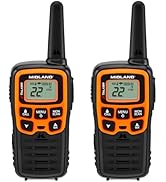
- Two (2) Midland T10 X-TALKER Two-Way Radios
- Two (2) Belt Clips
- One (1) Owner's Manual

Danasîna Wêne: A top-xwarê view of the package contents, showing two black Midland X-TALKER radios, two black belt clips, and an owner's manual, all neatly arranged.
Features Overview
The Midland T10 X-TALKER radios are designed for clear and efficient communication with several key features:
- 22 Kanalên FRS: Provides a wide range of communication options.
- Kodên Taybetîtiyê yên 38 CTCSS: Enhances communication privacy by filtering out unwanted transmissions.
- Skenkirina Hewayê ya NOAA + Hişyarî: Automatically scans 10 weather band channels and alerts you to severe weather.
- eVOX (Easy Voice and Sound Activated Transmission): Allows for hands-free operation.
- Ragihandina Menzîla Dirêj: Optimized for extended range in open areas.
- Sêwirana tevlihev û sivik: Easy to carry and handle.
- Dîmendera LCD -ya Backlit: Di şert û mercên ronahiya kêm de dîtinê peyda dike.

Danasîna Wêne: Nêzîk-up view of the Midland T10 X-TALKER radio, with key features labeled: Push to Talk Button, Channel Display, VOX - Hands-Free Communication, Battery Meter, Menu, Scan, Silent Operation, and WX (Weather) button.
Damezirandin
Sazkirina Pîlê
The Midland T10 radios are designed to operate with a rechargeable Li-ion battery (Model: BL-10C, 3.7V/1200mAh). To install the battery:
- Remove the belt clip by pinching the release tab and sliding the clip upwards.
- Open the battery compartment cover located on the back of the radio.
- Insert the BL-10C Li-ion battery into the compartment, ensuring correct polarity.
- Qapaxa beşa bateriyê vegerînin û klîpa kemerê ji nû ve girêdin.
Barkirina Pîl
To charge your Midland T10 radio:
- Locate the USB-C charging port on the side of the radio, protected by a rubber flap.
- Connect the provided USB-C charging cable to the radio's charging port.
- Serê din ê kabloya USB bi çavkaniyek hêza USB ya hevaheng ve girêde (mînak, adaptora dîwar, porta USB ya komputerê).
- Nîşana pîlê li ser ekrana LCD rewşa şarjkirinê nîşan dide.
Danasîna Vîdyoyê: A user demonstrates how to remove the belt clip, open the battery compartment, insert the rechargeable Li-ion battery, and then connect the USB-C charging cable to the radio. The video also shows the battery specifications on the battery itself.
Operasyona bingehîn
Power On / Off
To power on or off the radio, press and hold the MENU / POWER button located below the display.
Volume Control
Volume bi kar tînin eyar bikin UP û JÊR arrow buttons. The current volume level will be displayed on the screen.
Hilbijartina kanalê
Ji bo hilbijartina kanalek:
- Bitikîne QERTA XÛREKÊ carekê bişkojkê bikirtînin. Hejmara kanalê dê bibiriqe.
- Bi kar tînin UP or JÊR bişkokên tîrê ji bo hilbijartina kanala xwestinê (1-22).
- Bitikîne QERTA XÛREKÊ button again to confirm your selection, or wait a few seconds for the radio to automatically confirm.
Push-to-Talk (PTT)
Ji bo şandinê, pêl bikin û bigirin PTT button located on the left side of the radio. Speak clearly into the microphone. Release the PTT button to receive transmissions.
Taybetmendiyên pêşkeftî
Privacy Codes (CTCSS)
The T10 radios feature 38 CTCSS (Continuous Tone Coded Squelch System) Privacy Codes to minimize interference from other users on the same channel. To set a privacy code:
- Bitikîne QERTA XÛREKÊ du caran bişkojkê bikirtînin. Hejmara koda nepenîtiyê dê bibiriqe.
- Bi kar tînin UP or JÊR bişkokên tîrê ji bo hilbijartina koda nepenîtiyê ya xwestî (1-38).
- Bitikîne QERTA XÛREKÊ button again to confirm, or wait for automatic confirmation.
Têbînî: Ji bo ragihandinê divê her du radyo li ser heman kanal û koda nepenîtiyê bin.
NOAA Weather Scan + Alert
Stay informed about weather conditions with the NOAA Weather Scan and Alert feature:
- Weather Scan: Bişkojk û bigire WX button to activate NOAA Weather Scan. The radio will automatically scan through 10 available weather (WX) band channels and lock onto the strongest weather channel.
- Hişyariya hewayê: When activated, the NOAA Weather Alert will sound an alarm indicating a risk of severe weather in your area. NOAA Weather Radio also broadcasts AMBER alerts.
eVOX (Hands-Free Operation)
The eVOX feature allows you to transmit without pressing the PTT button. The radio detects your voice and automatically transmits. Refer to the owner's manual for detailed eVOX sensitivity settings.
Range û Performansa
The Midland T10 X-TALKER radios offer varying ranges depending on terrain and obstructions:
- No Obstruction: Up to 20 miles in open areas with clear line of sight.
- Partial Obstruction: 2-5 miles in areas with some trees or light buildings.
- Asteng kirin: Less than 1 mile in urban areas with heavy buildings or dense foliage.
Danasîna Wêne: A diagram showing three scenarios for radio range: 'No Obstruction' (up to 20 miles), 'Partial Obstruction' (2-5 miles with trees), and 'Obstructed' (less than 1 mile with city buildings). Actual distance may vary.
Danasîna Vîdyoyê: Vîdyoyek pêşkêşkirina fermî ya hilberêasing the Midland X-TALKER T10 walkie-talkie, highlighting its features and ease of use for various communication needs.
Lênerrînî
To ensure optimal performance and longevity of your Midland T10 radios:
- Paqijî: Nermek bikar bînin, damp Ji bo paqijkirina derveyê radyoyê qumaşê bikar bînin. Kîmyewiyên dijwar an paqijkerên aşınker bikar neynin.
- Lênêrîna Pîl: Fully charge batteries before extended storage. If storing for long periods, remove batteries.
- Embarkirinî: Store radios in a cool, dry place away from extreme temperatures and direct sunlight.
- Berxwedana avê: The radios are water resistant. Avoid submerging them in water. Ensure the USB-C port cover is securely closed when not charging.
Çareserkirina pirsgirêkan
If you experience issues with your Midland T10 radios, try the following:
- Hêz tune: Check battery charge level. Ensure batteries are correctly installed.
- Nikare were şandin/wergirtin: Verify both radios are on the same channel and privacy code. Ensure the PTT button is fully pressed when transmitting. Check for obstructions if range is limited.
- Static/Poor Audio: Move to an area with fewer obstructions. Adjust volume. Try a different channel.
- Klavyeya Girtî: If the keypad is locked, press and hold the lock button (usually the MENU button) until the lock icon disappears from the display.
Specifications
| Babetê Weight | 2.7 onsan |
| Mezinahiya Hilberê | 2 x 1.2 x 5.5 inches |
| Hejmara Modela Babetê | T10 |
| Cureyê Pîl | Rechargeable Li-ion (BL-10C, 3.7V/1200mAh) |
| Hejmara kanalan | 22 |
| Range Frequency | 400-512 MHz |
| Axaftina Range Maximum | 20 Miles (in optimal conditions) |
| Asta Berxwedana Avê | Water Resistant |
| Çêker | Midland |
Garantî û Piştgirî
The Midland T10 X-TALKER Two-Way Radios come with a Three Year Warranty. For warranty claims, technical support, or additional information, please refer to the contact details provided in your owner's manual or visit the official Midland website.


