Product Overview
The Sagemcom Sixty Cordless Telephone and Answer Machine combines modern technology with a classic design. Its unique aesthetic, smooth finish, and touchscreen functionality make it a distinctive addition to any environment. Designed for user comfort, the Sixty offers a range of features including hands-free mode, extended battery life, and an intuitive interface for easy communication.
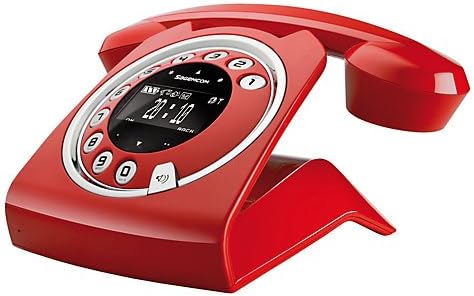
Image: The Sagemcom Sixty Cordless Telephone and Answer Machine in red, showcasing its unique retro-modern design with a circular dial and digital display.

Wêne: Alî view of the Sagemcom Sixty Cordless Telephone, highlighting its sleek profile and the cradle design.
Setup Guide
1. Unpacking
Carefully remove all components from the packaging. Ensure you have the base unit, handset, power adapter, and telephone line cord.
2. Girêdana Yekîneya Bingehîn
- Connect the power adapter to the 'DC IN' port on the back of the base unit and plug the other end into a wall outlet.
- Connect one end of the telephone line cord to the 'LINE' port on the base unit and the other end to your telephone wall jack.
3. Sazkirin û Şarjkirina Pîlê
- Parçeya pîlê li ser destikê vekin.
- Insert the supplied rechargeable batteries, observing the correct polarity (+ and -).
- Cihê pîlê bigire.
- Place the handset on the base unit. The display will indicate charging. Allow the handset to charge for at least 16 hours before first use to ensure optimal battery performance.
Telîmatên Operating
Çêkirin û wergirtina bangan
- Ji bo Bangek: Destê xwe rakin an pê bixin Bang button. Dial the number using the touchscreen keypad.
- Ji bo wergirtina telefonê: Destê xwe rakin an pê bixin Bang bişkojk dema ku telefon lê dixe.
- Ji bo Dawîkirina Bangek: Place the handset back on the base unit or press the Banga Dawî pişkov.
Bikaranîna Touchscreen
The Sixty features a responsive touchscreen for navigation and input. Tap icons or numbers to select functions or dial. Swipe to scroll through lists or menus.
Moda Destan-Free
Di dema bangekê de, pêl pê bikin Gotevan button to activate hands-free mode. Press it again to return to handset mode.
Rêveberiya Pirtûka Telefonê
- Zêdekirina Têkiliyekê: Navigate to the Phonebook menu, select 'Add New Contact', enter the name and number using the touchscreen, and save. The phonebook can store up to 150 names.
- Lêgerîna Têkiliyekê: Access the Phonebook and use the search function or scroll through the list.
- Editing/Deleting a Contact: Select the desired contact from the Phonebook and choose the 'Edit' or 'Delete' option.
Answering Machine Functions
The integrated answering machine has a recording capacity of 10 minutes.
- Çalakkirin/Neçalakkirin: Access the Answering Machine menu to turn it on or off.
- Peyamên Lîstinê: Select 'Play Messages' from the Answering Machine menu.
- Recording Outgoing Message: Follow the prompts in the Answering Machine menu to record a personalized outgoing message.
Lênerrînî
Paqijkirina Telefona We
To clean the phone, wipe it with a soft, damp cloth. Do not use abrasive cleaners or solvents, as these can damage the surface. Ensure the phone is disconnected from power before cleaning.
Lênêrîna Pîl
- Always use the supplied rechargeable batteries.
- If the phone will not be used for an extended period, remove the batteries to prevent leakage.
- Pîlên kevin bi berpirsiyarî li gorî rêzikên herêmî bavêjin.
Çareserkirina pirsgirêkan
| Pirsegirêk | Çareseriya gengaz |
|---|---|
| Dengê dialê tune | Check if the telephone line cord is securely connected to both the base unit and the wall jack. Ensure the power adapter is plugged in. |
| Telefon nayê şarjkirin | Ensure the handset is correctly placed on the base unit. Clean the charging contacts on both the handset and base unit with a dry cloth. Verify the power adapter is working. |
| Qalîteya dengê xerab | Nêzîkî yekîneya bingehîn bibe. Ji bo destwerdana cîhazên din ên elektronîkî kontrol bike. Piştrast bike ku kabloya xeta telefonê zirar nedîtiye. |
| Dîmender vala ye | Check if the handset battery is charged. If not, place it on the base unit to charge. Ensure the power adapter is connected to the base unit. |
| Nikare bangan bike an werbigire | Verify that the telephone line is active. Check all cable connections. Restart the base unit by unplugging and replugging the power adapter. |
Taybetmendiyên Teknîkî
| Taybetî | Specification |
|---|---|
| Nîşan | Sagemcom |
| Cins | Şêst |
| Reng | Sor |
| Tîpa Telefonê | Cordless |
| Dema Axaftina Telefonê | Heta 10 saetan |
| Dema Rawestandinê | Heta 120 saetan |
| Recording Capacity (Answering Machine) | 10 Minutes |
| Kapasîteya pirtûka têlefonê | 150 Nav |
| ASIN | B00DX64LPI |
| Dîroka Yekem Berdest | 15ê Avrêl, 2014 |
Garantî û Piştgirî
For warranty information and customer support, please refer to the documentation included with your purchase or visit the official Sagemcom webmalper. Delîla kirîna xwe ji bo her îdîaya garantiyê biparêzin.


