Pêşkêş
This instruction manual provides comprehensive guidance for the safe and effective use of your Vivitar Vivicam V3815 4-megapixel digital camera. Please read this manual thoroughly before operating the camera to ensure proper setup, function, and maintenance. Retain this manual for future reference.
Product Overview
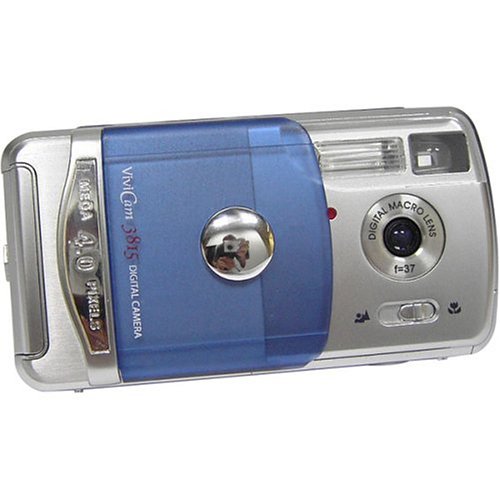
Familiarize yourself with the main components and controls of your Vivitar Vivicam V3815 digital camera.
jimar 1: Paş View of Vivitar Vivicam V3815 Digital Camera
The image displays the rear view of the Vivitar Vivicam V3815 digital camera. The 1.4-inch LCD screen is visible, displaying a sample image of a person. To the right of the screen are the 'MODE' and 'MENU' buttons, along with a four-way controller with an 'OK/Q' button in the center, and icons for flash and trash.
Pêkhateyên sereke:
- Nîsk: Fixed focus lens.
- Birûsk: Built-in autoflash system.
- Display LCD: 1.4-inch color TFT screen for viewwêne, vîdyo û vebijarkên menuyê nîşan dide.
- Bişkokên Kontrolê: MODE, MENU, and a directional pad with an OK/Q button for navigation and selection.
- Parçeya pîlê: Located on the camera body for AA batteries.
- Slota Qerta Bîrê: For optional SD memory cards.
- Porta USB: Ji bo girêdana bi komputerê.
- Video Out Port: For connecting to a television.
Damezirandin
1. Sazkirina Pîl
- Locate the battery compartment cover on the camera.
- Open the cover and insert two AA-size batteries, ensuring correct polarity (+/-) as indicated inside the compartment.
- Qapaxa beşa pîlê bi ewlehî bigire.
Not: Alkaline batteries are included. For extended use, rechargeable Ni-MH batteries are recommended (not included).
2. Memory Card Installation (Optional)
The camera has 16 MB of built-in memory. For additional storage, an SD (Secure Digital) memory card (up to 512 MB) can be used.
- Li ser kamerayê hêlîna qerta SD-ê bibînin.
- Karta SD bi têkiliyên metalî ber bi jêr ve têxin hundir heta ku li cîhê xwe bitikîne.
- Ji bo derxistinê, kartê bi nermî bipêçin heta ku ew derkeve.
3. Vekirina Destpêkê
Press the power button to turn on the camera. The LCD display will activate. You may need to set the date and time upon first use or after battery replacement.
Telîmatên Operating
1. Girtina Wêneyên Bêliv
- Kamera vekin.
- Ensure the camera is in still photo mode (indicated on the LCD). Use the MODE button to switch if necessary.
- Frame your shot using the LCD display. The camera features fixed focus.
- Ji bo girtina wêneyê bişkoja deklanşorê bi tevahî bikirtînin.
Zoom dîjîtal: The camera supports 2x digital zoom. Use the zoom controls (often integrated with directional pad) to adjust magnification before taking a photo.
2. Recording Video Clips
- Kamera vekin.
- Press the MODE button to select movie-clip mode.
- Ji bo destpêkirina tomarkirinê bişkoja deklanşorê bikirtînin. Ji bo rawestandinê dîsa bikirtînin.
Not: Video clips are recorded without audio. Maximum duration is approximately one minute at 320 x 240 resolution.
3. Mode Playback
- Press the MODE button to enter playback mode.
- Use the directional buttons to navigate through your captured photos and videos.
- Press the OK/Q button to view tiştek hilbijartî an vîdyoyek bilîze.
- To delete an image or video, select it and press the trash icon button (often integrated with directional pad). Confirm deletion when prompted.
4. Mîhengên Pêşek
Press the MENU button to access camera settings. Use the directional pad to navigate and the OK/Q button to select options.
- Modên Dîmenê: Select from Auto, Sports, Night, Portrait, Landscape, or Back-light for optimized shooting conditions.
- Modên Rengê: Choose between Color, Black & White, or Sepia-tone.
- Sharpness and Saturation: Adjust these settings to fine-tune image appearance.
- Demjimêra Xweser: Set a delay of 5 or 10 seconds before the shutter fires.
- Modên Flash: The 4-mode autoflash system automatically adjusts based on lighting conditions.
- Çareserkirin: Select image resolution (e.g., 2304 x 1728, 1600 x 1200, 1280 x 960, 640 x 480). Higher resolution results in larger file sizes and fewer images stored.
Girêdana bi Komputerê
Ji bo veguhestina wêne û vîdyoyan bo komputerê:
- Piştrast bike ku kamera vemiriye.
- Kamera bi kabloya USB ya hatî peyda kirin bi komputera xwe ve girêdin.
- Turn on the camera. Your computer should recognize the camera as a removable storage device.
- Access the camera's internal memory or SD card (if inserted) to copy files li ser komputera te.
- Safely eject the camera from your computer before disconnecting the USB cable.
Not: A CD-ROM with necessary software may be included for older operating systems or specific functionalities. For Windows XP and newer, drivers are often not required as the camera functions as a mass storage device.
Maintenance û Lênêrînê
- Paqijî: Use a soft, dry cloth to clean the camera body. For the lens and LCD screen, use a lens cleaning cloth specifically designed for optical surfaces. Avoid abrasive materials or harsh chemicals.
- Embarkirinî: Store the camera in a cool, dry place away from direct sunlight, extreme temperatures, and high humidity. If storing for an extended period, remove the batteries.
- Desthilatdariya Pîl: Always use the correct type of batteries. Remove depleted batteries promptly to prevent leakage. Do not mix old and new batteries or different types of batteries.
- Berxwedana avê: This camera is not water-resistant. Avoid exposure to water or moisture.
Çareserkirina pirsgirêkan
| Pirsegirêk | Sedema gengaz / Çareserî |
|---|---|
| Kamera vêna nabe. |
|
| Wêneyên zelal in. |
|
| Flaş natemire. |
|
| Date and time settings reset. |
|
| Nikare veguhezîne files bo komputerê. |
|
Specifications
| Taybetî | Hûrî |
|---|---|
| Type Sensor | 4 Megapixel CMOS |
| Çareseriya Hê jî bi bandor | 4 MP |
| Maximum Still Resolution | 2304 x 1728 pixel |
| Zoom digital | 2x (4x during playback) |
| Type Focus | Fixed Focus Autofocus |
| Pêşkêşî | 1.4-inch Rengê TFT LCD |
| Bîra Navxweyî | 16 MB built-in non-volatile flash memory |
| Bîra Derve | SD Card (up to 512 MB, not included) |
| Moda Vîdyoyê | Yes (320 x 240, approx. 1 minute, no audio) |
| Têkilî | USB 1.1/2.0 lihevhatî |
| Çavkaniya Hêzê | 2 x AA Alkaline batteries (included) or Ni-MH (not included) |
| Birûsk | Built-in, 4-mode autoflash system |
| Rêbazên gulebaranê | Fully automatic, Scene modes (Auto, Sports, Night, Portrait, Landscape, Back-light) |
| Modes Reng | Color, Black & White, Sepia-tone |
| Self-Timer | 5 an 10 seconds |
| Pîvan | 0.14 Kilograms (without batteries) |
Di Box çi ye
The Vivitar Vivicam V3815 package includes the following items:
- Vivitar Vivicam V3815 Digital Camera
- Cable USB
- Video Cable
- Hand Strap
- Hilgirtina Pouch
- 2 x Batteries Alkaline AA
- Destûra Rêvekirinê (ev belge)
- CD-ROM bi nivîsbariyê
Garantî û Piştgirî
Ji bo agahdariya garantiyê an piştgiriya teknîkî, ji kerema xwe li karta garantiyê ya ku bi hilbera we re tê de binêrin an jî serdana malpera fermî ya Vivitar bikin. webmalper. Ji bo her îdîaya garantiyê, wergirtina kirîna xwe wekî delîla kirînê biparêzin.


