
1. Destpêk
Thank you for choosing the Angrox Backlit Universal Remote Control for LG Smart TVs. This remote is designed to provide a seamless and enhanced television viewing experience, especially in low-light conditions. It serves as a direct replacement for your original LG TV remote, offering broad compatibility and ease of use without requiring complex setup procedures. This manual provides detailed instructions for setting up, operating, maintaining, and troubleshooting your new remote control.
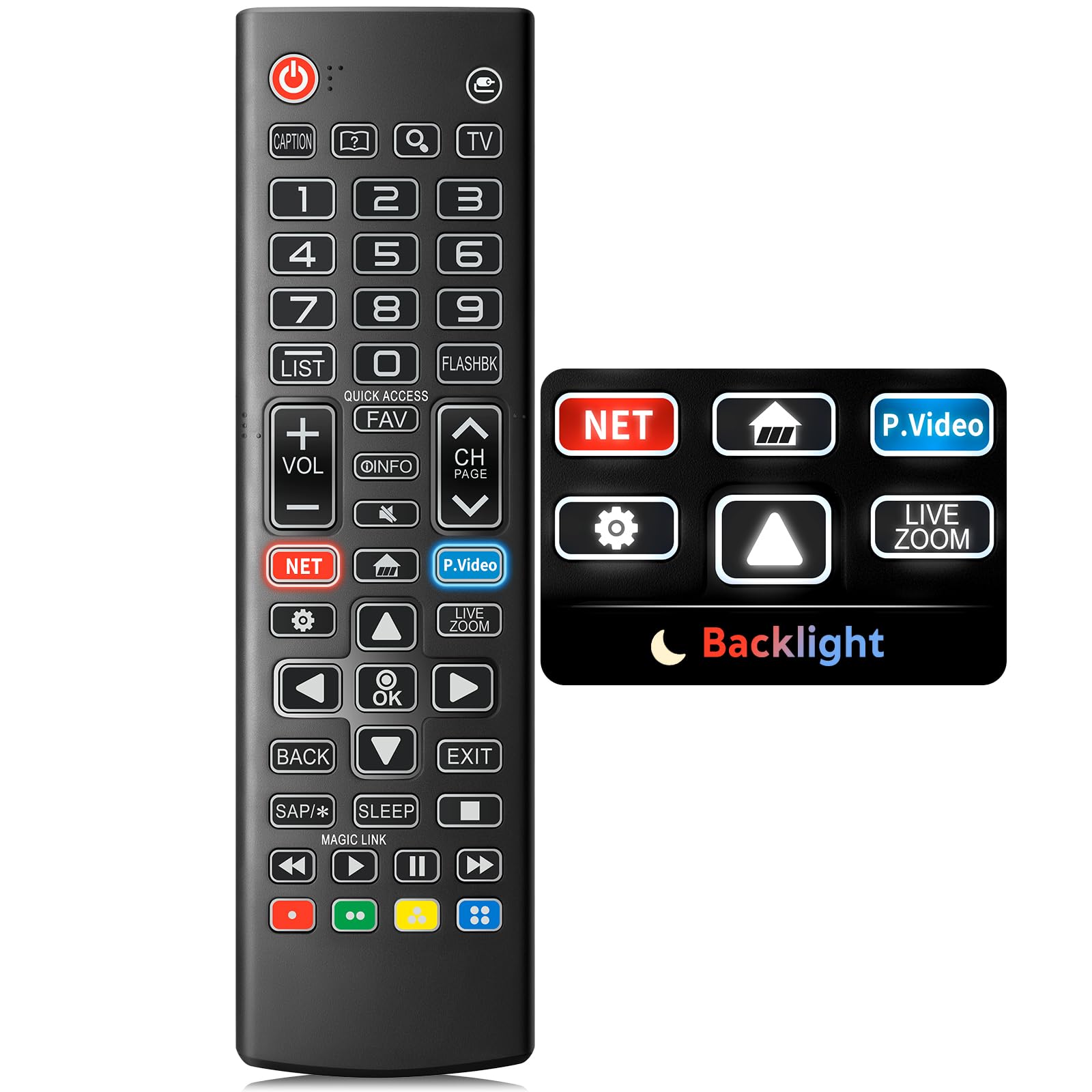
Image: The Angrox Backlit Universal Remote Control, a sleek black remote with clearly labeled buttons.
2. Taybetmendiyên sereke
- Easy Nighttime Operation: Features soft glow buttons that illuminate, allowing for clear visibility and use in dark environments without causing glare. The backlight activates with any button press and automatically turns off after 10 seconds of inactivity.
- Berhevoka gerdûnî: Designed as a direct replacement for LG TV remotes, compatible with all LG TV models. No programming or complex pairing is required; it works immediately out of the box.
- Performansa Kalîteya Bilind: Equipped with sensitive buttons and stable signal transmission for smooth and responsive operation.
- Sêwirana Ergonomîk: Shaped to fit comfortably in the hand, reducing fatigue during extended use. The button layout is intuitive for users of all ages.
- Dûr û pêbawer: Constructed from high-quality, sturdy materials to withstand daily use and accidental drops, ensuring a long lifespan.

Image: A comparison showing the remote control with its backlight off and then with its buttons illuminated, highlighting the easy nighttime operation feature.

Image: The remote control displayed alongside various LG TV models (OLED, UHD, QNED, NanoCell), illustrating its broad compatibility.
3. Rêwerzên Sazkirinê
3.1 Sazkirina Pîl
- Li ser pişta kontrolê ya ji dûr ve qapa beşa pîlê bibînin.
- Ji bo vekirina beşê, qapaxê ber bi jêr ve bihejînin an jî kilîtê bikirtînin.
- Du (2) pîlên AAA têxin hundir, piştrast bikin ku termînalên erênî (+) û neyînî (-) bi nîşanderên di hundurê beşê de bi rêkûpêk li hev tên.
- Qapaxa beşa bateriyê bi xişandina wê heta ku bi ewlehî bitikîne, vegerînin cihê xwe.
Not: Batteries are not included with the remote control. Please use new AAA alkaline batteries for optimal performance.

Image: A visual guide demonstrating the correct insertion of two AAA batteries into the remote control's battery compartment.
3.2 Initial Use (No Pairing Required)
The Angrox Backlit Universal Remote Control is designed for immediate use with LG Smart TVs. No pairing or programming steps are necessary. Once batteries are installed, the remote is ready to control your LG television.
4. Telîmatên Operating
This section details the functions of the buttons on your Angrox remote control.

Image: A comprehensive layout of the remote control, with labels pointing to each button and describing its primary function.
4.1 Fonksiyonên bingehîn
- Erk (
 ): Televizyonê vedike an qut dike.
 - Beyan (): Changes the input source (e.g., HDMI 1, HDMI 2).
- Volume Up / Down (VOL +/-): Asta dengdanê eyar dike.
- Kanal Up / Down (CH Page): Kanala televîzyonê diguherîne.
- Bêdeng (): Dengê TV-yê qut dike an jê dike.
- Bişkokên Hejmarê (0-9): Rasterast hejmarên kanalê an têketinên din ên hejmarî dinivîse.
- Bişkokên Navîgasyonê (Jor/Jêr/Çep/Rast): Used to scroll through menus and options.
- Bişkojka OK: Selects menu items or confirms your input.
4.2 Bişkokên Fonksiyonên Taybet
- Bişkojka Netflix: Launches the Netflix application directly.
- Amazon Prime Video Button: Launches the Amazon Prime Video application directly.
- Gihîştina Zû: A feature that allows you to enter a specified app or Live TV directly by pressing and holding the number buttons.
- Rêzkirin: Digihîje navnîşa bernameyên tomarkirî.
- Flashback: Li berê vedigere viewkanal an têketinê hatîye ed kirin.
- Agahî: Displays information on the current program.
- Bijarte: Gihîştin navnîşa kanala xweya bijare.
- Sazkirin (): Accesses the Quick Settings menu.
- Paş: Nîşaneyên li ser ekranê paqij dike û vedigere TV viewing.
- Derî: Ji menuya heyî derdikeve.
- Xew: Accesses the sleep timer.
- Bişkokên Kontrola Medyayê (Lîstin, Paşvekişandin, Rawestandin, Bilez Pêşve Biçe, Paşve Bizivire): Controls media content playback.
4.3 Fonksiyona Ronahîkirina Paşîn
The remote control features a soft backlight for easy use in the dark. Simply press any button, and the backlight will turn on. It will automatically turn off after 10 seconds of inactivity to conserve battery life.
Video: A demonstration of the Angrox Backlit Remote for LG Smart TV, showcasing its easy nighttime use and responsive buttons. This video highlights the convenience of the backlit feature in dark environments.
5. Specifications
| Nîşan | Angrox |
| Navê Model | AKB75095307 |
| Hejmara Model | AKB75095307 |
| Taybetmendiyên Taybet | Backlit, Ergonomic, Lightweight, No Programming Required, Universal |
| Amûrên Lihevhatî | Television (All LG TV models) |
| Hejmara herî zêde ya Amûrên Piştgirî | 1 |
| Teknolojiya Girêdanê | Infrared |
| Hejmara Bişkokan | 30 |
| Type Controller | Button Control |
| Rêzeya herî zêde | 10 Metre (nêzîkî 33 ling) |
| Hejmara Batteries Required | 2 bataryayên AAA |
| Cureyê Pîl | Alkaline |
| Mezinahiya Babetê (L x W x H) | 9.25"D x 1.89"Fi x 0.73"Bilindahî |
6. Destpêkirin
Heke hûn bi dûrbîna xwe re rastî pirsgirêkan werin, ji kerema xwe li çareseriyên hevpar ên jêrîn binêrin:
- Dûr bersiv nade:
- Piştrast bike ku pîl bi polarîteya rast (+/-) bi awayekî rast hatine danîn.
- Pîlên kevin bi pîlên alkaline yên AAA yên nû biguherînin.
- Di navbera dûrkontrolê û wergirê înfrared ê TV-yê de astengiyan kontrol bike.
- Ensure you are within the maximum operating range (10 meters) of the TV.
- Ronahiya paşîn naxebite:
- Verify battery power. Low batteries may affect backlight functionality.
- The backlight is designed to turn off after 10 seconds of inactivity. Press any button to reactivate it.
- Specific buttons not working (e.g., Netflix, Amazon Prime):
- Ensure your LG Smart TV is connected to the internet and the respective applications are installed and updated.
- Some smart TV features or app shortcuts may vary slightly depending on your TV's model and region.
- Remote feels sluggish or unresponsive:
- Pîl bi yên teze veguherînin.
- Clean the remote's infrared emitter (at the top) and the TV's IR receiver with a soft, dry cloth to ensure a clear signal path.
7. Maintenance
To ensure the longevity and optimal performance of your Angrox remote control, follow these maintenance guidelines:
- Paqijî: Use a soft, dry cloth to clean the remote's surface. Avoid using liquid cleaners, aerosols, or harsh chemicals, as they may damage the remote.
- Guhertina Pîl: Replace batteries promptly when the remote's performance declines or if the backlight becomes dim. Remove batteries if the remote will not be used for an extended period to prevent leakage.
- Embarkirinî: Kêm-kontrolê li cîhekî sar û hişk, dûr ji tîrêjên rojê yên rasterast, germahiyên zêde û şilbûna zêde hilînin.
- Ji dilopan dûr bixin: Her çend mayînde be jî, ketina dubarekirî dikare zirarê bide pêkhateyên hundurîn. Bi baldarî bi dûrdestê bikar bînin.
8. Garantî & Piştgirî
8.1 Agahî Garantî
The Angrox Backlit Universal Remote Control (Model AKB75095307) is covered by a Garantî 90-roj from the date of purchase. This warranty covers manufacturing defects and ensures the product functions as described under normal use. It does not cover damage caused by misuse, accidents, unauthorized modifications, or normal wear and tear.
8.2 Piştgiriya Mişterî
For any questions, technical assistance, or warranty claims, please contact Angrox customer support through the retailer where you purchased the product or visit the official Angrox store online. Please have your purchase receipt and product model number available when contacting support.