
1. Destpêk
The Audizio Desio is a versatile digital radio that combines classic aesthetics with modern audio technology. It features DAB, DAB+, and FM tuning for clear radio reception, along with Bluetooth 5.0 for wireless streaming, a USB port for media playback, and a 3.5mm AUX input for wired connections. The radio is equipped with a 2.4-inch color LCD display and integrated stereo speakers, making it suitable for various environments such as living rooms, kitchens, or bedrooms.
This manual provides detailed instructions for setting up, operating, and maintaining your Audizio Desio radio. Please read it thoroughly before use to ensure proper functionality and to maximize your listening experience.
2. Agahiyên Ewlekariyê
- Piştrast bike ku adaptora hêzê vol etagberî girêdanê bi dabînkirina hêza herêmî ya we re li hev dike.
- Amûrê li ber baran, şilbûn, an germahiyên zêde nehêlin.
- Ji danîna cîhazê nêzîkî çavkaniyên germê an jî di bin tîrêjên rasterast ên rojê de dûr bisekinin.
- C venekinasing; hemû xizmetguzarî ji karmendên pispor re bişînin.
- Yekîneyê ji qadên magnetîkî yên bihêz dûr bixin.
- Yekîneyê tenê bi qumaşek nerm û hişk paqij bikin.
3. Naveroka pakêtê
Ji kerema xwe dema vekirina pakêtê, kontrol bikin ka hemî tişt li wir in:
- Audizio Desio DAB/DAB+/FM Radio
- Adaptera Hêzê (DC 5V)
- Remote Control
- Manual Bikarhêner
4. Kontrol û Girêdan
Control Panel Eniya
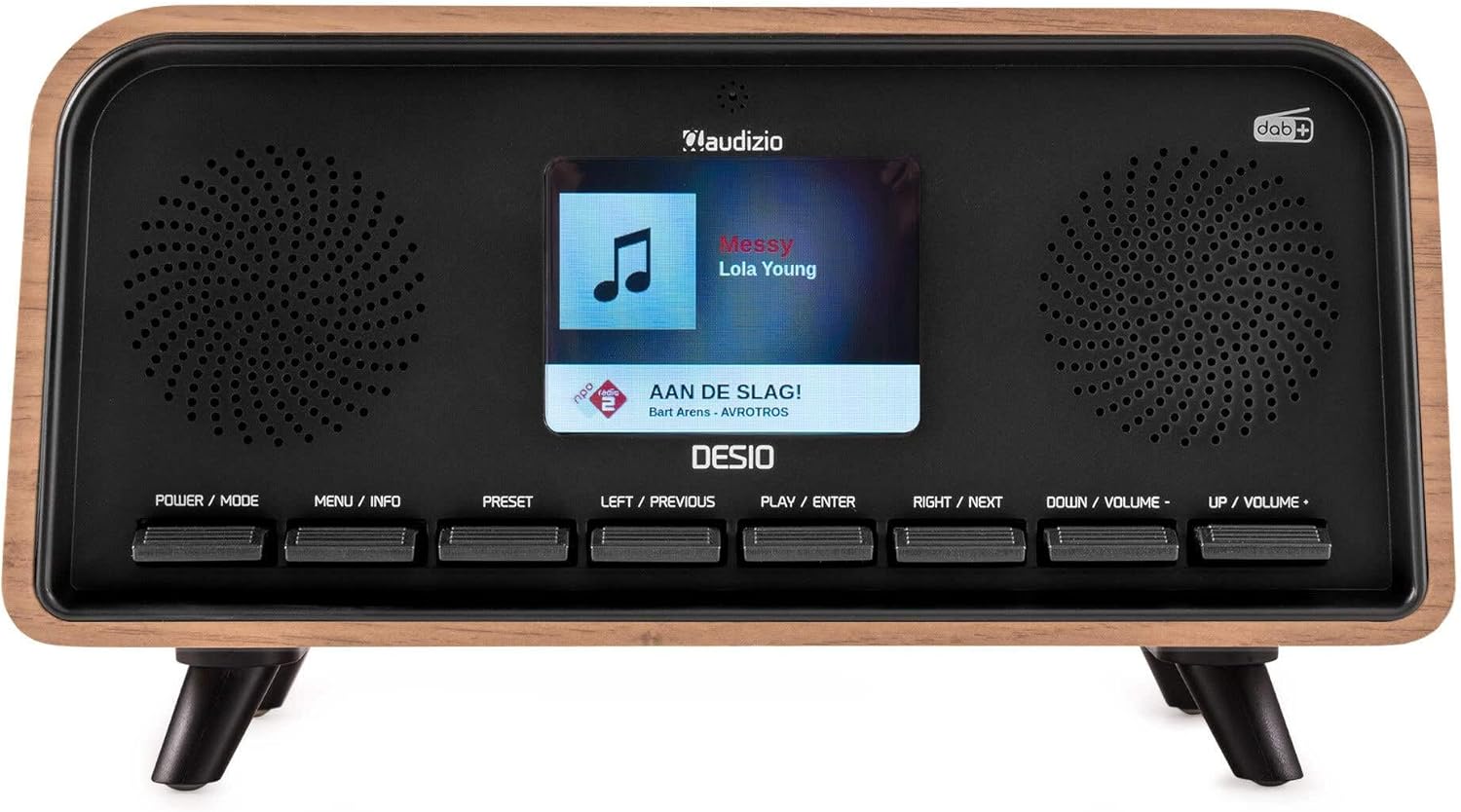
Pêşde view of the Audizio Desio radio, showing the display playing music with artist and track information. The control buttons are visible below the screen.
- POWER / MODE: Press to turn on/off. Press and hold to switch between DAB, FM, Bluetooth, USB, and AUX modes.
- MENU / INFO: Press to access menu options. In playback mode, press to cycle through information display.
- PÊŞKIRIN: Press to recall saved stations. Press and hold to save current station.
- LEFT / PREVIOUS: Navigate left in menus, or skip to previous track/station.
- PLAY / ENTER: Confirm selection in menus, or play/pause media.
- RIGHT / NEXT: Navigate right in menus, or skip to next track/station.
- DOWN / VOLUME -: Decrease volume, or navigate down in menus.
- UP / VOLUME +: Increase volume, or navigate up in menus.
Têkiliyên Panela Paşê
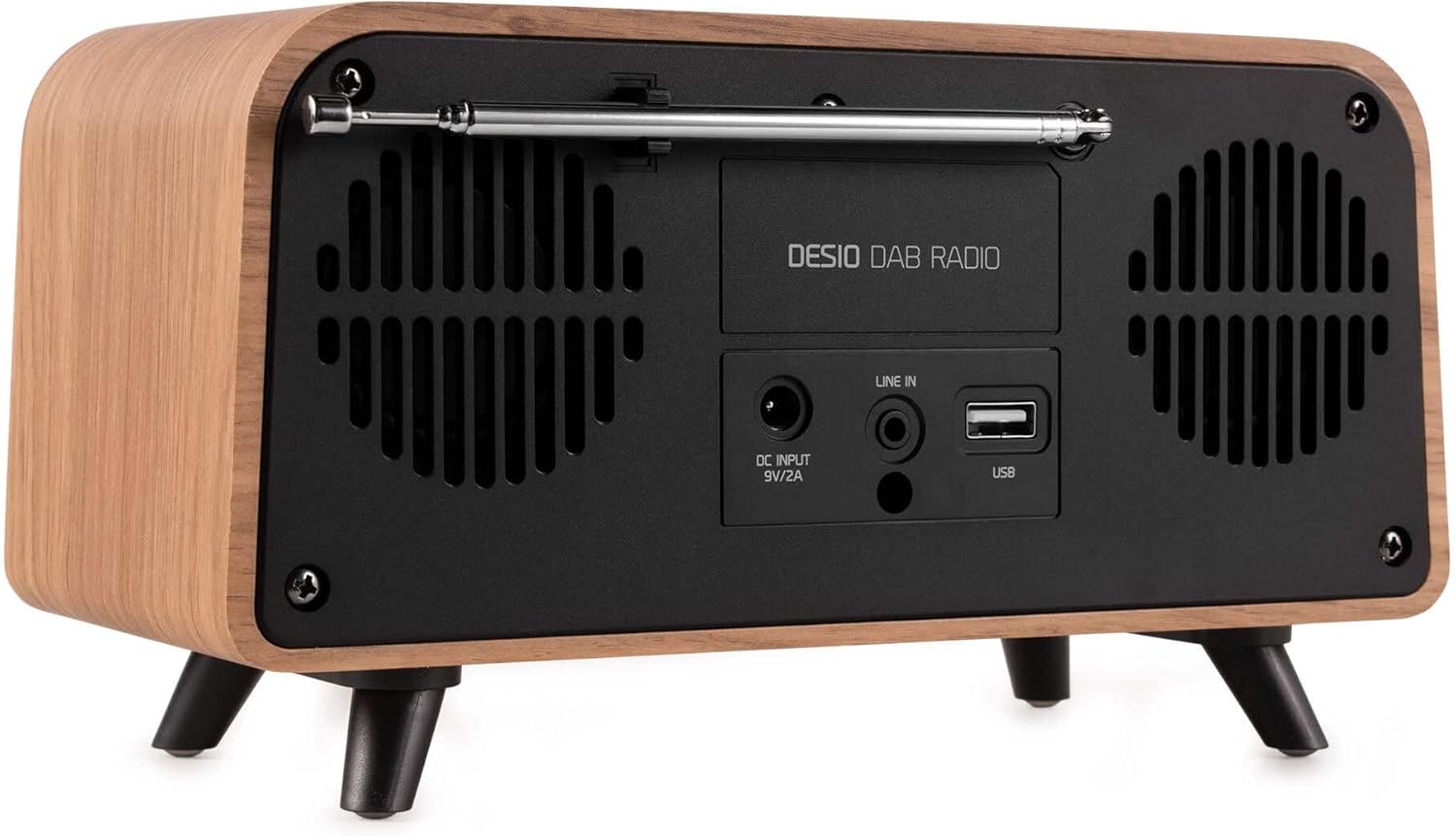
Mezinkirin view of the Audizio Desio radio, highlighting the DC INPUT 9V/2A, LINE IN (3.5mm AUX), and USB ports. The telescopic antenna is extended.
- DC INPUT 9V/2A: Adaptora hêzê ya peydakirî li vir ve girêdin.
- LINE IN (3.5mm AUX): Amûrên dengî yên derveyî bi karanîna kabloyek dengî ya 3.5 mm ve girêdin.
- USB: Insert a USB flash drive for MP3 playback.
- Antena Teleskopî: Extend fully for optimal DAB/DAB+ and FM reception.
5. Setup Destpêk
- Hêza girêdanê: Plug the provided DC 5V power adapter into the DC INPUT port on the rear of the radio, then plug the adapter into a wall outlet.
- Antenna dirêj bike: Fully extend the telescopic antenna located on the rear of the unit for best reception.
- Hêzdarkirin: Bitikîne POWER / MODE bişkojka ji bo vekirina radyoyê.
- First-time DAB Scan: Upon first power-on, the radio will automatically perform a full scan for DAB/DAB+ stations. This may take a few minutes. The display will show the scanning progress.
- Dem/Dîrok danîn: The time and date will usually be set automatically via DAB signal. If not, you can manually set them via the menu.
6. Telîmatên Operating
6.1 DAB/DAB+ Radio Operation

Pêşde view of the Audizio Desio radio, displaying a DAB radio station ('NPO Klassiek') and current time.
- Select DAB Mode: Bitikîne POWER / MODE button repeatedly until 'DAB' is displayed.
- Scan for Stations: If no stations are found or you wish to rescan, press MENU / INFO, paşê bikar bînin LEFT / PREVIOUS or RAST / PÊŞ to select 'Full Scan' and press PLAY / ENTER.
- Select Station: Bi kar tînin LEFT / PREVIOUS or RAST / PÊŞ buttons to browse available stations. Press PLAY / ENTER ku qereqolek hilbijêrin.
- Tomarkirina pêşwext: Ji bo tomarkirina stasyonekê, pêl bikin û bigirin PÊŞKIRIN pişkov. Bikaranîn LEFT / PREVIOUS or RAST / PÊŞ to choose a preset number (1-50), then press PLAY / ENTER piştrast kirin.
- Bersaziya bibîrxistin: Ji bo vegerandina stasyoneke tomarkirî, pêl bişkoka PÊŞKIRIN button (do not hold). Use LEFT / PREVIOUS or RAST / PÊŞ ji bo hilbijartina pêşwextê xwestî, paşê bikirtînin PLAY / ENTER.

Pêşde view of the Audizio Desio radio, showing the 'Preset Recall' menu on the display, indicating empty preset slots.
Xebata Radyoya 6.2 FM
- Moda FM hilbijêre: Bitikîne POWER / MODE button repeatedly until 'FM' is displayed.
- Lêgerîna Otomatîk: Çape bike û bigire PLAY / ENTER to automatically scan for and save available FM stations.
- Tuning Manual: Bikaranîn LEFT / PREVIOUS or RAST / PÊŞ to fine-tune the frequency.
- Save/Recall Presets: Follow the same procedure as for DAB radio (Section 6.1).
6.3 Bluetooth (BT) Operation

Pêşde view of the Audizio Desio radio, with the display showing 'BT' (Bluetooth) mode and 'Connected' status.
- Select BT Mode: Bitikîne POWER / MODE button repeatedly until 'BT' is displayed. The radio will enter pairing mode, indicated by a flashing Bluetooth icon.
- Cot Amûr: On your smartphone, tablet, or laptop, enable Bluetooth and search for available devices. Select 'Audizio Desio' from the list.
- Bihevgirêdan: Once paired, the display will show 'Connected'. You can now stream audio from your device to the radio.
- Kontrola Playback: Use your connected device or the radio's PLAY / ENTER, LEFT / PREVIOUS, û RAST / PÊŞ bişkokên ji bo kontrolkirina playback.
6.4 Lîstin bi USB

Pêşde view of the Audizio Desio radio, with the display showing 'USB' mode, current time, and details of an MP3 file tê lîstin.
- Ajokera USB-ê têxinê: Insert a USB flash drive (formatted to FAT32) containing MP3 files into the USB port on the rear of the radio.
- Select USB Mode: Bitikîne POWER / MODE button repeatedly until 'USB' is displayed. The radio will automatically start playing the first compatible audio file.
- Rêserbirin Files: Bikaranîn LEFT / PREVIOUS or RAST / PÊŞ to skip tracks. Press PLAY / ENTER ji bo rawestin / ji nû ve lêdanê.
6.5 Ketina AUX
- Amûra Têkilî: Connect an external audio device (e.g., MP3 player, smartphone) to the 'LINE IN' (3.5mm AUX) port on the rear of the radio using a 3.5mm audio cable (not included).
- Moda AUX hilbijêre: Bitikîne POWER / MODE button repeatedly until 'AUX' is displayed.
- Kontrola Playback: Playback is controlled directly from your connected external device. Adjust volume using the radio's volume controls.
6.6 Alarm and Timer Functions
- Sazkirina Alarm: Bi rêya vê, bigihîjin mîhengên alarmê MENU / INFO button. You can set multiple alarms with customizable sources (DAB, FM, Buzzer), volume, and recurrence (daily, weekdays, weekends).
- Demjimêrê Xewê: The sleep timer allows the radio to turn off automatically after a set period. Access this function via the MENU / INFO button and select the desired duration.
- Fonksiyona Snooze: When an alarm sounds, press any button (except Power) to activate the snooze function for a short period.
7. Maintenance
- Paqijî: Use a soft, dry, lint-free cloth to clean the radio's surface. Do not use abrasive cleaners, waxes, or solvents.
- Lênêrîna Antenna: Handle the telescopic antenna carefully to avoid bending or breaking.
- Embarkirinî: If storing the radio for an extended period, disconnect it from the power supply and store it in a cool, dry place.
8. Destpêkirin
| Pirsegirêk | Sedema gengaz | Çare |
|---|---|---|
| Hêz tune | Adaptora hêzê ne girêdayî ye an jî priza elektrîkê xera ye. | Check power adapter connection and try a different outlet. |
| Wergirtina DAB/FM ya xirab | Antenna not fully extended or poor signal area. | Fully extend the antenna. Try repositioning the radio. Perform a full scan. |
| Bluetooth nayê girêdan | Radio not in BT mode, device not in pairing mode, or too far away. | Ensure radio is in BT mode. Put your device in pairing mode. Move device closer to the radio (within 10m). |
| Playback USB nexebite | USB drive not inserted correctly, unsupported file format, or drive not FAT32. | Ajokera USB-ê ji nû ve têxe. Piştrast bike files are MP3. Check USB drive format (FAT32). |
| Deng ji AUX tune ye | Radio not in AUX mode, cable faulty, or external device volume low. | Select AUX mode. Check 3.5mm cable. Increase volume on both radio and external device. |
9. Specifications Teknîkî
- Nîşan: Audizio
- Cins: Desio
- Teknolojiya Tuner: FM, DAB+
- Bluetooth: Version 5.0 (Range: 10m)
- Vebijarkên Playback: Bluetooth, USB, 3.5mm AUX input
- Stasyonên pêşdibistanê: 50
- Pêşkêşî: 2.4 inch LCD Color
- Fonksiyon: Alarm, Sleep Timer, Snooze, Dimming, Week/Weekend Alarm
- Max Speaker Power: 30 Watt
- Navê min: DC 5V (Power Adapter)
- Pîvanên hilberê (H x W x D): 32 x 16 x 18 cm
- Pîvan: 1.66 kg
10. Garantî û Piştgirî
This product comes with a standard manufacturer's warranty. For detailed warranty terms and conditions, please refer to the documentation provided at the time of purchase or contact your retailer.
For technical support, troubleshooting assistance, or service inquiries, please contact the Audizio customer support team or your local dealer. Please have your product model number (Desio) and purchase information ready when contacting support.