
1. Destpêk
Thank you for choosing the Yigars Y580 Robot Vacuum and Mop. This manual provides essential information for the safe operation, maintenance, and troubleshooting of your device. Please read it thoroughly before use and retain it for future reference.
2. Telîmatên Ewlekariyê
- Ensure the robot is used indoors only.
- Robotê li hawîrdorên şil an nêzîkî avê bikar neynin.
- Kabloyên sist, perde û tiştên din ên ku dikarin robotê ji rêya wî dûr bixin.
- Dema ku robot dixebite, zarok û heywanên malê çavdêriyê bikin.
- Use only the original charging base and power adapter.
- Do not attempt to repair or modify the robot yourself. Contact customer support for assistance.
- Bi rêkûpêk çopê vala bikin da ku performansa çêtirîn biparêzin.
3. Naveroka pakêtê
Piştrast bike ku hemî tişt di pakêtê de hene:
- Yigars Y580 Robot Vacuum and Mop
- Charging Base
- Power Adapter
- Firçeyên Alî (2 cot)
- Mop Pads (2)
- HEPA Filter (1 spare)
- Manual Bikarhêner
4. Hilbera Serîview
The Yigars Y580 combines vacuuming, sweeping, and mopping functionalities. It features 360° LiDAR navigation for precise mapping and obstacle avoidance.

Image: The Yigars Y580 Robot Vacuum and Mop, showcasing its sleek white design, LiDAR sensor, side brushes, and included accessories like a filter and a smartphone displaying the app interface.
5. Sazkirin
5.1 Cihê Bingeha Şarjkirinê
Place the charging base against a wall in an open area, ensuring there are no obstacles within 1 meter (3 feet) to the sides and 2 meters (6 feet) in front. Connect the power adapter to the charging base and plug it into a power outlet.
5.2 Xerca Destpêkê
Place the robot on the charging base. Ensure the charging contacts on the robot align with those on the base. The robot will begin charging automatically. For first-time use, fully charge the robot before operation.
5.3 App Connection (Wi-Fi 2.4 GHz)
The Yigars Y580 can be controlled via a mobile application (Smart Life or Tuya APP). Follow these steps to connect:
- Download the Smart Life or Tuya APP from your smartphone's app store.
- Xwe qeyd bikin an têkeve hesabê xwe.
- Piştrast bike ku smartphoneya te bi tesîsekê ve girêdayî ye Tora Wi-Fi ya 2.4 GHz. The robot does not support 5 GHz Wi-Fi.
- Add a new device in the app, selecting 'Robot Vacuum' or similar.
- Follow the in-app instructions to connect the robot to your Wi-Fi network. This usually involves resetting the robot's Wi-Fi and entering your Wi-Fi password.

Image: A visual guide demonstrating the step-by-step process of connecting the Yigars Y580 robot vacuum to a smartphone application, including downloading the app, adding the device, connecting to a 2.4 GHz Wi-Fi network, and confirming successful connection.
5.4 Entegrasyona Alîkarê Deng
The Yigars Y580 is compatible with Amazon Alexa and Google Assistant. Once connected to the Smart Life/Tuya app, you can link your account to Alexa or Google Home apps to enable voice control. Refer to the respective voice assistant app's instructions for linking smart home devices.
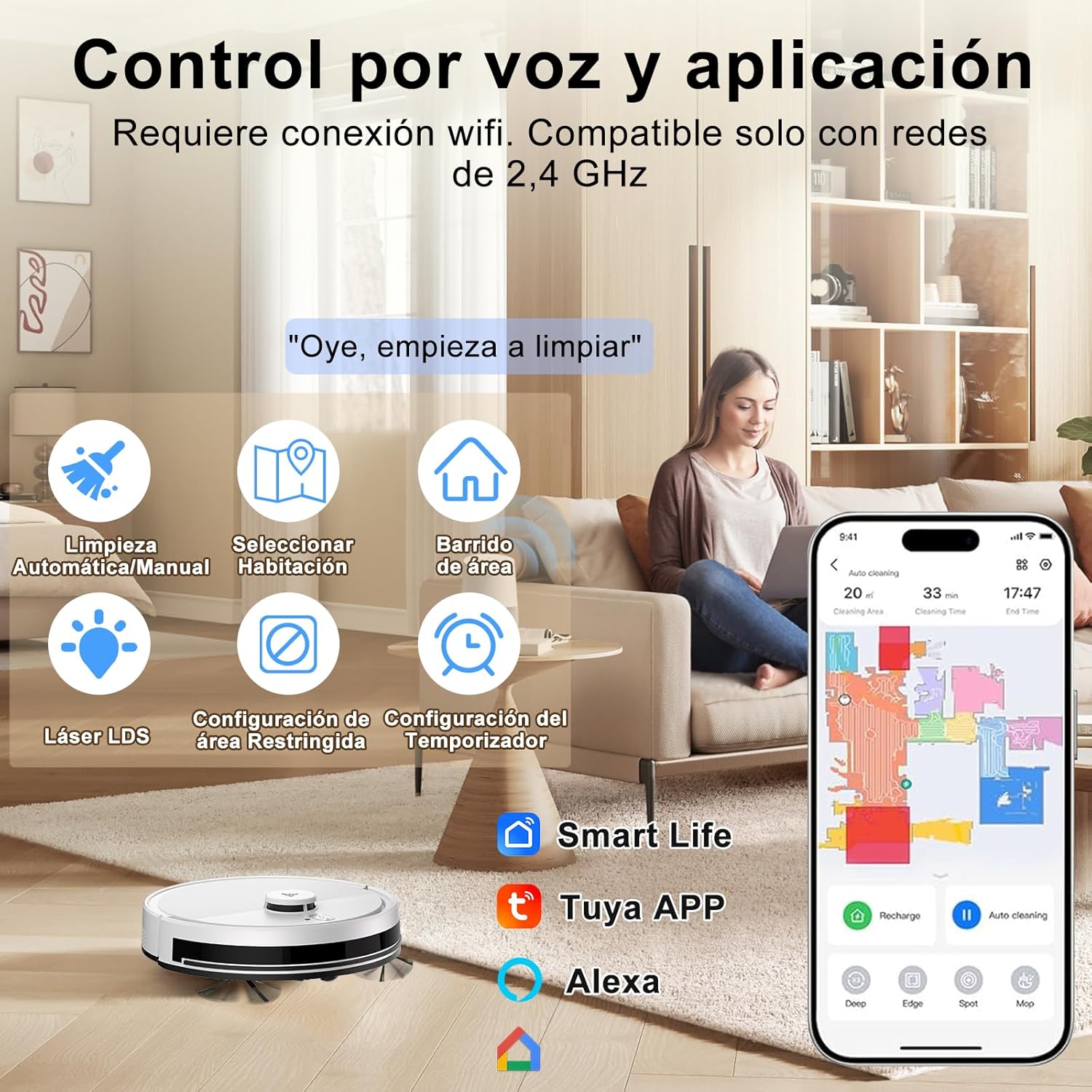
Image: An illustration showing the Yigars Y580 robot vacuum being controlled via voice commands and a smartphone app, highlighting features like automatic/manual cleaning, room selection, area sweeping, LDS laser, restricted area settings, and timer functions. Compatible with Smart Life, Tuya APP, and Alexa.
6. Telîmatên Operating
6.1 Modên Paqijkirinê
The robot offers various cleaning modes accessible via the mobile app:
- Moda Otomatîk: The robot intelligently plans its cleaning path for the entire area.
- Paqijkirina plansazkirî: Demên taybetî ji bo paqijkirina otomatîkî ya robotê destnîşan bikin.
- Paqijkirina Herêmê: Li ser nexşeyê deverên taybetî ji bo paqijkirina robot destnîşan bikin.
- Paqijkirina cîh: Direct the robot to clean a concentrated area.

Image: An illustration showing the Yigars Y580 robot vacuum cleaning a living room, with icons representing various cleaning modes: Automatic Mode, Scheduled Cleaning (S-shape path), Spot Mode, and Timed Mode.
6.2 Vacuuming and Mopping
The Yigars Y580 performs 3-in-1 cleaning: vacuuming, sweeping, and mopping. It features a 350 ml dustbin and a 250 ml water tank with three adjustable humidity levels. The suction power can reach up to 4000Pa (with three adjustable speeds) and is suitable for all floor types, including short-pile carpets (under 1.5 cm).

Wêne: Qutkirinek view of the Yigars Y580 robot vacuum demonstrating its sweeping and mopping capabilities, highlighting the 2700Pa suction power and its effectiveness against pet hair, dust, crumbs, and pet food pellets.
6.3 Dûrketina ji Astengiyan û Navîgasyon
Equipped with 360° LiDAR laser technology, the robot precisely maps your home environment and plans efficient cleaning routes. It can overcome obstacles up to 18 mm high and ascend inclines of up to 15°, allowing it to navigate thresholds and carpets effectively.

Image: The Yigars Y580 robot vacuum demonstrating its 360° LiDAR obstacle avoidance capabilities, showing its ability to navigate around objects and over small thresholds.
6.4 Smart Mapping and Management
The robot uses fast mapping technology and can automatically save up to five different maps. This allows for multi-floor cleaning and customized cleaning zones. You can set virtual walls and restricted areas via the app to prevent the robot from entering specific zones.

Image: A diagram illustrating the Yigars Y580 robot vacuum's ability to automatically save up to five different maps, supporting area selection and zone cleaning functions for multi-floor homes.

Image: A visual representation of the Yigars Y580 robot vacuum's virtual wall and restricted zone configuration capabilities, allowing users to define areas where the robot should not clean.
6.5 Management Pîlê
The robot is equipped with a high-efficiency battery providing up to 120 minutes of runtime. When the battery level drops below 20%, the robot automatically returns to its charging base. Once sufficiently recharged (to 90%), it will resume cleaning from where it left off.

Image: A diagram illustrating the Yigars Y580 robot vacuum automatically returning to its charging base when the battery level is low (20%) and then resuming cleaning from its last position after recharging.
7. Maintenance
Regular maintenance ensures optimal performance and extends the lifespan of your Yigars Y580.
7.1 Qutî û Depoya Avê
- Qutîka Zibilê ya Vala: After each cleaning cycle, remove and empty the dustbin.
- Tanka Ava Paqij: After mopping, empty any remaining water from the tank and allow it to air dry.
7.2 Firçeyên
- Firçeyên Alî: Check for tangled hair or debris weekly. Remove and clean if necessary. Replace if worn.
- Firçeya Sereke: Remove the main brush cover and clean any tangled hair or debris from the brush and its bearings. Perform this monthly or as needed.
7.3 Parzûnên
- Parzûna HEPA: Tap the filter to remove dust. Do not wash the HEPA filter with water. Replace every 3-6 months depending on usage.
7.4 Sensor
- Wipe the cliff sensors, wall sensors, and charging contacts with a clean, dry cloth monthly to ensure proper function.
8. Destpêkirin
If you encounter issues with your Yigars Y580, refer to the following common problems and solutions:
| Pirsegirêk | Sedema gengaz | Çare |
|---|---|---|
| Robot venagere | Batarya kêm; Guhestina elektrîkê girtî ye | Robotê şarj bike; Piştrast bike ku guhêrbarê hêzê vekirî ye |
| Robot nikare şarj bike | Têkiliyên şarjkirinê qirêj in; Bingeha şarjkirinê nayê elektrîkkirin | Clean charging contacts; Check power connection to base |
| Robot pir caran asê dibe | Astengiyên zêde; Kabloyên sist | Clear the cleaning area; Secure loose items |
| Performansa paqijkirinê ya xirab | Qutî tijî tozê; Fîltera girtî; Firçeyên kevin | Qutiya çopê vala bikin; Fîlterê paqij bikin/biguherînin; Firçeyan paqij bikin/biguherînin |
| App connection failed | Incorrect Wi-Fi (5GHz); Wrong password; Robot too far from router | Ensure 2.4GHz Wi-Fi; Re-enter password; Move robot closer to router |
For further assistance, please contact Yigars customer support.
9. Specifications
| Taybetî | Hûrî |
|---|---|
| Nîşan | Yigars |
| Navê Model | Y580 |
| Hejmara Model | 001 |
| Reng | Spî |
| Suction Power | Up to 4000Pa (3 adjustable speeds) |
| Rêserbirinî | 360° LiDAR Laser (LDS) |
| Battery Life | Heta 120 hûrdem |
| Kapasîteya Pîl | 2600 mAh |
| Kapasîteya Dustbin | 350 ml |
| Kapasîteya Tank a Avê | 250 ml (3 humidity levels) |
| Noise Level | Approx. 60 dB |
| Obstacle Climbing Ability | Up to 18 mm (15° incline) |
| Amûrên Lihevhatî | Smartphones (Wi-Fi 2.4GHz), Amazon Alexa, Google Home |
| Cureyê Parzûnê | HEPA |
| Dimensions | 33L x 33W x 10H cm |
| Giraniya hilberê | 3 kg |

Image: The Yigars Y580 robot vacuum highlighting its 2600mAh battery capacity, providing up to 120 minutes of cleaning time, and its low operating noise level of approximately 60dB.

Image: The Yigars Y580 robot vacuum illustrating its support for OTA (Over-The-Air) firmware and software updates, ensuring the system remains current with the latest features and improvements.
10. Garantî û Piştgirî
The Yigars Y580 Robot Vacuum and Mop comes with a standard manufacturer's warranty. Please refer to the warranty card included in your package for specific terms and conditions. For technical support, troubleshooting assistance, or warranty claims, please contact Yigars customer service through the contact information provided in your product documentation or on the official Yigars website.