
Pêşkêş
This manual provides detailed instructions for the setup, operation, and maintenance of your Yigars Robot Vacuum and Mop Y680. Please read this manual thoroughly before using the device to ensure optimal performance and safety.
Naveroka pakêtê
Piştrast bike ku hemû tiştên ku li jêr hatine navnîş kirin di pakêta te de hene:
- Robota paqijkirinê (x1)
- Base Station with Auto-Empty Function (x1)
- Filters (x2)
- Mop Pad (x2, one pre-installed)
- Side Brush (x4)
- Water Tank (x1)
- Dust Bag (x5, one pre-installed)
- Amûra Paqijkirinê (pêş-sazkirî)
- Destûra Bikarhêner (x1)

Figure 1: Included components of the Yigars Robot Vacuum and Mop Y680.
Damezirandin
- Unpack and Place the Base Station: Remove all packaging materials. Place the auto-empty base station against a wall in an open area with good Wi-Fi signal. Ensure there are no obstacles within 1.5 meters (5 feet) in front and 0.5 meters (1.6 feet) on either side of the base station.

Figure 2: Proper placement of the auto-empty base station for optimal operation.
- Firçeyên Alî Saz Bikin: Attach the side brushes to the designated slots on the underside of the robot vacuum until they click into place.
- Install Mop Pad and Water Tank: If using the mopping function, fill the water tank with clean water and attach the mop pad to the mop bracket. Slide the assembled water tank and mop bracket into the rear of the robot until it clicks.
- Xerca destpêkê: Place the robot vacuum onto the charging contacts of the base station. Ensure the robot is properly aligned. Allow the robot to fully charge before its first use (approximately 4-5 hours).
- Girêdana bi App Mobîl: Download the companion mobile app (e.g., Tuya Smart or Smart Life) from your app store. Follow the in-app instructions to connect your Yigars Y680 to your home's 2.4GHz Wi-Fi network. (Note: 5GHz networks are not supported).

Figure 3: Step-by-step guide for connecting the robot vacuum to the mobile application.
- Initial Mapping: For the first cleaning cycle, allow the robot to complete a full scan of your home to create an accurate map. This map will be used for efficient navigation and personalized cleaning settings.

Figure 4: The robot vacuum utilizing LiDAR for precise navigation and mapping.
Telîmatên Operating
Modên Paqijkirinê
- Paqijkirina Xweser: The robot intelligently cleans your entire home based on the mapped layout.
- Paqijkirina Herêmê: Select specific areas on the app map for targeted cleaning.
- Paqijkirina Cihê: Robotê rêve bibe da ku deverek piçûk û komkirî paqij bike.
Suction and Mopping Settings
The Y680 offers customizable cleaning power:
- Asta şûştinê: Choose from four adjustable suction levels (up to 8000 Pa) via the mobile app to suit different floor types and debris.
- Water Flow Settings: Select from three water flow settings for mopping, allowing adjustment for varying floor materials and dirt levels.
- Boost Xalîçe: The robot automatically detects carpets using ultrasonic sensors and increases suction power for deeper cleaning.

Figure 5: Illustration of the robot vacuum's adjustable suction power.
Navigation and Mapping
The Y680 utilizes advanced navigation for thorough coverage:
- Navîgasyona LiDAR: 360-degree laser LDS technology accurately maps your home and plans efficient cleaning routes.
- Multi-Map Storage: The robot can store up to five distinct maps, ideal for multi-level homes.
- Paqijkirina Astengiyan: Capable of clearing obstacles up to 20mm and climbing 15° inclines, allowing it to navigate thresholds and carpets.
- Herêmên Qedexe: Use the app to define areas the robot should avoid, such as pet bowls or delicate furniture.

Figure 6: The robot vacuum using LiDAR for precise navigation and mapping.
Serlêdan û Kontrola Deng
- Personalized Cleaning: The mobile app allows you to select specific zones, set no-go areas, schedule cleaning times, and customize water flow and suction levels for each room.
- Fermanên Deng: Compatible with Amazon Alexa and Google Assistant for convenient voice-activated operation.
- Nûvekirinên OTA: The robot supports Over-The-Air (OTA) updates for continuous firmware and software improvements.
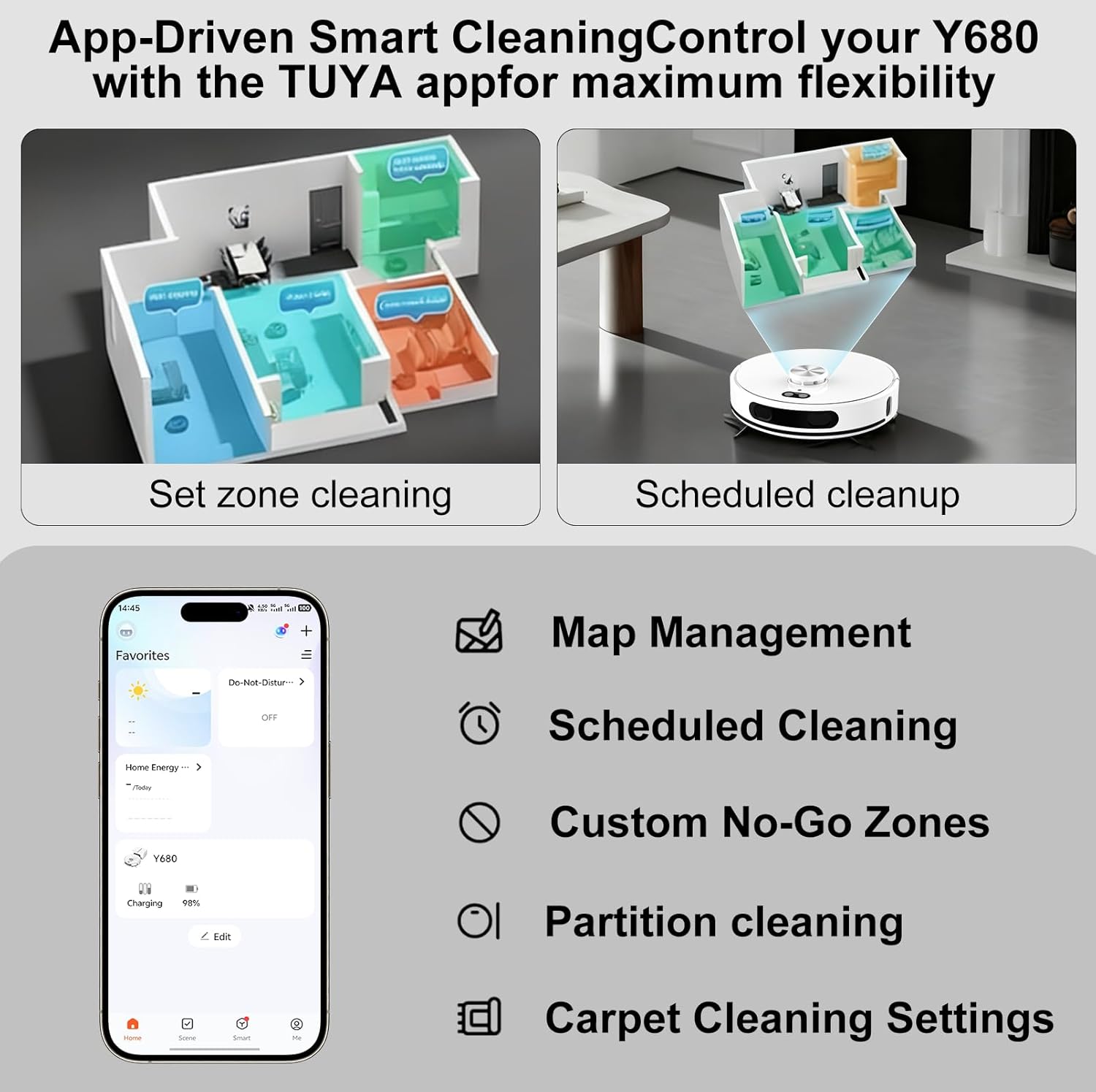
Figure 7: Mobile app interface for personalized cleaning settings and map management.
Battery Life and Smart Recharging
- Dema Berfirehkirî: A powerful 5200mAh battery provides up to 220 minutes of cleaning time, covering up to 3229 square feet (300 square meters) on a single charge.
- Smart Recharge and Resume: When the battery is low, the robot automatically returns to its charging dock. Once sufficiently recharged, it resumes cleaning from where it left off.
Lênerrînî
Self-Emptying Dustbin
The Y680 features an auto-empty base station that empties the robot's dustbin into a large-capacity dust bag. This provides up to 60 days of hands-free cleaning.
- Guhertina çenteyê tozê: Replace the dust bag in the base station approximately every 60 days, or when full. This ensures hygienic disposal of collected debris.

Figure 8: The robot vacuum returning to its self-emptying base station.
Cleaning Components
- Parzûn: Regularly check and clean the filters to maintain optimal suction performance. Replace filters as needed (extra filters are provided).
- Pêçên Mopê: Remove and clean the mop pads after each mopping session. They can be hand-washed or machine-washed.
- Side Brushes and Main Brush: Periodically inspect and clean the side brushes and main brush to remove tangled hair or debris. Use the provided cleaning tool for easy maintenance.
- Sensor: Wipe the robot's sensors with a soft, dry cloth to ensure accurate navigation.
Çareserkirina pirsgirêkan
If you encounter any issues with your Yigars Y680, please refer to the following common solutions:
- Robot nayê şarj kirin: Ensure the base station is plugged in and the robot is properly aligned with the charging contacts. Clean the charging contacts on both the robot and the base station.
- Robot asê maye: Clear any loose cables, small objects, or thick rugs that might obstruct the robot's path. Ensure no-go zones are correctly set in the app.
- Performansa paqijkirinê ya xirab: Check and empty the dustbin/dust bag. Clean or replace filters, main brush, and side brushes. Ensure the water tank is filled for mopping.
- Pirsgirêkên girêdana sepanê: Verify your Wi-Fi network is 2.4GHz. Restart your router and the robot. Ensure the robot is within Wi-Fi range.
- Dengên neasayî: Inspect the main brush and side brushes for tangled hair or debris. Check if any foreign objects are lodged in the wheels.
Ji bo bêtir alîkariyê, ji kerema xwe bi piştgiriya xerîdar re têkilî daynin.
Specifications
| Nîşan | Yigars |
| Navê Model | Y680 |
| Suction Power | Heta 8000 Pa |
| Kapasîteya Pîl | 5200 mAh |
| Runtime | Heta 220 hûrdem |
| Kapasîteya tozê bag | 2.5 Lître (heta 60 rojan) |
| Cureyê Navîgasyon | LiDAR (Laser Distance Sensing) |
| Paqijkirina Astengiyê | 20mm |
| Incline Climbing | 15° |
| Têkilî | 2.4GHz Wi-Fi (5GHz nayê piştgirî kirin) |
| Kontrola Deng | Amazon Alexa, Alîkarê Google |
| Mezinahiya Hilberê | 13.5"D x 13.5"Fi x 3.8"Bilindahî |
| Babetê Weight | 8.5 lîre |
| Cureyê Parzûnê | HEPA |
| Pêşniyara Rûyê | Hardwood, Carpet, Tile, Laminate |
Garantî û Piştgirî
Your Yigars Robot Vacuum and Mop Y680 comes with a Garantiya Du-Sal from the date of purchase. This warranty covers manufacturing defects and ensures reliable operation.
We offer 24/7 after-sales customer service and lifetime technical support. Should you encounter any issues or require assistance, please do not hesitate to contact our support team.
For support, please refer to the contact information provided in the included User Manual or visit the official Yigars website.