
Pêşkêş
Thank you for choosing the Digitus DA-70919 USB-C 8K 12-Port Docking Station. This device is designed to expand the connectivity of your USB-C enabled laptop or computer, providing a comprehensive solution for video output, data transfer, network access, and power delivery. Please read this manual carefully to ensure proper installation and operation.
Product Overview
The Digitus DA-70919 docking station offers 12 essential ports to enhance your workspace. It supports high-resolution video output, fast data transfer, and efficient power delivery to your host device.

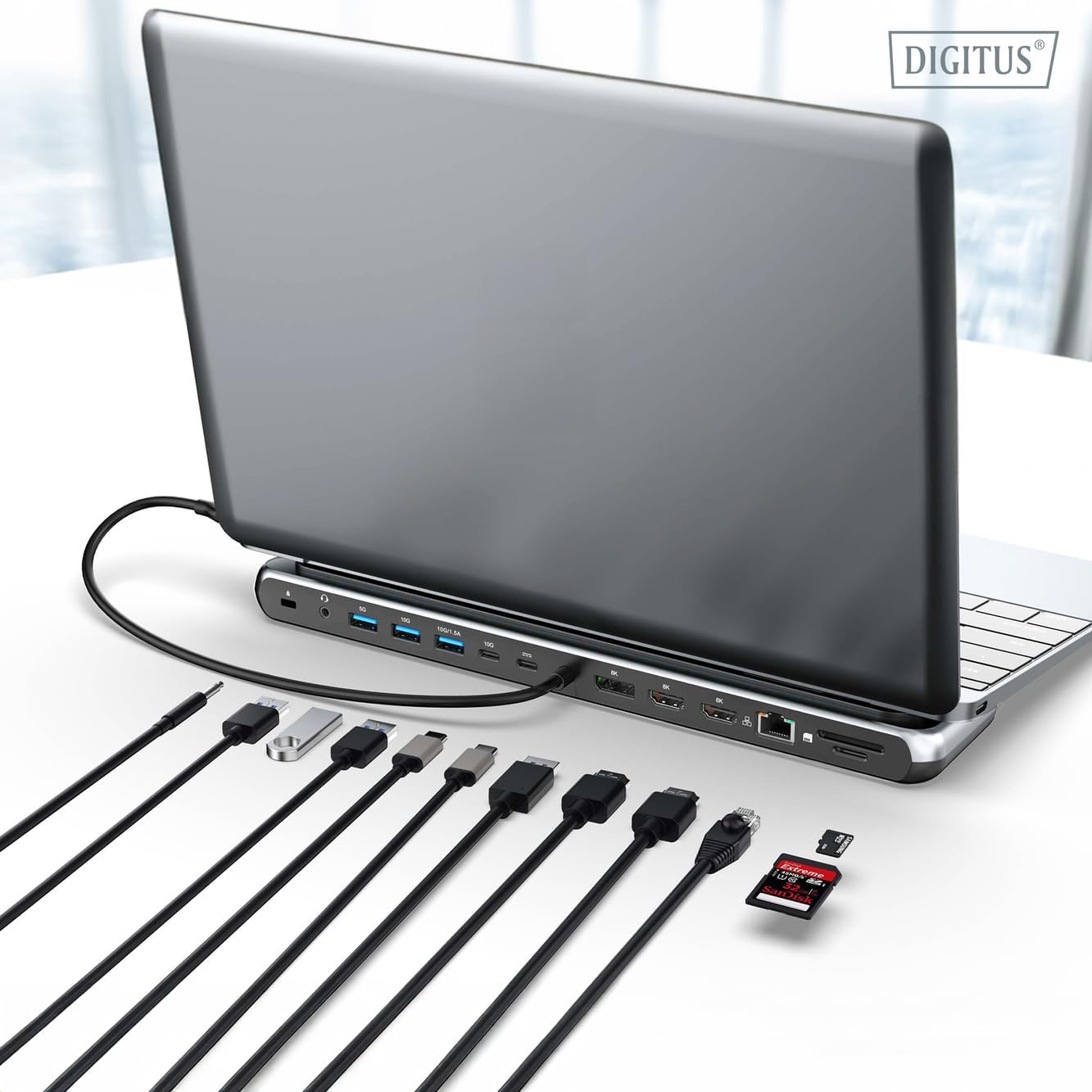
jimar 1: Detailed diagram of the Digitus DA-70919 docking station ports and their functions. This diagram labels each of the 12 ports on the docking station, including Audio Jack, USB-A, USB-C, USB-C PD, DisplayPort, HDMI, RJ45 Gigabit Ethernet, and SD/MicroSD card slots, along with anti-theft protection.

jimar 2: Pêşde view of the Digitus DA-70919 docking station showing all accessible ports. A clear view of the docking station's front panel, displaying the various input and output ports including USB-A, USB-C, HDMI, DisplayPort, Ethernet, and card readers.
Taybetmendiyên sereke:
- Derketina Vîdyoyê: 2x HDMI, 1x DisplayPort (DP) supporting up to 8K/30Hz for single display, or multi-display configurations.
- Portên Daneyên USB: 2x USB-A 3.2 Gen 2 (10Gbps), 1x USB-A 3.2 Gen 1 (5Gbps), 1x USB-C 3.2 Gen 2 (10Gbps).
- Radestkirina Hêzê (PD): USB-C PD 3.0 port for charging your host laptop (up to 85W output).
- Tor: Gigabit Ethernet (RJ45) for stable wired internet connection.
- Xwendevanên Kartê: SD and MicroSD card slots with 104 MBps transfer speed.
- Deng: 3.5mm audio jack for headphones or speakers.
Talîmatên Setup
Follow these steps to set up your Digitus DA-70919 docking station:
- Check Host USB-C Port Compatibility: Ensure your laptop's USB-C port supports DisplayPort Alternate Mode (DP Alt Mode) for video output and Power Delivery for charging. Without DP Alt Mode, video output will not function.

jimar 3: Guide to USB-C port compatibility for DisplayPort Alternate Mode. This graphic explains which types of USB-C ports on your laptop support the full functionality of the docking station, specifically highlighting the requirement for DisplayPort Alternate Mode (DP Alt Mode) for video output.
- Girêdana bi Amûra Mêvandar re: Connect the integrated USB-C cable from the docking station to the USB-C port on your laptop.
- Adaptora Hêzê Girêde Bike (Vebijarkî lê Tê Pêşniyarkirin): If you wish to charge your laptop via the docking station or power high-demand peripherals, connect a USB-C Power Delivery adapter (not included, up to 100W recommended) to the USB-C PD input port on the docking station.
- Dîmenderên Derveyî Girêdan Bike: Connect your monitors to the HDMI and/or DisplayPort outputs on the docking station using appropriate cables.
- Girêdana Peripheral: Plug in your USB devices (keyboard, mouse, external drives), Ethernet cable, SD/MicroSD cards, and audio devices to the corresponding ports on the docking station.
- Sazkirina ajokar: In most cases, the docking station is plug-and-play and does not require additional drivers. If prompted, allow your operating system to install any necessary drivers automatically.
Telîmatên Operating
Modes Display
Îstasyona dockingê cûrbecûr mîhengên nîşandanê piştgirî dike:
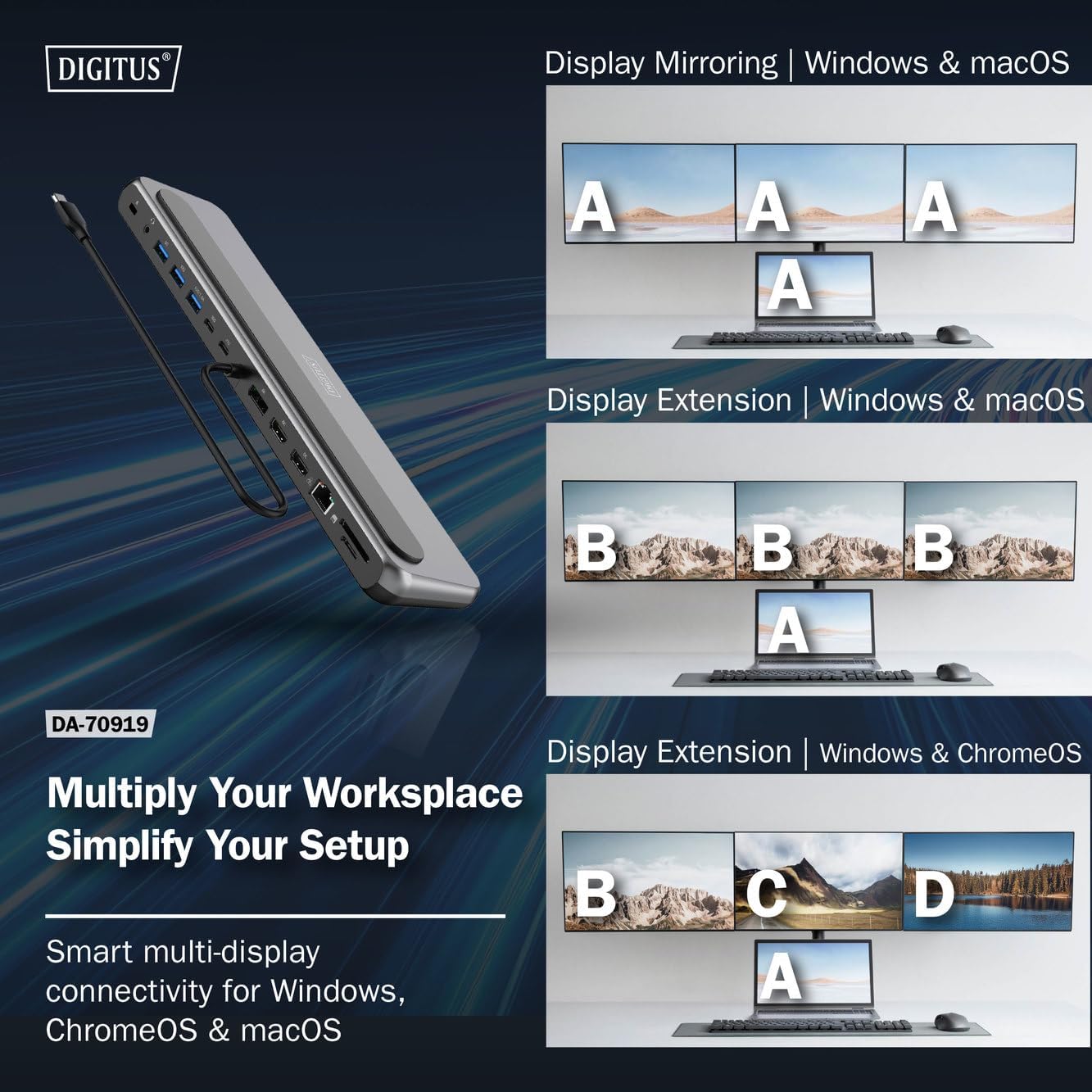
jimar 4: Diagram showing display mirroring and extension modes for Windows, macOS, and ChromeOS. This image illustrates the various display configurations supported by the docking station, including mirroring your screen or extending it across multiple external monitors on Windows, macOS, and ChromeOS.
- Moda Neynikê: Dîmendera laptopa we li ser ekranên derveyî kopî dike.
- Extend Mode (Windows/ChromeOS): Extends your desktop across multiple external monitors, allowing for a multi-tasking environment. Supports dual monitors (2x 4K/60Hz) and triple monitors (1x 4K/60Hz + 2x 4K/30Hz) in MST (Multi Stream Transport) mode.
- Extend Mode (macOS): macOS typically supports extended desktop to one external monitor, with other external monitors mirroring each other.
To configure display settings, access your operating system's display settings (e.g., Windows Display Settings, macOS System Preferences > Displays).
Veguheztina daneyan
Utilize the USB-A and USB-C data ports for connecting external storage devices, keyboards, mice, and other USB peripherals. The USB 3.2 Gen 2 ports offer speeds up to 10Gbps, while the USB 3.2 Gen 1 port offers speeds up to 5Gbps.
Delivery Power
When a compatible USB-C PD power adapter is connected to the docking station's PD input port, the docking station can deliver up to 85W of power to charge your connected laptop. This allows you to power your laptop and peripherals through a single USB-C connection.
jimar 5: Illustration of the docking station's fast charging capability via USB-C Power Delivery. This image demonstrates the Power Delivery function, showing a 100W input to the docking station and an 85W output to charge the connected laptop.
Têkiliya Torê
Connect an Ethernet cable to the RJ45 port for a stable and high-speed wired network connection (10/100/1000 Mbps Gigabit Ethernet).
Card Readers
Insert SD or MicroSD cards into the dedicated slots for quick access to photos, videos, and other files. The card readers support transfer speeds up to 104 MBps.
Output Audio
Connect your headphones or speakers to the 3.5mm audio jack for audio output.
Lênerrînî
- Paqijî: Use a soft, dry cloth to clean the surface of the docking station. Avoid using liquid cleaners or solvents.
- Embarkirinî: Docking station li cîhekî sar, hişk û dûr ji tîrêjên rojê yên rasterast û germahiyên zêde hilînin.
- Handling: Avoid dropping or subjecting the device to strong impacts. Do not attempt to disassemble the docking station.
Çareserkirina pirsgirêkan
If you encounter issues with your docking station, please refer to the following common solutions:
- Derana Nîşandanê Tune ye:
- Piştrast bike ku porta USB-C ya laptopê te Moda Alternatîf a DisplayPort piştgirî dike.
- Check all video cables (HDMI/DP) are securely connected to both the docking station and the monitor.
- Verify that the monitor is powered on and set to the correct input source.
- Ji bo çareserkirina pirsgirêkê, hewl bidin ku yek bi yek monitorekê ve girêdin.
- Ajokarên grafîkê yên laptopê xwe nûve bikin.
- Radestkirina enerjiyê bo laptopê tune ye:
- Ensure a compatible USB-C PD power adapter (up to 100W) is connected to the docking station's PD input port.
- Verify that your laptop's USB-C port supports Power Delivery.
- Adaptora hêzê û kabloya wê ji bo zirara wê kontrol bikin.
- Cîhazên USB yên Nayên Naskirin:
- Amûra USB-ê ji nû ve bi portek cûda li ser stasyona dockingê ve girêdin.
- Ensure the docking station is properly connected to the host laptop.
- If using a high-power USB device, ensure the docking station is connected to an external power adapter.
- Pirsgirêkên Girêdana Ethernetê:
- Girêdana kabloya Ethernetê hem bi stasyona dockingê û hem jî bi router/modema xwe ve kontrol bike.
- Mîhengên torê li ser laptopê xwe verast bikin.
- Modem/router û laptopê xwe ji nû ve bidin destpêkirin.
- Xwendevanê Kartê Nexebite:
- Ensure the SD/MicroSD card is inserted correctly and fully.
- Test the card with another device to confirm it is not damaged.
Specifications
| Taybetî | Specification |
|---|---|
| Cins | DA-70919 |
| Têkiliya Host | USB-C (integrated cable) |
| Derketina Vîdyoyê | 2x HDMI, 1x DisplayPort (DP) |
| Max. Single Display Resolution | 8K (7680x4320) @ 30Hz |
| Max. Dual Display Resolution (MST) | 2x 4K (3840x2160) @ 60Hz |
| Max. Triple Display Resolution (MST) | 1x 4K@60Hz + 2x 4K@30Hz |
| Portên Daneyên USB-A | 2x USB 3.2 Gen 2 (10Gbps), 1x USB 3.2 Gen 1 (5Gbps) |
| Porta Daneyên USB-C | 1x USB 3.2 Gen 2 (10Gbps) |
| Power Delivery (PD) Input | USB-C PD 3.0 (up to 100W) |
| Power Delivery (PD) Output to Host | Heta 85W |
| Ethernet | RJ45 Gigabit (10/100/1000 Mbps) |
| Card Readers | SD, MicroSD (104 MBps) |
| Audio | 1x 3.5mm Audio Jack |
| Compatibility | Windows, macOS, ChromeOS |
| Germahiya xebitandinê | 0°C heta 45°C (32°F heta 113°F) |
| Germahiya Storage | -10°C heta 70°C (14°F heta 158°F) |
Garantî û Piştgirî
The Digitus DA-70919 USB-C 8K 12-Port Docking Station comes with a Garantiya 2-salî ji roja kirînê ve. Ev garantî kêmasiyên çêkirinê vedihewîne û piştrast dike ku hilber di bin karanîna normal de wekî ku hatî vegotin dixebite.
For technical support, warranty claims, or further assistance, please contact your retailer or visit the official Digitus website for contact information. Please have your product model number (DA-70919) and proof of purchase ready when seeking support.