
1. Destpêk û Agahdariya Ewlekariyê
This manual provides detailed instructions for the safe installation, operation, and maintenance of your Parrot Uncle 52-inch Gold Smart Ceiling Fan with Lights and Remote. Please read all instructions carefully before beginning installation and retain this manual for future reference.
Rêbazên Ewlekariya Girîng:
- Ensure the power is disconnected at the circuit breaker before installation or servicing.
- Divê hemû têlkirin li gorî rêziknameyên elektrîkê yên neteweyî û herêmî bin. Heke hûn bi têlan nizanin, bi elektrîkçîyekî pispor re şêwir bikin.
- Divê avahiya montajê bikaribe giraniya fanê (bi qasî 15 lbs) hilgire.
- Di dema sazkirin, hevsengkirin, an paqijkirinê de girgirên kêran netewînin.
- Dema ku fan dixebite, destên xwe ji perrên fanosê dûr bigirin.
- This fan is suitable for indoor and covered outdoor use. Avoid direct water exposure.
2. Naveroka pakêtê
Piştrast bike ku hemû pêkhateyên ku li jêr hatine rêzkirin di pakêta te de ne. Ger perçeyek wenda be an jî zirar dîtibe, ji kerema xwe bi piştgiriya xerîdar re têkilî daynin.
- Meclîsa Xanî ya Motor
- Fan Blades (5 reversible blades: matte black & maple)
- LED Light Panel (integrated 24W)
- Remote Control
- Çîpên jêrîn (6 înç û 10 înç)
- Bracket
- Pakêta Amûrên Bikaranînê (vîd, şûşe, gwîzên têl)
- Manual Instruction

jimar 2.1: Fan components and dimensions. The fan features an anti-glare light cover and double-sided blades (matte black and maple finish).
3. Rêbernameya Sazkirinê
Ji bo sazkirina rast van gavan bişopînin. Pêşniyar tê kirin ku du kes ji bo sazkirinê hebin.
3.1 Pêş-Sazkirin
- Elektrîkê li şikandê qut bikin.
- Identify a suitable mounting location. The ceiling fan must be mounted to a ceiling joist or a fan-rated outlet box capable of supporting at least 35 lbs.
- Unpack all components and lay them out on a soft surface to prevent scratches.
3.2 Çêkirina Bracket
- Secure the mounting bracket to the ceiling outlet box using the screws provided with the outlet box. Ensure the bracket is firmly attached.
3.3 Assembling the Fan
- Attach the chosen downrod (6-inch or 10-inch) to the motor housing.
- Carefully hang the fan assembly from the mounting bracket.
- Connect the electrical wires according to the wiring diagram provided in the full instruction manual (Live, Neutral, Ground).
- Attach the fan blades to the motor housing using the provided screws. Ensure all screws are tightened securely.
- Connect the LED light panel to the fan's light kit wiring and secure it to the bottom of the motor housing.

jimar 3.1: The fan is designed for easy installation with modular assembly.
Fîlm 3.1: An official video demonstrating the features and installation process of the Parrot Uncle Gold Ceiling Fan Light. This video provides visual guidance for setting up your fan.
4. Telîmatên Operating
Your Parrot Uncle Smart Ceiling Fan can be controlled via the included remote control or a smartphone application.
4.1 Fonksiyonên Kontrola Dûr
The remote control allows for comprehensive management of your fan and light settings.
- Bişkojka Hêzê: Fan û ronahiyê vedike/digire.
- Kontrola Leza Fan: Di navbera 6 leza fanosê de eyar dike.
- Ronahî Ronahî / Vemirandin: Toggles the LED light.
- Rêzkirina Germahiya Rengê: Cycles through 3000K (Warm White), 4200K (Natural White), and 6500K (Cool White).
- Kontrola Dimming: Kêmkirina ronîkirinê ya bêgav ji %15 heta %100 geşiyê.
- Fonksiyona Timer: Sets the fan to turn off after 1 or 2 hours.
- Fonksiyona Berevajî: Asta zivirîna kêran ji bo havînê (herikîna hewayê ya ber bi jêr) an zivistanê (herikîna hewayê ya ber bi jor) diguherîne.
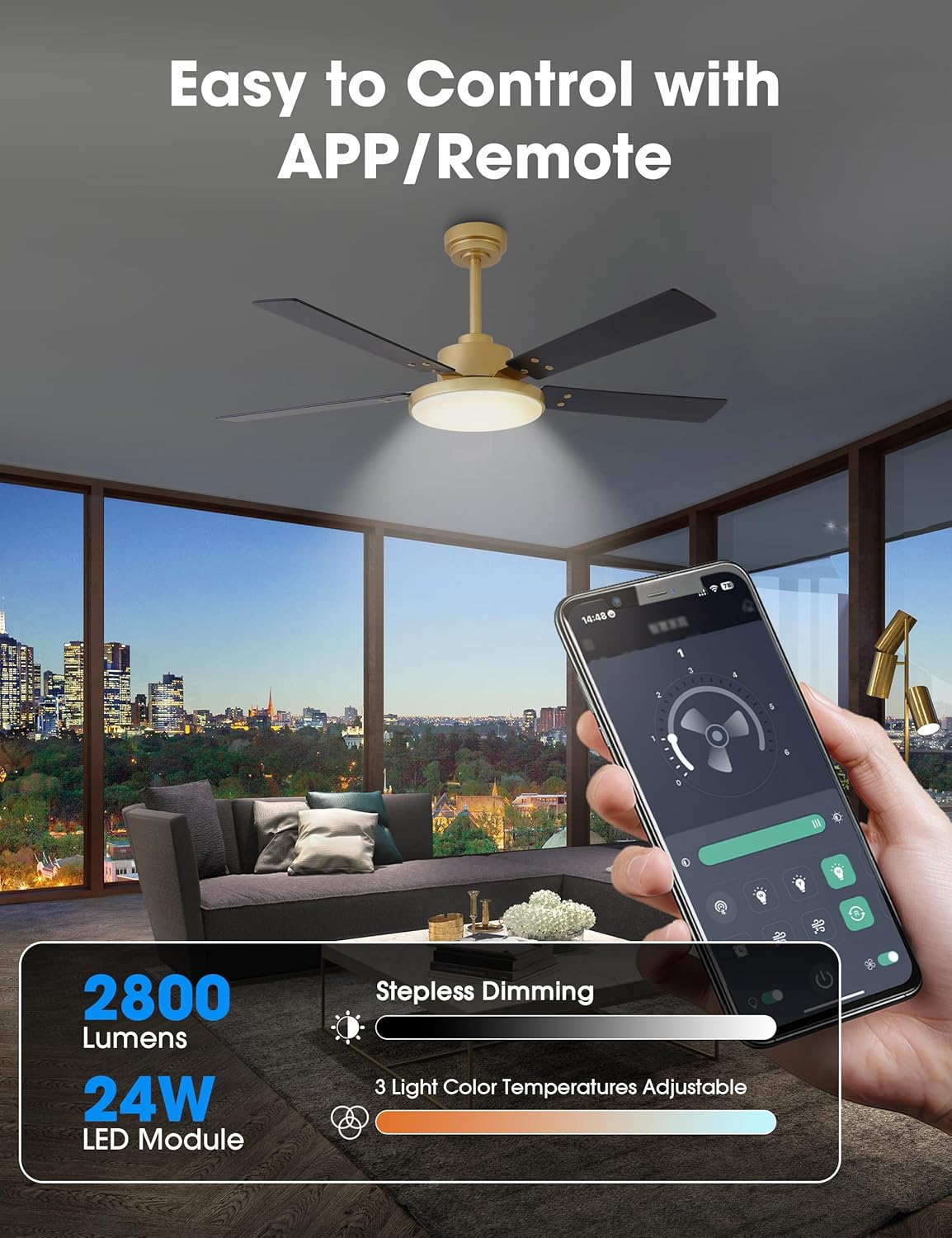
jimar 4.1: Control your fan and light settings via the remote or smartphone app, including stepless dimming and 3 color temperatures.

jimar 4.2: The reversible DC motor allows for seasonal air circulation: downward airflow for cooling in summer and upward airflow for heat distribution in winter.
4.2 Kontrola Serlêdana Smartphone
Download the dedicated smartphone application (refer to the full manual for app name and QR code) to access additional smart features:
- All remote control functions.
- Scheduling and automation.
- Built-in memory function to recall last settings.
5. Maintenance
Parastina birêkûpêk performansa çêtirîn û temendirêjiya fanosa banê we garantî dike.
5.1 Paqijkirin
- Always turn off the power at the circuit breaker before cleaning.
- Nermek bikar bînin, damp Ji bo paqijkirina perrên fanosê û xaneya motorê qumaşê bikar bînin. Paqijker an çareserkerên aşınker bikar neynin.
- Periodically check for dust accumulation on the blades and light cover to maintain airflow and light output.
5.2 Lênêrîna Giştî
- Hemû girêdan û pêçan bi periyodîk kontrol bikin da ku ew hişk bimînin.
- Motora DC ji bo xebitandina demdirêj û bêdeng hatiye sêwirandin û bi gelemperî hewceyê rûnkirinê nake.
6. Destpêkirin
Heke hûn bi fanosa xwe re pirsgirêkan bibînin, li pirsgirêk û çareseriyên hevpar ên jêrîn binêrin:
| Pirsegirêk | Sedema gengaz | Çare |
|---|---|---|
| Fan dest pê nake | Ne dabînkirina hêzê Girêdanên têl ên bêbandor Pîlê kontrola dûr kêm | Bişkojka çerxê kontrol bikin Piştrast bikin ku hemî girêdanên têlan ewle ne Pîlê kontrolê ji dûr ve biguherînin |
| Ronahî naxebite | Girêdanên têl ên bêbandor Pirsgirêka panelê LED | Kabloyên kîteya ronahiyê kontrol bikin Contact customer support if LED panel is faulty |
| Fan dihejîne | Pêçên kêrê yên sist Pêlên bêhevseng Kûçika lêdanê ya bêhêz | Hemî pêlên tîrêjê hişk bikin Use balancing kit (not included) if necessary Piştrast bike ku braketa montajê bi ewlehî hatiye girêdan |
| Dûr bersiv nade | Battery low/dead Dûr nayê hev kirin | Pîl biguherînin Refer to full manual for remote pairing instructions |
If the problem persists after attempting these solutions, please contact Parrot Uncle customer support.
7. Specifications Product
- Nîşan: Apê Parrot
- Hejmara Model: VZA01A117GD
- Mezinayî: 52 Inch
- Reng: Gold-A117
- Mal: Iron (housing), Acrylic (shade), MDF (blades)
- Tîpa motorê: DC Motor, Reversible
- Wattage: 35 watts (fan)
- Herikîna hewayê: Heta 4896 CFM
- Çavkaniya Ronahî: Integrated 24W LED Module
- Ronahî: 2800 Lumen (Max)
- Germahiya Rengê: 3000K / 4200K / 6500K (Guherbar)
- Dimming: Stepless (15% - 100%)
- Rêbaza Kontrolê: Remote Control, Smartphone APP
- Voltage: 120 Volt
- Bikaranîna hundur / Derveyî: Indoor, Covered Outdoor
- Giraniya Babetê: 15 Pound
- Sertîfîka: ETL Certified

jimar 7.1: The fan features high efficiency and low energy consumption, providing up to 4896 CFM air volume.

jimar 7.2: The 35W pure copper DC motor ensures high performance and energy efficiency with 6 wind speeds.

jimar 7.3: Enjoy ultra-quiet operation, ensuring a comfortable rest with noise levels as low as 35dB.
8. Garantî û Piştgirî
Parrot Uncle stands behind the quality of its products.
8.1 Garantiya Hilberîner
Ev hilber ji hêla a Garantiya çêker a 3 salî. Ev garantî di bin karanîna normal de kêmasiyên materyal û xebatê vedigire.
8.2 Piştgiriya Mişterî
For any questions, assistance, or warranty claims, please contact Parrot Uncle customer support. Our team is available 24/7 to provide the best service.
If your ceiling fan arrives damaged or does not meet your expectations, please reach out to us immediately.