
1. Destpêk
This manual provides detailed instructions for the Loutoc SRC4526 Universal Remote Control, designed for seamless compatibility with Philips Ambilight Smart TVs. Please read this guide thoroughly to ensure optimal use and longevity of your remote control.
1.1 Product Overview
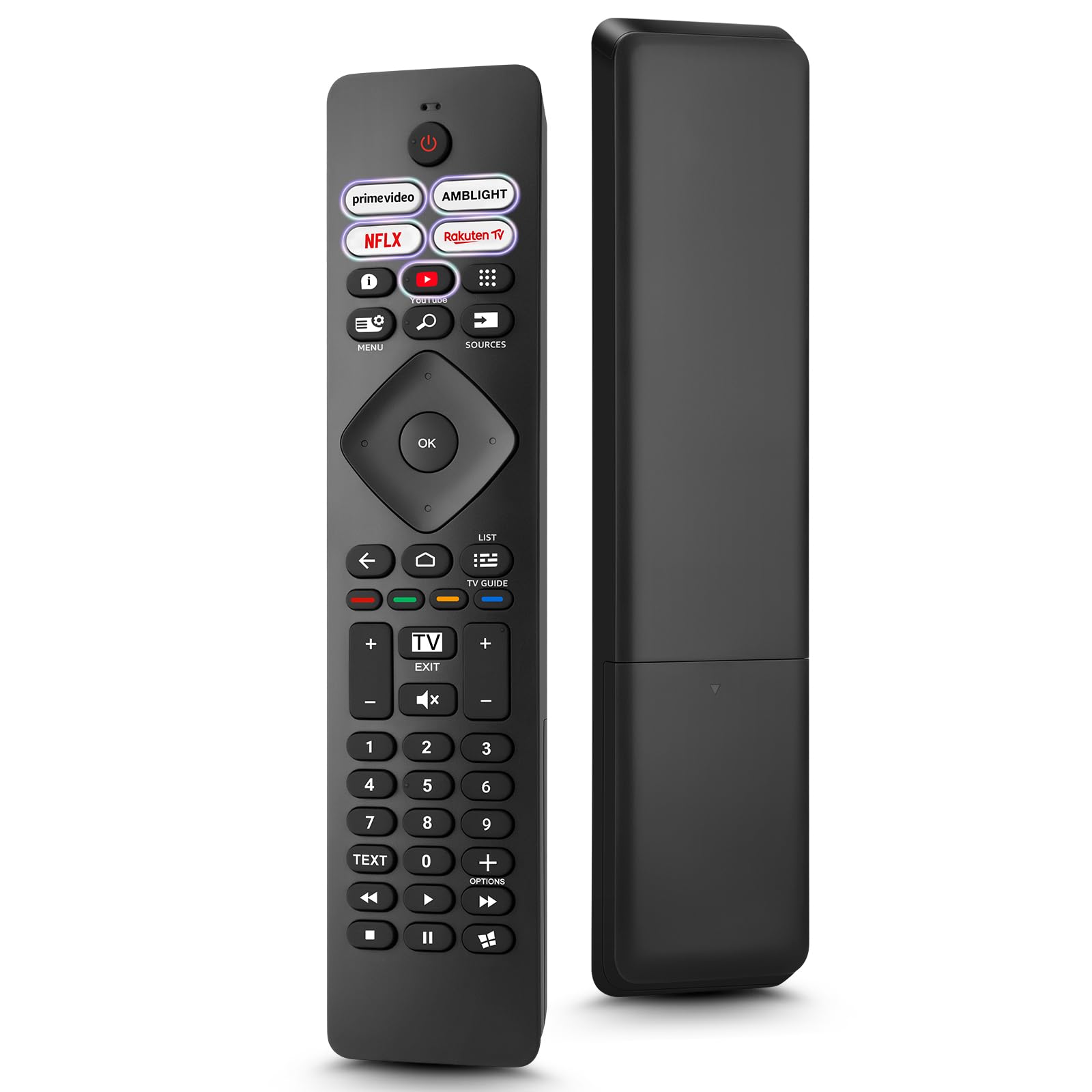
Image: The Loutoc SRC4526 Universal Remote Control, showcasing sêwirana wê ya ergonomîk û sêwirana bişkokan.
1.2 Taybetmendiyên sereke
- Convenient Plug-and-Play: No complex setup or programming required. Simply insert batteries and the remote is ready for use.
- Wide TV Compatibility: Fully compatible with Philips Ambilight TVs, including 4K Ambilight LED, OLED, FHD, and Full Ultra HD models.
- Dedicated Shortcut Buttons: Features 5 direct access buttons for popular streaming platforms: Ambilight, Video, NFLX (Netflix), Rakuten TV, and YouTube.
- Performansa pêbawer: Offers an effective operating range of 8 meters (26 feet) and an ultra-fast response time of 0.2 seconds.
2. Sazkirin
2.1 Sazkirina Pîl
The Loutoc SRC4526 remote control requires two AAA batteries (not included) for operation.
- Cihê beşa pîlê li ser pişta kontrolê ji dûr ve.
- Slide qapaxa beşa pîlê vekin.
- Du pîlên AAA têxin hundir, piştrast bikin ku termînalên erênî (+) û neyînî (-) bi nîşanderên di hundurê beşê de bi rêkûpêk li hev tên.
- Qapaxa beşa pîlê bi ewlehî bigire.
2.2 Bikaranîna Destpêk
This remote control is designed for immediate use with compatible Philips Ambilight TVs. No programming or pairing is required. Once batteries are installed, point the remote at your TV and begin operation.
3. Telîmatên Operating
3.1 Fonksiyonên Bişkokan li Serview
Refer to the image below for a visual guide to the remote control's buttons and their corresponding functions.

Image: Detailed diagram of the Loutoc SRC4526 remote control, illustrating each button and its primary function.
| Pişkov | Karkirin |
|---|---|
| Erk | Switches the TV on or off (Standby mode). |
| Prime Video, Ambilight, Netflix, Rakuten TV | Quickly launches the corresponding application. |
| Qerta xûrekê | Opens the Quick Menu with typical TV functions. Hold to show Gaming control bar. |
| Gerr | Opens the Search tab on the Home screen. |
| Çavkanî | Opens or closes the TV's input sources menu. |
| OK | Confirms a selection or setting. |
| Arrow/Navigation Keys | Navigates up, down, left, or right through menus and options. |
| Paş | Vedigere ekran an kanala berê. |
| Xane | Opens the TV's Home menu. |
| Rêber TV | Opens or closes the TV Guide. Long press to open the channel list. |
| Color Keys (Red, Green, Yellow, Blue) | Provides direct selection of on-screen options. The blue key typically opens Help. |
| Volume (+/-) | Asta dengê TV-yê eyar dike. |
| Channel (+/-) | Switches to the next or previous channel. |
| Derî | Exits current menu/application or returns to live TV. From standby, goes to last viewçavkaniya ed. |
| Bêdeng | Dengê TV-yê bêdeng dike an jî vedike. |
| Bişkojên Hejmarê (0-9) | Directly selects TV channels. |
| NIVÎSTOK | Opens or closes Text/Teletext. |
| Kontrolên Playback | Controls media playback: Play, Pause, Stop, Rewind, Fast Forward. |
| Apps | Opens the Apps tab on the Home screen. |
3.2 Ambilight Functionality
For Philips TVs equipped with Ambilight functionality, the dedicated Ambilight button on your remote allows you to control the lighting effects.
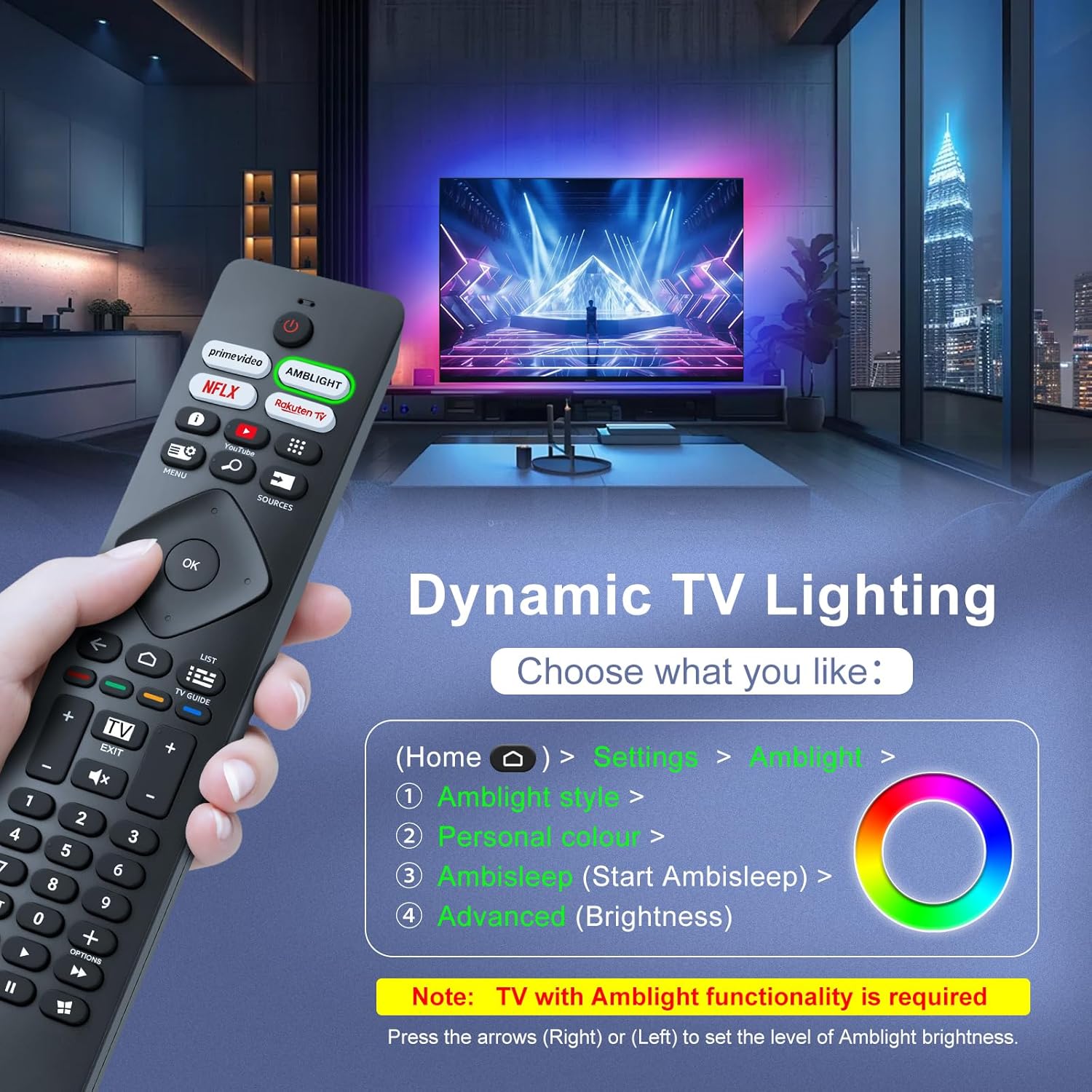
Image: A hand holding the remote control, with an overlay showing Ambilight settings on a TV screen.
After pressing the Ambilight button, you can navigate through the TV's menu to:
- Select different Ambilight display styles.
- Adjust personal color preferences.
- Initiate AmbiSleep mode.
- Adjust Ambilight brightness levels (using the right or left arrow keys).
Note: This feature requires a Philips TV with built-in Ambilight functionality.
4. Maintenance
4.1 Paqijkirin
To clean your remote control, gently wipe it with a soft, dry cloth. Avoid using liquid cleaners, aerosols, or harsh chemicals, as these can damage the remote's surface or internal components.
4.2 Storage
Kontrola dûr li cîhekî sar, hişk û dûr ji tîrêjên rojê û germahiyên zêde hilînin. Ger kontrol dê demek dirêj neyê bikar anîn, ji bo rêgirtina li rijandinê tê pêşniyar kirin ku pîlan werin derxistin.
4.3 Lênêrîna Pîl
- Hemî bataryayê di heman demê de biguherînin; bataryayên kevin û nû tevlihev nekin.
- Do not mix different types of batteries (e.g., alkaline and rechargeable).
- Pîlên bikar anîne bi berpirsiyarî li gorî rêzikên herêmî bavêjin.
5. Destpêkirin
5.1 Pirsgirêkên Hevbeş û Çareserî
- Dûr bersiv nade:
- Kontrol bike ka batarya bi awayekî rast û bi polarîteya rast hatine danîn an na.
- Pîlan bi pîlên nû yên AAA biguherînin.
- Piştrast bike ku di navbera kontrola dûr û wergirê înfrared ê TV-yê de ti astengî tune ye.
- Piştrast be ku tu di nav rêza xebitandinê ya bi bandor de yî (heta 8 metreyan).
- Bişkokên taybet nexebitin:
- Clean the remote control, especially around the non-functioning buttons, to remove any dirt or debris.
- If only Ambilight functions are not working, ensure your Philips TV model supports Ambilight.
5.2 Bi Piştgiriyê re Têkilî Daynin
If you encounter persistent issues that cannot be resolved with the troubleshooting steps above, please contact Loutoc customer support directly. We aim to respond to all inquiries within 12 working hours.
6. Specifications
| Taybetî | Hûrî |
|---|---|
| Nîşan | Loutoc |
| Navê Model | SRC4526-FBA |
| Hejmara Modela Babetê | SRC4526 |
| Reng | Reş |
| Teknolojiya Girêdanê | Infrared |
| Taybetmendiyên Taybet | No programming required, Ergonomic, Lightweight |
| Amûrên Lihevhatî | Television (Philips Ambilight TVs) |
| Hejmara Herî Zêde ya Amûrên Piştgirîkirî | 1 |
| Type Controller | Button Control |
| Rêzeya herî zêde | 8 Metre (26 Feet) |
| Danasîna Pîl | AAA (2 pêwîst in, ne tê de ne) |
| Çêker | Loutoc |
| Welatê Origin | çîn |
| Dîroka Yekem Li ser Amazon.com.be Peyda dibe | 31 Tebax 2025 |
7. Garantî û Piştgirî
7.1 Agahî Garantî
This Loutoc remote control comes with a manufacturer's warranty of 30 days from the date of purchase. Please retain your proof of purchase for any warranty claims.
7.2 Piştgiriya Mişterî
For any questions, technical assistance, or warranty inquiries, please contact Loutoc customer support. We are committed to providing timely assistance and will respond to your queries within 12 working hours.