
1. Destpêk
Thank you for choosing the STF G Track Ultra Portable Speaker. This manual provides essential information for the safe and efficient operation of your device. Please read it thoroughly before use and retain it for future reference. This portable speaker features a 4-inch driver, 20W output, RGB LED lighting, True Wireless Stereo (TWS) functionality, Bluetooth 5 connectivity, and multiple playback options including USB, Micro SD, Aux, FM radio, and microphone input.
2. Naveroka pakêtê
Piştrast bike ku hemî tişt di pakêtê de hene:
- STF G Track Ultra Portable Speaker
- Kabloya gingarjkirina USB Type-C
- Auxiliary 3.5mm Audio Cable
- Manual Bikarhêner
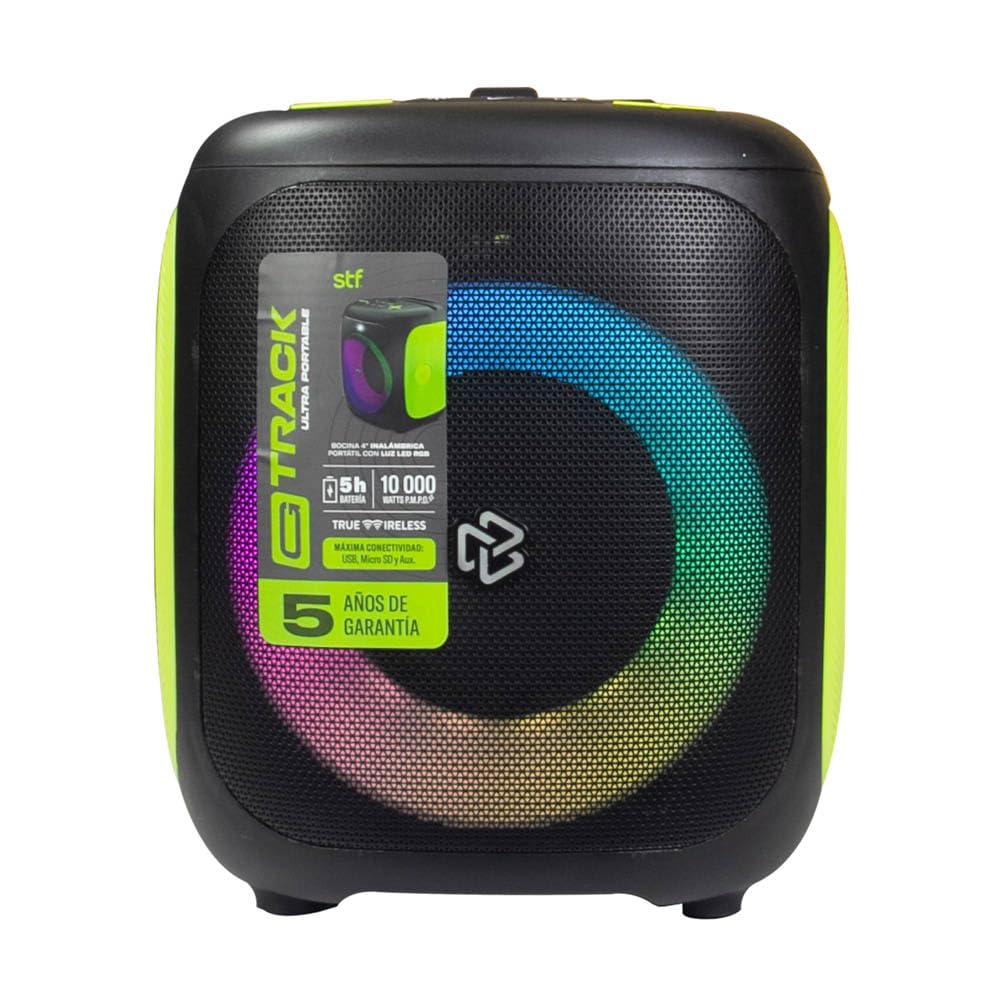
Image 2.1: STF G Track Ultra Portable Speaker with its charging cable, auxiliary cable, and user manual.
3. Hilbera Serîview
3.1 Panela Kontrolê
The control panel is located on the top of the speaker and provides access to all primary functions.

Image 3.1: Top control panel with buttons for mode, menu, power, volume, LED, play/pause, and EQ.
- Bişkojka M (Mode): Switches between Bluetooth, USB, Micro SD, Aux, and FM radio modes.
- Bişkoka MENU: Accesses additional settings or functions depending on the mode.
- Bişkoka Hêzê (⑁): Press and hold to power on/off. Short press to play/pause in music modes.
- Volume Down (-) / Previous Track: Ji bo strana berê bi kurtî bikirtînin, ji bo kêmkirina deng bi dirêjî bikirtînin.
- Volume Up (+) / Next Track: Ji bo strana din bi kurtî bikirtînin, ji bo zêdekirina deng bi pêleke dirêj bikirtînin.
- LED Button (☀): Bandorên ronahîkirina RGB kontrol dike.
- Play/Pause Button (▶): Lêxistina deng dilîze an jî radiwestîne.
- EQ Button (EQ 1.2.3): Mîhengên pêşwext ên ekvalîzatorê diguhere.
3.2 Port û Girêdan
The connection ports are typically located on the rear or side of the speaker.

Wêne 3.2: Paş view of the speaker, highlighting the bass port and potential charging/input ports (not visible in this specific image, but typically located near the bottom or side).
- Porta USB: Ji bo lîstina bi ajokera flash USB.
- Slota Qerta Micro SD: Ji bo lîstina bi karta Micro SD.
- Têketina AUX (3.5mm): For connecting external audio devices via an auxiliary cable.
- Ketina mîkrofonê: Ji bo girêdana mîkrofonek bi têl.
- Porta barkirinê ya USB Type-C: Ji bo şarjkirina bataryaya navxweyî ya axaftvanê.
4. Sazkirin
4.1 Barkirina Axêverê
- Kabloya USB Type-C ya ku hatiye dayîn bi porta şarjê ya axaftvanê ve girêdin.
- Connect the other end of the USB cable to a compatible USB power adapter (5V/1A recommended, not included) or a computer's USB port.
- Çira nîşana şarjê dê di dema şarjê de vêkeve, bi gelemperî sor.
- Once fully charged, the indicator light will change color or turn off (refer to specific product LED behavior). A full charge provides approximately 5 hours of playback.
4.2 Power On / Off
- To power on, press and hold the Power button (⑁) for approximately 2-3 seconds until you hear an audible prompt or see the LED lights activate.
- To power off, press and hold the Power button (⑁) again for approximately 2-3 seconds.
4.3 Pairkirina Bluetooth
- Ensure the speaker is powered on and in Bluetooth mode. If not, press the 'M' (Mode) button until you hear the Bluetooth prompt. The LED indicator will typically flash, indicating it's in pairing mode.
- Li ser cîhaza xwe ya mobîl (smartphone, tablet, komputer), Bluetooth-ê çalak bike û li cîhazên berdest bigere.
- Select "STF G Track" from the list of found devices.
- Once paired, you will hear a confirmation sound, and the LED indicator will stop flashing and remain solid.
- Ger Bluetooth-a cîhazê çalak be û di nav rêzê de be, axaftvan dê dema ku were vekirin bixweber bi cîhaza dawî ya girêdayî ve ji nû ve were girêdan.
4.4 Hevberdana Stereo ya Bêtêl a Rastîn (TWS)
TWS allows you to connect two STF G Track speakers for a stereo sound experience.
- Ensure both STF G Track speakers are powered on and in Bluetooth mode, but not yet connected to any device.
- On one of the speakers (this will be the primary speaker), press and hold the 'M' (Mode) button for approximately 3-5 seconds. You should hear a pairing tone.
- Herdu axaftvan dê bixweber li hev bigerin û bi hev ve girêbidin. Dema ku girêdan pêk hat, hûn ê dengek pejirandinê bibihîzin.
- Now, on your mobile device, search for Bluetooth devices and connect to the primary speaker (e.g., "STF G Track"). Both speakers will now play audio in stereo.
5. Telîmatên Operating
5.1 Music Playback (USB, Micro SD, Aux)
- USB/Micro SD: Ajokerek flash USB an qerta Micro SD (bi dengê piştgirîkirî) têxin files) into the corresponding port. The speaker will automatically switch to USB/Micro SD mode and begin playback. Use the Play/Pause, Next, and Previous buttons to control playback.
- Ketina Alîkar: Connect an external audio device (e.g., MP3 player, smartphone) to the speaker's 3.5mm AUX input using the provided auxiliary cable. Press the 'M' (Mode) button until you select AUX mode. Control playback from your connected device.
5.2 Radyoya FM
- Press the 'M' (Mode) button repeatedly until you select FM radio mode.
- To automatically scan and save available stations, press and hold the Play/Pause button (▶). The speaker will scan and store stations.
- Use the Next (+) and Previous (-) buttons to navigate between saved FM stations.
5.3 Bikaranîna Mîkrofonê
- Connect a wired microphone (not included) to the microphone input port on the speaker.
- Adjust the microphone volume using the speaker's volume controls or any dedicated microphone volume knob if available.
5.4 Kontrola Ronahiya LED
- Press the LED button (☀) to cycle through different RGB lighting modes or to turn the lights off.
5.5 Wekhevker (EQ)
- Press the EQ button (EQ 1.2.3) to switch between available equalizer presets (e.g., Pop, Rock, Jazz, Classic, Flat) to optimize the sound for different music genres.
6. Maintenance
- Paqijî: Ji bo paqijkirina derveyê axaftvanê qumaşek nerm û hişk bikar bînin. Paqijkerên aşınker, mûm, an çareserkeran bikar neynin.
- Embarkirinî: Axêverê li cîhekî sar û hişk, dûr ji tîrêjên rojê yên rasterast û germahiyên zêde hilînin.
- Lênêrîna Pîl: Ji bo dirêjkirina temenê bateriyê, ji valakirina pir caran a bateriyê dûr bisekinin. Axêverê bi rêkûpêk şarj bikin, her çend ji bo demek dirêj neyê bikar anîn jî.
- Berxwedana avê: Ev axaftvan ne li hember avê ye. Ji ber ku ew li ber avê an jî şilbûna zêde nesekinin, dûr bisekinin.
7. Destpêkirin
| Pirsegirêk | Sedema gengaz | Çare |
|---|---|---|
| Axaftvan vênanake. | Pîlê kêm. | Axêverê bi karanîna kabloya USB Type-C ya ku tê peyda kirin şarj bikin. |
| Deng tune. | Volume too low; incorrect mode selected; device not connected. | Increase volume; press 'M' to select correct input mode; ensure Bluetooth device is paired or AUX cable is fully inserted. |
| Hevberdana Bluetooth têk diçe. | Axaftvan ne di moda cotkirinê de ye; cîhaz pir dûr e; destwerdan. | Ensure speaker is in Bluetooth pairing mode (flashing LED); move device closer to speaker; turn off other Bluetooth devices. |
| Hevberdana TWS têk diçe. | Speakers already connected to a device; incorrect pairing procedure. | Disconnect both speakers from any Bluetooth devices. Follow TWS pairing steps carefully. |
| Wergirtina radyoya FM xirab e. | Sînyala qels; destwerdana jîngehê. | Axêverê veguhezînin deverek bi wergirtina çêtir. |
8. Specifications
| Navê Model | ST-S49667 |
| Type Speaker | Cîtêgûherr |
| Mezinahiya Speaker | 4 Inches |
| Maximum Output Power | 20 Watt |
| Bersiva Frequency | 100Hz - 20kHz |
| Asta Zexta Deng (SPL) | 95 DBSPL |
| Guhertoya Bluetooth | Bluetooth 5 |
| Rêzeya bêhêl | Heta 10 metre (33 ling) |
| Kapasîteya Pîl | 3000 mAh |
| Average Battery Life | Heta 5 saetan (bi dengekî navîn) |
| Charging Port | USB Type-C |
| Vebijêrkên Girêdanê | Bluetooth, USB, Micro SD, Aux 3.5mm, FM Radio, Microphone Input |
| Rêbaza Kontrolê | Tactile Buttons |
| Taybetmendiyên Taybet | RGB LED Lighting, True Wireless Stereo (TWS) |
9. Garantî û Piştgirî
This product comes with a standard warranty. Please refer to the warranty card included in your package for detailed terms and conditions. For technical support, troubleshooting assistance, or warranty claims, please contact STF customer service through their official website or the contact information provided on your warranty documentation.
Cureyê Garantî: Rêzan
10. Vîdyoya Berhemê Li Serview
Video 10.1: An official product video providing a general overview of the STF G Track Ultra Portable Speaker's features and design.