
VVV-Group AM-288
Digital Hot Wire Anemometer AM-288 User Manual
Model: AM-288 | Brand: VVV-Group
1. Destpêk
The VVV-Group AM-288 Digital Hot Wire Anemometer is a precision instrument designed for accurate measurement of wind speed, airflow (CFM/CMM), and air temperature. Utilizing advanced hot wire sensor technology, it provides rapid and reliable data, making it an essential tool for HVAC professionals, industrial applications, ventilation system analysis, and environmental monitoring.

Image: The VVV-Group AM-288 Digital Hot Wire Anemometer, showing the main unit and the flexible, extendable hot wire probe.
Its intuitive design, backlit LCD, and versatile measurement units ensure ease of use and readability in various environments. The telescopic probe allows for measurements in hard-to-reach areas, providing comprehensive data for system optimization and diagnostics.
2. Taybetmendiyên sereke
- Accurate Wind Speed Measurement: Measures wind speed from 0.0 to 30 m/s (0.0-108 km/h, 0.0-67 mph) with high precision.
- CFM/CMM Airflow Calculation: Easily switch between Cubic Feet per Minute (CFM) and Cubic Meters per Minute (CMM) for air volume measurement.
- Wide Temperature Measurement Range: Built-in sensor measures air temperature from 0°C to 45°C (32°F to 113°F).
- Intuitive LCD with Backlight: Bright display provides real-time readings and ensures visibility in low-light conditions.
- Multiple Wind Speed Units: Supports m/s, km/h, ft/min, knots, and mph for adaptable use.
- Advanced Hot Wire Sensor Technology: Ensures rapid response to air velocity changes for precise airflow measurement.
- Max/Min & Data Hold Functions: Stores maximum and minimum readings and allows for data hold for easy reference.
- Girêdana PC: Connects via USB for data export and detailed airflow analysis with included software.
- Sivik & Portable: Compact and ergonomic design for easy handling and field inspections.
- Bendable Telescopic Probe: Extends up to 2 meters, suitable for hard-to-reach areas.

Image: The AM-288 anemometer highlighting its core functions: wind speed measurement, air temperature monitoring, and air volume calculation.
3. Sazkirin
3.1 Vekirin û Teftîşkirin
Carefully unpack the AM-288 Anemometer and all its components. Verify that all items listed below are present and undamaged. If any items are missing or damaged, please contact VVV-Group customer support immediately.
- AM-288 Hot Wire Anemometer Main Unit
- Telescopic Hot Wire Probe
- USB Computer Cable
- Destûra Rêvekirinê (ev belge)
- PP Box (Carrying Case)
- 2 x Pîlên AAA (berî sazkirinê an jî cuda hatine zêdekirin)

Image: All components included in the AM-288 Anemometer package, neatly arranged in its protective carrying case.
3.2 Sazkirina Pîl
The AM-288 Anemometer requires 2 AAA batteries. These are typically included. To install or replace batteries:
- Cihê beşa pîlê li ser pişta yekîneya sereke bibînin.
- Open the battery cover by sliding it down or unscrewing it, depending on the model.
- 2 pîlên AAA têxin hundir, û wekî ku di hundirê beşê de hatiye nîşandan, piştrast bikin ku polarîteya wan rast e (+ û -).
- Qapaxa pîlê bi ewlehî bigire.
3.3 Têkiliya Probe
Connect the telescopic hot wire probe to the main unit:
- Align the connector of the probe cable with the port on the top of the main unit.
- Girêdanê bi nermî bixin nav portê heta ku ew li cîhê xwe bicîh bibe, da ku girêdanek ewle peyda bike.
- To disconnect, grasp the connector firmly and pull it straight out. Do not pull on the cable itself.

Wêne: Berfireh view of the AM-288's high-sensitive hot wire probe, illustrating its flexible and extendable nature for reaching confined spaces.
4. Telîmatên Operating
4.1 Power On / Off
- Ji bo hêzkirina amûrê, pêl pê bikin ERK button (usually red, centrally located).
- Ji bo qewitandinê, pêlê bigire û bigire ERK bişkojka heta ku dîmen jê bibe.
4.2 Nîşandana Serview
The large LCD provides clear readings. It features a backlight for visibility in dark environments.
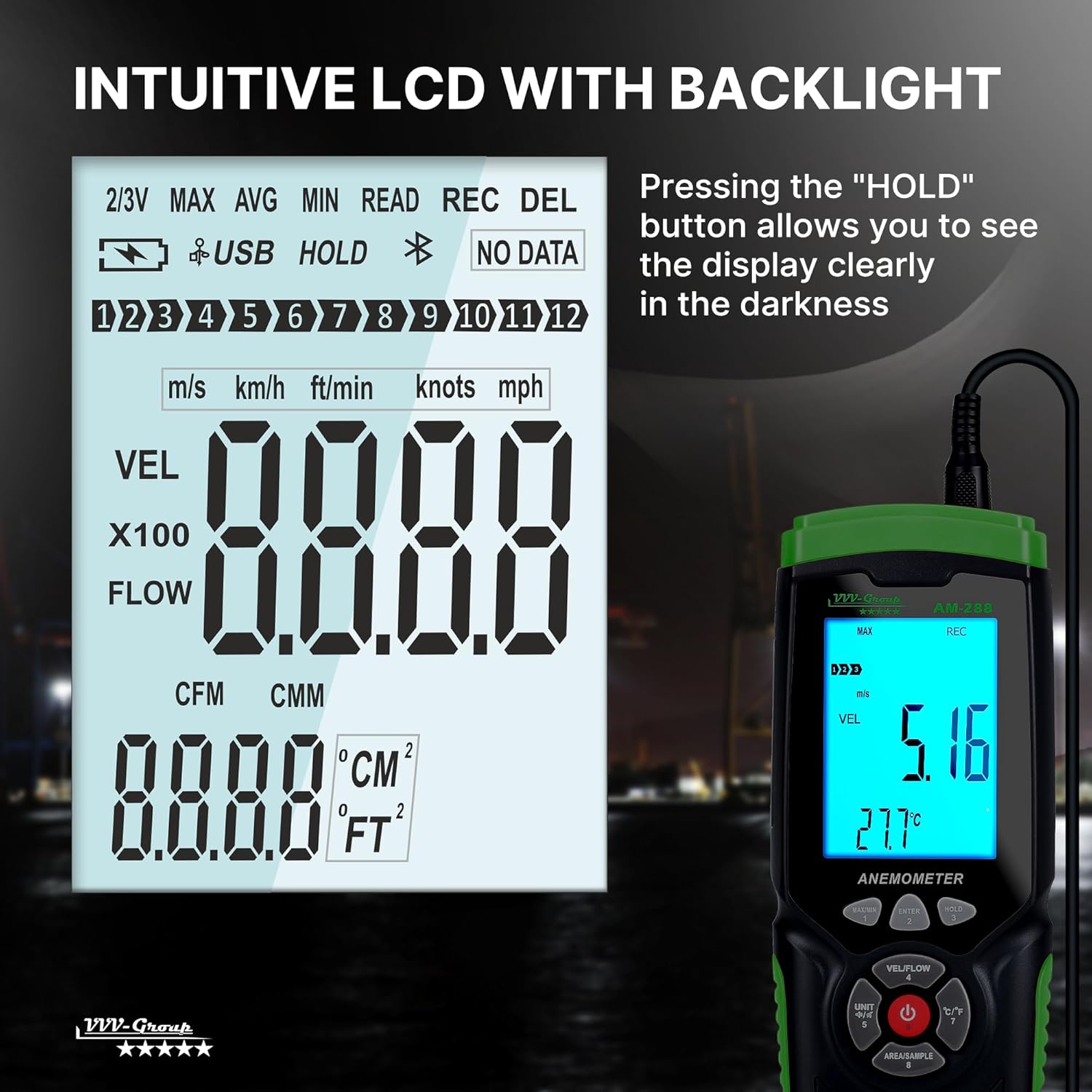
Image: The backlit LCD screen of the AM-288, displaying wind speed, temperature, and various unit indicators for clear readability.
- ZÛBÛNÎ: Displays wind velocity.
- HERRIKÎN: Displays airflow volume (CFM/CMM).
- Germî: Displays air temperature in °C or °F.
- Nîşan: MAX, MIN, REC (Record), HOLD, USB, Battery level.
4.3 Hilbijartina Yekîneyê
To change the wind speed units (m/s, km/h, ft/min, knots, mph):
- Bitikîne YEKBÛN button to cycle through the available wind speed units.
To change the temperature units (°C or °F):
- Bitikîne ° C / ° F button to toggle between Celsius and Fahrenheit.

Image: The AM-288's display indicating support for various wind speed units (m/s, km/h, ft/min, knots, mph) and the ability to switch between CFM and CMM for airflow calculation.
4.4 CFM/CMM Airflow Calculation
To measure air volume:
- Bitikîne VEL/FOW button to switch to airflow measurement mode.
- Bitikîne AREA/SAMPLE button to set the area of the duct or vent. Refer to the on-screen prompts or manual for entering dimensions.
- The display will show the airflow in CFM or CMM based on your unit selection.
4.5 Max/Min & Data Hold Functions
- MAX/MIN: Bitikîne MAX/MIN button to view the maximum or minimum recorded values during a measurement session. Press again to cycle.
- RAWESTAN: Bitikîne RAWESTAN button to freeze the current reading on the display. Press again to release. This is useful for taking readings in difficult-to-view cihên.
4.6 PC Connection and Data Export
The AM-288 can connect to a computer via USB for data logging and analysis.
- Install the provided software on your Windows 7/XP/10 computer.
- Connect the main unit to your computer using the supplied USB cable.
- Launch the software to access real-time data, export readings, and generate reports. The device can store up to 960 data sets.

Image: The AM-288 anemometer connected to a laptop, demonstrating its PC connectivity for data export and detailed airflow analysis using dedicated software.
5. Maintenance
5.1 Paqijkirin
- Wipe the main unit and probe with a soft, dry cloth.
- Paqijkerên aşınker, çareserkeran bikar neynin, an jî cîhazê nexin nav avê.
- Keep the hot wire sensor on the probe clean and free from dust or debris to ensure accurate readings.
5.2 Storage
- When not in use, store the anemometer and probe in its protective PP box.
- Li cîhek sar û zuwa, ji tîrêja tavê ya rasterast û germahiya zêde dûr hilînin.
- Ger amûr dê ji bo demek dirêj neyê bikar anîn, pîlan derxînin da ku rê li ber rijandinê bigirin.
5.3 Lênêrîna Pîl
- Dema ku nîşana pîlê kêm li ser ekranê xuya bibe, pîlan biguherînin.
- Pîlên bikar anîne li gorî rêzikên herêmî bavêjin.
6. Destpêkirin
| Pirsegirêk | Sedema gengaz | Çare |
|---|---|---|
| Cîhaz pê naçe. | Pîl kêm an mirî; sazkirina pîlê şaş. | Batteries bi yên nû veguherînin, polarîteya rast piştrast bikin. |
| Xwendinên nerast. | Dirty hot wire sensor; probe not fully extended or positioned incorrectly; environmental interference. | Clean the sensor carefully. Ensure the probe is fully extended and positioned correctly in the airflow. Minimize external drafts. |
| Nîşandan tarî ye an jî dibiriqe. | asta pîlê kêm. | Pîl biguherînin. |
| Nikare bi PC-yê ve were girêdan. | USB cable not connected properly; software not installed or running; driver issues. | Ensure USB cable is securely connected. Verify software installation and run as administrator. Check device manager for driver issues. |
| Probe not responding. | Probe not securely connected; damaged probe. | Ensure probe is fully inserted. If problem persists, contact customer support for probe replacement. |
7. Specifications
| Parametre | Giranî |
|---|---|
| Range Speed Wind | 0.0 - 30 m/s (0.0-108 km/h, 0.0-67 mph) |
| Rastiya Leza bayê | ±3% |
| Wind Speed Resolution | 0.01 m/s |
| Rêzeya Germahiya Hewayê | 0°C heta 45°C (32°F heta 113°F) |
| Rastiya germahiya hewayê | ±1°C (1.8°F) |
| Air Temperature Resolution | 0.1°C/°F |
| Wind Flow Range (CFM) | 0 - 999900 ft³/min |
| Wind Flow Range (CMM) | 0 - 999900 m³/min |
| Data Storage | Up to 960 data sets |
| Têkiliya PC-ê | USB (Windows 7/XP/10 compatible software) |
| Navê min | 2 x Batteries AAA (tevî) |
| Mezinahiya Hilberê | 7.64 x 2.87 x 1.5 inches |
| Babetê Weight | 8.47 ons (240 gram) |
| Mal | Pîlastîk |
| Çêker | VVV-Koma |

Image: The AM-288 anemometer's display showing its professional accuracy specifications, including wind speed range, air temperature range, and accuracy percentages.
8. Garantî û Piştgirî
For warranty information, technical support, or service inquiries regarding your VVV-Group AM-288 Digital Hot Wire Anemometer, please contact VVV-Group customer support directly. Refer to the contact information provided with your product packaging or visit the official VVV-Group website.
VVV-Group is committed to providing high-quality precision measurement instruments and dedicated customer service.
You can visit the VVV-Group Store for more information: VVV-Group Amazon Store