
1. Destpêk
This manual provides detailed instructions for the installation, operation, and maintenance of your Evjuicion Wallbox 7.4 kW Type 2 Electric Vehicle (EV) Charger. This Level 2 charger is designed to provide efficient and reliable charging for your electric or hybrid vehicle. Please read this manual thoroughly before installation and use to ensure safe and optimal performance.
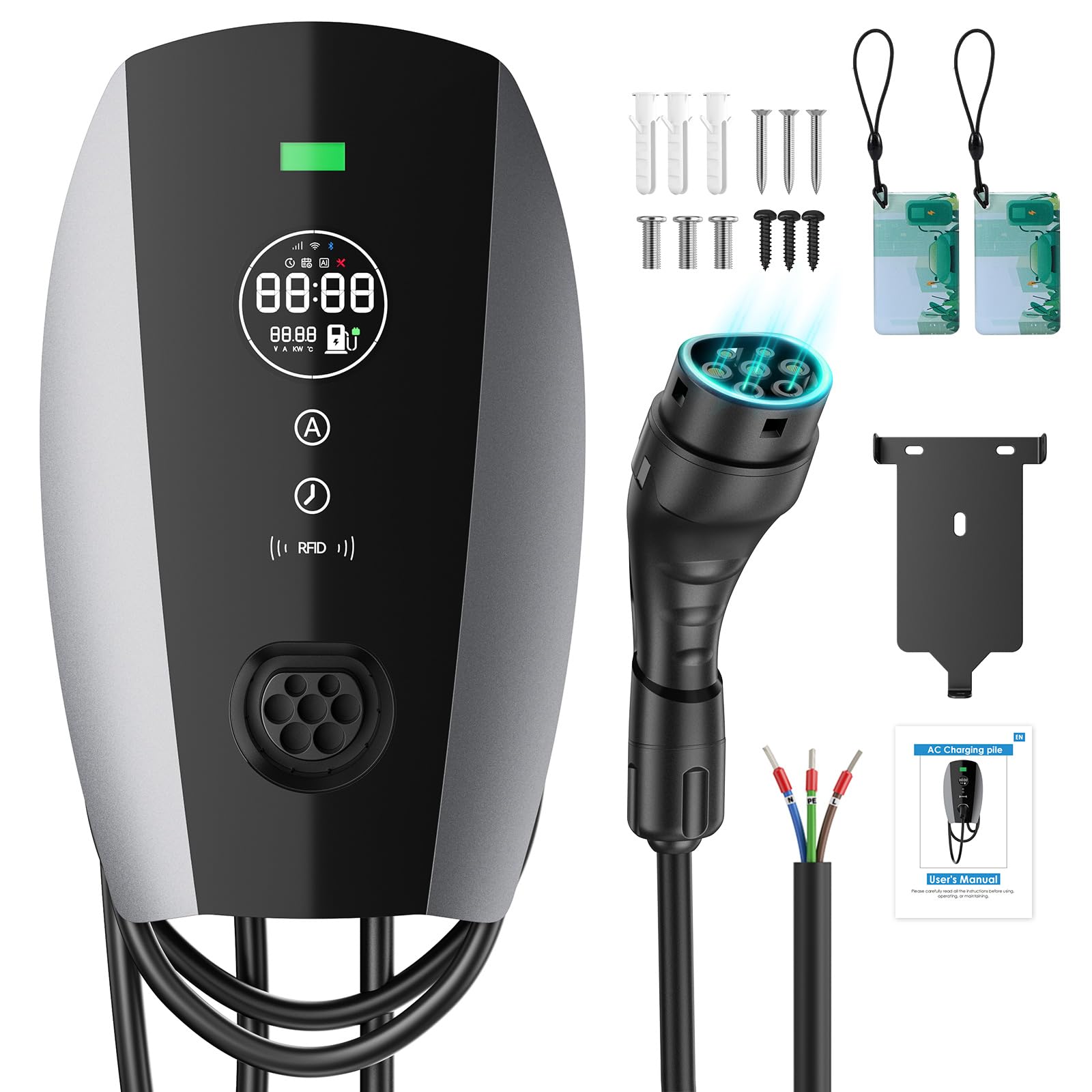
Figure 1: Evjuicion Wallbox 7.4 kW Type 2 EV Charger in use, illustrating rapid charging capabilities.
2. Agahiyên Ewlekariyê
Rêbazên Ewlekariya Girîng:
- Berî ku hûn vê hilberê bikar bînin, hemî rêwerzan bixwînin.
- This device must be installed by a qualified electrician in accordance with all local and national electrical codes and regulations.
- Do not use if the charging cable or connector is damaged, frayed, or shows any signs of wear.
- Do not immerse the charger or cable in water or other liquids.
- Do not operate the charger in explosive or flammable environments.
- Ensure the charging cable is properly routed to prevent tripping hazards or damage.
- Keep children away from the charging area during operation.
- Berî ku hûn her tamîrkirin an paqijkirinê bikin, elektrîkê veqetînin.

Figure 2: The Evjuicion Wallbox incorporates 8 layers of protection for safe and reliable charging, including safeguards against overcharges, thermal issues, ground faults, current leakage, high and low voltage, overloads, and lightning strikes.
3. Naveroka pakêtê
Piştrast bike ku hemû tiştên ku li jêr hatine navnîş kirin di pakêta te de hene:
- 1 x EV Charger Unit (Evjuicion Wallbox 7.4 kW Type 2)
- 1 x Mounting Plate
- 1 x Charging Cable (5 meters, integrated)
- 3 x Flat-head Screws
- 3 x Expansion Anchors
- 3 x Round-head Self-tapping Screws
- 3 x Round-head Screws
- 1 x Rêbernameya Bikarhêner (ev belge)
4. Taybetmendiyên Hilberê
The Evjuicion Wallbox 7.4 kW Type 2 EV Charger offers a range of features designed for convenience and efficiency:
- Barkirina Bilez: Delivers up to 7.4 kW power, significantly reducing charging times compared to standard chargers.
- Herika Verastbar: Selectable current settings (6A, 8A, 10A, 13A, 16A, 32A) to optimize charging based on vehicle and grid capacity.
- Timed Charging: Program charging start times up to 12 hours in advance to take advantage ji rêjeyên elektrîkê yên lûtkeyê.
- 2.8-inch LED Display: Provides real-time information on current, voltage, charging status, temperature, and more.
- RFID Access: Secure charging activation using RFID cards, preventing unauthorized use.
- Sêwirana Durable: IP65 rated for weather resistance, suitable for both indoor and outdoor installation, operating in temperatures from -20°C to +50°C.
- Rêveberiya Kabloya Yekgirtî: Built-in cable holder for neat and organized storage of the 5-meter charging cable.
- Lihevhatina Berfireh: Compatible with 99% of EV and PHEV models adhering to the IEC 62196-2 standard (Type 2 connector).
- Gelek Parastinê: Equipped with 8 safety protections including overcharge, thermal, leakage, high/low voltage, and lightning protection.

Figure 3: The charger features intelligent current adjustment and delayed charging options, allowing users to optimize charging schedules for cost savings during off-peak hours.

Figure 4: Designed for all-weather reliability, the Evjuicion Wallbox is IP65 rated for water and dust resistance, and can withstand extreme temperatures from -20°C to +50°C.

Figure 5: The charger offers wide compatibility with most EV and PHEV models, supporting Type 2 and CCS2 standards, ensuring hassle-free charging for a broad range of vehicles.
5. Sazkirin û Sazkirin
The Evjuicion Wallbox can be installed on a wall or a dedicated charging column. Professional installation by a qualified electrician is highly recommended to ensure compliance with electrical codes and safety standards.
5.1 Installation Steps (Wall Mount Example)
- Malpera Sazkirinê amade bikin: Choose a suitable location near your parking spot, ensuring it is protected from direct impact and has access to the main electrical supply.
- Hêzê qut bikin: Before starting any electrical work, ensure the main power supply to the installation area is turned off at the circuit breaker.
- Sazkirina Plateya Mounting:
- Use the included mounting plate as a template to mark the drilling points on the wall.
- Drill holes at the marked positions. Insert the expansion anchors into the drilled holes.
- Secure the mounting plate to the wall using the flat-head screws.
- Têkiliya Elektrîkê:
- Remove the back cover of the charger unit.
- Connect the AC power supply wires to the designated terminals inside the charger. Ensure correct polarity (Live, Neutral, Ground).
- Secure all wiring connections firmly.
- Berga piştê ji nû ve girêdin.
- Attach Charger Unit: Carefully align the charger unit with the mounted plate and secure it using the remaining screws (round-head self-tapping and round-head screws).
- Kontrolên dawî: Double-check all connections and ensure the unit is securely mounted.
- Vejandina Hêzê: Turn on the main power supply at the circuit breaker. The charger's LED display should illuminate.
Note: For column installation, follow similar steps, adapting to the specific column mounting hardware.
6. Telîmatên Operating
6.1 Understanding the LED Display and Indicators

Figure 6: The 2.8-inch LED display provides real-time monitoring of charging parameters and status indicators. A solid blue light indicates standby or charge completion, while a flashing green light signifies active charging.
The 2.8-inch LED display shows critical charging information. Familiarize yourself with the following indicators:
- Niha (A): Displays the charging current in Amperes.
- Voltage (V): Voluma niha nîşan didetage.
- Hêza (kW): Indicates the charging power in kilowatts.
- Germahiya (°C): Displays the internal temperature of the charger.
- Rewşa Barkirinê: Icons indicate if charging is active, paused, or complete.
- Barkirina Plansazkirî: Indicates if a timed charging session is set.
- Ronahiya nîşana LED:
- Blueîn Zexm: Charger is in standby mode or charging is complete.
- Kesk dibiriqe: Charger is actively charging the vehicle.
- Sor: Indicates an error or fault. Refer to the Troubleshooting section.
6.2 Starting a Charge Session
- Connect the Vehicle: Plug the Type 2 connector firmly into your vehicle's charging port. Ensure a secure connection.
- Activate with RFID Card: Hold your RFID card over the designated RFID reader area on the charger. The charger will beep, and the LED display will show "RFID OK" or similar confirmation. Charging will begin automatically.
- Barkirina Monitor: Observe the LED display for real-time charging data and the flashing green indicator light.

Figure 7: The 5-meter charging cable provides flexibility, and charging is securely activated using an RFID card to prevent unauthorized use.
6.3 Rêkxistina Herika Barkirinê
You can adjust the charging current (Amperage) to suit your needs or vehicle's requirements. This can help prolong battery life or manage grid load.
- Before or during a charging session, press the "A" button (Amperage adjustment) on the charger's control panel.
- Each press will cycle through the available current settings: 6A, 8A, 10A, 13A, 16A, 32A.
- Select your desired current. The display will update to reflect the new setting.
6.4 Setting Timed Charging
To schedule a delayed start for your charging session (e.g., for off-peak hours):
- Kabloya barkirinê bi wesayîta xwe ve girêdin.
- Press the "Clock" button (Timed Charging) on the charger's control panel.
- Each press will increase the delay time in 1-hour increments, from 0 to 12 hours.
- Once the desired delay is set, the charger will wait for that duration before automatically starting the charging session.
- You can still use the RFID card to override the timer and start charging immediately if needed.
6.5 Stopping a Charge Session
- Via Vehicle: Most EVs allow you to stop charging from within the vehicle's infotainment system or app.
- Bi rêya Charger: If your vehicle does not release the cable automatically, you may need to use the RFID card again to stop the session and unlock the connector.
- Hevqetandin: Once charging has stopped and the cable is unlocked, safely disconnect the Type 2 connector from your vehicle.
- Kabloya Firoşgehê: Return the charging cable to its integrated storage position on the charger.
7. Maintenance
Regular maintenance ensures the longevity and safe operation of your Evjuicion Wallbox.
- Paqijî:
- Ensure the charger is powered off before cleaning.
- Wipe the exterior of the charger with a soft, damp qumaş. Paqijkerên aşınker, çareserker, an kîmyewiyên dijwar bikar neynin.
- Keep the charging connector free from dust, dirt, and moisture.
- Kontrola kabloyê:
- Periodically inspect the charging cable and connector for any signs of damage, cuts, fraying, or discoloration.
- If any damage is found, discontinue use immediately and contact customer support.
- Hilberîna kabloyê: Always store the charging cable neatly using the integrated cable management system when not in use to prevent damage and tripping hazards.

Figure 8: The integrated cable management system ensures the charging cable is stored cleanly, organized, and practically, preventing tangles and maintaining a tidy charging area.
8. Destpêkirin
If you encounter issues with your Evjuicion Wallbox, refer to the following common problems and solutions:
| Pirsegirêk | Sedema gengaz | Çare |
|---|---|---|
| Charger does not power on / LED display is off. | Çavkaniya elektrîkê tune ye; şkênera devreyê qut bûye. | Check the main power supply and circuit breaker. Ensure the charger is correctly wired and connected to power. |
| Charging does not start after connecting the vehicle and using RFID. | RFID card not recognized; vehicle not ready to charge; cable not fully inserted; charger error. |
|
| Red indicator light is on. | Internal fault or error. | Disconnect the vehicle, turn off the charger's power at the circuit breaker for a few minutes, then restore power. If the error persists, contact customer support. |
| Charging stops unexpectedly. | Vehicle battery full; power interruption; charger fault; vehicle fault. |
|
| RFID card lost. | Lost access to charger activation. | Contact Evjuicion customer service for assistance with replacement or alternative activation methods. |
If the problem persists after attempting these solutions, please contact Evjuicion customer support for further assistance.
9. Specifications
| Parametre | Giranî |
|---|---|
| Cins | ZAU207C-CS |
| Hêza Nirxkirî | 7.4 kW |
| Output Current | 32A (max) (Adjustable: 6A/8A/10A/13A/16A/32A) |
| Timed Charging | 0-12 saetan |
| Cable Length | 5 metre |
| Rêjeya parastinê | IP65 |
| Germahiya xebitandinê | -20°C heta +50°C |
| Pîvan (Pakêt) | 38 x 32 x 11 cm |
| Pîvan | 4.5 Kîlo |
| Çêker | Evjuicion |
10. Garantî & Piştgirî
Agahiya Garantiyê:
Evjuicion products are manufactured to high-quality standards. For specific warranty terms and conditions, please refer to the warranty card included with your product or visit the official Evjuicion webmalper. Delîla kirîna xwe ji bo îdiayên garantiyê biparêzin.
Piştgiriya Xerîdar:
If you have any questions, require technical assistance, or need to report a problem with your Evjuicion Wallbox, please contact our customer support team. Contact details can typically be found on the product packaging, the official Evjuicion webmalperê, an jî bi rêya firoşkarê xwe.
When contacting support, please have your product model number (ZAU207C-CS) and purchase date available.