
1. Destpêk
This manual provides detailed instructions for the setup, operation, and maintenance of your HISTTON H4-T Industrial Mini PC. Please read this manual thoroughly before using the device to ensure proper functionality and safety.
2. Agahiyên Ewlekariyê
- Pêbaweriya dabînkirina hêzê piştrast bikintage bi daxwazên cîhazê re hevrû dike.
- Amûrê li ber şilbûn, germahiyên zêde, an tîrêjên rojê yên rasterast nehêlin.
- Ji astengkirina vebûnên hewayê dûr bixin.
- Hewl nedin ku cîhazê bi xwe vekin an jî tamîr bikin. Bi karmendên xizmetê yên pispor re têkilî daynin.
- Amûrê ji qadên magnetîkî yên xurt dûr bixin.
3. Naveroka pakêtê
Piştrast bike ku hemî tişt di pakêtê de hene:
- 1 x HISTTON Mini PC
- 1 x Power Adapter
- 1 x Rêbernameya Bikarhêner (ev belge)
- 1 x Cable HDMI
- Screws (for mounting/storage installation)
- Antên WiFi
- VESA Mount (if included with specific models)
- SATA Cable (for 2.5-inch drive installation)

4. Hilbera Serîview
The HISTTON H4-T Mini PC is a compact, fanless industrial computer designed for various applications requiring stable performance and extensive connectivity. It features an Intel Core i7-10710U processor and supports multiple display outputs.
4.1 Panelên Pêş û Paş

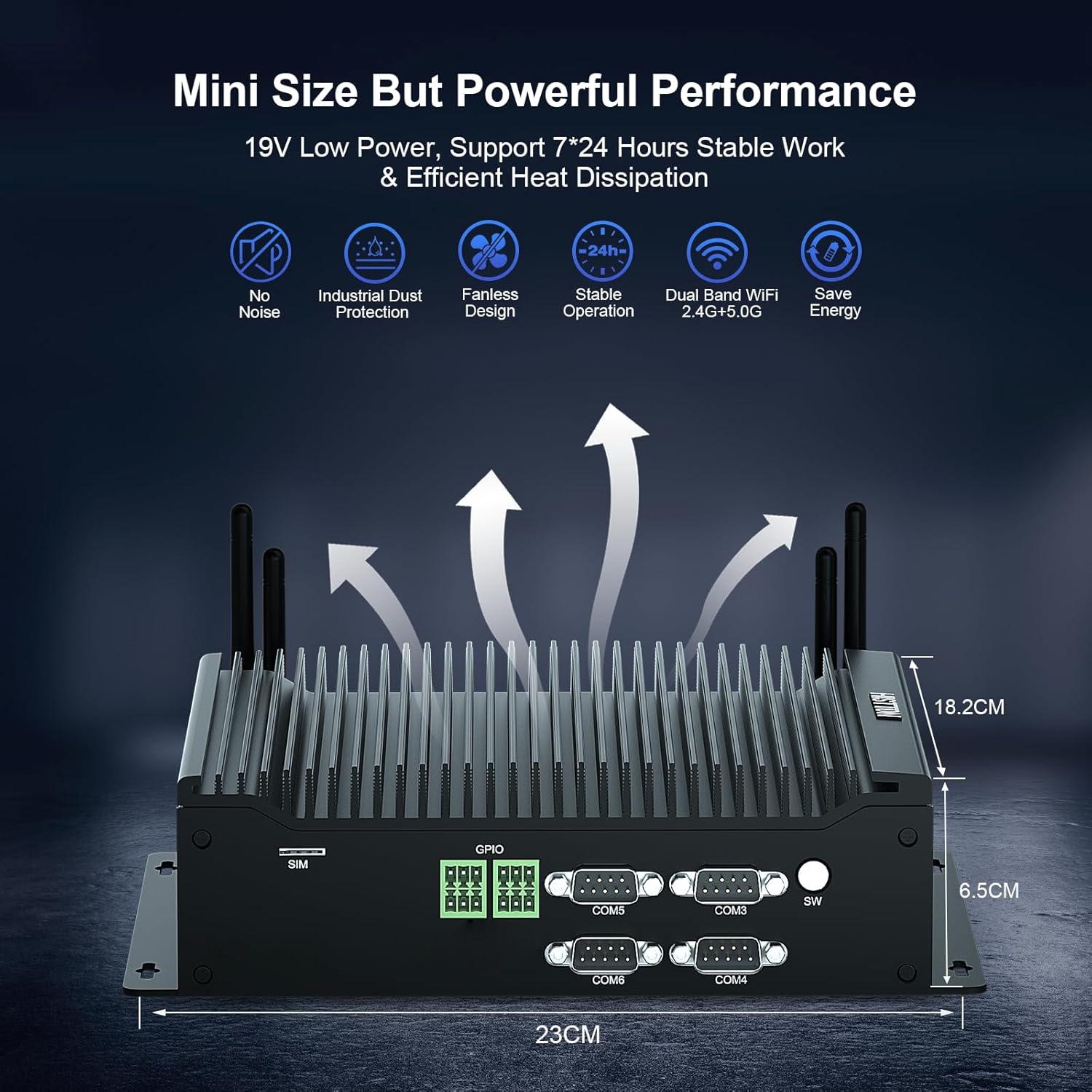
The device features a comprehensive set of ports for various industrial and general computing needs. These include multiple USB ports, LAN ports, COM ports, and video outputs.
4.2 Taybetmendiyên sereke
- Prosesor: Intel Core i7-10710U (10th Gen) with up to 4.70 GHz turbo frequency.
- Grafîk: Intel UHD Graphics for 10th Gen Processors, supporting 4K resolution.
- Bîr: Dual DDR4 SO-DIMM slots, expandable up to 64GB.
- Embarkirinî: M.2 2280 NVME PCIe 3.0x4 / SATA 3 SSD slot and a 2.5-inch SATA HDD/SSD bay.
- Hilbera Nîşandanê: HD, DisplayPort (DP), and Type-C for triple 4K display support.
- Tor: 2 x RJ45 Intel I210/211 Gigabit LAN, Dual-band WiFi 5 (2.4G+5.0G), Bluetooth 4.2.
- Têkilî: 4 x USB 3.0, 4 x USB 2.0, 6 x DB9pin COM ports (configurable for RS232/RS422/RS485), 2 x 6pin GPIO, 1 x SIM card slot.
- Sarkirin: Fanless design for silent operation and industrial dust protection.
- Pergala Xebatê: Pre-installed Windows 11 Pro (64-bit, activated) with support for Ubuntu.


5. Rêwerzên Sazkirinê
5.1 Girêdana Peripherals
- Girêdana Dîmenderê: Use the provided HDMI cable or a DisplayPort/Type-C cable to connect your monitor(s) to the Mini PC. The device supports up to three 4K displays simultaneously.
- Klavyeyê û mişkê bi hev ve girêdin: Plug your USB keyboard and mouse into any available USB ports (USB 2.0 or USB 3.0).
- Tora Têkilî: For a wired connection, connect an Ethernet cable to one of the RJ45 LAN ports. For wireless, attach the included WiFi antennas to the designated ports.
- Girêdana Deng: If using external speakers or headphones, connect them to the SPK (speaker) port. A microphone can be connected to the MIC port.

5.2 Hêzdarkirin
- Adaptera Hêzê ve girêdin: Plug the power adapter into the DC 19V 5A input port on the Mini PC, then plug the adapter into a power outlet.
- Bişkojka Hêzê: Press the power button located on the front panel to turn on the Mini PC.
- The system will boot into Windows 11 Pro. Follow the on-screen instructions for initial setup if prompted.
6. Telîmatên Operating
6.1 Pergala Xebatê
Your HISTTON H4-T Mini PC comes with Windows 11 Pro (64-bit) pre-installed and activated. It also supports other operating systems like Ubuntu, allowing for flexible deployment in various environments.
- Windows 11 Pro: Utilize standard Windows features for productivity, multimedia, and internet browsing.
- Ubuntu Support: For users preferring Linux-based systems, the hardware is compatible with Ubuntu installations. Refer to Ubuntu's official documentation for installation procedures.
6.2 Girêdana Torê
- Wired LAN: The two Gigabit Ethernet ports provide stable and high-speed wired network access.
- Wireless (WiFi & Bluetooth): The dual-band WiFi 5 (2.4G+5.0G) and Bluetooth 4.2 modules enable wireless internet access and connection to Bluetooth peripherals. Ensure antennas are securely attached for optimal performance.

6.3 Industrial Features
The H4-T is designed for industrial applications, offering robust connectivity:
- Portên COM: Six DB9pin COM ports support RS232, with four of them configurable for RS422/RS485, suitable for connecting industrial control devices.
- GPIO: Two 6pin GPIO interfaces provide programmable input/output capabilities for custom applications.
- Slota SIM Kartê: Supports 4G/5G modules (module not included by default) for mobile network connectivity in remote locations.
7. Maintenance
The fanless design of the HISTTON H4-T Mini PC significantly reduces maintenance requirements by eliminating moving parts and minimizing dust accumulation. However, regular care is still recommended.
- Paqijî: Periodically wipe the exterior of the Mini PC with a soft, dry cloth. Avoid using liquid cleaners or solvents.
- Nûvekirinên Nermalavê: Ji bo performansa çêtirîn û ewlehiyê, pergala xebitandinê û ajokarên xwe nûve bikin.
- Şertên Jîngehê: Ensure the device is operated within recommended temperature and humidity ranges to prolong its lifespan.
- Berfirehkirina Storage: If installing additional storage (2.5-inch HDD/SSD or M.2 SSD), ensure the device is powered off and disconnected from power. Follow proper anti-static procedures.
8. Destpêkirin
If you encounter issues with your HISTTON H4-T Mini PC, refer to the following common problems and solutions:
| Pirsegirêk | Sedema gengaz | Çare |
|---|---|---|
| No power / Device does not turn on | Power adapter not connected or faulty; Power outlet issue; Power button not pressed correctly. | Ensure power adapter is securely connected to both the PC and a working power outlet. Try a different outlet. Press the power button firmly. |
| Nîşandan li ser monitorê tune ye | Display cable loose or faulty; Incorrect input selected on monitor; Monitor off or faulty. | Check display cable connections. Ensure monitor is on and set to the correct input source (HDMI, DP, Type-C). Test with a different monitor or cable if possible. |
| Girêdana înternetê tune ye (bi kabloyê ve girêdayî ye) | Kabloya Ethernetê sist an xirabe ye; Pirsgirêka router/modemê; Pirsgirêka ajokera torê. | Verify Ethernet cable is securely connected. Restart your router/modem. Check network adapter status in OS. |
| Girêdana înternetê tune ye (bêtêl) | WiFi antennas not connected; WiFi disabled; Incorrect WiFi password; Router issue. | Ensure WiFi antennas are attached. Check WiFi settings in OS. Verify WiFi password. Restart your router. |
| Peripherals (USB devices) not working | Loose connection; Driver issue; Faulty peripheral. | Try a different USB port. Reinstall or update drivers for the peripheral. Test the peripheral on another computer. |
9. Specifications
| Taybetî | Hûrî |
|---|---|
| Navê Model | H4-T |
| Processor | Intel Core i7-10710U (10th Gen), 6 Cores, 12 Threads, 12M Cache, up to 4.70 GHz |
| Graphics Coprocessor | Grafîkên Intel UHD ji bo Pêvajoyên Genê 10-ê Intel |
| BERAN | 32GB DDR4 SO-DIMM (Expandable up to 64GB) |
| Hard Drive | 512GB M.2 NVMe SSD (Supports M.2 2280 NVME PCIe 3.0x4 / SATA 3 SSD and 2.5 inch SATA HDD/SSD) |
| Operating System | Windows 11 Pro (64-bit, activated), Supports Ubuntu |
| Display Output | HD, DisplayPort (DP), Type-C (Supports Triple 4K Display) |
| LAN | 2 x RJ45 Intel I210/211 Gigabit LAN |
| Têkiliya Wireless | Dual-band WiFi 5 (2.4G+5.0G), Bluetooth 4.2 |
| Portên USB | 4x USB 3.0, 4x USB 2.0 |
| Portên COM | 6 x DB9pin (2 x RS232, 4 x RS422/RS485 configurable) |
| Navokên din | 2 x 6pin GPIO, 1 x SIM card slot, 1 x SPK, 1 x MIC |
| Navê min | DC19V 5A |
| Vexwarina Hêzê | 15W-20W |
| Cooling | Fanless Design |
| Pîvan (LxWxH) | 9.06 x 7.17 x 2.56 înç (23 x 18.2 x 6.5 cm) |
| Babetê Weight | 6.38 pound (nêzîkî 2.9 kg) |
10. Agahdariya Garantiyê
HISTTON products are covered by a standard manufacturer's warranty. Please refer to the warranty card included with your product or visit the official HISTTON webji bo şert û mercên garantiyê yên berfireh malperê bibînin. Delîla kirîna xwe ji bo îdiayên garantiyê biparêzin.
11. Piştgiriya Mişterî
For technical assistance, troubleshooting, or any questions regarding your HISTTON H4-T Mini PC, please contact HISTTON customer support. Contact information can typically be found on the official HISTTON webli ser malperê an jî li ser materyalên pakkirinê.
Çavkaniyên Serhêl: For additional support and driver downloads, visit the official HISTTON website.