1. Destpêk
The SpaceX Starlink Mini Kit (4th Gen) provides high-speed, low-latency internet access in remote and mobile locations. Designed for portability, it features an integrated Wi-Fi router, DC power input, and supports free roam region unlock, making it ideal for RVs, camping, and remote work scenarios.

Image: The Starlink Mini Kit (4th Gen) satellite antenna with its integrated kickstand.
2. Naveroka pakêtê
Verify that all components are present in your Starlink Mini Kit package:
- Starlink Mini Satellite Antenna with Integrated Wi-Fi Router
- DC Power Cable (15m / 49.2 ft)
- Navê min
- Flat Mount Mini Pipe Adapter
- Kickstand

Image: All included accessories for the Starlink Mini Kit.
Vîdyo: Serkeftinekview of the Starlink Mini Kit components and basic setup.
3. Sazkirin
3.1 Cihgirtina Destpêkê
For optimal performance, the Starlink Mini antenna requires a clear, unobstructed view of the sky. Avoid placing it near tall buildings, trees, or other objects that could block the signal to the satellites. The integrated kickstand allows for quick deployment on flat surfaces.
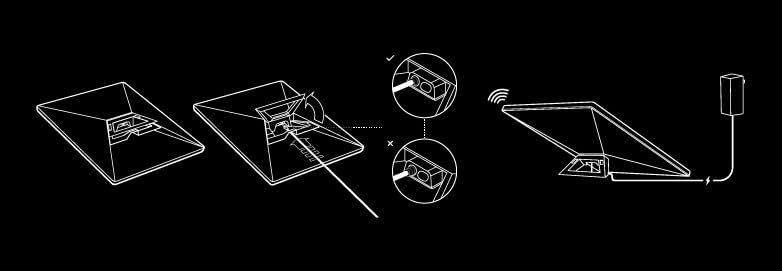
Image: Illustrated guide for connecting the Starlink Mini.
3.2 Girêdana Hêzê
Connect the DC Power Cable to the Starlink Mini antenna and then to the provided Power Supply. The kit supports 12–48V DC input or can be powered via USB-C PD battery packs for off-grid use.
Video: Demonstrates how to install the Starlink Mini using a Gen 3 mount.
3.3 Using the Starlink App
Download the official Starlink app from your device's app store. The app will guide you through the alignment process to ensure your antenna has the best possible connection to the Starlink satellite constellation. It also provides tools to check for obstructions and monitor performance.

Image: The Starlink app showing internet speed test results.
4. Telîmatên Operating
4.1 Têkilî
The Starlink Mini features an integrated Wi-Fi 5 (802.11ac) router with dual-band 3x3 MU-MIMO technology, supporting up to 128 devices simultaneously. Once connected, you can expect download speeds over 100 Mbps, suitable for streaming, video calls, and general internet use.
4.2 Portability and Roaming
The compact design (11.75" x 10.2", under 2.5 lbs) allows for easy transport in a backpack. With the Free Roam Region Unlock feature, the Starlink Mini can be used across various regions without restrictions, offering internet access for international travelers and digital nomads.

Image: Starlink Mini attached to a backpack, demonstrating its portability.

Image: Starlink Mini supports connectivity at home, on the go, and on boats.
5. Maintenance
To ensure the longevity and optimal performance of your Starlink Mini Kit, follow these maintenance guidelines:
- Paqijî: Gently wipe the antenna surface with a soft, damp cloth to remove dust, dirt, or debris. Avoid abrasive cleaners or solvents.
- Parastina Jîngehê: While designed for outdoor use, protect the antenna from extreme weather conditions when possible. Ensure proper ventilation around the power supply.
- Rêveberiya Cable: Keep cables neatly organized and free from kinks or damage. Avoid placing heavy objects on cables.
6. Destpêkirin
If you encounter issues with your Starlink Mini Kit, consider the following steps:
- Têkiliya Înternetê tune:
- Piştrast bikin ku antenna zelal e view of the sky. Use the Starlink app's "Check for Obstructions" feature.
- Ensure all cables are securely connected to the antenna and power supply.
- Restart the Starlink Mini by unplugging and re-plugging the power supply.
- Lezên Hêdî:
- Check the Starlink app for any performance alerts or network issues in your area.
- Ensure your device is connected to the Starlink Wi-Fi network and not another network.
- Minimize the number of active devices or high-bandwidth activities on your network.
- Pirsgirêkên Têkiliya Appê:
- Ensure your smartphone is connected to the Starlink Wi-Fi network.
- Update the Starlink app to the latest version.
- Smartphone xwe ji nû ve bidin destpêkirin.
For further assistance, refer to the Starlink app's support section or visit the official Starlink support website.
7. Specifications
| Taybetî | Hûrî |
|---|---|
| Cins | Starlink Mini Kit 4th Gen |
| Dimensions | 11.75"L x 10.2"W x 2.5"H (Antenna) |
| Babetê Weight | 2.5 lbs (Antenna), 4.8 lbs (Package) |
| Wi-Fi Standard | Wi-Fi 5 (802.11ac), Dual-Band 3x3 MU-MIMO |
| Vexwarina Hêzê | 25-40W |
| Input Power | 12–48V DC, USB-C PD compatible |
| Rêzeya herî zêde | 3200 Feet (Wi-Fi coverage) |
| Reng | Spî û Gewr |
8. Garantî û Piştgirî
For information regarding product warranty, please refer to the documentation included with your purchase or visit the official SpaceX Starlink website. Extended protection plans may be available for purchase, such as the 3-Year Protection Plan or Complete Protect monthly plan.
For technical support, troubleshooting assistance, or service inquiries, please contact Starlink customer service through the Starlink app or their official support channels.


