
1. Destpêk
Thank you for choosing the Evjuicion Wallbox 7kW 32A Single-Phase EV Charger. This manual provides essential information for the safe and efficient installation, operation, and maintenance of your charging station. Please read this manual thoroughly before installation and use, and retain it for future reference.
2. Agahiyên Ewlekariyê
Rêbazên Ewlekariya Girîng:
- Sazkirin divê ji hêla elektrîkçîyekî pispor ve li gorî hemî kodên elektrîkê yên herêmî û neteweyî were kirin.
- Do not attempt to open, disassemble, repair, or modify the charging station. This may cause damage, electric shock, or fire.
- Ensure the charging cable and connector are free from damage before each use. Do not use if damaged.
- Dema xebitandinê, zarok û heywanên malê ji qada şarjkirinê dûr bigirin.
- Do not immerse the charging station or cable in water.
- Operate the charger only within its specified environmental conditions.
3. Naveroka pakêtê
Piştrast bike ku hemî tişt di pakêtê de hene:
- 1x Evjuicion EV Charging Station with 5-meter cable
- 2x RFID Cards
- 1x Dîwarê Çêkirina Dîwarê
- 1x Holder Cable
- 1x Manual Bikarhêner
- Mounting Screws û Accessories

Image: Illustration of all components included in the Evjuicion Wallbox package, including the charger unit, cable, RFID cards, mounting hardware, and user manual.
4. Hilbera Serîview
The Evjuicion Wallbox is a 7kW 32A single-phase electric vehicle charging station designed for efficient and secure home or office charging. It features a robust design with multiple protection mechanisms and flexible charging options.

Image: The Evjuicion Wallbox charging unit, charging cable with Type 2 connector, two RFID cards, a cable holder, and mounting screws are displayed.
Taybetmendiyên sereke:
- Barkirina Bilez: 7kW, 32A single-phase output for rapid EV charging.
- Modên Şarjkirina Dual: Supports RFID card activation and Plug-and-Play modes.
- Nîşaneyên Rewşa LED: Clear LED lights for Power, Charge, and Fault status.
- Durable û Berxwedêr-Heway: IP65 rated protective housing, resistant to dust, water, cold, and heat.
- Ewlehiya zêdekirî: Includes protection against overcurrent, overvoltage, overtemperature, lightning, leakage, and ungrounded conditions.
- Kabloya Dirêj: 5-meter (16.4 ft) flexible Type 2 charging cable.

Image: Diagram illustrating the multiple protection features of the Evjuicion Wallbox, including IP67 waterproof rating, overload protection, overcurrent protection, leakage protection, overtemperature protection, lightning protection, ungrounded protection, and CP-protection.

Image: Four panels showing the Evjuicion Wallbox and charging cable in various extreme weather conditions: waterproof (rain), dustproof (dusty environment), cold resistant (snow), and heat resistant (sunlight), highlighting its IP67 and IP54 ratings.
5. Sazkirin û Sazkirin
The Evjuicion Wallbox can be mounted on a wall or a dedicated charging pole. Professional installation by a certified electrician is highly recommended.
Gavên Sazkirinê:
- Step 1: Mount the Bracket. Drill holes in the wall at the desired location and securely mount the wall bracket using the provided screws.
- Step 2: Hang the Main Unit. Carefully hang the main charging unit onto the mounted bracket and fix it tightly.
- Step 3: Connect the Wires. Connect the electrical wiring to the charging station according to local electrical codes. This step must be performed by a qualified electrician.
- Step 4: Plug In and Charge. Once installed and wired, the unit is ready for use.

Image: A four-panel illustration demonstrating the installation process: 1. Drilling holes and mounting the bracket. 2. Hanging the main unit onto the bracket. 3. Connecting the electrical wires. 4. Plugging in the EV for charging.

Image: Two illustrations showing different installation scenarios: one with the charger mounted on a dedicated charging pole next to an EV, and another with the charger wall-mounted with its cable neatly coiled.
6. Telîmatên Operating
The Evjuicion Wallbox offers two modes of operation: RFID card mode and Plug-and-Play mode.
6.1. Modes Charging
- RFID Card Mode: To initiate charging, plug the Type 2 connector into your vehicle's charging port, then swipe one of the provided RFID cards over the card reader area on the charging station. The charging process will begin.
- Plug-and-Play Mode: To enable this mode for continuous use by family members, hold the RFID card over the scanning area for 15 seconds. After this initial setup, you can simply plug the connector into your vehicle, and charging will start automatically without needing to swipe the card each time.

Image: Two panels illustrating the charging options: 1. Plug and Charge, showing a hand plugging the connector into an EV. 2. Swipe and Charge, showing a hand swiping an RFID card over the charging station.

Image: A visual comparison of RFID Card Swipe Mode (insert gun, swipe card, start charging) and Plug and Play Mode (insert gun, start charging).
6.2. Nîşaneyên Rewşa LED
The charging station is equipped with three LED indicators to show its operational status:
- Hêz (Kesk): Solid green indicates the unit is powered on.
- Barkirin (Kesk): Flashing green indicates charging is in progress. Solid green indicates charging is complete.
- Fault (Red): Solid red indicates an error or fault condition.
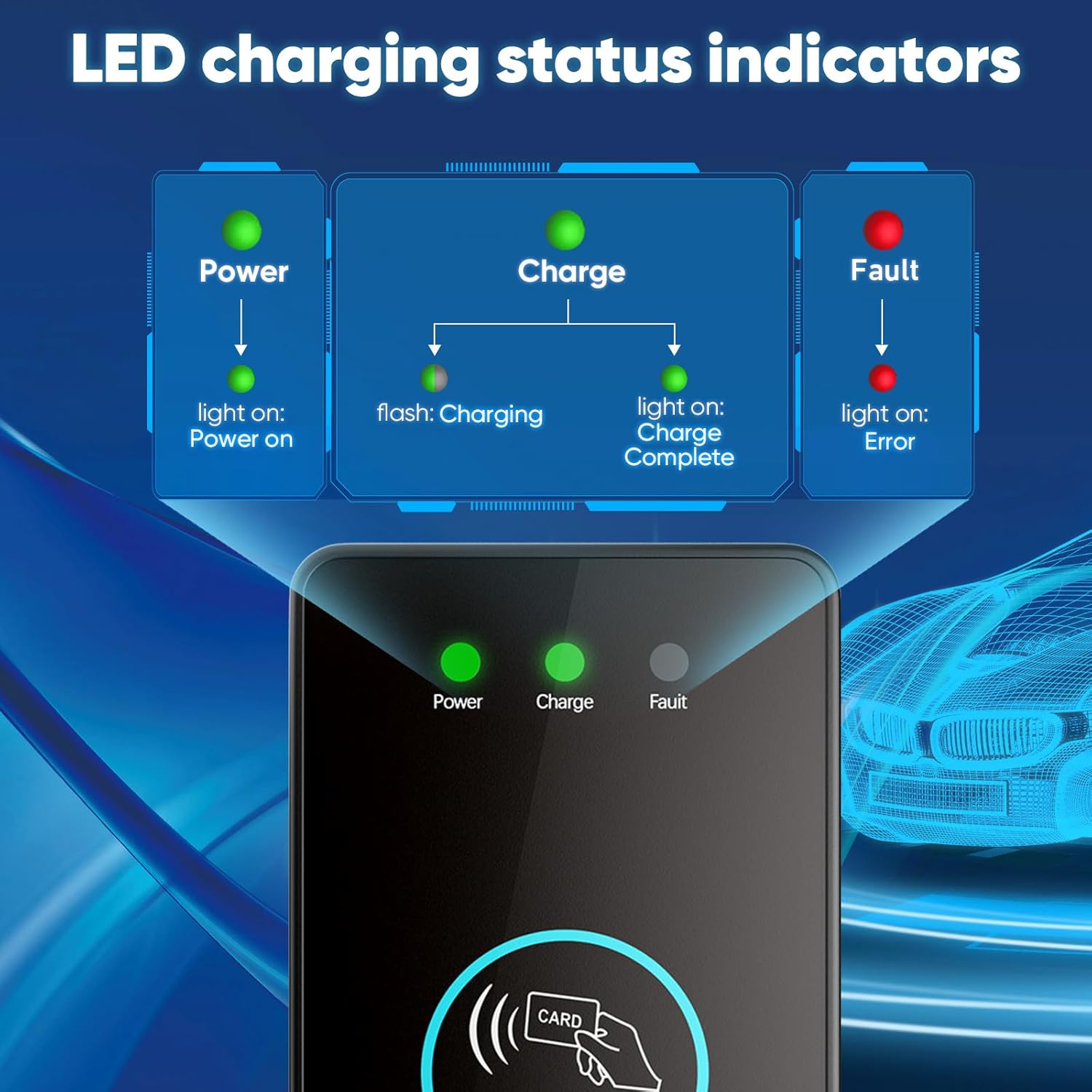
Image: Diagram explaining the LED charging status indicators: Power (light on: Power on), Charge (flash: Charging; light on: Charge Complete), and Fault (light on: Error).
7. Maintenance
To ensure optimal performance and longevity of your Evjuicion Wallbox, follow these maintenance guidelines:
- Paqijkirina bi rêkûpêk: Derveyê stasyona şarjê bi kaxezek nerm paqij bikinamp çît. Kîmyewî û paqijkerên hişk bikar neynin.
- Kontrola kabloyê: Periodically inspect the charging cable and connector for any signs of wear, cuts, or damage. Ensure the cable is stored properly using the included cable holder to prevent damage.
- Parastina Jîngehê: While the unit is weather-resistant, avoid prolonged exposure to extreme conditions when possible.
- Professional Checks: Consider having a qualified electrician inspect the installation periodically to ensure continued safety and compliance.
8. Destpêkirin
If you encounter issues with your Evjuicion Wallbox, refer to the following common problems and solutions:
| Pirsegirêk | Sedema gengaz | Çare |
|---|---|---|
| Charger not powering on (Power LED off) | Çavkaniya elektrîkê tune ye; şkênera devreyê qut bûye. | Check the main power supply and circuit breaker. Ensure the unit is properly connected to the electrical grid. |
| Charging does not start (Charge LED off/flashing) | RFID card not recognized; cable not fully inserted; vehicle not ready to charge. | Ensure the RFID card is swiped correctly. Re-insert the charging cable firmly into the vehicle. Check vehicle's charging status. |
| Fault LED is red | Internal error; overcurrent/overvoltage; ground fault. | Disconnect the charger from the vehicle and power supply. Wait a few minutes, then reconnect. If the fault persists, contact customer support. Do not attempt to repair. |
| Leza barkirinê hêdî | Vehicle limitation; power supply issue. | Verify your vehicle's maximum charging rate. Ensure the electrical installation can provide consistent 32A power. |
For issues not listed here or if troubleshooting steps do not resolve the problem, please contact Evjuicion customer support.
9. Specifications
| Parametre | Giranî |
|---|---|
| Nîşan | Evjuicion |
| Cins | DCWP-ZUS1 |
| Charging Power | 7 kW |
| Vêga | 32 A |
| Voltage | 220-240 V (AC) |
| Dem | Yek-qonaxa |
| Type Connector | Tîpa 2 (IEC 62196-2) |
| Cable Length | 5 metre (16.4 ling) |
| Rating IP | IP65 (Unit), IP67 (Cable) |
| Operating Temperature (Cable) | Heta 50 °C |
| Operating Temperature (Plug) | -25 °C heta 50 °C |
| Mezinahiyên hilberê (L x W x H) | 10 x 15 x 23 cm (nêzîkî 3.9 x 5.9 x 9.05 înç) |
| Giraniya hilberê | 3.75 kg (nêzîkî 8.27 lbs) |
| Sertîfîkayên | CE, TUV, UKCA |

Image: An illustration showing the compact dimensions of the Evjuicion Wallbox: 23cm (9.05in) height and 15cm (5.9in) width, with the 5-meter cable coiled.
10. Garantî û Piştgirî
Evjuicion provides a 1-sal garantiya guheztinê for this product. For technical support, warranty claims, or any inquiries, please contact Evjuicion customer service.
You can typically find contact information through your purchase platform or the official Evjuicion website. When contacting support, please have your product model (DCWP-ZUS1) and purchase details ready.

Image: An illustration depicting customer service representatives, with text indicating '24/7 Service', '1-year Replacement', 'Business Consultation', 'Information Consultation', and 'Technical Support'.