
1. Destpêk
Thank you for choosing the PRUVEEO Waterproof Rear Camera. This manual provides essential information for the proper installation, operation, and maintenance of your new rear camera. Please read this manual thoroughly before use to ensure optimal performance and longevity of the product.
2. Naveroka pakêtê
Verify that all items listed below are present in your package. If any items are missing or damaged, please contact PRUVEEO customer support.
- 1x PRUVEEO Rear Camera (1080P)
- 1x Cable Extension
- Installation Tools (screws)

jimar 2.1: Package contents including the rear camera, extension cable, and installation tools.
3. Compatibility
This PRUVEEO Rear Camera is specifically designed for use with the following PRUVEEO Dash Camera models:
- PRUVEEO D90-4CH
- PRUVEEO A6
- PRUVEEO D88
It features a Type-C port for connection to the compatible dash camera. Ensure your dash camera model is listed above for proper functionality.
4. Taybetmendiyên sereke
- 1080P Resolution: Provides clear and detailed video recording.
- Sêwirana Waterproof: Engineered to withstand various weather conditions.
- Lensa Goşeya Berfireh: Offers an expansive field of view for comprehensive rear coverage.
- Porta Type-C: Ensures secure and reliable connection to compatible dash cameras.
- Sazkirina hêsan: Designed for straightforward setup with included tools and extension cable.

jimar 4.1: The rear camera demonstrating its waterproof feature.

jimar 4.2: Visual representation of the camera's key features: waterproof, high resolution, car rear view, and wide angle.
5. Sazkirin û Sazkirin
Proper installation is crucial for optimal performance. It is recommended to have this camera installed by a professional if you are unfamiliar with vehicle wiring.
5.1 Hilbijartina Cihê Sazkirinê
The rear camera is typically mounted on the rear license plate area or near the rear window. Choose a location that provides a clear, unobstructed view of the road behind your vehicle. Ensure the camera is centered for the best perspective.
5.2 Çêkirina Kamera
- Clean the chosen mounting surface thoroughly to ensure proper adhesion or secure screw placement.
- Attach the camera bracket to the vehicle using the provided screws. Ensure it is securely fastened and angled correctly.
- Adjust the camera angle to achieve the desired rear view.
5.3 Girêdana Kabloyan
- Connect the rear camera's cable to the provided extension cable.
- Carefully route the extension cable from the rear of the vehicle to the location of your PRUVEEO dash camera. Ensure the cable is tucked away safely to avoid interference with vehicle operations and to protect it from damage.
- Connect the Type-C end of the extension cable to the designated rear camera input port on your compatible PRUVEEO dash camera (D90-4CH, A6, or D88).
- Once connected, power on your dash camera to verify the rear camera feed is displayed correctly.
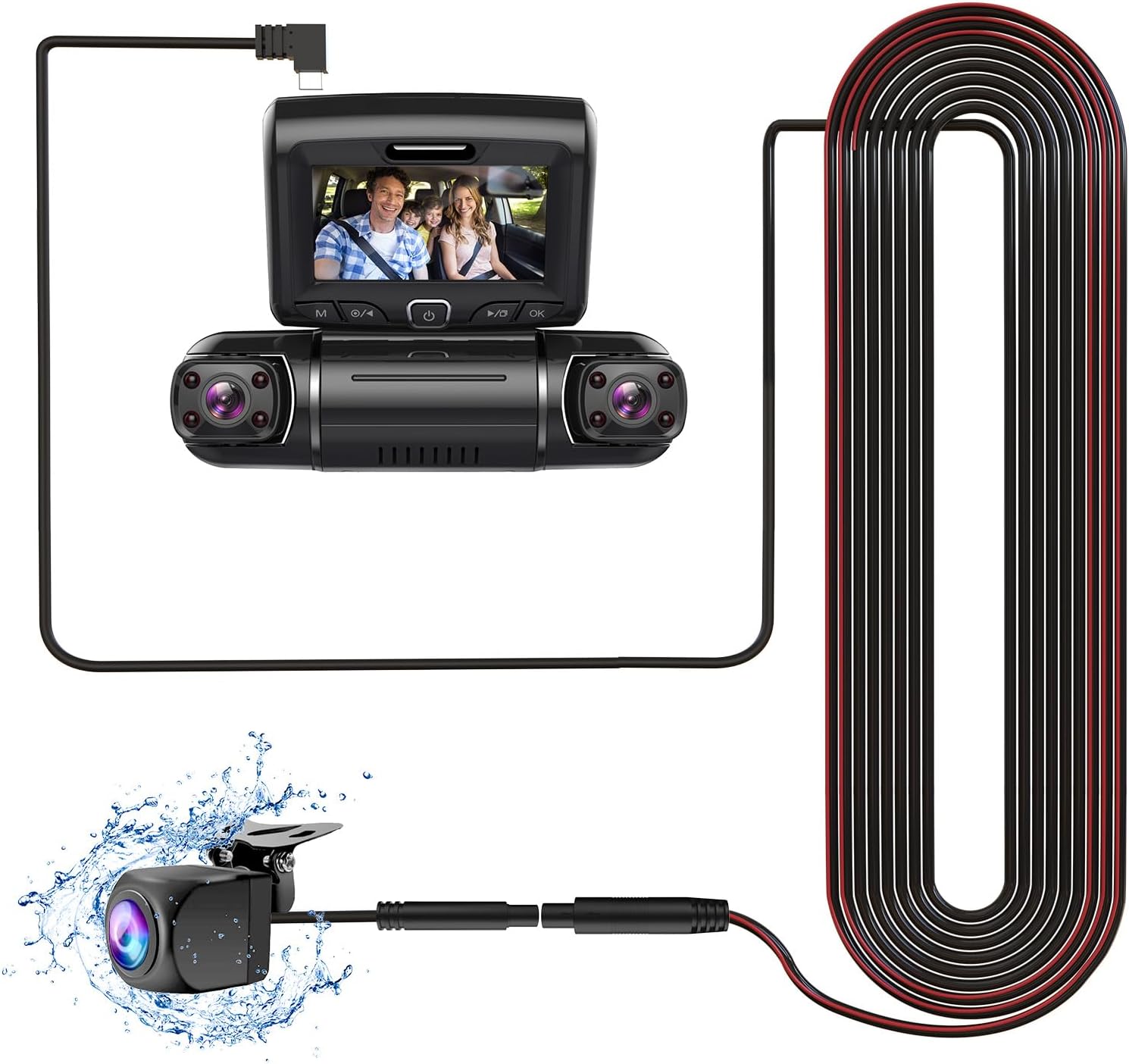
jimar 5.1: Connection diagram of the rear camera to a compatible dash camera.

jimar 5.2: The PRUVEEO Rear Camera and its extension cable.
6. Operasyon
Once properly installed and connected to a compatible PRUVEEO dash camera, the rear camera operates in conjunction with the dash camera system.
- Tomarkirina otomatîk: The rear camera will automatically begin recording when the dash camera is powered on, typically when the vehicle's ignition is turned on.
- Modên Nîşandanê: Refer to your specific PRUVEEO dash camera's manual for instructions on how to switch between front camera view, kamera paş view, or picture-in-picture display modes.
- Parking Monitor (if supported by dash cam): If your dash camera supports a parking monitor feature, the rear camera will also record events when the vehicle is parked, depending on the dash camera's settings.
For detailed operational instructions, please consult the user manual of your PRUVEEO D90-4CH, A6, or D88 dash camera.
7. Maintenance
Regular maintenance ensures the longevity and optimal performance of your rear camera.
- Paqijkirina Lensê: Lensa kamerayê bi nermî car bi car paqij bikinamp qumaşê ji bo rakirina ax, toz, an lekeyên avê yên ku dikarin asteng bikin view. Avoid abrasive materials or harsh chemicals.
- Kontrola kabloyê: Regularly check the connection cable for any signs of wear, damage, or loose connections. Ensure it remains securely tucked away.
- Kontrola Mountkirinê: Verify that the camera remains securely mounted and its angle has not shifted due to vibrations or impacts.
- Nûvekirinên Nermalavê: Ensure your main dash camera firmware is up-to-date, as this may affect the performance of connected accessories like the rear camera.
8. Destpêkirin
If you encounter issues with your PRUVEEO Rear Camera, refer to the following common problems and solutions.
| Pirsegirêk | Sedema gengaz | Çare |
|---|---|---|
| No image from rear camera |
|
|
| Wêne nezelal an nezelal e |
|
|
| Girêdana navber |
|
|
If the problem persists after attempting these solutions, please contact PRUVEEO customer support for further assistance.
9. Specifications
| Taybetî | Hûrî |
|---|---|
| Compatibility Model | PRUVEEO D90-4CH, A6, D88 Dash Cameras |
| Resolution | 1080P |
| Rêjeya Waterproof | Yes (Specific IP rating not provided, but described as "Waterproof") |
| Type Connector | Type-C (USB) |
| Teknolojiya Sensorê Optîk | CMOS |
| Lens Type | Wide Angle |
| Optical Sensor Size | 1/4 inch |
| Mezinahiya Hilberê | 11.02"L x 5.7"W x 1.95"H (Packaging dimensions, actual camera dimensions not specified, using packaging for reference) |
| Babetê Weight | 10.6 ounces (Packaging weight, actual camera weight not specified, using packaging for reference) |
10. Garantî û Piştgirî
For information regarding warranty coverage, technical support, or to purchase replacement parts, please contact PRUVEEO customer service.
Please refer to the official PRUVEEO webji bo agahdariya têkiliyê ya herî nûjen û hûrguliyên garantiyê, malper an belgeyên kirîna xwe bibînin.