
1. Hilbera Serîview
The Tomzn TOMPD-63SW is a WiFi-enabled smart energy meter and leakage current protection relay designed to provide reliable protection and monitoring for your electrical installation. This 63A capacity device offers remote monitoring and control capabilities via a smartphone application. Its integrated LCD screen displays instantaneous voltage, current, and power consumption values. Featuring DIN rail mounting, it ensures easy installation within electrical panels. The device automatically disconnects the circuit in cases of over-voltage, di bin-voltage, or leakage current, safeguarding connected appliances. Through the mobile application, users can track energy consumption data and review historical records. It is an ideal solution for ensuring the safety of electrical devices in both residential and commercial environments, offering a compact design and user-friendly interface.
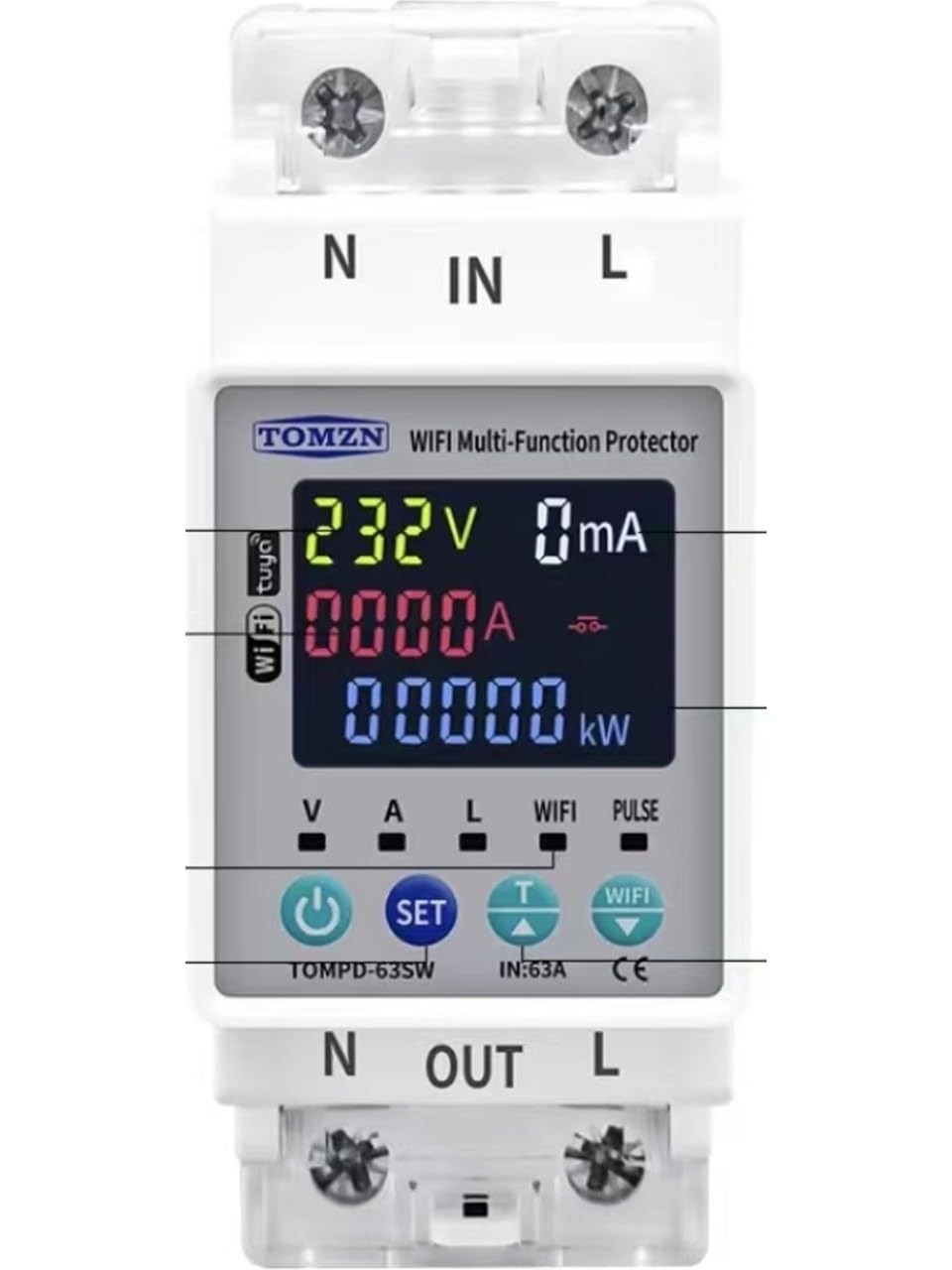
Image showing the front view of the Tomzn WiFi Smart Energy Meter, highlighting its LCD display and compact design for DIN rail mounting.
2. Agahiyên Ewlekariyê
- Sazkirina Pîşeyî Pêşniyar kirin: Installation should be performed by a qualified electrician to ensure safety and compliance with local electrical codes.
- Hêzê qut bikin: Always ensure the main power supply is disconnected before installing, maintaining, or servicing the device.
- Voltage û Nirxên Niha: Ji cildê diyarkirî derbas neketage and current ratings (63A) of the device.
- Têlkirina rast: Ensure all wiring connections are secure and correctly terminated according to the wiring diagram. Loose connections can cause overheating or malfunction.
- Şertên Jîngehê: Amûrê li ber şilbûn, germahiyên zêde, an jîngehên korozîf nehêlin.
3. Naveroka pakêtê
Ji kerema xwe pakêtê ji bo tiştên jêrîn kontrol bikin:
- Tomzn WiFi Smart Energy Meter and Leakage Current Protection Relay (Model TOMPD-63SW)
- Manual Bikarhêner
4. Taybetmendiyên Hilberê
- Çavdêriya Smart: Wi-Fi connectivity for remote tracking of energy consumption and voltage values via a mobile application.
- Taybetmendiyên Teknîkî: 63A capacity, suitable for single-phase electrical systems, DIN rail mountable.
- Fonksiyonên Parastinê: Automatic protection against over-voltage, di bin-voltage, and leakage current.
- Display LCD: Digital screen showing instantaneous voltage, current, and energy consumption values.
- Lêkirinî: Easy and secure mounting onto electrical panels.
5. Specifications
| Specification | Giranî |
|---|---|
| Çêker | Tomzn |
| Manufacturer Reference | TMZN01 |
| Mezinahiya Hilberê | 4.5 x 4.5 x 8.5 cm |
| Pîvan | 150 gram |
| Type Connector | Bi qulikê |
| Rêjeya Niha | 63 Amperes |
| Mounting Type | Rûwaya DIN |
| Nîşan | TOMZN |
| Mode Operating | Otomatîkî |
6. Sazkirin (Sazkirin)
Gazî: Installation must be performed by a qualified electrician. Ensure all power is disconnected before proceeding.
- Veqetandina hêzê: Turn off the main power supply at the circuit breaker before starting any installation work. Verify that no voltage is present using a suitable testing device.
- Çêkirin: Mount the TOMPD-63SW device onto a standard 35mm DIN rail within your electrical panel. Ensure it is securely fastened.
- Têkiliyên Têlê:
- Connect the incoming live (phase) wire to the L-IN rawesta paşîn.
- Connect the incoming neutral wire to the N-IN rawesta paşîn.
- Connect the outgoing live (phase) wire to the L-OUT terminal, leading to your load.
- Connect the outgoing neutral wire to the N-DERKET terminal, leading to your load.
- Ensure all connections are tight and correct according to the wiring diagram provided with the product.
- Vegerandina hêzê: Once all connections are verified, restore the main power supply. The device's LCD screen should illuminate.
- Sazkirina sepanê: Download the designated mobile application (e.g., Tuya Smart or Smart Life, as commonly used for such devices) from your smartphone's app store. Follow the in-app instructions to add and configure the TOMPD-63SW device to your Wi-Fi network. This typically involves putting the device into pairing mode (refer to the device's specific button sequence for pairing).
7. Operasyon
The TOMPD-63SW offers both local display and remote control/monitoring capabilities.
7.1. Dîmendera LCD
The integrated LCD screen provides real-time information:
- Voltage (V): Displays the instantaneous line voltage.
- Niha (A): Shows the instantaneous current flowing through the circuit.
- Power (W/kW): Indicates the instantaneous active power consumption.
- Energy (kWh): Accumulates total energy consumption.
- Nîşaneyên Rewşê: May show indicators for Wi-Fi connectivity, protection status (e.g., over-voltage, di bin-voltage, leakage current trip).
7.2. Mobile Application Control
After successful app setup, you can:
- Çavdêriya Dûr: View real-time voltage, current, power, and energy consumption from anywhere.
- Kontrola dûr: Turn the connected circuit ON or OFF remotely (if this feature is enabled for the specific model).
- Mîhengên Parastinê: Adjust parameters for over-voltage, di bin-voltage, and leakage current protection thresholds.
- Daneyên Dîrokî: Access and analyze historical energy consumption data and event logs (e.g., protection trips).
- Bername: Set schedules or timers for the device to turn ON/OFF automatically.
8. Maintenance
The Tomzn TOMPD-63SW is designed for minimal maintenance. However, regular checks can ensure optimal performance and safety:
- Paqijî: Periodically clean the device's exterior with a dry, soft cloth. Do not use abrasive cleaners or solvents.
- Kontrolkirina girêdanê: Annually, or as needed, verify that all wiring connections are secure and free from corrosion. Ensure power is disconnected before performing this check.
- Nûvekirinên Firmware: Check the mobile application periodically for any available firmware updates for the device. Updates can improve performance and add new features.
9. Destpêkirin
If you encounter issues with your TOMPD-63SW, refer to the following common problems and solutions:
- Cîhaz Nakeve:
- Çavkaniya sereke ya elektrîkê û şkênera devreyê kontrol bikin.
- Verify all wiring connections (L-IN, N-IN) are correct and secure.
- Girêdana Wi-Fi tune ye:
- Ensure your Wi-Fi network is 2.4GHz (5GHz networks are typically not supported by these devices).
- Check the Wi-Fi signal strength at the device's location.
- Routera Wi-Fi-ya xwe ji nû ve bidin destpêkirin.
- Attempt to re-pair the device with the mobile application (refer to app instructions for pairing mode).
- Amûr Pir Caran Diteqe:
- Check the load connected to the device; it might be drawing excessive current or experiencing a fault.
- Review ser-voltage, di bin-voltage, and leakage current protection settings in the mobile application. They might be set too sensitively.
- Inspect the electrical system for actual faults (e.g., ground fault, short circuit).
- Xwendinên nerast:
- Ensure wiring connections are correct and tight.
- Compare readings with a calibrated multimeter if possible.
If the problem persists, contact customer support or a qualified electrician.
10. Garantî û Piştgirî
Libersekînîn: Please refer to your purchase documentation, retailer, or the manufacturer's official website for detailed warranty information regarding the Tomzn TOMPD-63SW device.
Piştgiriya Teknîkî: For technical assistance, troubleshooting beyond this manual, or inquiries about your device, please contact your point of purchase or the official Tomzn customer support channels. Ensure you have your product model number (TOMPD-63SW) and purchase details ready when contacting support.