
Atcall SFZN005
Atcall Fast Link Cell Phone Booster for Home Instruction Manual
Model: SFZN005
1. Destpêk
This instruction manual provides comprehensive guidance for the installation, operation, and maintenance of your Atcall Fast Link Cell Phone Booster. This device is designed to enhance cellular signal strength within your home or office, supporting all major U.S. carriers across multiple frequency bands. Please read this manual thoroughly before installation to ensure optimal performance and safe operation.
2. Naveroka pakêtê
Piştrast bike ku hemû tiştên ku li jêr hatine navnîş kirin di pakêta te de hene:
- 1 x Signal Booster (with built-in indoor antenna)
- 1 x Outdoor Directional Antenna
- 2 kabloyên RG6 ên 30ft
- 1 x Power Adapter
- Mounting Kits (for roof/pole mount)
- F Female to F Female Connector
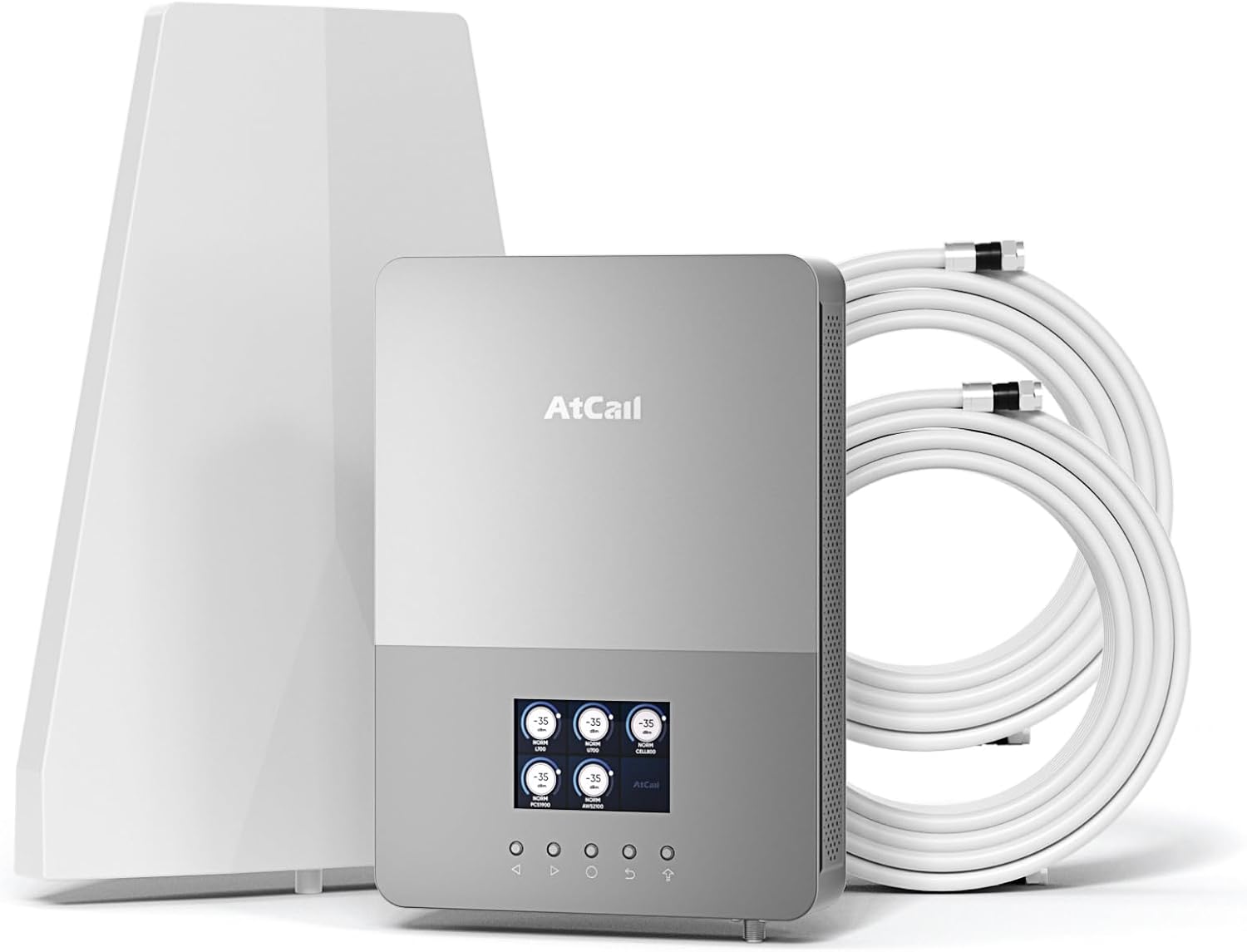
jimar 2.1: Components included in the Atcall Fast Link Cell Phone Booster package. This image displays the main booster unit with its built-in indoor antenna, the separate outdoor directional antenna, two 30-foot coaxial cables, the power adapter, and mounting hardware.

jimar 2.2: Detailed diagram showing the package contents and approximate dimensions of the booster unit (8.35 x 11.81 inches) and outdoor antenna (8.2 x 11.6 inches). Also shown are the two 30ft RG6 cables, power supply, F female to F female connector, and roof/pole mount bracket.
3. Hilbera Serîview
The Atcall Fast Link Cell Phone Booster is designed to improve cellular signal strength for various U.S. carriers. It features a real-time LCD monitor for easy setup and troubleshooting.
3.1 Taybetmendiyên sereke
- Five-Band Support: Works on bands 12/17, 13, 5, 2/25, and 4/66.
- Real-Time LCD Monitor: Displays working status, signal strength (dBm), uplink/downlink gain, and frequency band.
- Lihevhatina Hilgirê Berfireh: Supports Verizon, AT&T, T-Mobile, Sprint, Straight Talk, U.S. Cellular, and other U.S. carriers.
- Vegirtin: Up to 5,000 sq ft, suitable for homes, offices, warehouses, and rural areas.
- 5G Compatible: Enhances signal for 5G devices.
- Built-in Indoor Antenna: Simplifies installation.
- FCC Pejirandî: Complies with FCC regulations (FCC ID: 2A34B-SFZN005).
3.2 Fonksiyonên Display LCD
The integrated LCD screen provides critical information for monitoring and optimizing the booster's performance.

jimar 3.1: The Smart LCD Display provides a clear view of signal strength. It shows real-time downlink signal strength (dBm), uplink and downlink gain, the working status of each band, and allows for frequency band switching. This visual feedback aids in installation and troubleshooting.
- Real Time Downlink Signal Strength (dBm): Indicates the strength of the signal received by the booster.
- Rewşa Xebatê: Shows if a particular frequency band is active and boosting.
- Bandora Frekansê: Identifies the specific cellular band being boosted (e.g., Band 12/17, Band 13).
- Uplink Gain / Downlink Gain: Nîşan dide amplification level for signals transmitted from your phone (uplink) and received by your phone (downlink).
- Band Switch: Allows selection or deselection of specific frequency bands.
4. Guide Setup
Proper installation is crucial for optimal performance. Follow these steps carefully.
4.1 Kontrola Pêş-Sazkirinê
- Check Outdoor Signal Strength: Before installation, ensure you have at least 1-2 bars of existing outdoor signal. The booster amplifies existing signal; it does not create signal where none exists.
- Identify Your Carrier's Frequency Band: Use your cell phone to determine the frequency band your carrier uses.
- Ji bo iPhone: Dial *3001#12345#* then press the call button. Click "All Metrics," then "Serving Cell Info," and check "Band Info."
- Ji bo têlefonê Android: Download "Network Cell Info Lite" from your app store. Choose "GAUGE" and then check "BAND."

jimar 4.1: Visual guide demonstrating how to check the frequency band on both iPhone and Android devices. This step is important to confirm compatibility and optimize booster settings.
4.2 Gavên Sazkirinê
- Antena derve saz bike:
- Choose a location on your roof or an exterior wall that has the strongest existing cellular signal.
- Mount the directional outdoor antenna using the provided mounting kit. Ensure it is pointed towards the nearest cell tower.
- Maintain a minimum horizontal distance of 20 feet (6 meters) and a vertical distance of 20 feet (6 meters) between the outdoor antenna and the indoor booster unit. A straight-line distance of over 30 feet (9 meters) is recommended.
- Install the Indoor Booster Unit:
- Place the booster unit (with built-in indoor antenna) in a central location within your desired coverage area.
- Ensure the unit is positioned away from metal objects and other electronic devices that may cause interference.
- Kabloyan girêdin:
- Connect one end of a 30ft RG6 cable to the outdoor antenna.
- Route the cable indoors and connect the other end to the "Outdoor" port on the booster unit.
- Ensure all connections are finger-tight.
- Hêza girêdanê:
- Connect the power adapter to the booster unit's power input.
- Adaptera elektrîkê têxin nav dergehek elektrîkê ya standard.
- Hêzdar û Çavdêr:
- The booster will power on, and the LCD screen will display real-time signal information.
- Adjust the outdoor antenna's direction slightly while monitoring the LCD display to achieve the highest possible downlink signal strength (dBm) and gain.

jimar 4.2: Installation instruction diagram showing the recommended minimum separation distances: greater than 20 feet (6m) horizontally and vertically, and greater than 30 feet (9m) in a straight line between the outdoor antenna and the indoor booster unit to prevent oscillation.
5. Telîmatên Operating
Once installed and powered on, the Atcall Fast Link Cell Phone Booster operates automatically. The LCD display provides continuous feedback on its performance.
5.1 Çavdêriya Performansê
- The LCD screen will show the signal strength (dBm) for each supported band. A higher (less negative) dBm value indicates a stronger signal.
- Observe the uplink and downlink gain values. These indicate the amplification provided by the booster.
- If a band is not showing activity or has low signal, ensure the outdoor antenna is correctly aimed and there is sufficient isolation between the indoor and outdoor antennas.
5.2 Band Selection (if applicable)
The booster typically operates on all supported bands simultaneously. If you need to disable a specific band, use the "Band Switch" function on the LCD display as indicated in Figure 3.1.
6. Destpêkirin
If you experience issues with your cell phone booster, refer to the following common problems and solutions.
| Pirsegirêk | Sedema gengaz | Çare |
|---|---|---|
| No signal improvement or weak signal. |
|
|
| Booster LCD shows "OSC" or oscillation warning. | Feedback loop between indoor and outdoor antennas (antennas are too close). | Increase the physical separation between the outdoor and indoor antennas. Ensure they are not facing each other directly. |
| Power light is off. | Ne dabînkirina hêzê. | Check power adapter connection and wall outlet. Ensure the power adapter is functioning. |
| Specific band not boosting. |
|
|
If problems persist after attempting these solutions, please contact Atcall customer support for assistance.
7. Specifications
| Taybetî | Hûrî |
|---|---|
| Cins | SFZN005 |
| Bandên piştgirî kirin | Banda 12/17, Banda 13, Banda 5, Banda 2/25, Banda 4/66 |
| Max Gain | 68 dB |
| Qada Vegirtinê | Heta 5,000 metre çargoşe |
| Pêşkêşî | Real-Time LCD Monitor |
| Antenna hundir | Built-in Panel Antenna |
| Antenna Derveyî | Directional Antenna |
| Cable Type | Kabloya Koaksiyal a RG6 |
| ID FCC | 2A34B-SFZN005 |
| Babetê Weight | 6.8 lîre |
| Mezinahiyên pakêtê | 13.8 x 9.5 x 5.5 inches |
8. FCC Compliance
Ev cîhaz bi Beş 15 ya Rêgezên FCC re tevdigere. Operasyon bi du şertên jêrîn ve girêdayî ye: (1) dibe ku ev amûr nebe sedema destwerdana zerardar, û (2) ev cîhaz divê her destwerdana ku hatî wergirtin, tevî destwerdana ku dibe sedema xebata nexwestî qebûl bike.
Nasnameya FCC: 2A34B-SFZN005
BİXWÎNE BİXWÎNE: This is a CONSUMER device. Before use, you DIVÊ VÊ CAMÛRÊ TÊKIRIN with your wireless provider and have your provider's consent. Most wireless providers consent to the use of signal boosters. Some providers may not consent to the use of this device on their network. If you are unsure, contact your provider. You MUST OPERATE this device with approved antennas and cables as specified by the manufacturer. Antennas NABE be installed within 20 centimeters (8 inches) of any person. You MECBÛRMAYIN Ger ji hêla FCC an dabînkerek karûbarê wireless ya destûrdar ve were xwestin tavilê xebata vê cîhazê rawestînin.

jimar 8.1: Mezinkirin view of the Atcall booster unit displaying the FCC compliance label. The label includes the HVIN, IC, and FCC ID, along with important consumer device registration and operation warnings.
9. Garantî û Piştgirî
Atcall provides a limited warranty for this product. For detailed warranty information, please refer to the warranty card included in your package or visit the official Atcall website.
For technical support, troubleshooting assistance, or any questions regarding your Atcall Fast Link Cell Phone Booster, please contact our customer service team:
- Email: [E-nameya Piştgiriya Xerîdar Li Vir Binivîse]
- Telefon: [Hejmara Telefona Piştgiriya Xerîdar Li Vir Binivîse]
- Webmalper: Visit the Atcall Store on Amazon
Our professional tech-support team is available to assist you.
Ask a question about this manual
Ask about setup, troubleshooting, compatibility, parts, safety, or missing instructions. Manuals+ will review the question and use this page’s manual context to help answer it.