
Evelame R11
Evelame Smart Ring Health Tracker (Model R11) User Manual
Rêbernameya Berfireh ji bo Sazkirin, Xebitandin û Parastinê
1. Destpêk
The Evelame Smart Ring (Model R11) is a sophisticated health and fitness tracker designed to provide real-time insights into your well-being. This compact, wearable device monitors various essential health metrics and supports multiple sports activities, all while offering convenient gesture control. This manual provides detailed instructions to help you get the most out of your smart ring.
2. Hilbera Serîview
The Evelame Smart Ring is engineered with advanced sensors to accurately track your health data. Its sleek design ensures comfort for continuous wear, and its robust construction makes it suitable for various environments.
Taybetmendiyên sereke:
- Çavdêriya Tenduristî ya Berfireh: Tracks heart rate, blood pressure, and SpO2 levels.
- Advanced Sleep Tracking: Monitors deep sleep, light sleep, REM sleep, and wake times.
- Multi-Sport Activity Tracking: Supports various activities including running, walking, cycling, hiking, yoga, golf, jump rope, and dancing.
- Kontrola Geştê: Allows for seamless interaction, such as remote photo capture.
- IP68 Waterproof: Designed for durability and resistance to water and dust, suitable for swimming and daily wear.
- Têkiliya Bluetooth-ê ya bêhêz: Pairs easily with Android (5.0+) and iOS (10.0+) devices via a free accompanying app.
- Jiyana Pîlê dirêj: Provides 3-5 days of usage on a single charge.
- Materyalên Premium: Constructed with a stainless steel outer layer and an epoxy resin inner layer for comfort and durability.
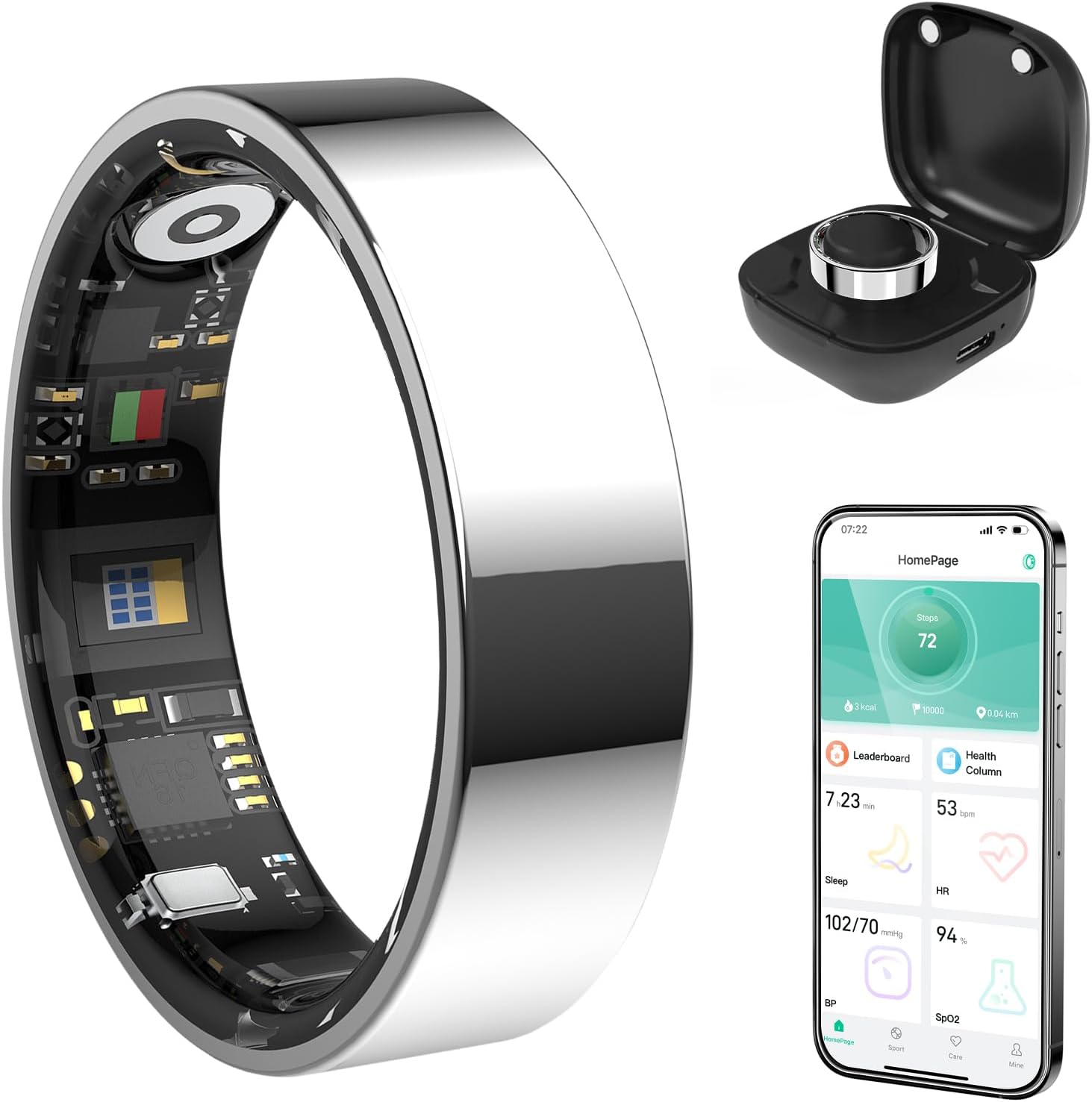
jimar 1: Evelame Smart Ring, showing the ring itself, its charging case, and a smartphone displaying the companion app's interface with health data.
3. Guide Setup
3.1 Vekirina Qutîkê û Xerca Destpêkê
Upon receiving your Evelame Smart Ring, carefully unbox the device. The package includes the smart ring, a charging cable, and a user guide.
- Remove the smart ring from its packaging.
- Connect the provided charging cable to a USB power source.
- Attach the magnetic end of the charging cable to the charging contacts inside the ring. Ensure the ring is securely connected and the charging indicator light illuminates.
- Allow the ring to fully charge before first use. This typically takes approximately 2 hours.
Fîlm 1: Unboxing and initial charging process of the Evelame Smart Ring. This video demonstrates how to connect the charging cable to the ring and initiate the charging process.
3.2 Dakêşana Serlêdanê û Hevberkirin
To access your health data and customize settings, download the companion app:
- Scan the QR code provided in the user guide or search for "Smart Health" in your device's app store (compatible with Android 5.0+ and iOS 10.0+).
- Serlêdanê saz bikin û hesabek biafirînin.
- Bluetooth-ê li ser smartphone xwe çalak bikin.
- Open the "Smart Health" app, navigate to the device section, and select "Add Device."
- Follow the on-screen prompts to pair your Evelame Smart Ring with your smartphone.

jimar 2: Visual guide for downloading the companion app and connecting the smart ring via Bluetooth, including screenshots of the app interface.
3.3 Proper Wearing Style
For optimal accuracy of health measurements (blood pressure, SpO2, heart rate), ensure the sensor inside the ring is facing your fingerpad while wearing it. The ring should fit comfortably, not too tight or too loose.

jimar 3: Illustration demonstrating the correct way to wear the Evelame Smart Ring for accurate sensor readings, with the sensor positioned against the fingerpad.

jimar 4: Guide for measuring finger size to ensure a perfect fit for the Evelame Smart Ring, showing different ring sizes and measurement steps.
4. Telîmatên Operating
4.1 Şopandina Tenduristiyê
The Evelame Smart Ring continuously monitors your health metrics. View real-time and historical data through the "Smart Health" app.
- Tewsê dil: Access the Heart Rate section in the app to see your current heart rate and historical trends.
- Tansiyona xwînê: Navigate to the Blood Pressure section for readings. Some measurements may require manual initiation within the app for accuracy.
- SpO2 (oksîjena xwînê): Check your blood oxygen levels in the dedicated SpO2 section.
- Şopandina xewê: The ring automatically tracks your sleep patterns. Review detailed sleep analysis, including deep sleep, light sleep, and REM duration, in the Sleep section of the app.

jimar 5: Visual representation of the Evelame Smart Ring's health tracking capabilities, including sleep, heart rate, blood pressure, and blood oxygen monitoring.
Fîlm 2: Demonstrates the health monitoring and fitness tracking features of the Smart Ring, showcasing how data is displayed in the companion app.
Fîlm 3: This video focuses on the sleep tracking capabilities of the Smart Ring, showing how it monitors sleep patterns and provides insights.
4.2 Şopandina Çalakiyan
The ring automatically detects and tracks various sports activities. View your activity data, including steps, distance, and calorie consumption, in the app's Sports section.
- Gavên: The ring counts your daily steps and calculates distance covered.
- Modên Sporê: Select specific sports modes within the app (e.g., running, walking, cycling) to get more tailored tracking data for your workouts.

jimar 6: The Evelame Smart Ring's ability to track various sports activities, including running, cycling, ropeskipping, walking, yoga, golf, jump rope, and dancing, with app interface examples.
4.3 Kontrola Jestê
Utilize the gesture control feature for convenient actions, such as remote photo capture:
- Ensure your phone's camera app is open and connected to the smart ring via Bluetooth.
- Perform the designated gesture (e.g., a simple swipe of your finger) to remotely trigger the camera shutter.

jimar 7: A family using the smart ring's gesture control feature to capture a remote photo with their smartphone, highlighting convenience.
5. Maintenance
5.1 Paqijkirin
To maintain optimal performance and hygiene, clean your smart ring regularly:
- Wipe the ring with a soft, damp çît.
- Avoid using harsh chemicals or abrasive materials, as these can damage the ring's finish and sensors.
- Berî şarjkirinê, piştrast bikin ku têkiliyên şarjkirinê paqij û hişk in.
5.2 Berxwedana Avê (IP68)
The Evelame Smart Ring is IP68 waterproof, meaning it can withstand immersion in water up to 1.5 meters for 30 minutes. It is suitable for:
- Showering
- Şûştina destan
- Avjenî (ava kêm kûr)
- Şertên baranê
Avoid prolonged exposure to hot water, steam, or high-pressure water jets, as this may compromise the water resistance over time.

jimar 8: The Evelame Smart Ring demonstrating its IP68 waterproof capability, shown being worn by a person underwater.
6. Destpêkirin
6.1 Pirsgirêkên Girêdanê
- Zengil nayê hevberkirin: Ensure Bluetooth is enabled on your phone and the ring is charged. Restart both the ring (by placing it on the charger) and your phone.
- Daneyên senkronîze nabin: Check your phone's internet connection and ensure the app is running in the background. Try manually syncing data within the app.
6.2 Xwendinên Nerast
- Heart Rate/SpO2/Blood Pressure: Verify the ring is worn correctly with the sensor facing your fingerpad. Ensure the ring is clean and free from obstructions. Avoid taking measurements during intense physical activity.
- Şopandina xewê: Ensure the ring is worn throughout the entire sleep period.
6.3 Pirsgirêkên Pîlê
- Zengil nayê şarj kirin: Check the charging cable and adapter for damage. Ensure the magnetic connection is secure and the charging contacts on the ring are clean.
- Jiyana bateriya kurt: Reduce the frequency of continuous monitoring for certain metrics if possible. Ensure the ring is fully charged before use.

jimar 9: The Evelame Smart Ring in its charging case, illustrating the charging mechanism and highlighting its 3-5 day battery life.
7. Specifications
| Taybetî | Hûrî |
|---|---|
| Hejmara Model | R11 |
| Nîşan | Evelame |
| Têkilî | Bluetooth |
| Compatibility System Operating | iOS 10.0+ an Android 5.0+ |
| Berxwedana avê | IP68 (heta 50 metre) |
| Kapasîteya Pîl | 4 Amp Hours (1 CR5 battery included) |
| Battery Life | 3-5 rojan |
| Kapasîteya Storage Memory | 4 GB |
| Babetê Weight | 3.2 ons (0.09 Kilogram) |
| Taybetmendiyên Taybet | Activity Tracker, Gesture Control, Lightweight, Multisport Tracker |
8. Garantî û Piştgirî
For warranty information and customer support, please refer to the documentation included with your product or visit the official Evelame website. If you encounter any issues not covered in this manual, please contact our customer service team for assistance.
Ask a question about this manual
Ask about setup, troubleshooting, compatibility, parts, safety, or missing instructions. Manuals+ will review the question and use this page’s manual context to help answer it.