
1. Destpêk
Thank you for choosing the OKP Life K5 Robot Vacuum. This intelligent cleaning device is designed to provide efficient and convenient floor cleaning for your home. Featuring Wi-Fi connectivity and remote control capabilities, the K5 offers multiple cleaning modes and smart navigation to ensure a thorough clean. Please read this manual carefully before using the product to ensure proper operation and maintenance.
2. Naveroka pakêtê
Dema ku hûn ji pakêtê vedikin, piştrast bikin ku hemî tişt li wir in û di rewşek baş de ne.
- OKP Life K5 Robot Vacuum Cleaner (1 unit)
- Kontrola dûr (1 yekîne)
- Charging Dock (1 unit)
- Adaptora Hêzê (1 yekîne)
- Side Brushes (4 units, 2 for immediate use, 2 spares)
- Cleaning Tool (1 unit)
- Manual Bikarhêner (Ev belge)

Image: The OKP Life K5 Robot Vacuum, its remote control, and a set of four side brushes, illustrating the typical package contents.
3. Hilbera Serîview
3.1 Pêkhateyên Valahiya Robotê
Familiarize yourself with the main parts of your K5 Robot Vacuum.

Wêne: Ji jor ber bi jêr ve view of the OKP Life K5 Robot Vacuum, highlighting its sleek, disc-shaped design and central power button.
- Main Body: Contains the motor, dustbin, and navigation sensors.
- Power Button/Indicator Light: For manual operation and status indication.
- Dustbin: 550ml capacity for collecting debris.
- Side Brushes: Two rotating brushes to sweep debris into the suction path.
- Driving Wheels: For movement across various floor types.
- Charging Contacts: For automatic recharging at the charging dock.
- Sensors: Anti-drop and anti-collision sensors for safe navigation.
3.2 Kontrolkirina Dûr
The remote control provides convenient access to various cleaning functions.

Image: A close-up of the white remote control for the OKP Life K5 Robot Vacuum, showing its various function buttons for control and mode selection.
- Power Button: Turns the robot on/off or starts/pauses cleaning.
- Directional Buttons: Manually control the robot's movement.
- Home Button: Sends the robot back to the charging dock.
- Mode Selection Buttons: Switch between Auto, Spot, Edge, and Zigzag cleaning modes.
- Suction Power Adjustment: Adjusts the vacuum's suction strength.
4. Sazkirin
4.1 Preparing the Robot
- Hemû fîlmên parastinê û çîtikan ji robot û doka şarjê derxînin.
- Attach the side brushes by pressing them onto the square posts until they click into place.
4.2 Placing the Charging Dock
- Doka şarjkirinê li hember dîwêr, li ser rûyekî hişk û asoyî bi cîh bikin.
- Piştrast bike ku li her du aliyên dokê herî kêm 0.5 metre (1.6 ling) û li pêşiya wê jî 1.5 metre (4.9 ling) cîhê vala heye.
- Adaptora hêzê bi doka şarjê ve girêdin û dûv re jî bi priza dîwar ve girêdin.
4.3 Barkirina Destpêk
For optimal performance, fully charge the robot before its first use.
- Manually place the robot onto the charging dock, ensuring the charging contacts align.
- The indicator light on the robot will show charging status (e.g., breathing light).
- Barkirina tevahî bi gelemperî 4-5 demjimêran digire.

Image: The OKP Life K5 Robot Vacuum automatically navigating back to its charging dock, demonstrating its self-charging capability when the battery is low.
4.4 Connecting to Wi-Fi and App
The OKP Life App allows for advanced control and scheduling.
- Download the "OKP Life" app from the App Store (iOS) or Google Play Store (Android).
- Hesabek qeyd bikin û têkevinê.
- Follow the in-app instructions to add your K5 robot vacuum. Ensure your Wi-Fi network is 2.4GHz.
- The robot can also be connected to Amazon Alexa and Google Assistant for voice control. Refer to the app for detailed instructions on integrating with these smart home platforms.

Image: A user interacting with the OKP Life K5 Robot Vacuum via a smartphone app, with icons indicating compatibility with Google Assistant and Amazon Alexa, and a note about 2.4GHz Wi-Fi connectivity.
5. Telîmatên Operating
5.1 Destpêkirina Paqijkirinê
- Ji Robotê: Press the power button on the robot once.
- Ji Kontrola Ji Dûr ve: Bişkojka hêzê ya li ser dûr vekin.
- Ji Appê: Tap the "Start Cleaning" button in the OKP Life app.
- Fermana Deng: Use a connected smart assistant (e.g., "Alexa, turn on Robot Vacuum").
5.2 Pausing/Resuming a Clean
- Press the power button on the robot or remote, or use the app/voice command.
- Press again to resume cleaning.
5.3 Sending Robot to Charging Dock
- Press the "Home" button on the remote control or in the app.
- The robot will automatically return to its charging dock when the battery is low.
5.4 Modên Paqijkirinê
The K5 offers multiple cleaning modes to suit different needs, selectable via the remote control or app.
- Paqijkirina Xweser: The robot intelligently navigates and cleans the entire accessible area. This is the default mode.
- Paqijkirina cîh: The robot cleans a concentrated area in a spiral pattern, ideal for localized dirt or spills.
- Paqijkirina qiraxa: Robot li dîwaran û qiraxên mobîlyayan paqij dike da ku bi tevahî paqijiyê bike.
- Paqijkirina Zîgzagê: The robot cleans in a systematic back-and-forth pattern, covering the maximum area and reducing missed spots.

Image: The OKP Life K5 Robot Vacuum cleaning a room, with an overlay illustrating its efficient Z-Shape (zigzag) cleaning path, designed to maximize coverage and minimize missed areas.
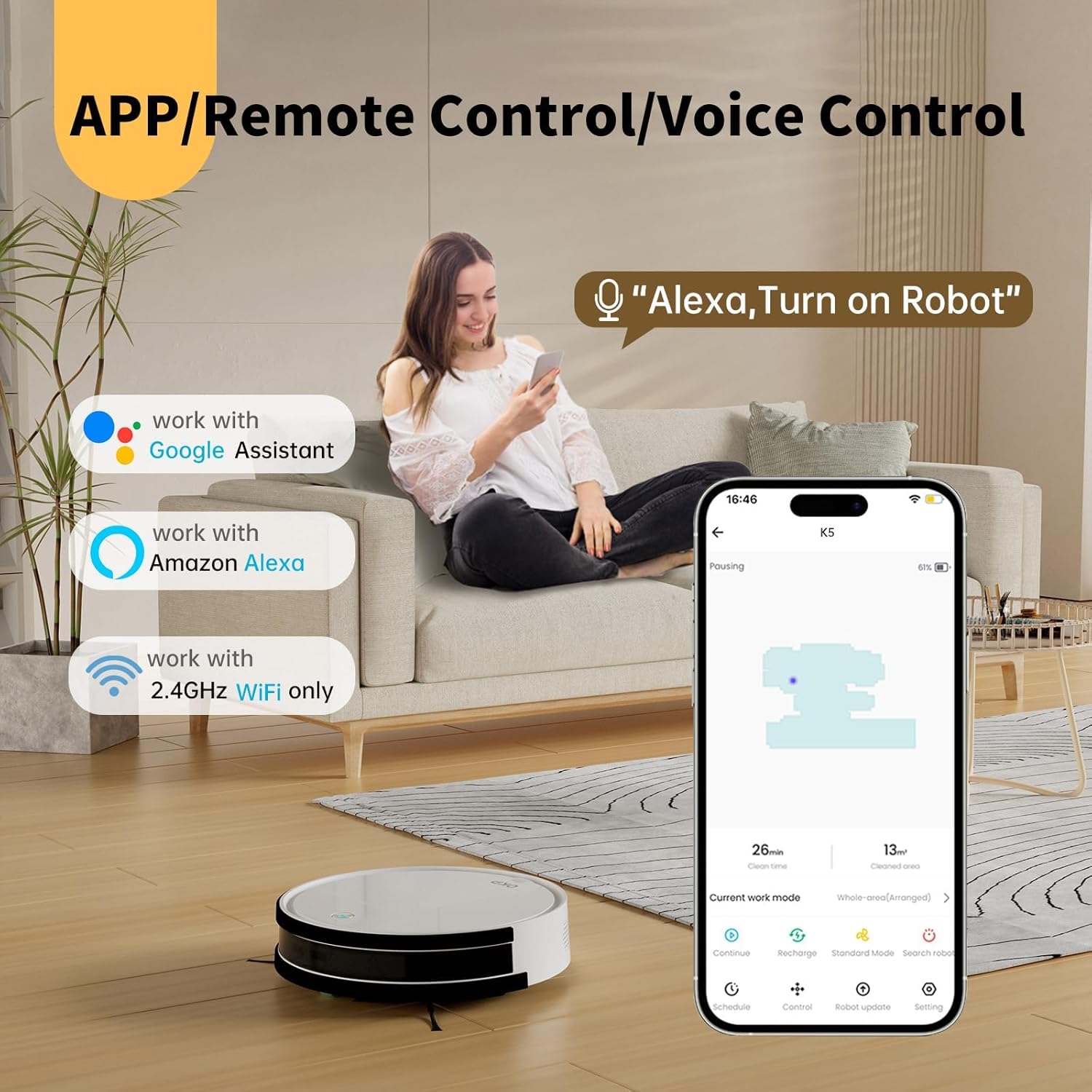
Image: The OKP Life K5 Robot Vacuum demonstrating its suction power, with illustrations of various debris types (debris, dust, beans, hair) being effectively vacuumed, indicating its versatility for different cleaning scenarios.
6. Maintenance
Parastina birêkûpêk performansa çêtirîn garantî dike û temenê robota weya valahiyê dirêj dike.
6.1 Valakirina Qutiya Zibilê
- Bişkoka vekirina qutiya tozê bikirtînin û qutiya tozê bikişînin derve.
- Qapaxa konteynirê veke û naveroka wê vala bike nav konteynirek çopê.
- Rinse the dustbin with water if necessary (ensure it is completely dry before reinserting).
6.2 Paqijkirina Parzûnê
- Fîlterê ji qutîya tozê derxînin.
- Ji bo rakirina tozê bi nermî li fîlterê bidin. Fîltera HEPA bi avê neşon.
- Li gorî bikaranînê, her 3-6 mehan carekê fîlterê biguherînin.
6.3 Firçeyên Alî yên Paqijkirinê
- Remove the side brushes by pulling them upwards.
- Remove any hair or debris wrapped around the brushes.
- Reattach the brushes. Replace if worn or damaged.
6.4 Paqijkirina Sensor û Têkiliyên Şarjkirinê
- Wipe the anti-drop sensors, anti-collision sensors, and charging contacts on both the robot and the charging dock with a clean, dry cloth.
- Keep these areas clean to ensure proper navigation and charging.
7. Destpêkirin
If your robot vacuum encounters issues, refer to the following common problems and solutions.
| Pirsegirêk | Sedema gengaz | Çare |
|---|---|---|
| Robot venagere. | Pîla kêm; Bişkoja elektrîkê girtî ye. | Charge the robot; Ensure the main power switch (if present) is ON. |
| Robot nikare şarj bike. | Têkiliyên şarjkirinê qirêj in; doka şarjkirinê elektrîk nagire. | Clean charging contacts; Ensure charging dock is plugged in and has power. |
| Robot gelek caran tê girtin. | Obstacles; Sensors dirty. | Clear cables, rugs, or small objects; Clean sensors. |
| Performansa paqijkirinê ya xirab. | Full dustbin; Clogged filter; Worn brushes. | Empty dustbin; Clean/replace filter; Clean/replace side brushes. |
| Girêdana bi Wi-Fi/Appê re nayê kirin. | Incorrect Wi-Fi band (only 2.4GHz supported); Incorrect password; Robot too far from router. | Ensure 2.4GHz Wi-Fi; Re-enter password; Move robot closer to router. |
Heke pirsgirêk berdewam bike, ji kerema xwe bi piştgiriya xerîdar re têkilî daynin.
8. Specifications
| Nîşan | Jiyana OKP |
| Navê Model | K5 |
| Suction Power | 2100 PA |
| Kapasîteya Dustbin | 550 ml |
| Çavkaniya Hêzê | Battery Powered |
| Faktora Form | Disc-shaped |
| Taybetmendiyên Taybet | Smart, Edge Cleaning, Obstacle Avoidance, Selective Room Cleaning, Bagless, Wi-Fi Connectivity, Remote Control, Voice Control (Alexa, Google Assistant), Automatic Charging, Multiple Cleaning Modes (Auto/Spot/Edge/Zigzag) |
| Pîvan (Nêzîkî) | 280mm (width) x 77mm (height) / 11.02 inches (width) x 3 inches (height) |
9. Garantî û Piştgirî
OKP Life products come with a standard manufacturer's warranty. Please refer to the warranty card included in your package or visit the official OKP Life webmalper ji bo merc û şertên garantiyê yên berfireh.
For technical support, troubleshooting assistance, or to order replacement parts, please contact OKP Life customer service through the contact information provided on their official website or within the OKP Life app.
Webmalper: Visit the OKP Life Store on Amazon