
1. Destpêk
Welcome to the HOTWAV Hyper 7 Pro rugged smartphone user manual. This guide will assist you in understanding and utilizing all the features of your new device. The Hyper 7 Pro is designed for durability and high performance, featuring Android 14, 5G connectivity, a 200MP camera, and a large 10800mAh battery.
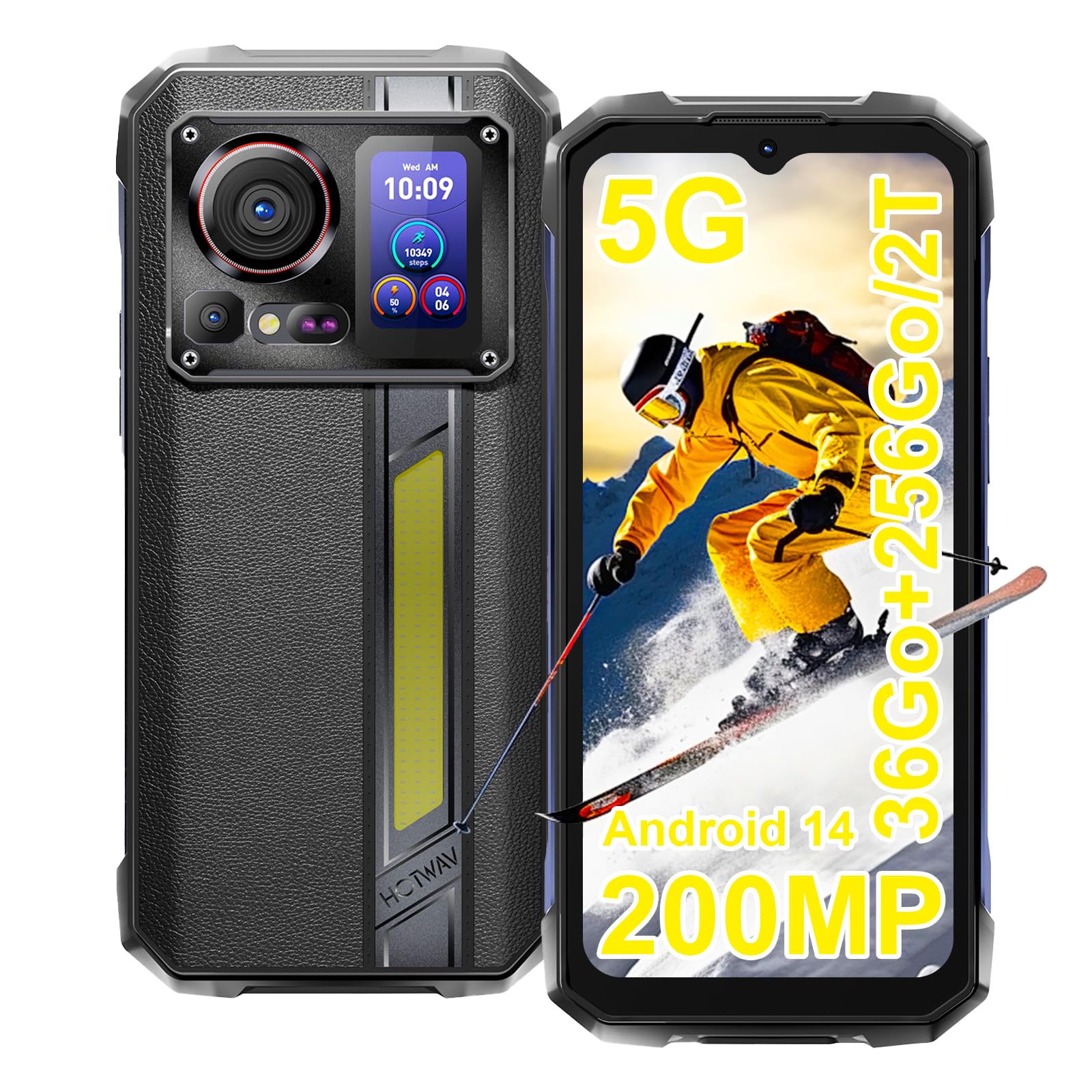
Image: The HOTWAV Hyper 7 Pro rugged smartphone, showcasing its robust design and rear display.
2. Çi di Qutîkê de ye
Upon unboxing your HOTWAV Hyper 7 Pro, please ensure all the following items are present:
- HOTWAV Hyper 7 Pro Smartphone
- Cable USB Type-C
- Adaptera Hêzê (33W)
- SIM Ejector Tool
- Pre-applied Screen Protector (Gorilla Glass)
- Additional Screen Protector
- Manual Bikarhêner

Image: All items included in the HOTWAV Hyper 7 Pro package, including the phone, charger, cables, and documentation.
3. Guide Setup
3.1. Installing SIM Cards and MicroSD Card
- Tepsiya karta SIM-ê li milê çepê yê cîhazê bibînin.
- Amûra derxistina SIM-ê têxe qulika piçûk a li kêleka tepsiyê û bi nermî bipêçe heta ku tepsi derkeve derve.
- Place your Nano-SIM card(s) and/or a microSD card (up to 2TB) into the designated slots on the tray. Ensure the gold contacts face downwards.
- Tepsiyê bi baldarî dîsa têxe nav telefonê heta ku li cihê xwe bicîh bibe.
3.2. Vekirina Destpêkê û Mîhengkirina Bingehîn
- Press and hold the Power button (located on the right side) until the HOTWAV logo appears.
- Ji bo hilbijartina zimanê xwe, girêdana bi toreke Wi-Fi û sazkirina hesabê xwe yê Google, rêwerzên li ser ekranê bişopînin.
- Configure your preferred security methods, such as Face ID and Fingerprint Unlock.
3.3. Barkirina Amûrê
Berî karanîna yekem, tê pêşniyar kirin ku hûn cîhazê bi tevahî bar bikin.
- Kabloya USB Type-C bi porta şarjê ya li binê telefonê ve girêdin.
- Serê din ê kabloyê bi adaptera hêzê ya 33W ya peyda kirî ve girêbide.
- Plug the power adapter into a wall outlet. The charging indicator will appear on the screen.

Image: The HOTWAV Hyper 7 Pro charging with its 33W fast charger, highlighting the OTG function.
4. Telîmatên Operating
4.1. Main Display and Navigation
The Hyper 7 Pro features a 6.6-inch FHD+ display with a 120Hz refresh rate for smooth interactions. Navigate through the Android 14 interface using standard touch gestures: tap, swipe, pinch-to-zoom.

Image: The vibrant 6.6-inch FHD+ display of the Hyper 7 Pro, showcasing its visual quality.
4.2. Secondary Rear Screen
The innovative secondary screen on the back provides quick access to essential information and controls without activating the main display.
- Nîşandana Demjimêr: View dem û dîroka niha.
- Kontrola kamerayê: Wek a viewfinder for rear camera selfies or quick shots.
- Music Applications: Control playback for music apps.
- Notifications: See incoming call and message alerts.
- Battery Status & Step Count: Monitor battery level and daily steps.

Image: The versatile secondary display on the back of the Hyper 7 Pro, showing different information widgets.
4.3. Fonksiyonên Kamerayê
The Hyper 7 Pro is equipped with a powerful camera system:
- Kamera paşîn: 200MP main sensor for high-resolution photos and a 24MP night vision camera with infrared LEDs for clear images in low light.
- Kamera pêş: 32MP for sharp selfies and video calls.
- AI Algorithms: Enhance saturation for night scenes, portraits, and landscapes.
- Tomarkirina Vîdyoyê: Supports 4K video capture.

Image: A visual comparison demonstrating the superior detail captured by the Hyper 7 Pro's 200MP camera.
4.4. Customizable Side Button
The red side button can be configured for three different actions:
- Çapemeniya Yekane: Assign to open a specific app or function.
- Çapemeniya Double: Assign to open a different app or function.
- Çapemeniya Dirêj: Assign to open a third app or function.
Configure these settings in the phone's 'Side Key Function' menu.

Image: The customizable side button on the Hyper 7 Pro, showing how different press actions can launch various applications.
4.5. Connectivity and Special Features
- Tora 5G: Enjoy high-speed internet connectivity.
- Wi-Fi 6 û Bluetooth 5.2: Advanced wireless connectivity for faster speeds and stable connections.
- NFC: For contactless payments and quick pairing with other devices.
- GPS: Integrated GPS, Beidou, Galileo, and GLONASS for precise navigation.
- CampRonahî: A powerful 280-lumen LED light on the back, with timer and SOS/Flash functions.
- Fonksiyona OTG: Connect USB devices or use your phone as a power bank to charge other devices.
- Moda lepikan: Enhanced touch sensitivity for use with gloves.
- Radyoya FM: Li radyoyên xweyên bijare guhdarî bikin.

Image: The powerful LED camping light of the Hyper 7 Pro, demonstrating its illumination capabilities.
5. Maintenance
5.1. Paqijkirina Amûrê We
The HOTWAV Hyper 7 Pro is IP68/IP69K rated for water and dust resistance. To clean, gently wipe the device with a soft, damp cloth. For stubborn dirt, you may rinse it under low-pressure fresh water, ensuring all ports are securely closed. Avoid using harsh chemicals or abrasive materials.

Image: The Hyper 7 Pro enduring water splashes, highlighting its waterproof design.
5.2. Lênêrîna Pîl
Ji bo dirêjkirina temenê bataryaya xwe ya 10800mAh:
- Ji germên zêde dûr bixin.
- Use only the provided 33W charger and USB-C cable.
- Pir caran nehêlin ku batarya bi tevahî vala bibe.
5.3. Nûvekirinên Nivîsbariyê
Regularly check for and install system updates to ensure optimal performance, security, and access to new features. You can usually find this option in your phone's Settings menu under 'System' or 'About phone'.
5.4. Rêveberiya Storage
With 256GB of internal storage and support for up to 2TB microSD cards, you have ample space. Periodically review ya te files and applications to free up space and maintain performance. Consider backing up important data to cloud storage or an external device.
6. Destpêkirin
If you encounter issues with your HOTWAV Hyper 7 Pro, refer to the following common solutions:
- Cîhaz Nakeve: Ensure the battery is charged. Connect the phone to the charger for at least 30 minutes, then try powering on again.
- Pirsgirêkên Barkirinê: Verify that the charger and USB-C cable are securely connected and undamaged. Try a different power outlet. Ensure the charging port is clean and free of debris.
- Network Connectivity Problems (5G/Wi-Fi): Check if Airplane Mode is off. Restart your phone. For mobile data, ensure your SIM card is correctly inserted and your plan is active. For Wi-Fi, forget the network and reconnect.
- Kamera Nexebitî: Restart the camera app or the phone. Check app permissions for the camera in Settings.
- Performansa Hêdî: Close unnecessary background apps. Clear cache for frequently used apps. Ensure you have sufficient storage space. Restart the device.
- Ekran bersiv nade: Restart the phone by holding the power button for an extended period (usually 10-15 seconds). If a hard reset is needed, consult the online support resources.
- Kêşeyên nermalavê: Ensure your Android 14 system is up to date. If issues persist, a factory reset might be necessary (back up your data first).
If these steps do not resolve your issue, please contact HOTWAV customer support for further assistance.
7. Specifications
| Taybetî | Specification |
|---|---|
| Nîşan | HOTWAV |
| Navê Model | Hyper 7 Pro |
| Operating System | Android 14 |
| Processor | MediaTek Dimensity 7050 Octa-core (2.6 GHz) |
| BERAN | 16 GB (expandable to 36 GB with virtual memory) |
| Storage Navxweyî | 256 GB |
| Expandable Storage | Up to 2 TB (microSD) |
| Mezinahiya Nîşandanê | 6.6 înç FHD+ |
| Resolution Display | 1080 * 2408 pixel |
| Refresh Rate | 120 Hz |
| Parastina Display | Corning Gorilla Glass 3 |
| Kapasîteya Pîl | 10800 mAh |
| Charging | Şarjkirina Bilez a 33W, Şarjkirina Berevajî ya OTG |
| Kamera paşîn | 200 MP Main, 24 MP Night Vision |
| Kamera pêş | 32 MP |
| Çareserkirina Vîdyoyê | 4K |
| Nirxandinên Berxwedanê | IP68, IP69K, MIL-STD-810H |
| Têkilî | 5G, Wi-Fi 6, Bluetooth 5.2, NFC |
| Rêserbirinî | GPS, Beidou, Galileo, GLONASS |
| Tîpa SIM Kartê | Dual Nano SIM |
| Dimensions | 17.5 x 8.2 x 1.8 cm |
| Pîvan | 406 gram |
8. Garantî û Piştgirî
8.1. Agahdariya Garantiyê
Your HOTWAV Hyper 7 Pro comes with a Garantiya 2-salî ji roja kirînê ve. Ev garantî kêmasiyên çêkirinê û xirabûnên di bin karanîna normal de vedihewîne. Ji kerema xwe delîla kirînê ji bo îdîayên garantiyê biparêzin.
8.2. Piştgiriya Mişterî
For any technical assistance, warranty claims, or product-related inquiries, please contact HOTWAV customer support through their official website or the contact information provided with your purchase. Ensure you have your device model and purchase details ready when contacting support.

Image: HOTWAV's commitment to customer satisfaction, including a 2-year warranty and dedicated customer service.