
Pêşkêş
This manual provides essential information for the installation, operation, maintenance, and troubleshooting of the Cisco Catalyst C9300L-24P-4X-E Network Essentials Switch. This device is designed for enterprise-grade access, offering 24 Gigabit PoE+ ports and four 10 Gbps SFP+ uplinks for robust network connectivity.
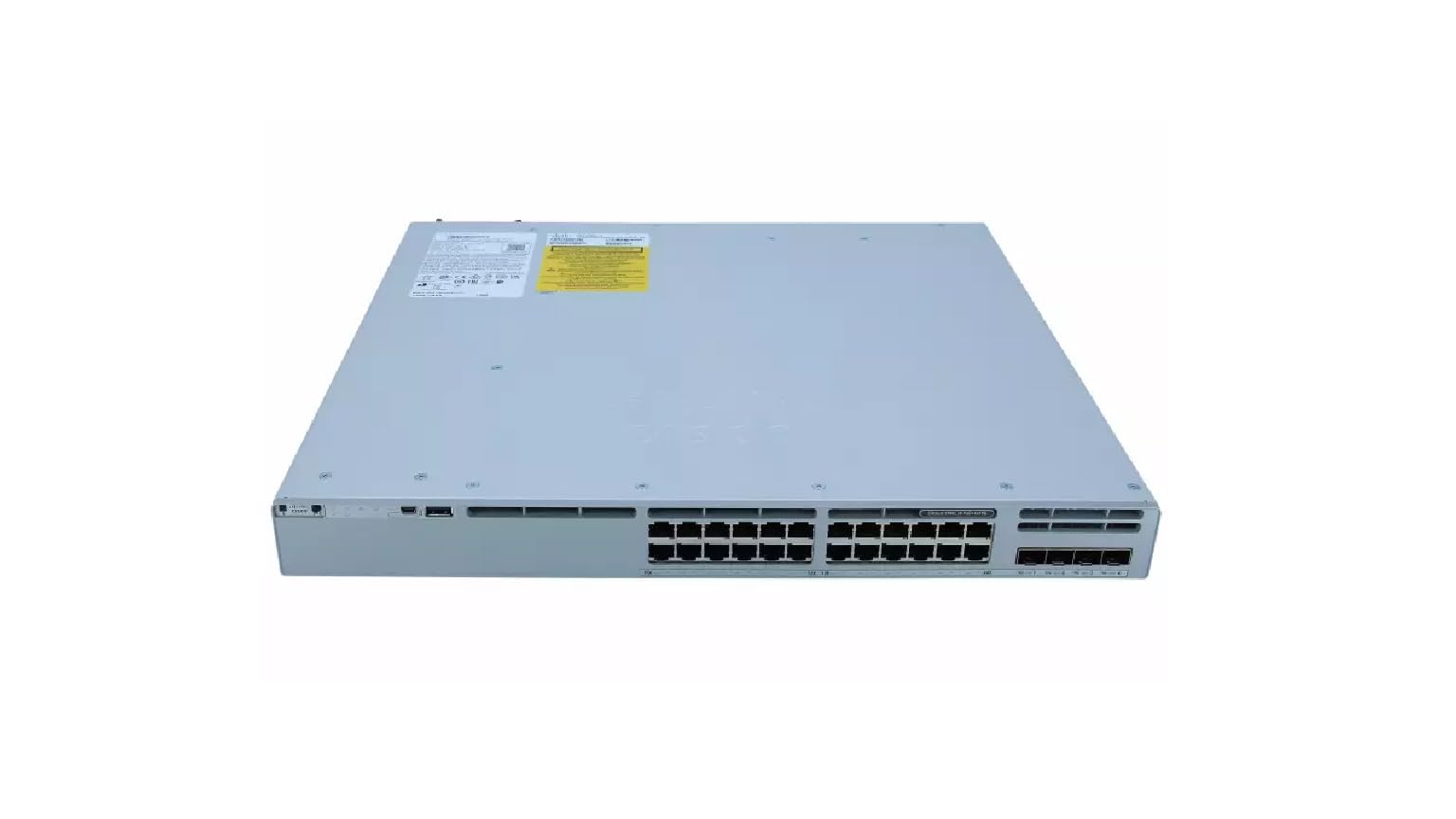
This image displays the rear panel of the Cisco Catalyst C9300L-24P-4X-E switch, highlighting the various ports, cooling fans, and the power supply unit.
Agahiyên Ewlekariyê
Ji bo rêgirtina li zirar û ziyanên li ser amûrê û ji ber vê yekê, tedbîrên ewlehiyê yên jêrîn bişopînin:
- Ensure proper grounding before connecting power.
- Guhêrkerê di hawîrdorên şil an jî pir şil de nexebitînin.
- Tenê kabloyên elektrîkê û aksesûarên pejirandî bikar bînin.
- Ji bo pêşîlêgirtina germbûna zêde, hewaya têra xwe bicîh bikin.
- Berî ku hûn her prosedurên lênêrîn an sazkirinê pêk bînin, elektrîkê qut bikin.
Naveroka pakêtê
Piştrast bikin ku pakêta we tiştên jêrîn dihewîne:
- Cisco Catalyst C9300L-24P-4X-E Switch
- Cord Power
- Kîta Mountkirina Rafê (eger hebe)
- Kabloya Konsolê (RJ-45 ber DB-9)
- Belgekirin (Rêbernameya Destpêkirina Bilez, Agahiyên Ewlehiyê)
Danasîna Fîzîkî
The Cisco Catalyst C9300L-24P-4X-E switch features a robust design for network deployments. The rear panel includes:
- 24 Gigabit Ethernet PoE+ Ports: For connecting network devices and providing power over Ethernet.
- 4x 10Gbps SFP+ Uplink Ports: For high-speed connections to the distribution or core layer.
- Porta konsolê: For command-line interface access.
- Portên USB: Bo file management and system configuration.
- Modular Power Supply Bay: For installing power supply units.
- Fansên sarkirinê: Ji bo rêveberiya germê.
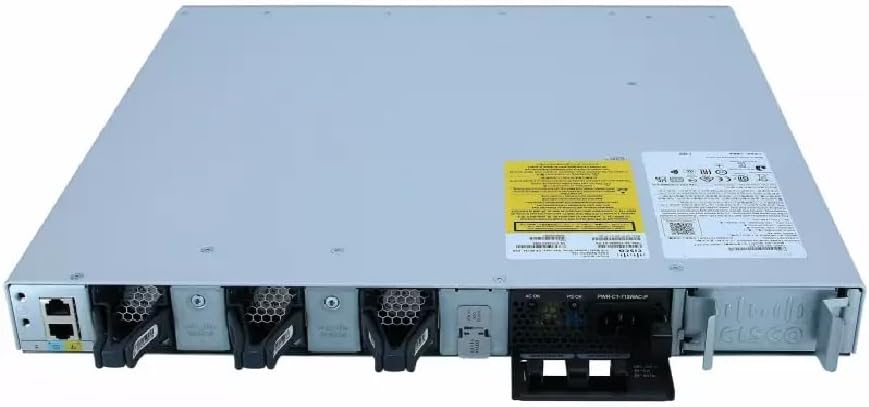
A berfireh view of the rear panel of the Cisco Catalyst C9300L-24P-4X-E switch, illustrating the 24 Gigabit PoE+ ports, four 10Gbps SFP+ uplink ports, and the modular power supply bay.
Damezirandin
1. Unpacking and Inspection
Carefully remove the switch from its packaging. Inspect the device for any signs of physical damage. If damage is found, contact your supplier immediately.
2. Sazkirina Guhestinê
The switch can be mounted in a standard 19-inch equipment rack or placed on a desktop.
- Rack-Mount Installation: Bi pêçan, braketên rafê yên hatine peyda kirin bi aliyên guhêrbarê ve girêdin. Bi pêçên rafê yên guncaw, guhêrbarê bi rafê ve girêdin.
- Sazkirina Sermaseyê: Ensure the surface is flat, stable, and allows for adequate ventilation around the switch. Attach the rubber feet (if provided) to the bottom of the switch.
3. Girêdana Hêza
Insert the power cord into the AC power connector on the rear of the switch. Connect the other end of the power cord to a grounded electrical outlet. Ensure the power supply is properly seated in its bay.
4. Girêdanên Torê
- Portên PoE+: Connect Ethernet cables from your network devices (e.g., IP phones, access points, surveillance cameras) to the 24 Gigabit PoE+ ports. These ports will provide both data connectivity and power.
- SFP+ Uplink Ports: Insert compatible SFP+ transceivers into the four 10Gbps SFP+ uplink ports. Connect fiber optic cables from these transceivers to your distribution or core network devices.
- Porta konsolê: For initial configuration or troubleshooting, connect a console cable from your management workstation to the console port on the switch.
Karkirina Guhestinê
1. Vekirina Destpêkê
After connecting power, the switch will automatically power on. Observe the system LED indicators for boot status. The system LED should turn green once the boot process is complete.
2. Veavakirina bingehîn
The Cisco Catalyst C9300L-24P-4X-E runs on Cisco IOS XE. Initial configuration can be performed via the console port using a command-line interface (CLI) or through a web-based graphical user interface (GUI) if enabled. Refer to Cisco's official documentation for detailed configuration guides.
3. Indicators LED
The switch features various LED indicators to provide status information:
- Pergala LED: Indicates overall system status (e.g., green for normal operation, amber for warning).
- PoE LED: Indicates Power over Ethernet status for the ports.
- LED-yên rewşa portê: Rewşa girêdanê û çalakiya her porta torê nîşan bide.
Lênerrînî
Regular maintenance ensures optimal performance and longevity of your switch:
- Paqijî: Periodically clean the exterior of the switch with a soft, dry cloth. Ensure ventilation openings are free from dust and debris. Do not use liquid cleaners directly on the device.
- Nûvekirinên Firmware: Keep the switch firmware updated to the latest version provided by Cisco. This ensures access to new features, security patches, and performance improvements.
- Kontrola Jîngehê: Maintain the operating environment within specified temperature and humidity ranges to prevent hardware failure.
- Rêveberiya Cable: Ensure all cables are neatly organized and properly secured to prevent accidental disconnections or damage.
Çareserkirina pirsgirêkan
If you encounter issues with your switch, consider the following troubleshooting steps:
- Hêz tune: Verify the power cord is securely connected to both the switch and the power outlet. Check the power source and any circuit breakers. Ensure the power supply unit is correctly installed.
- Girêdana Torê Tune ye: Check the link status LEDs on the affected ports. Ensure Ethernet cables are properly connected and undamaged. Verify connected devices are powered on and functioning correctly.
- Amûrê PoE Vêna Nake: Confirm the PoE+ port is enabled and the device is PoE compatible. Check the PoE budget and ensure it's not exceeded.
- Performansa Hêdî: Check for network congestion, duplex mismatches, or errors on ports. Ensure uplink bandwidth is sufficient.
- Accessing the Switch: If unable to access via network, try connecting directly to the console port for CLI access.
Specifications
| Taybetî | Hûrî |
|---|---|
| Nîşan | Cisco |
| Hejmara Model | C9300L-24P-4X-E |
| Hejmara Ports | 24 Gigabit PoE+ ports, 4x 10Gbps SFP+ uplinks |
| Interface | PoE, SFP+ |
| Rêjeya Veguheztina Daneyên | 1 Gigabits Per Second (Gigabit Ethernet), 10 Gigabits Per Second (Uplinks) |
| Voltage | 240 Volt (AC) |
| Switch Type | Managed, Fixed, PoE+, Layer 2 |
| Cureyê Materyalê Dozê | Pîlastîk |
| Amûrên Lihevhatî | Desktop, Laptop, Printer (and other network devices) |
Agahî Garantî
Ev hilber bi a 90 rojan garantiya sînorkirî. Please refer to the warranty documentation provided with your purchase for specific terms and conditions. For warranty claims, contact your reseller or the manufacturer's support channels.
Piştgiriya Teknîkî
For further assistance, technical support, or advanced configuration guidance, please refer to the official Cisco documentation available on their website. You may also contact your authorized Cisco reseller or support provider for specialized assistance.
Piştgiriya Cisco Webmalper: https://www.cisco.com/c/en/us/support/index.html