
TELLUR Obia PRO
TELLUR Obia PRO 60W Bluetooth Speaker User Manual
Model: Obia PRO | Brand: TELLUR
1. Destpêk
This manual provides essential information for the safe and efficient operation of your TELLUR Obia PRO 60W Bluetooth Speaker. Please read this manual thoroughly before using the product and retain it for future reference.
2. Agahiyên Ewlekariyê
- Axêverê ji bo demên dirêj li ber germahiyên zêde an tîrêjên rojê yên rasterast nehêlin.
- Dûr nexin an jî dengbêj ji bandorên xurt re nehêlin.
- Do not attempt to disassemble or modify the speaker. This will void the warranty.
- Keep the speaker away from medical devices.
- Ensure the charging port cover is securely closed when near water to maintain IPX6 water resistance.
- Tenê kabloya şarjê û adaptora hêzê ya diyarkirî bikar bînin.
3. Naveroka pakêtê
Piştrast bike ku hemî tişt di pakêtê de hene:
- TELLUR Obia PRO 60W Bluetooth Speaker
- Cable Charging USB
- 3.5mm AUX Cable Audio
- Manual Bikarhêner (ev belge)
4. Hilbera Serîview û Controls
Familiarize yourself with the speaker's components and control buttons.

jimar 4.1: Pêşde view of the TELLUR Obia PRO speaker, showcasing the main grille, control panel, and integrated LED lights on the handle and side woofers.
4.1 Panela Kontrolê

jimar 4.2: Bi berfirehî view of the control buttons located on the top panel of the speaker.
- Volume Down (-) / Previous Track: Press briefly to decrease volume. Press and hold to go to the previous track.
- Volume Up (+) / Next Track: Press briefly to increase volume. Press and hold to go to the next track.
- LED Light Mode Button: Press to cycle through different LED light modes.
- Bişkojka Hêzê: Press and hold to power on/off. Briefly press to play/pause music.
- TWS (True Wireless Stereo) Button: Press to activate TWS pairing mode.
- Bişkojka Modê (M): Press to switch between Bluetooth, USB, and AUX input modes.
4.2 Kevir / Derketin
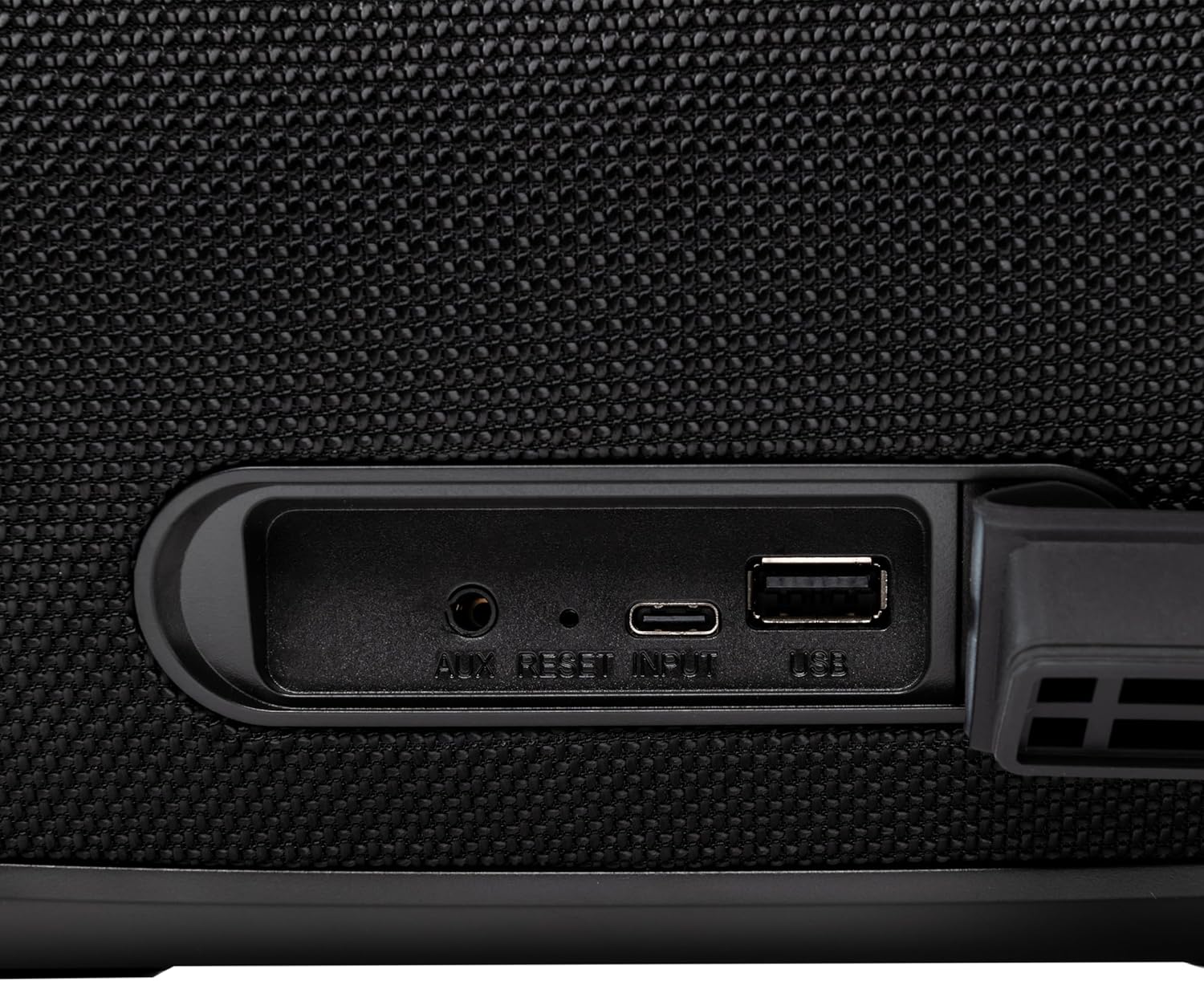
jimar 4.3: Close-up of the protected input/output ports on the rear of the speaker.
- Porta AUX-IN: Ji bo girêdana cîhazên dengî yên derveyî bi rêya kabloyek dengî ya 3.5 mm.
- Bişkojka Vegerandinê: Use a thin object to press and reset the speaker if necessary.
- USB-C Têketin: Ji bo barkirina axaftvan.
- Porta USB-A: For playing MP3 audio files from a USB drive or for power bank functionality.
5. Sazkirin
5.1 Barkirina Axêverê
Before initial use, fully charge the speaker. The speaker also functions as a power bank to charge other devices via its USB-A port.
- Connect the USB charging cable to the USB-C input port on the speaker.
- Serê din ê kabloyê bi adapterek hêzê ya USB-yê ya lihevhatî ve girêde (ne di nav de ye).
- The charging indicator light will illuminate. It will turn off once charging is complete.
- The battery level can be displayed on your connected phone when paired via Bluetooth.
5.2 Hêzdarkirin/Off
- Hêzdarkirin: Bişkojk û bigire Bişkojka Hêzê for approximately 3 seconds until you hear an audible prompt and the LED lights activate.
- Ji bo Veqetandinê: Bişkojk û bigire Bişkojka Hêzê for approximately 3 seconds until you hear an audible prompt and the LED lights turn off.
6. Telîmatên Operating
6.1 Pairkirina Bluetooth
The speaker uses Bluetooth v5.3 for stable wireless connection up to 10 meters.
- Piştrast bike ku axaftvan vekirî ye û di moda Bluetooth-ê de ye (bi LED-a şîn a biriqok ve tê nîşandan). Heke ne wisa be, pêl bişkoka Bişkojka Modê (M) ji bo guhertina moda Bluetooth-ê.
- Bluetooth-ê li ser cîhaza xwe ya mobîl (smartphone, tablet, hwd.) çalak bike.
- Search for available Bluetooth devices and select "TELLUR Obia PRO" ji navnîşê.
- Once paired, the speaker will emit an audible confirmation, and the blue LED will stop flashing.
- The speaker will automatically reconnect to the last paired device when powered on, if available.

jimar 6.1: The TELLUR Obia PRO speaker wirelessly connected to a smartphone, ready for audio playback.
6.2 Fonksiyona Stereo ya Bêtêl a Rastîn (TWS)
TWS allows you to pair two Obia PRO speakers for a stereo sound experience.
- Ensure both Obia PRO speakers are powered on and in Bluetooth mode, but not yet paired with any device.
- Li ser yek axaftvan (ev dê axaftvanê sereke be), pêl bişkoka Bişkojka TWS. The speaker will enter TWS pairing mode, indicated by a flashing light.
- The two speakers will automatically connect to each other. Once connected, you will hear an audible confirmation, and the TWS indicator light on both speakers will become solid.
- Now, connect your mobile device to the primary speaker via Bluetooth as described in Section 6.1. The audio will play in stereo across both speakers.
6.3 Multiple Link Technology
This technology allows connecting an unlimited number of Obia PRO speakers wirelessly for a synchronized audio experience. Refer to the manufacturer's website or specific instructions for detailed setup of Multiple Link.
6.4 Lêdana USB (MP3)
Dengê MP3 bilîzin files directly from a USB flash drive (up to 128GB).
- Flash ajokek USB-ya ku MP3 tê de tê de têxe files into the USB-A port.
- Bitikîne Bişkojka Modê (M) to switch to USB mode. The speaker will automatically begin playing music from the USB drive.
- Bi kar tînin Volume Up / Down û Bişkojka Hêzê (for play/pause) to control playback.
6.5 AUX-IN Connection
Connect non-Bluetooth devices using the 3.5mm AUX audio cable.
- Connect one end of the 3.5mm AUX audio cable to the AUX-IN port on the speaker.
- Connect the other end to the audio output jack of your external device (e.g., MP3 player, laptop).
- Bitikîne Bişkojka Modê (M) ji bo guhertina moda AUX.
- Ji cîhaza xwe ya derveyî lêdanê û deng kontrol bikin.
6.6 Banga bêdestpêk
When connected to a smartphone via Bluetooth, the speaker's built-in microphone allows for hands-free calls.
- Bersiv/Dawiya Bangê: Bi kurtî pêl pê bikin Bişkojka Hêzê.
- Bang red kirin: Bişkojk û bigire Bişkojka Hêzê ji bo 2 seconds.
6.7 Modên Ronahiya LED
The speaker features integrated LED lights with multiple display modes.
- Bitikîne Button Mode Light LED to cycle through available light patterns and colors.
- Bişkojk û bigire Button Mode Light LED to turn the lights off or on.

jimar 6.2: A user interacting with the LED light mode button to change the speaker's lighting effects.
6.8 Equalizer Settings (Indoor/Outdoor)
The speaker allows for equalizer customization for different environments. Specific controls for this are not detailed in the provided data, but typically involve a dedicated button or a combination of existing buttons. Refer to the product's quick start guide or manufacturer's website for precise instructions on adjusting the equalizer.
7. Maintenance
7.1 Paqijkirin
- Axêverê bi qumaşek nerm û hişk paqij bikin.
- Paqijkerên aşınker, alkol, an çareserkerên kîmyewî bikar neynin.
7.2 Berxwedana Avê (IPX6)
The Obia PRO speaker is rated IPX6, meaning it is protected against high-pressure water jets from any direction. This makes it suitable for outdoor use and environments where it might be exposed to splashes or rain.
- Ensure the rubber cover for the charging and AUX ports is securely closed before exposing the speaker to water.
- Dengbêj di nav avê de nehêlin.
- Piştî ku bi avê re rû bi rû ma, berî şarjkirinê axaftvanê hişk paqij bikin.
7.3 Lênêrîna Pîl
- Ji bo dirêjkirina temenê bateriyê, ji valakirina pir caran a bateriyê bi tevahî dûr bisekinin.
- Ji bo parastina rewşa bateriyê, her çend ne di kar de be jî, axaftvanê bi rêkûpêk şarj bikin.
- Dema ku hûn ji bo demek dirêj bikar neynin, axaftvanê li cîhek sar û hişk hilînin.
8. Destpêkirin
| Pirsegirêk | Sedema gengaz | Çare |
|---|---|---|
| Axaftvan vênanake. | Pîlê kêm. | Axêverê bi tevahî şarj bikin. |
| Bi rêya Bluetooth-ê nayê hevberkirin. | Axaftvan ne di moda cotkirinê de ye; Bluetooth-a cîhazê girtî ye; pir dûrî axêver e. | Ensure speaker is in Bluetooth mode (flashing LED). Turn on Bluetooth on your device. Move device closer to speaker (within 10m). |
| Deng tune. | Volume too low; incorrect mode selected; device not playing. | Increase speaker and device volume. Press Bişkojka Modê (M) to select correct input. Ensure audio is playing on the connected device. |
| Hevberdana TWS têk diçe. | Speakers already paired to a device; not both Obia PRO models. | Disconnect both speakers from any Bluetooth devices. Ensure both speakers are Obia PRO models. Try TWS pairing again. |
| Lîdana USB-ê naxebite. | Ajokera USB-ê bi awayekî rast nehatiye formatkirin; nayê piştgirîkirin file type; drive capacity too large. | Piştrast bike ku ajokera USB-ê bi FAT32-ê hatiye formatkirin. Tenê MP3 ye. files are supported. Max capacity 128GB. |
9. Specifications
| Navê Model | Obia PRO |
| Nîşan | TELLUR |
| Hêza derketinê | 60W (2x 20W RMS subwoofers, 2x 10W RMS tweeters) |
| Guhertoya Bluetooth | v5.3 |
| Rêzeya bêhêl | Heta 10 metreyan |
| Bersiva Frequency | 80 MHz (Note: This value is unusual for speaker frequency response and may be a typo in source data. Typically measured in Hz-kHz.) |
| Impedance | 4 ohms |
| Modes Audio | Bluetooth, USB (MP3), AUX-IN |
| Piştgiriya USB | USB 2.0/3.0, up to 128GB (MP3 format) |
| Berxwedana avê | IPX6 |
| Kapasîteya Pîl | 5400 mAh |
| Dema Playback | Heta 12 saetan (bi dengekî navîn) |
| Fonksiyona Power Bank | Yes, via USB-A port |
| Pîvan (L x W x H) | 37.7 x 17 x 18 cm |
| Pîvan | 3.48 kg |
| Mal | Pîlastîk |
| Reng | Reş |
Nîşe: Specifications bêyî agahdariya pêşîn têne guhertin.
10. Garantî û Piştgirî
TELLUR products are manufactured to the highest quality standards. For information regarding warranty terms, technical support, or service, please refer to the warranty card included with your product or visit the official TELLUR website.
Agahiyên Têkilî: Ji kerema xwe biçin www.tellur.com ji bo agahdariya piştevaniya herî dawî.