
1. Destpêk
This manual provides detailed instructions for the setup, operation, and maintenance of your edaiser Swivel Keyboard Case. Please read this manual thoroughly before using the product to ensure proper function and longevity. This keyboard case is designed to enhance your iPad mini experience by providing a physical keyboard and trackpad, along with robust protection and versatile viewing angles.
2. Naveroka pakêtê
- edaiser Swivel Keyboard Case
- Kabloya barkirinê ya USB-C
- Manual Bikarhêner
3. Compatibility
Ev qutiya klavyeyê bi taybetî ji bo modelên iPad-ê yên jêrîn hatiye çêkirin:
- 2021 iPad mini 6th Generation (8.3-inch): Model Numbers A2567, A2568, A2569
- 2024 iPad mini 7th Generation (8.3-inch): Model Numbers A2993, A2995, A2996
To verify your iPad model number, check the back of your iPad or go to Settings > General > About > Model Number.

Image: Compatible iPad models and their model numbers.
4. Taybetmendiyên Hilberê
4.1 Swivel and Rotation
The keyboard case features a 360-degree rotatable hinge and 180-degree fold, allowing for multiple viewing and typing modes:
- Moda Laptopê: Standard laptop-like setup for typing.
- Stand Mode: Ideal for watching videos or presentations.
- Moda Konê: Suitable for touch-based interactions or drawing.
- Mode Tablet: Fold the keyboard back for a traditional tablet experience.

Image: iPad mini in laptop mode, demonstrating swivel and rotation.

Image: Different usage modes of the keyboard case.
4.2 RGB Backlit Keyboard and Trackpad
The integrated keyboard features RGB backlighting for comfortable typing in low-light conditions. The precision trackpad supports multi-touch gestures for enhanced navigation within iPadOS.
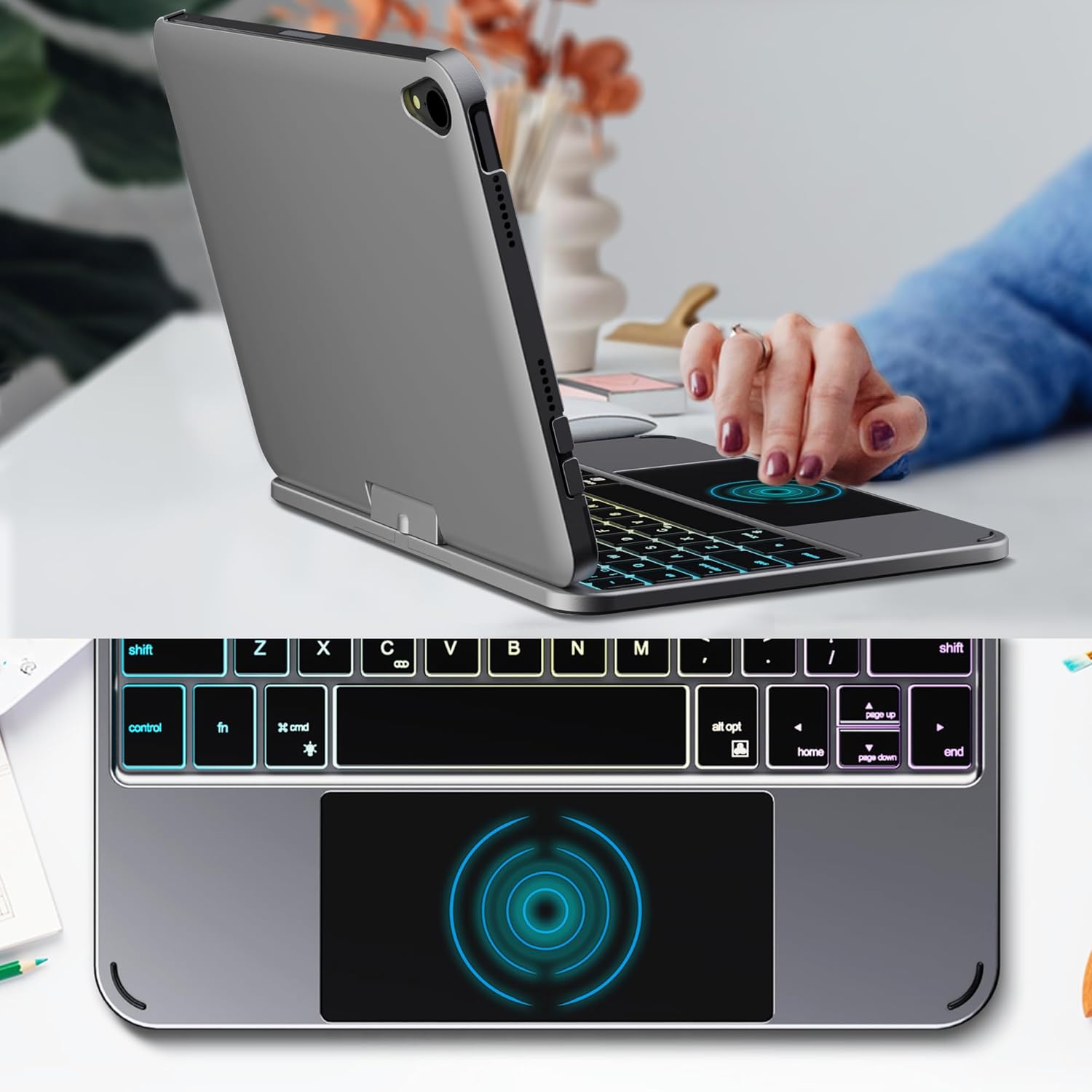
Image: Backlit keyboard and trackpad in use.

Image: Keycap and touchpad dimensions, and available colors.
4.3 Protection and Design
The case provides comprehensive protection for your iPad mini, safeguarding it from scratches and minor impacts. It features precise cutouts for the camera, charging port, and speakers.

Image: Case features and drop protection illustration.
5. Rêwerzên Sazkirinê
5.1 Installing Your iPad mini
- Gently align your iPad mini with the case.
- Press the iPad firmly into the case until it is securely seated. Ensure all edges are properly covered and ports/buttons are accessible.
Video: Demonstrates the installation of the iPad mini into the keyboard case, followed by usage in laptop mode, trackpad interaction, and backlight activation.
5.2 Pairkirina Bluetooth
- Klavyeyê veke: Locate the power button on the keyboard and press it to turn on the device.
- Activate Bluetooth on the keyboard: Press the "Fn" key and the "C" key simultaneously to activate Bluetooth pairing mode. The Bluetooth indicator light will flash.
- Open iPad Settings: Li ser iPad-a xwe, biçin Settings > Bluetooth.
- Bihevgirêdan: In the Bluetooth device list, find "iPad keyboard" and tap to connect. A pairing request may appear; confirm it.
- The Bluetooth indicator light on the keyboard will stop flashing once successfully paired.
Video: Demonstrates the rotation of the iPad within the case, various usage modes, and the Bluetooth pairing process for the keyboard.
6. Telîmatên Operating
6.1 Fonksiyonên Klavyeyê
The keyboard includes standard keys and function keys specific to iPadOS:
- Fn + C: Activates Bluetooth pairing mode.
- Fn + Light Bulb icon: Toggles keyboard backlight on/off and cycles through brightness levels.
- Fn + RGB icon: Changes backlight color (if multiple colors are supported).
- Mifteya malê: Returns to the iPad home screen.
- Bişkojka lêgerînê: Activates iPad search.
- Bişkojkên Volume: Adjusts iPad volume.
- Bişkojkên kontrola medyayê: Play/Pause, Previous Track, Next Track.
6.2 Trackpad Gestures
The trackpad supports various multi-touch gestures for efficient navigation:
- Tepika yek-tilî: Left-click.
- Tîpa du tilî: Right-click (context menu).
- Scroll du-tilî: Scroll up/down or left/right.
- Sê tiliyan ber bi jor ve hejandin: Go to the home screen.
- Three-finger swipe up and hold: Open the App Switcher.
- Sê tiliyan bişkînin ber bi çep/rastê: Switch between open apps.
- Bi zoomê bikişînin: Zoom in/out on content.
7. Şarjkirin û Pîl
The keyboard case is powered by a built-in rechargeable battery. Use the provided USB-C cable to charge the keyboard.
- Kapasîteya Pîl: 500 mAh
- Dema Rawestandinê: Heta 90 rojan
- Dema Xebatê: Up to 180 hours (without backlight)
- Charging Indicator: The LED indicator will show charging status.
Connect the USB-C cable to the charging port on the keyboard and the other end to a USB power adapter (not included).

Image: Battery specifications and charging port location.
8. Maintenance
- Qutiya klavyeyê ji şilek û germahiyên zêde dûr bigirin.
- Clean the case and keyboard with a soft, damp çît. Ji kîmyewiyên dijwar dûr bixin.
- Hewl nedin ku hilberê ji hev veqetînin.
9. Destpêkirin
9.1 Klavyeyê bi rêya Bluetoothê ve girêdayî nabe
- Piştrast bike ku klavyeyê vekiriye û bi tevahî şarj kiriye.
- Piştrast bikin ku Bluetooth li ser iPad-a xwe çalak e.
- Press "Fn" + "C" on the keyboard to enter pairing mode.
- Amûrê di mîhengên Bluetooth-ê yên iPad-a xwe de ji bîr bike û hewl bide ku ji nû ve hevber bike.
- Hem iPad-a xwe û hem jî klavyeyê ji nû ve bidin destpêkirin.
9.2 Bişkok Bersiv Nadin
- Check the battery level of the keyboard.
- Piştrast bike ku klavyeyê bi rêya Bluetooth-ê bi rêkûpêk ve girêdayî ye.
- Li dora mifteyan paqij bikin da ku her bermahiyê jê bikin.
9.3 Trackpad Naxebite
- Piştrast bike ku klavyeyê bi rêya Bluetooth ve girêdayî ye.
- Check iPad settings: Settings > Giştî > Trackpad & Mouse to ensure it's enabled and sensitivity is adjusted.
- Hem iPad-a xwe û hem jî klavyeyê ji nû ve bidin destpêkirin.
10. Specifications
| Taybetî | Specification |
|---|---|
| Nîşan | edaiser |
| Hejmara Model | edaiser Swivel 83ATS |
| Modelên Lihevhatî | Apple iPad mini 6th Gen (8.3-inch), iPad mini 7th Gen (A17 Pro) |
| Têkilî | Bluetooth |
| Tîpa Klavyeyê | Compact with RGB Backlight |
| Trackpad | Integrated, Multi-touch |
| Çavkaniya Hêzê | Battery Powered |
| Kapasîteya Pîl | 500 mAh |
| Dema Rawestandinê | Heta 90 rojan |
| Dema Xebatê | Up to 180 hours (without backlight) |
| Charging Port | USB-C |
| Hejmara Keys | 64 |
| Keycap Size | 11.5mm x 12.9mm |
| Touchpad Size | 98.4mm x 49.7mm |
11. Garantî û Piştgirî
For warranty information and customer support, please refer to the official edaiser webmalperê an rasterast bi karûbarê xerîdar re têkilî daynin. Ji bo îdiayên garantiyê fatûreya kirîna xwe biparêzin.