
WONDOM ADAU1701
WONDOM ADAU1701 DSP Preamp: 2-In 4-Out Digital Signal Processor Instruction Manual
Model: ADAU1701
Pêşkêş
This manual provides detailed instructions for the installation, operation, and maintenance of your WONDOM ADAU1701 DSP Preamp. This unit is designed for advanced audio signal processing, offering a 2-input, 4-output configuration with digital crossover capabilities and support for SigmaStudio programming.
Taybetmendiyên sereke hene:
- Powered by ADAU1701 DSP, a 28/56bit Digital Signal Processor Engine.
- 24bit ADC/DAC Resolution Ratio with a 48kHz Sampling Rate.
- Unbalanced 2-Input, 4-Output Preamp Yekbûn.
- USB Type-C Port for DC 5V Power.
- Four Potentiometers for High-Pass Filter (HPF), Low-Pass Filter (LPF), and Volume Control.
- Integrated Mute & Phase Switches.
- Supports SigmaStudio Programming when connected with an ICP5 programmer.
- Open-sourced Demo Program & HEX Files are provided for restoring factory settings.
Naveroka pakêtê
Ji kerema xwe piştrast bikin ku hemî tişt di pakêtê de hene:
- WONDOM ADAU1701 DSP Preamp Yekbûn
- USB Type-C Cable (for power)
- Manual Bikarhêner (ev belge)
- (Optional: ICP5 Programmer, sold separately for advanced programming)
Agahiyên Ewlekariyê
- Ensure the power supply matches the device's requirements (DC 5V, 1A via USB Type-C).
- Amûrê li ber şilbûn an germahiyên zêde nehêlin.
- Avoid opening the enclosure unless you are a qualified technician.
- Dûr negihêjin zarokan.
Damezirandin
1. Girêdanên Fizîkî
Refer to the diagrams below for proper connection of audio inputs, outputs, and power.

Wêne 1: Girêdanên Panela Paşîn. This image shows the rear panel of the ADAU1701 DSP Preamp, highlighting the DC Input (5V, 1A), ICP Port, Line In (ADC0 Left, ADC1 Right), and Line Out (DAC0 Right, DAC1 Left, DAC2 Right, DAC3 Left) RCA jacks.
- Têkiliya Hêzê: Connect a DC 5V, 1A power supply to the USB Type-C port labeled "DC INPUT 5V, 1A" on the rear panel.
- Ketina Deng: Connect your audio source (e.g., media player, pre-amplifier) to the "LINE IN" RCA jacks (ADC0 Left, ADC1 Right).
- Derketina Deng: Girêdana xwe amplifiers or powered speakers to the "LINE OUT" RCA jacks. The default configuration provides 2-channel mid-range output (DAC2 Right, DAC3 Left) and 2-channel bass output (DAC0 Right, DAC1 Left) for a 2-way digital crossover setup.
- ICP Port: This port is used for connecting an ICP5 programmer (sold separately) for advanced SigmaStudio programming.
2. Vekirina Destpêkê
Once all connections are secure, apply power to the unit. The "POWER" LED on the front panel should illuminate, indicating the device is operational.
Telîmatên Operating
The WONDOM ADAU1701 DSP Preamp features several controls on its front panel for direct adjustment, as well as advanced programming capabilities via SigmaStudio.

Wêne 2: Kontrolên Panela Pêşiyê. This image displays the front panel, showing the Power LED, Busy LED, SW1 (Mute) and SW2 (Phase) switches, and four potentiometers (POT1, POT2, POT3, POT4) for various audio adjustments.
Kontrolên Panela Pêşî:
- Hêza LED: Nîşan dide ku cîhaz vekiriye.
- BUSY LED: Indicates DSP activity.
- SW1 (Mute Switch): Toggles audio output mute on/off.
- SW2 (Phase Switch): Adjusts the phase of the audio output.
- POT1 (MP3 / ADC2): Controls the High-Pass Filter (HPF) for Bank B (3kHz-20kHz).
- POT2 (MP8 / ADC3): Controls the Low-Pass Filter (LPF) for Bank A (210Hz-3kHz).
- POT3 (MP9 / ADC0): Controls the High-Pass Filter (HPF) for Bank A (10Hz-310Hz).
- POT4 (VOL): Hêjmara giştî kontrol dike.
Digital Crossover Configuration:
The unit's default output is configured as a 2-way digital crossover, providing dedicated outputs for bass and mid-range frequencies.
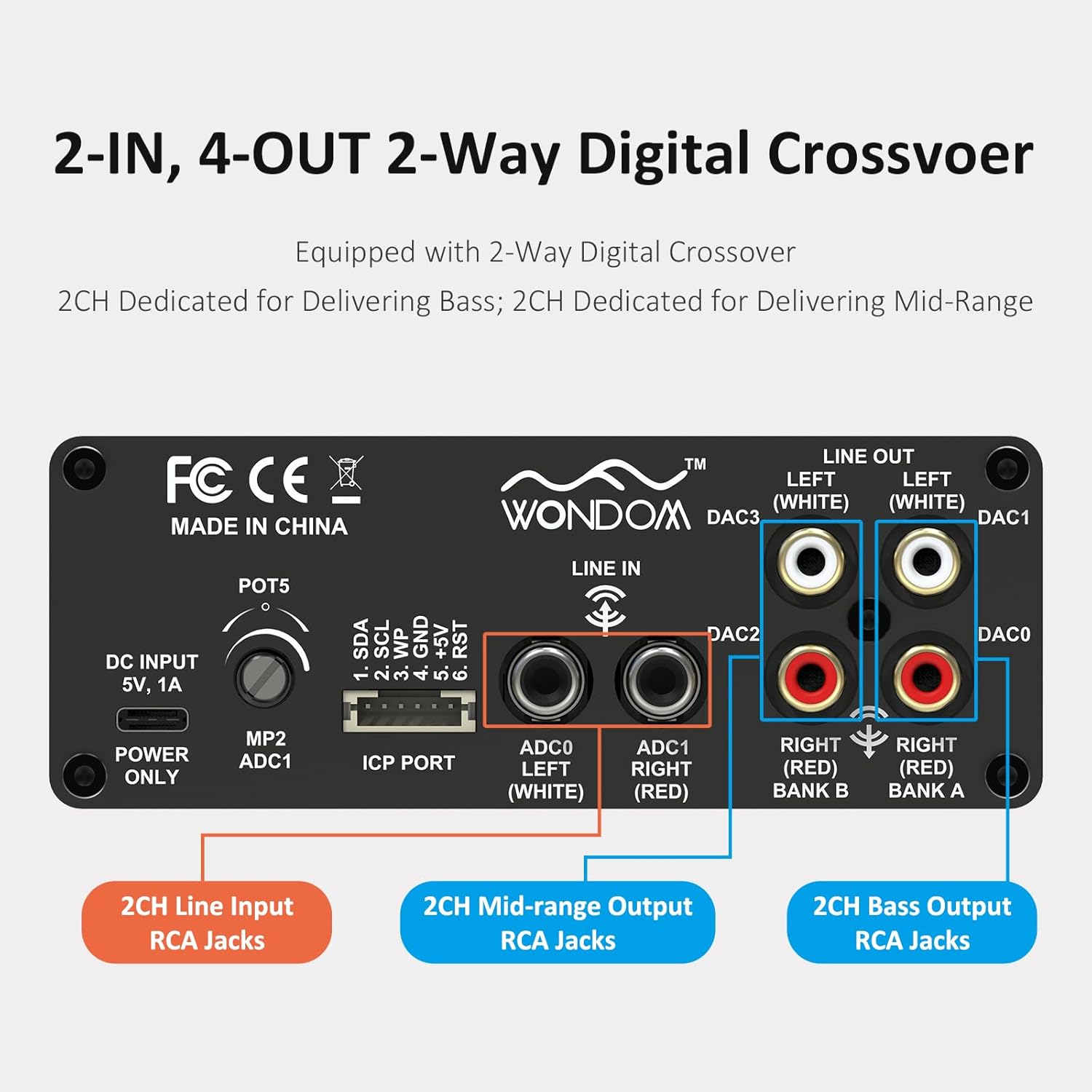
Figure 3: 2-In, 4-Out Digital Crossover. This diagram shows the RCA jack assignments for 2-channel Line Input, 2-channel Mid-range Output, and 2-channel Bass Output, facilitating a 2-way digital crossover setup.
- 2CH Line Input: ADC0 Left (White), ADC1 Right (Red).
- 2CH Mid-range Output: DAC2 Right (Red), DAC3 Left (White).
- 2CH Bass Output: DAC0 Right (Red), DAC1 Left (White).
SigmaStudio Programming:
For advanced customization and fine-tuning of the DSP functions, the unit supports programming via Analog Devices' SigmaStudio software. An ICP5 programmer (sold separately) is required to connect the DSP unit to your computer.

Figure 4: SigmaStudio Programming Setup. This image illustrates the connection between the DSP unit and an ICP5 programmer, along with a visual representation of the SigmaStudio graphical programming interface.
- Software: Download and install SigmaStudio from the Analog Devices website.
- Hardware: Connect the ICP5 programmer to the ICP Port on the DSP unit and to your computer via USB.
- Bernamekirin: Utilize the open-sourced demo program and HEX files provided by WONDOM to get started or to restore factory settings. All terminal functions can be tailored to specific needs using SigmaStudio.
Lênerrînî
- Yekîneyê paqij bihêlin û wê bi qumaşek nerm û hişk paqij bikin.
- Ji karanîna kîmyewî yên hişk an paqijkerên abrasive dûr bixin.
- Ji bo rêgirtina li germbûna zêde, li dora cîhazê hewakirina têr peyda bikin.
- Regularly check all cable connections for secure fit.
Çareserkirina pirsgirêkan
| Pirsegirêk | Sedema gengaz | Çare |
|---|---|---|
| Hêz tune ye / LED-a Hêzê vemirî ye | Incorrect power supply, loose connection, faulty cable. | Verify DC 5V, 1A power supply. Check USB Type-C cable connection. Try a different power source or cable. |
| Derketina deng tune | Incorrect input/output connections, Mute switch engaged, volume too low, faulty audio cables. | Check all RCA connections. Ensure SW1 (Mute) is disengaged. Increase POT4 (Volume). Test with different audio cables. |
| Audible hiss or noise | Ground loop, interference, power supply noise, high gain settings. | Ensure all components are properly grounded. Use a high-quality, stable 5V power supply (a separate USB power bank/battery can help reduce noise from PC USB). Reduce gain settings if applicable. |
| Cannot connect to SigmaStudio | ICP5 programmer not connected or faulty, DSP not powered, incorrect software drivers. | Ensure ICP5 programmer is correctly connected to the DSP and computer. Verify DSP unit is powered on. Install SigmaStudio drivers in administrator mode (as suggested by user reviews). |
Specifications
| Taybetî | Hûrî |
|---|---|
| DSP Chip | ADAU1701 (28/56bit Digital Signal Processor) |
| ADC/DAC Resolution | 24-bit |
| Sampling Rêjeya | 48 kHz |
| Veavakirina Input | 2-Input (Unbalanced RCA) |
| Veavakirina derketinê | 4-Output (Unbalanced RCA, default 2-way digital crossover) |
| Navê min | DC 5V, 1A (via USB Type-C) |
| Controls | 4 Potentiometers (HPF/LPF/Volume), Mute Switch, Phase Switch |
| Programming Support | SigmaStudio (requires ICP5 programmer, sold separately) |
| Pîvan (L x W x H) | 4.72 x 4.72 x 1.77 inches |
| Pîvan | 1.23 lîre |
| Xanî | Sleek Aluminum Enclosure |
Garantî û Piştgirî
WONDOM products are manufactured by Sure Electronics. For warranty information, technical support, and further assistance, please refer to the official Sure Electronics webmalperê an rasterast bi karûbarê xerîdar a wan re têkilî daynin. Rapora kirîna xwe wekî delîla kirînê ji bo îdîayên garantiyê biparêzin.
Manufacturer: Sure Electronics
For additional resources and community support regarding SigmaStudio programming, online forums and tutorials can be a valuable resource.
Belgeyên Têkildar - ADAU1701
 |
WONDOM ADSP1701-2.4U: Unbalanced 2-In, 4-Out DSP Preamp & 2-Way Digital Crossover User Manual Comprehensive user manual for the WONDOM ADSP1701-2.4U, an unbalanced 2-channel input, 4-channel output digital signal processor featuring the Analog Device ADAU1701 DSP chip. Learn about its features, specifications, block diagram, connections, programming, and troubleshooting. |
 |
How to Program WONDOM ADAU1701 DSP Unit with SigmaStudio This guide provides step-by-step instructions on how to program the WONDOM ADAU1701 DSP Unit using SigmaStudio. It covers product overview, necessary preparations, installation of SigmaStudio, ICP5 settings, connection procedures, programming, debugging, restoring factory settings, troubleshooting, and an explanation of the DSP's correspondence and controls. |
 |
WONDOM ADSP1701-2.4U Rêbernameya Bikarhêner: Prosesorê Dengê Dîjîtal Rêbernameya bikarhêner ji bo WONDOM ADSP1701-2.4U, ADAU1701 DSP Pre-ya 2-In, 4-Out a nehevsengamp bi Crossoverek Dîjîtal a 2-Alî. Taybetmendî, şirove, nexşeyên mekanîkî, diyagramên blokê, mîhengên xwerû, çareserkirina pirsgirêkan, û agahdariya garantiyê bi hûrgulî nîşan dide. |
 |
WONDOM ICP5 User Guide: In-Circuit Programmer for SigmaStudio & PC UI Comprehensive user guide for the WONDOM ICP5 In-Circuit Programmer, detailing its use for SigmaStudio programming and PC UI control with various DSP products. Includes setup, connection, and troubleshooting information. |
 |
WONDOM ICP5 User Guide: In-Circuit Programmer for DSP Audio Explore the WONDOM ICP5, a versatile in-circuit programmer from Sure Electronics for SigmaStudio programming and PC UI control of Analog Devices DSP products. This guide covers setup, connections, and firmware updates. |
 |
WONDOM ICP1 User Guide: In-Circuit Programmer for ADAU1701 Comprehensive user guide for the WONDOM ICP1, an in-circuit programmer designed for customer programming of WONDOM products, specifically the ADAU1701 digital signal processor. This guide covers product overview, interface definitions, setup procedures, programming steps, firmware restoration, and troubleshooting for WONDOM audio systems like APM2 and JAB3. |