
1. Destpêk
Thank you for choosing the FLEXISPOT L-Shaped Electric Standing Desk. This manual provides essential information for the safe assembly, operation, and maintenance of your new desk. Please read these instructions carefully before use and retain them for future reference. This desk is designed to provide a versatile and ergonomic workspace, allowing seamless transitions between sitting and standing positions.
2. Telîmatên Ewlekariyê
Ji bo ku hûn bi ewlehî bixebitin û pêşî li birîndarî an zirara ku hûn dikişînin bigirin, ji kerema xwe rêwerzên ewlehiyê yên jêrîn bişopînin:
- Berî ku bikar bînin, pê ewle bibin ku hemî pêkhate bi ewlehî ve girêdayî ne.
- Di dema xebatê de, zarok û heywanên malê ji maseyê dûr bigirin.
- Do not place hands or other body parts near moving parts of the desk frame.
- Avoid overloading the desk. The maximum load capacity is 80 kg.
- Li ser maseyê rûnenin û rawestin.
- Only use the desk indoors in a dry environment.
- Berî paqijkirin an lênêrînê hêzê qut bikin.
- If any parts are damaged or missing, contact customer support immediately. Do not attempt to repair the desk yourself.
3. Naveroka pakêtê
Please verify that all parts are present and undamaged before beginning assembly. Refer to the assembly diagram for a complete list of components.
- L-Shaped Desktop (2 parts)
- 4-Leg Frame (Dual Motor Mechanism)
- Panela Kontrolê ya Aqilmend
- Adapter û kabloyên hêzê
- Amûrên Montajê (vîd, amûr, hwd.)
- Manual Bikarhêner
4. Setup û Meclîsa
Ji bo komkirinê bi gelemperî du kes hewce ne. Van gavan bi baldarî bişopînin:
- Parçeyên pakkirinê: Hemû parçeyan bi baldarî ji pakêtê derxînin û li ser rûyekî nerm û paqij deynin da ku xêzik çênebin.
- Assemble the 4-Leg Frame: Connect the frame components according to the included diagram. Ensure all bolts are tightened securely. The 4-leg design provides enhanced stability.
- Install Dual Motor Mechanism: The dual motor system is integrated into the frame. Ensure all motor connections are secure. This mechanism allows for smooth and precise height adjustments.
- Panelên Sermaseyê Bigire: Carefully place the two desktop panels onto the assembled frame. Align the pre-drilled holes and secure the desktop to the frame using the provided screws. The L-shaped design offers ampcîhê xebatê.
- Panela Kontrolê ya Çêkirinê: Attach the intelligent control panel to the underside of the desktop in an easily accessible location. Connect the control panel cable to the main control box.
- Hêza girêdanê: Plug the power adapter into the control box, then plug the power cord into a standard electrical outlet.
- Initial Reset: After connecting power, perform an initial reset. Press and hold the 'Reset' button (usually marked with a circular arrow) until the desk reaches its lowest position and then slightly rises. This calibrates the desk.
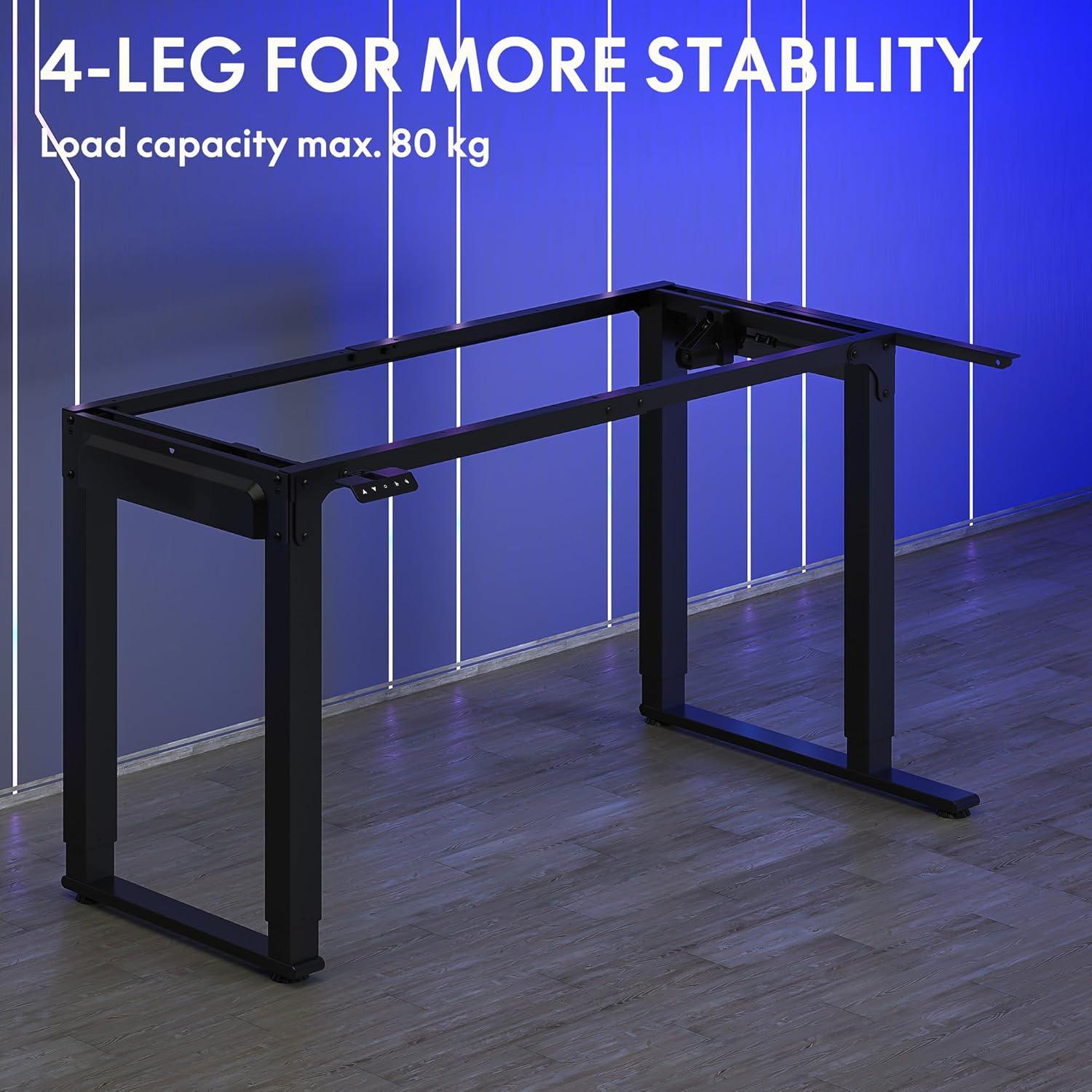
Image: The robust 4-leg frame provides superior stability for the L-shaped standing desk.

Image: Detail of the dual-motor mechanism, ensuring accurate and smooth height positioning.
5. Telîmatên Operating
Your FLEXISPOT L-Shaped Electric Standing Desk features an intelligent control panel for easy height adjustment and memory presets.
5.1 Fonksiyonên Panela Kontrolê

Image: The intelligent control panel with clearly labeled buttons for desk operation.
- Bişkokên Jor/Jêr (▲ / ▼): Ji bo ku bilindahiya maseyê bi berdewamî jor an jêr were verastkirin, bikirtînin û bigirin. Ji bo ku li bilindahiya xwestî rawestin, berdin.
- Reset Button (↺): Used for initial calibration or to reset the desk if an error occurs. Press and hold until the desk moves to its lowest point and slightly rises.
- Sitting Preset Button (👭): Press to automatically move the desk to your programmed sitting height.
- Standing Preset Button (👭 with upward arrow): Press to automatically move the desk to your programmed standing height.
5.2 Danîna Mîhengên Pêşwext ên Bîrê
To save your preferred sitting or standing height:
- Bi karanîna bişkokên Jor/Jêr, maseyê li gorî bilindahiya xwestinê eyar bikin.
- Press and hold the desired preset button (Sitting or Standing) for approximately 3-5 seconds until you hear a beep or see the display flash. This indicates the height has been saved.

Image: The desk can be adjusted from a minimum height of 72cm to a maximum of 117cm.

Image: The spacious L-shaped desktop (180cm x 110cm) provides ample room for multiple computers and accessories.
6. Maintenance
Parastina birêkûpêk temenê dirêj û performansa çêtirîn a maseya we garantî dike.
- Paqijî: Maseya sermaseyê û çarçovê bi nermî paqij bikin,amp qumaş. Ji kîmyewiyên dijwar an paqijkerên aşınker dûr bisekinin.
- Berçavderbasî: Hemû pêç û girêdan dem bi dem kontrol bikin da ku piştrast bibin ku ew teng in. Ger pêwîst be dîsa teng bikin.
- Rêveberiya Cable: Ensure power cables and other device cables are properly managed to prevent entanglement or damage during height adjustments.
- Lênêrîna motorê: The dual motors are designed for durability. Avoid obstructing the desk's movement or exceeding the weight limit to prevent strain on the motors.

Image: The desk features safe and stylish rounded corners.
7. Destpêkirin
Heke hûn bi pirsgirêkan re bi maseya xwe re rû bi rû bimînin, li pirsgirêk û çareseriyên hevpar ên jêrîn binêrin:
| Pirsegirêk | Sedema gengaz | Çare |
|---|---|---|
| Mase naçe. | Power cable disconnected; Control panel cable loose; Overload protection activated. | Check power connections; Ensure control panel cable is secure; Reduce weight on desk and perform a reset. |
| Mase bi awayekî neyeksan tevdigere an jî dengekî neasayî derdixe. | Unbalanced load; Loose connections; Obstruction. | Distribute weight evenly; Check and tighten all frame connections; Remove any obstructions. Perform a reset. |
| Mîhengên bilindahiyê yên pêşwextkirî naxebitin. | Mîhengên pêşwext bi awayekî rast nehatine tomarkirin. | Re-save the desired height by holding the preset button until confirmation. |
| Mase di nîvê tevgerê de radiweste. | Overload protection; Overheating protection. | Reduce weight on the desk. Allow the desk to cool down for 20-30 minutes if it has been used continuously. |
If the problem persists after attempting these solutions, please contact FLEXISPOT customer support.
8. Specifications
| Taybetî | Hûrî |
|---|---|
| Hejmara Model | QS2LB-1811 |
| Nîşan | FLEXISPOT |
| Desk Type | L-Şaped Electric Standing Desk |
| Type Motor | Dual Motor |
| Tîpa Çarçoveyê | 4-Leg Frame |
| Range Adjustment Bilindahî | 72 cm heta 117 cm |
| Pîvanên Maseya Sermaseyê (D x F) | 180 cm x 110 cm |
| Maximum Load Capacity | 80 kg |
| Noise Level | <50 dB |
| Mal | Pola Alloy (Çarçove) |
| Reng | Reş |
| Babetê Weight | 30 Kîlo |
9. Garantî û Piştgirî
FLEXISPOT products are designed for quality and durability. For specific warranty information, please refer to the warranty card included with your purchase or visit the official FLEXISPOT website. If you require technical assistance, have questions about assembly, or need to report a missing/damaged part, please contact FLEXISPOT customer support directly. Ensure you have your model number (QS2LB-1811) and purchase details available when contacting support.
Agahiyên Têkilî: Please refer to the contact details provided on the FLEXISPOT official webmalper an belgeyên kirîna we ji bo kanalên piştgiriyê yên herî nûjen.