
1. Hilbera Serîview
The AUVON TENS Electrostimulation Device is a professional, rechargeable unit designed to stimulate sensory nerves and muscles. It utilizes a special pain gate mechanism to help relax your body and provide pain relief. Featuring 24 easy-to-use pre-programmed massage modes and an adjustable timer, this multi-mode electrotherapy device offers a convenient solution for pain management.

jimar 1: The AUVON TENS device provides targeted pain relief for various body areas.
2. Hişyariyên Ewlekariya Girîng
Read all warnings and instructions before use. Failure to do so may result in serious injury.
- NE bikar bînin this product if you have an implanted defibrillator, pacemaker, or any other implanted metallic or electronic device.
- NE bikar bînin this product if you have heart rhythm problems, seizures, cerebral diseases, or neurological disorders.
- NE bikar bînin this product if you have undiagnosed chronic pain.
- NE bikar bînin this product if you are pregnant or in labor.
- NE bikar bînin this product if you have cancer.
- NE bikar bînin this product if you are sensitive to electrotherapy.
- NE bikar bînin this product excessively.
- NE bikar bînin this product above the neck, especially on the head or throat.
- NE bikar bînin this product if you are under 22 years old.
- Consult your doctor before use if you have any medical condition.
- Individual symptoms, situations, circumstances, and results may vary. The information provided is not intended for medical diagnosis or treatment, nor is it a substitute for professional medical advice.
3. Naveroka pakêtê
Ji kerema xwe piştî wergirtina pakêtê, naveroka pakêtê kontrol bikin da ku hûn piştrast bibin ku hemî tişt li wir in:
- 1 x AUVON TENS Electrostimulator Device
- 10 x 5 cm x 5 cm Electrode Pads
- 2 x Connection Wires (1/2 wire)
- 1 x Girêderê Padê
- 1 x Cable Charging USB
- 1 x Storage Bag
- 1 x Manual Bikarhêner Pir-ziman

jimar 2: All items included in your AUVON TENS device package.
4. Guide Setup
- Amûrê barkirin: Before first use, ensure the device is fully charged. Connect the provided USB cable to the device and a suitable USB power source. The power indicator will show the charging status. A full charge provides up to 10 hours of continuous use.
- Têlên Serî Girêdanê: Insert the 2mm pin connectors of the lead wires into the electrode pads. Ensure a secure connection.
- Çerm amade bikin: Clean and dry the skin area where you intend to place the electrodes. Avoid applying on broken or irritated skin.
- Elektrodan bicîh bînin: Remove the transparent film from the electrode pads and firmly press them onto your skin. Ensure the entire surface of the pad is in contact with the skin for optimal conductivity.
- Girêdana Amûrê: Plug the other end of the lead wires into the output ports on the AUVON TENS device.

jimar 3: Visual guide for connecting electrodes and operating the device.
5. Telîmatên Operating
- Hêzdarkirin: Press and hold the Power button (usually the 'M' button) to turn on the device.
- Mode Hilbijêre: Press the 'M' button to cycle through the 6 main massage modes. The device offers 24 pre-programmed sub-modes, which are accessible within these 6 main modes.
- Select Sub-Mode: Once a main mode is selected, use the '+' or '-' buttons to navigate through the available sub-modes if applicable.
- Intensity eyar bikin: Use the '+' button to increase the intensity and the '-' button to decrease it. Start with a low intensity and gradually increase until you feel a comfortable, yet effective, sensation.
- Demjimêr Saz Bike: Press the 'T' button to select your preferred massage duration. The timer is adjustable.
- Dermankirinê dest pê bikin: The device will start the treatment according to your selected settings.
- Hêzdarkirin: After your session, press and hold the Power button to turn off the device. Remove the electrodes from your skin.

jimar 4: The device offers 24 mode choices and adjustable intensity for personalized treatment.
6. Maintenance
6.1 Electrode Pad Care
The electrode pads feature an advanced American adhesive gel designed for durability and reusability. To maximize their lifespan:
- Paqijî: After each use, gently clean the adhesive side of the pads with a small amount of water. Do not use soap or harsh chemicals. Allow them to air dry completely before storing.
- Embarkirinî: Always place the pads back onto the provided pad holder or their original protective film after use. This prevents them from drying out and losing their adhesive quality. Store them in a cool, dry place.
- Diber: Replace electrode pads when they lose their stickiness or if you notice reduced conductivity. The pads are designed for approximately 45 uses with proper care.
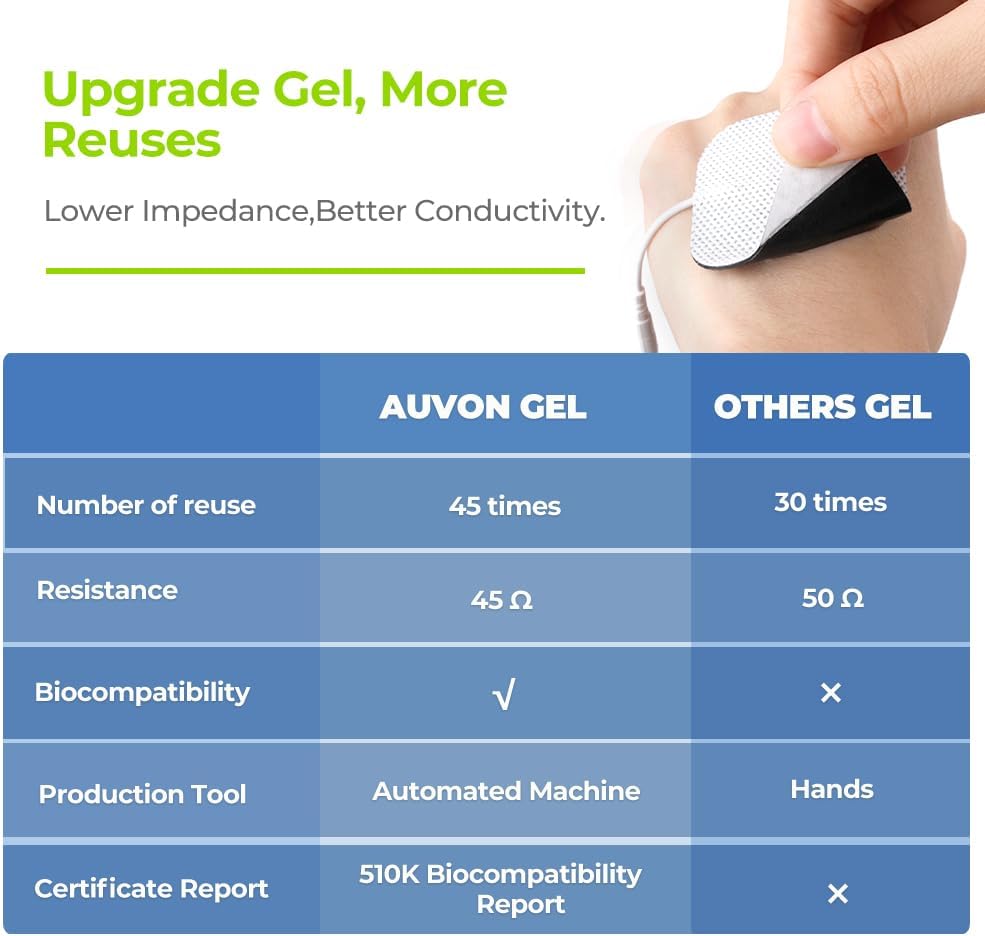
jimar 5: AUVON electrode pads offer enhanced reusability and conductivity.
6.2 Lênêrîna Device
- Paqijî: Amûrê bi qumaşek nerm û hişk paqij bikin. Paqijkerên aşınker bikar neynin û amûrê nexin nav avê.
- Embarkirinî: Amûrê di nav kîsika hilanînê ya peyda kirî de li cîhek sar û hişk, dûr ji tîrêjên rojê yên rasterast û germahiyên zêde hilînin.
- Pîl: The device contains a rechargeable Lithium-ion battery. Charge it regularly to maintain battery health, even if not used frequently.
7. Destpêkirin
| Pirsegirêk | Sedema gengaz | Çare |
|---|---|---|
| Amûr naçe. | Pîlê kêm an jî vala. | Amûrê bi karanîna kabloya USB ya peydakirî şarj bikin. |
| Hestiyariyek tune an jî hestyariyek qels heye. |
|
|
| Pads are not sticking. |
|
|
8. Specifications Product
| Nîşan | AUVON |
| Hejmara Model | AS1080 |
| Type Device | TENS Electrostimulation Device |
| Channels | 2 Kanalên Serbixwe |
| Programs | 24 Pre-programmed Modes |
| Elektrod | 10 x 5cm x 5cm Electrode Pads (pin-style) |
| Cureyê Pîl | Rechargeable Lithium-ion (included) |
| Bikaranîna Duration | Up to 10 hours (on a full charge) |
| Mezinahiyên pakêtê | 14.6 x 9.2 x 7.7 cm |
| Pîvan | 320 gram |
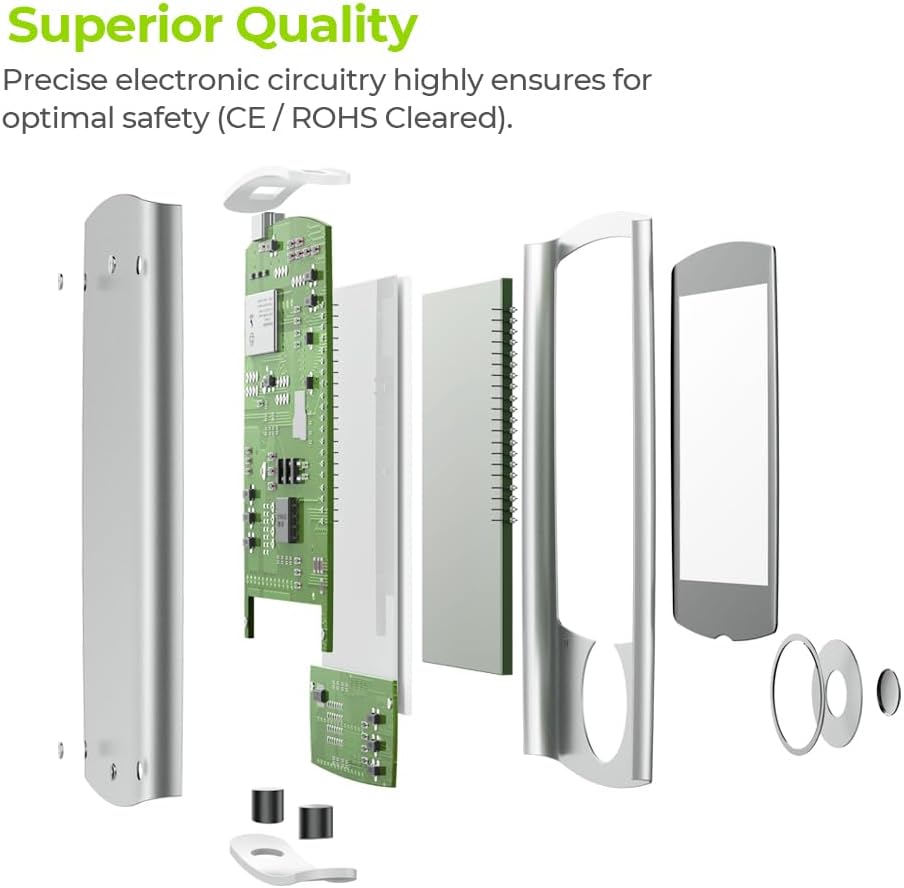
jimar 6: Internal components demonstrating the superior quality and precise electronic circuitry.
9. Garantî û Piştgiriya Mişterî
The AUVON TENS Electrostimulation Device AS1080 comes with a Garantiya 24 mehan ji roja kirînê.
For any questions, concerns, or technical support, please contact AUVON customer service. You can also find additional resources, including a downloadable version of this manual, on the product details page where you purchased the device.
We are committed to providing friendly and helpful customer support.