
1. Destpêk
This manual provides detailed instructions for the proper use and maintenance of your Arlec Remote SS3136. This remote control is specifically designed to operate the Arlec Wall Fan AWDC001HA, offering convenient and effortless control over your fan's functions. Please read this manual thoroughly before first use to ensure optimal performance and longevity of your device.
2. Taybetmendiyên Hilberê
- Kontrola hêsan: Utilizes Infrared technology for seamless communication with your Arlec Wall Fan AWDC001HA from up to 10 meters away.
- Hêza Demdirêj: Requires 3 alkaline batteries for extended use.
- Sêwirana Sleek: Finished in a sophisticated black color.
- Lihevhatina Piralî: Designed to control Arlec Wall Fans, specifically model AWDC001HA.
- Operasyona hêsan: Features 3 intuitive buttons for easy fan control.
3. Naveroka pakêtê
Piştrast bike ku hemî tişt di pakêtê de hene:
- 1 x Arlec Remote SS3136
- 1 x Wall Mount Holder
- 2 x Screws Mounting
- 2 x Pêlên Dîwarê
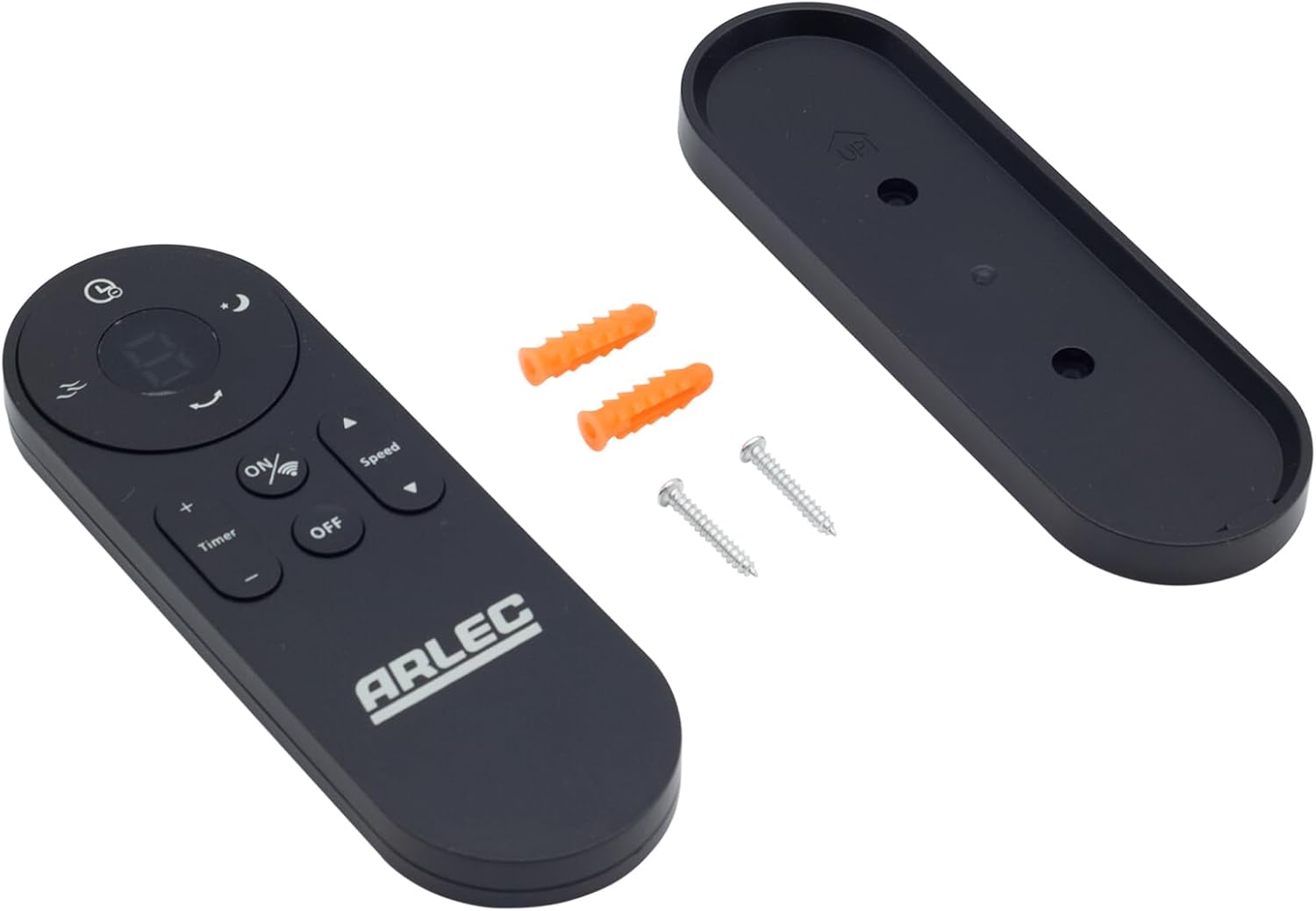
Image: Arlec Remote SS3136 shown with its included wall mount holder, two mounting screws, and two wall plugs, indicating the complete package contents.
4. Sazkirin
4.1 Sazkirina Pîl
- Cihê beşa pîlê li ser pişta kontrolê ji dûr ve.
- Berga beşa pîlê vekin.
- Insert 3 Alkaline batteries (not included) into the compartment, ensuring the correct polarity (+ and -) as indicated inside the compartment. The remote requires 3 Volts (DC).
- Qapaxa beşa pîlê bi ewlehî bigire.
4.2 Sazkirina Li Dîwar (Vebijarkî)
- Choose a suitable location on a wall for the remote holder.
- Mark the positions for the two mounting screws using the holder as a template.
- Drill pilot holes at the marked positions. Insert the wall plugs if drilling into drywall or masonry.
- Secure the wall mount holder to the wall using the provided screws.
- Place the remote control into the installed holder for convenient storage.
5. Telîmatên Operating
The Arlec Remote SS3136 features a simple 3-button layout for controlling your Arlec Wall Fan AWDC001HA. Ensure there is a clear line of sight between the remote and the fan's infrared receiver for optimal performance.

Wêne: Nêzîk view of the Arlec Remote SS3136, highlighting its three main control buttons: ON/OFF, Speed, and Timer.
- Bişkojka ON/OFF: Vê bişkojkê bikirtînin da ku fanosê vekin an vekin.
- Bişkojka Lezê: Use this button to cycle through the available fan speed settings (e.g., Low, Medium, High).
- Bişkojka Timer: Press this button to set or adjust the fan's timer function. Refer to your Arlec Wall Fan AWDC001HA manual for specific timer intervals.
The remote operates using Infrared (IR) technology. Point the remote directly towards the fan's IR receiver. The effective operating range is up to 10 meters (approximately 33 feet).
6. Maintenance
- Paqijî: Kontrola dûr bi qumaşek nerm û hişk paqij bike. Paqijker an çareserkerên aşınker bikar neyne.
- Guhertina Pîl: Replace batteries when the remote's performance degrades or it stops responding. Always replace all 3 batteries at the same time with new alkaline batteries.
- Embarkirinî: If the remote will not be used for an extended period, remove the batteries to prevent leakage. Store in a cool, dry place.
7. Destpêkirin
| Pirsegirêk | Sedema gengaz | Çare |
|---|---|---|
| Remote not responding to fan. |
|
|
| Bişkok zeliqî ne an jî bersiv nadin. | Di bin bişkokan de qirêj an jî çopê. | Clean the remote surface with a soft, dry cloth. Avoid liquids. |
8. Specifications
| Taybetmendî | Hûrî |
|---|---|
| Cins | SS3136 |
| Çêker | Arlec |
| Amûrên Lihevhatî | Arlec Wall Fan AWDC001HA |
| Teknolojiya Girêdanê | Infrared (IR) |
| Hejmara Bişkokên | 3 |
| Type Controller | Button Control |
| Cureyê Pîl | Alkaline (3 required) |
| Voltage | 3 Volt (DC) |
| Range Operating | Heta 10 metreyan |
9. Garantî û Piştgirî
For warranty information and technical support, please refer to the documentation provided with your Arlec Wall Fan AWDC001HA or contact Arlec customer service directly. Keep your purchase receipt as proof of purchase.
For further assistance, please visit the manufacturer's official webmalperê an bi xeta piştgiriya xerîdar a wan re têkilî daynin.