
1. Destpêk
This manual provides detailed instructions for the safe and efficient use of your Havit H2590BT PRO Wireless Bluetooth Headphones. Please read this guide thoroughly before operating the device to ensure optimal performance and longevity. Keep this manual for future reference.

Wêne 1.1: Pêşî view of the Havit H2590BT PRO Wireless Bluetooth Headphones, showcasing the sleek black design and over-ear cups.
2. Hilbera Serîview
The Havit H2590BT PRO headphones are designed for wireless audio playback, offering comfort and convenience. Familiarize yourself with the components and controls:
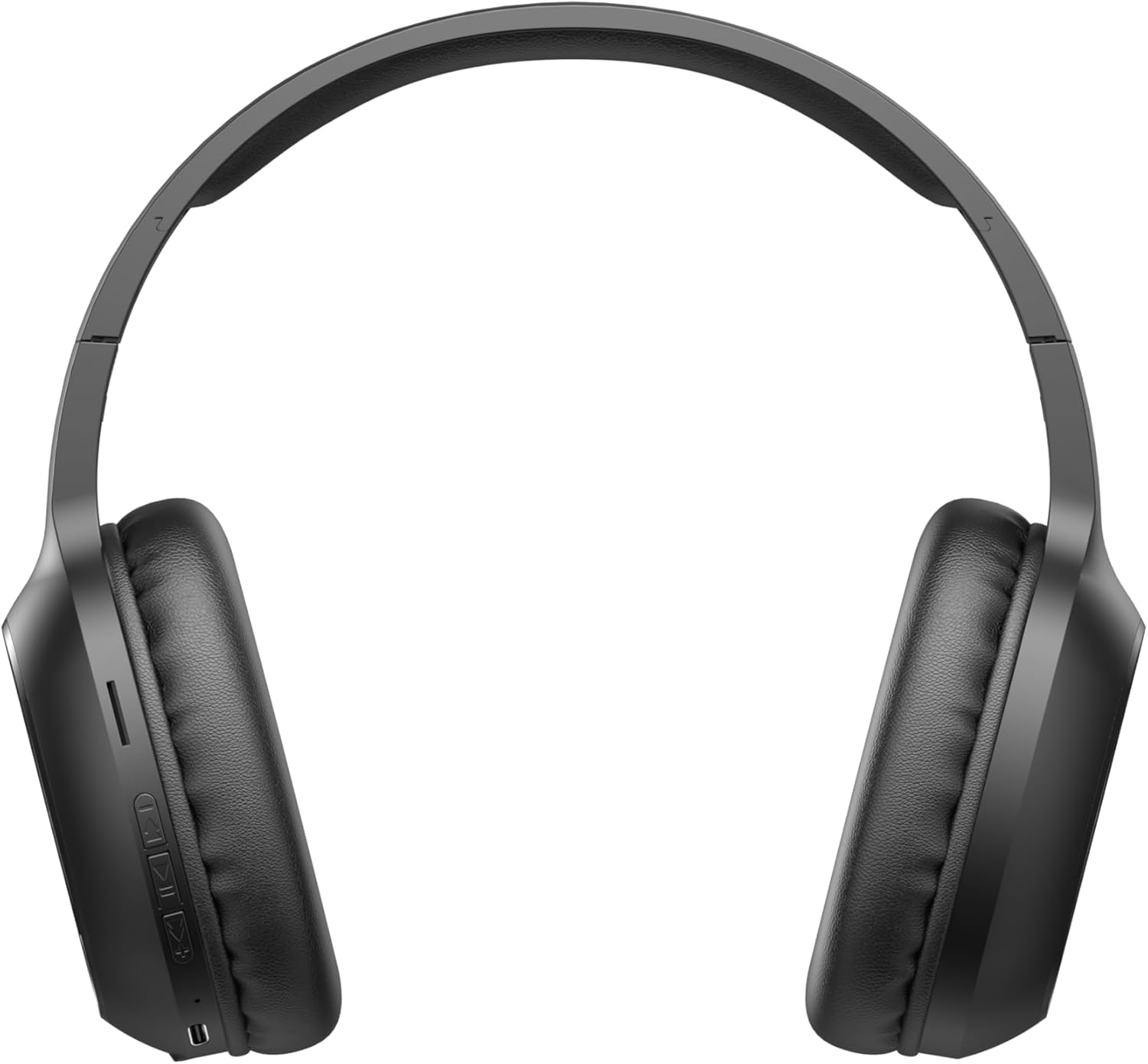
Image 2.1: Close-up of the left earcup showing the control buttons and charging port.
2.1. Kontrol û Nîşan
- Bişkoka Hêzkirinê/Pir-fonksiyonê: Used to power on/off, play/pause music, answer/end calls, and activate pairing mode.
- Bişkoka Bilindkirina Deng (+): Increases audio volume. Long press for next track.
- Bişkoka Kêmkirina Dengê (-): Decreases audio volume. Long press for previous track.
- Nîşana LED: Rewşa hêzê, rewşa şarjkirinê, û rewşa cotkirina Bluetooth nîşan dide.
- Mîkrofon: Ji bo bangkirina bêdest.
- Porta barkirinê: Ji bo girêdana kabloya şarjê.
3. Sazkirin
3.1. Barkirina Headphones
Before first use, fully charge the headphones. The headphones include a Lithium-polymer battery.
- Kabloya şarjê bi porta şarjê ya li ser guhguhkan ve girêde.
- Serê din ê kabloya şarjkirinê bi çavkaniyek hêzê ya USB ve girêbide (mînak, porta USB ya komputerê, adaptera dîwar a USB).
- The LED indicator will show the charging status (e.g., red for charging, blue/off for fully charged).
- Piştî ku bi tevahî dakêşin, kabloya barkirinê veqetînin.
3.2. Hevgirtina Bluetooth
Ji bo girêdana guhguhkên xwe bi cîhazek bi Bluetooth-ê ve:
- Piştrast bikin ku guhên guhêz têne girtin.
- Press and hold the Power/Multi-function Button until the LED indicator flashes rapidly (e.g., blue and red alternately), indicating pairing mode.
- Li ser cîhaza xwe (smartphone, tablet, komputer), Bluetooth-ê çalak bike û li cîhazên berdest bigere.
- Select "Havit H2590BT PRO" from the list of found devices.
- Once paired, the LED indicator will typically show a slow blue flash or turn off, and you will hear an audible confirmation.
- Heke şîfreyek ji we were xwestin, "0000" binivîse.
4. Telîmatên Operating
4.1. Power On / Off
- Hêzdarkirin: Press and hold the Power/Multi-function Button for approximately 3 seconds until the LED indicator lights up and you hear a power-on prompt.
- Hêzdarkirin: Press and hold the Power/Multi-function Button for approximately 3-5 seconds until the LED indicator turns off and you hear a power-off prompt.
4.2. Playback Music
- Lîstik / Rawestandin: Press the Power/Multi-function Button once.
- Volume Up: Bişkoka Bilindkirina Deng (+) bikirtînin.
- Volume Down: Bişkoka Kêmkirina Deng (-) bikirtînin.
- Tracka Piştre: Bişkoja Bilindkirina Deng (+) dirêj bikirtînin.
- Traopa Berê: Bişkoka Dengê Kêmkirinê (-) dirêj bikirtînin.
4.3. Rêvebiriya Bangê
- Bersiva Bangê: Press the Power/Multi-function Button once when an incoming call rings.
- Banga Dawî: Press the Power/Multi-function Button once during a call.
- Bang red kirin: Press and hold the Power/Multi-function Button for approximately 2 seconds when an incoming call rings.
- Jimara dawîn ji nû ve bihejîne: Double-press the Power/Multi-function Button.
5. Maintenance
Proper care ensures the longevity of your headphones:
- Paqijî: Ji bo paqijkirina guhguhkan qumaşek nerm û hişk bikar bînin. Paqijker an çareserkerên aşınker bikar neynin.
- Embarkirinî: Guhguhkan li cîhekî sar, hişk û dûr ji tîrêjên rojê yên rasterast û germahiyên zêde hilînin.
- Ji avê dûr bixin: Ev guhguhk li hember avê nînin. Ji ber vê yekê ji ber avê an jî şilbûna zêde dûr bisekinin.
- Barkirin: Ji bo parastina rewşa bateriyê, guhguhkan bi rêkûpêk şarj bikin, her çend neyên bikar anîn jî.
6. Destpêkirin
Heke hûn bi pirsgirêkên guhguhkên xwe re rû bi rû bimînin, li çareseriyên hevpar ên jêrîn binêrin:
| Pirsegirêk | Sedema gengaz | Çare |
|---|---|---|
| Nikare bi hêz bike | Pîlê kêm | Serguhan bi tevahî bar bikin. |
| Nikare bi cîhazê re were hevber kirin | Headphones not in pairing mode; Bluetooth off on device; device too far | Piştrast bike ku guhdarok di moda cotkirinê de ne (LED dibiriqe). Bluetooth-ê li ser cîhaza xwe veke. Cîhazê nêzîkî guhdarokan bike (di nav 10 metreyan de). |
| Deng tune | Volume too low; headphones not connected; incorrect audio output selected | Dengê guhdarokan û cîhazê zêde bikin. Guhdarokan ji nû ve bi hev ve girêdin. Mîhengên derana deng a cîhazê kontrol bikin. |
| Kalîteya banga xirab | Sînyala qels; mîkrofon asteng bûye | Biçe deverek ku sînyala wê çêtir e. Piştrast bike ku mîkrofon ne nixumandî ye. |
| Pirsgirêka barkirinê | Kabloya xelet an çavkaniya hêzê | Try a different charging cable and USB power source. |
7. Specifications
- Navê Model: H2590BT PRO
- Hejmara Model: 6939119045722
- Nîşan: Havit
- Reng: Reş
- Tîpa Pîl: 1 Lîtyûm-polîmer (tê de ye)
- Pîvanên hilberê (L x W x H): 15 x 19.5 x 6.8 cm
- Giraniya Babetê: 1000 Gram (1 kg) (Note: This weight is as provided in product data and may include packaging or be a data entry error.)
- Parçeyên Tê de: 1 package (typically headphones and charging cable)
8. Garantî û Piştgirî
8.1. Agahdariya Garantiyê
The Havit H2590BT PRO Wireless Bluetooth Headphones come with a Garantiya hilberînerê 2-salEv garantî kêmasiyên materyal û karîgeriyê di bin karanîna normal de vedihewîne. Ji kerema xwe delîla kirînê ji bo îdîayên garantiyê biparêzin.
8.2. Piştgiriya Mişterî
For further assistance, technical support, or warranty inquiries, please contact Havit customer service through their official website or the retailer where the product was purchased. Refer to the product packaging or Havit's official channels for specific contact details.