
Telîmatên Ewlekariya Girîng
Read all instructions thoroughly before operating this appliance. Failure to follow these instructions may result in electric shock, fire, or serious injury. Keep this manual for future reference.
- Ev amûr tenê ji bo karanîna malê ye. Li derve an li ser rûberên şil bikar neynin.
- Nehêlin zarok makîneya paqijkirinê bikar bînin. Dema ku li nêzîkî zarokan tê bikaranîn, çavdêriya nêzîk pêwîst e.
- Tenê wekî ku di vê rêbernameyê de hatî ravekirin bikar bînin. Tenê pêvekên ku ji hêla çêker ve têne pêşniyar kirin bikar bînin.
- Bi destên şil fîşa an amûrê nedin dest.
- Por, cil û bergan, tiliyên xwe û hemû beşên laş ji vebûn û beşên tevgerê dûr bigirin.
- Do not pick up large objects, hard or sharp objects, or anything that is burning or smoking.
- Bêyî ku kasa tozê û fîlter bi rêkûpêk werin sazkirin bikar neynin.
- Amûrê di hundurê hundur de li cîhek sar û hişk hilînin.
Product Overview
The Shark UR2500SR AI Ultra Robot Vacuum is designed for automated home cleaning, featuring advanced AI Laser Navigation, a self-empty base, and convenient app control.
Pêkhat:
- Shark AI Ultra Robot Vacuum
- Bingeha Xwe Vala
- Firçeyên kêlekê (2)
- Filter (pre-installed in robot and base)
- Cord Power

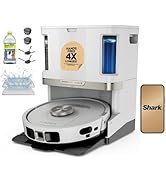
This image displays the Shark UR2500SR AI Ultra Robot Vacuum, its self-empty base, and a smartphone showing the SharkClean app, illustrating the complete product system.

This diagram illustrates the contents of the product package, including the robot vacuum unit, the self-empty base, and two side brushes.
Damezirandin
1. Vekirin û Bicîhkirin
- Remove all packaging materials from the robot and the charging base.
- Place the self-empty base on a level surface against a wall, ensuring at least 3 feet (0.9 meters) of clear space on either side and 5 feet (1.5 meters) in front.
- Plug the power cord into the base and then into a wall outlet.

This image demonstrates the robot vacuum docked at its self-empty base, positioned against a wall in a living area, ready for operation.
2. Xerca Destpêkê
Place the robot onto the charging base. Ensure the charging contacts on the robot align with those on the base. The robot will begin charging. Allow for a full charge before first use (approximately 6 hours).
3. Firçeyên Aliyê Saz bikin
Snap the two side brushes onto the square pegs located on the bottom of the robot.
4. Download the SharkClean App
Download the SharkClean app from your device's app store. Follow the in-app instructions to connect your robot to your home Wi-Fi network and complete the initial mapping process.

This image shows the SharkClean app on a smartphone, illustrating its mapping capabilities and how users can define cleaning areas within their home.
Bixebitandina Robota Vacuumê
1. First Run - Home Mapping
For the first cleaning cycle, allow the robot to complete a full mapping run of your home. This process helps the robot learn your floor plan for efficient future cleaning. Remove any obstacles that might impede its path during this initial run.

This image depicts the robot vacuum actively mapping a room, using its AI Laser Navigation to understand the layout and identify objects.
2. Modên Paqijkirinê
- Standard Clean: The robot cleans your entire home or selected rooms based on your settings.
- UltraClean Mode: Activated via the SharkClean app, this mode performs two passes (back and forth, then side to side) for a deeper clean.
- Paqijkirina Cihê: Direct the robot to clean a specific small area for targeted cleaning.
3. Using the SharkClean App
The SharkClean app provides comprehensive control over your robot vacuum. Through the app, you can:
- Demjimêrên paqijkirinê plansaz bikin.
- Ode an deverên taybetî ji bo paqijkirinê hilbijêrin.
- Set No-Go Zones to restrict access to certain areas.
- View cleaning history and detailed maps of your home.
- Activate UltraClean mode for enhanced cleaning.
4. Kontrola Deng
The robot is compatible with Amazon Alexa and Google Assistant. Link your SharkClean account to your preferred voice assistant app to use voice commands for starting, stopping, or scheduling cleaning cycles.
Lênerrînî
Regular maintenance is crucial for ensuring the optimal performance and longevity of your robot vacuum.
1. Emptying the Dust Bin (Robot)
While the self-empty base handles most debris, it is advisable to occasionally check the robot's internal dust bin.
- Press the dust bin release button on the robot.
- Pull out the dust bin from the robot.
- Qutîka tozê vekin û naveroka wê vala bikin nav konteynirek çopê.
- Reinsert the dust bin into the robot until it clicks securely into place.
2. Cleaning the Self-Empty Base
The self-empty base features a bagless design. The collection bin should be emptied as needed, typically every 30 days, depending on usage and the volume of debris collected.
- Lift the lid of the self-empty base.
- Remove the internal dust bin from the base.
- Empty the contents of the bin.
- Wipe the interior of the base and the bin with a dry cloth.
- Reinsert the bin and securely close the lid.
This image visually explains how the robot vacuum automatically empties collected debris into its self-empty base.
3. Parzûnên Paqijkirinê
Both the robot and the self-empty base contain filters that require regular cleaning to maintain suction power.
- Robot Filter: Remove the filter from the robot's dust bin. Tap it gently over a trash can to remove loose debris. If necessary, rinse it with water and allow it to air dry completely for at least 24 hours before reinserting.
- Base Filter: Locate the filter in the self-empty base. Clean by tapping or rinsing as needed. Ensure it is completely dry before reinstallation.
4. Cleaning the Brushroll
Periodically check the brushroll for tangled hair, string, or other debris that may reduce cleaning effectiveness.
- Robotê bizivirîne.
- Remove the brushroll guard.
- Fîrçeyê rakin.
- Use scissors or a cleaning tool to carefully cut away any hair or string wrapped around it.
- Reinsert the brushroll and secure the guard.
5. Cleaning Side Brushes and Sensors
Wipe the side brushes and all sensors (including cliff sensors and bumper sensors) with a clean, dry cloth to remove dust and debris. This ensures accurate navigation and prevents falls.
Çareserkirina pirsgirêkan
| Pirsegirêk | Sedema gengaz | Çare |
|---|---|---|
| Robot nayê barkirin | Charging contacts are dirty or misaligned. Power cord not plugged in. | Clean charging contacts on both the robot and the base. Ensure the power cord is securely plugged into the base and a functional wall outlet. |
| Robot pir caran asê dibe | Obstacles in cleaning path. Robot is navigating tight spaces. | Clear clutter from the floor. Use No-Go Zones in the app to restrict access to problem areas. |
| Performansa paqijkirinê ya xirab | Dust bin full. Filters clogged. Brushroll tangled. | Empty the robot's dust bin. Clean or replace filters as needed. Remove any debris from the brushroll. |
| Robot nikare bi Wi-Fi ve girêbide | Incorrect Wi-Fi password. Router issues. Robot too far from router. | Verify the Wi-Fi password. Reboot your router. Move the robot closer to the router during setup. Ensure you are connecting to a 2.4GHz network. |
| Self-empty base not emptying | Base dust bin full. Debris blockage in the base or robot's emptying port. | Empty the base's dust bin. Check for and clear any blockages in the debris transfer path between the robot and the base. |
Specifications
- Cins: UR2500SR
- Nîşan: Sehmasî
- Dimensions (Robot): 13.7"D x 13.7"Fi x 4.1"Bilindahî
- Pîvan: 14.42 pounds (total product)
- Tîpa Pîl: Lithium Ion
- Jiyana Pîlê: Heta 120 hûrdem
- Dust Bin Capacity (Base): Up to 30 days of debris
- Rêserbirinî: AI Laser Navigation
- Têkilî: Wi-Fi, Compatible with Amazon Alexa, Google Assistant
- Cureyê Parzûnê: Fîşek
Garantî û Piştgirî
For detailed warranty information and customer support, please refer to the official Shark website or contact their customer service directly. It is recommended to keep your purchase receipt as proof of purchase.
Online resources and frequently asked questions (FAQs) are available at www.sharkclean.com.