
Pêşkêş
The Tzumi Probuds V2 offer a blend of comfort and high-quality audio for hands-free listening and phone calls. Designed for versatility and convenience, these true wireless earbuds are an ideal companion for daily use. They feature intuitive touch controls, voice assistant compatibility, and the ability to use each earbud independently.
The compact charging case ensures your Probuds V2 are always ready, providing extended listening time on the go. This manual provides essential information on setting up, operating, maintaining, and troubleshooting your Probuds V2 to ensure optimal performance.
Naveroka pakêtê
- Probuds V2 Wireless Earbuds
- Doza barkirinê
- Silicone Earbud Tips
- Neck Strap
- Kabloya gingarjkirina Type-C
- Destûra Rêvekirinê (ev belge)
Damezirandin
1. Charging the Probuds V2
Before first use, fully charge your Probuds V2 and their charging case. Connect the included Type-C charging cable to the charging port on the case and to a compatible USB power source. The charging time for a full charge is approximately 5 hours. Indicators on the case will show charging status.
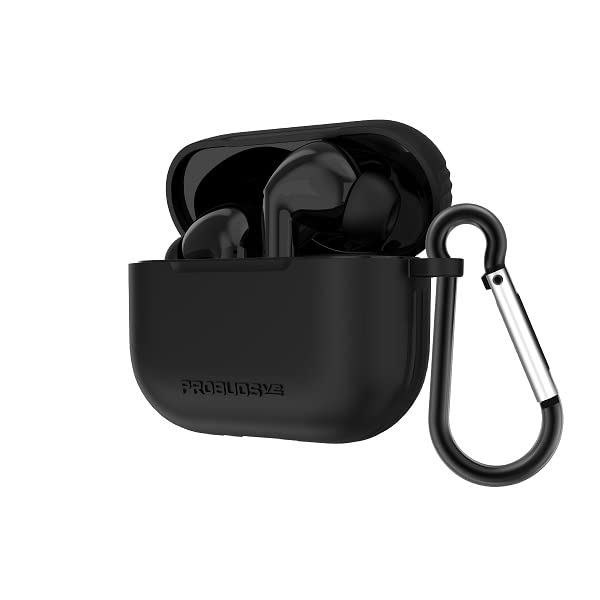
Image: Tzumi Probuds V2 wireless earbuds shown inside their open charging case. The case is black and has a black carabiner clip attached to its side, indicating portability. The earbuds themselves are also black and fit snugly within the case.
2. Hevberdana bi Amûrê We re
- Ensure the Probuds V2 are charged and placed inside the charging case.
- Qutiya şarjkirinê veke. Guhguhk dê bixweber bikevin moda cotkirinê.
- Li ser cîhaza xwe (smartphone, tablet, hwd.), biçin mîhengên Bluetooth-ê.
- Search for available devices and select "Probuds V2" from the list.
- Dema ku girêdan pêk hat, hûn ê dengekî pejirandinê bibihîzin, û guhguhk dê ji bo karanînê amade bin.
- The Probuds V2 utilize reliable Bluetooth 5.0 technology for a stable connection.
3. Achieving a Comfortable Fit
The Probuds V2 come with silicone earbud tips designed for a comfortable fit. Experiment with different tip sizes (if provided, though not explicitly mentioned in input, it's standard) to find the best seal for optimal sound quality and comfort. Gently insert each earbud into your ear canal and twist slightly to secure them. A neck strap is also included for added security during activities.
Operating Your Probuds V2
Controls Touch
The Probuds V2 feature full touch controls for media playback and call management. Specific touch gestures for functions like play/pause, skip track, answer/end call, and activating voice assistant are typically detailed in a quick start guide or on the product packaging. Refer to those for precise commands.
- Kontrola Medyayê: Manage your music and audio playback.
- Kontrola Deng: Activate your device's voice assistant (e.g., Siri, Google Assistant).
Call Management and Single Earbud Use
The Probuds V2 allow for high-quality phone calls. Each earbud can be used separately, providing flexibility for shared calls or listening to music while keeping one ear open to your surroundings.
Battery Life
Enjoy up to 5 hours of music playback time on a single charge. The charging case provides additional charges, extending the total standby time to approximately 40 hours.
Lênerrînî
Proper care will extend the life of your Probuds V2.
- Paqijî: Guhguh û qutiya şarjê bi rêkûpêk bi qumaşek nerm, hişk û bê lîf paqij bikin. Ji karanîna kîmyewiyên dijwar an materyalên aşınker dûr bisekinin.
- Embarkirinî: Dema ku hûn neyên bikaranîn, guhguhkan di qutiya şarjê de bihêlin da ku ji toz û zirarê biparêzin.
- Ji Nermbûnê dûr bixin: Do not expose the earbuds or charging case to excessive moisture, rain, or liquids.
- Germî: Ji bo rêgirtina li xirabûna pîlê, cîhazê di nav rêjeyên germahiya pêşniyarkirî de hilînin û bixebitînin.
Çareserkirina pirsgirêkan
| Pirsegirêk | Sedema gengaz / Çareserî |
|---|---|
| Earbuds nayên hev kirin |
|
| Deng ji guhan nayê |
|
| Doza şarjê nayê barkirin |
|
| Guhguhkên di qutiyê de nayên şarj kirin |
|
Specifications
| Taybetî | Hûrî |
|---|---|
| Navê Model | ProBuds V2 |
| Hejmara Model | 8016SC |
| Teknolojiya Girêdanê | Wireless |
| Teknolojiya Ragihandinê ya Wireless | Bluetooth |
| Guhertoya Bluetooth | 5.0 |
| Mal | Silicone |
| Time Charging | 5 Saet |
| Tîpa Kontrolê | Kontrola Medyayê |
| Rêbaza Kontrolê | Dest, Deng |
| Jîyana Pîlê (Lîstina Muzîkê) | Heta 5 saetan |
| Dema Rawestandinê | Heta 40 saetan |
| Cihkirina Guh | Li Ear |
| Faktora Form | Li Ear |
| Reng | Reş |
| UPC | 841351180160 |
| Çêker | Tzumi |
Garantî û Piştgirî
For warranty information and customer support, please refer to the warranty card included with your product or visit the official Tzumi website. You can also contact Tzumi customer service directly for assistance with product inquiries, technical support, or warranty claims.
Çêker: Tzumi