
Pêşkêş
This manual provides detailed instructions for the safe installation, operation, and maintenance of your bimar Wi-Fi Ceiling Fan, Model 1 (Ø 132). Please read this manual thoroughly before using the product and retain it for future reference.
Bikaranîna Armanc: This high-performance ceiling fan is designed for ventilation in indoor domestic environments. Any other use is considered improper and potentially hazardous. The manufacturer cannot be held responsible for any damages resulting from improper use or repairs performed by unqualified personnel.
Telîmatên Ewlekariya Girîng
Ji bo kêmkirina metirsiya agir, şoka elektrîkê, an birîndarbûna mirovan, van tiştan bişopînin:
- Berî sazkirina fanosê hemû rêwerzan bixwînin.
- Sazkirin divê ji hêla elektrîkçîyekî pispor ve li gorî hemî kodên elektrîkê yên herêmî û neteweyî were kirin.
- Ensure the installation site can support the fan's weight (approximately 6.2 kg).
- Berî sazkirin an xizmetguzariyê, her tim elektrîkê ji şkênera sereke qut bikin.
- Fanê bi kabloya elektrîkê an jî prizê xerabûyî nexebitînin.
- Keep hands, hair, and clothing away from moving blades.
- Dema ku fan dixebite, ti tiştî nexin nav perrên fanosê.
- Ev amûr ne ji bo karanîna kesên (zarok jî di nav de) yên kêmbûna kapasîteyên laşî, hestî an derûnî, an kêmbûna ezmûn û zanînê ne, heya ku çavdêrî an rêwerzek derbarê karanîna amûrê ji hêla kesek berpirsiyarê ewlehiya wan ve neyê dayîn.
- Divê çavdêriya zarokan were kirin da ku ew bi amûrê nelîzin.
Di Box çi ye
Your bimar Wi-Fi Ceiling Fan package includes the following components:
- bimar Wi-Fi Ceiling Fan unit (with 3 blades)
- Remote Control
- Mounting hardware (screws, brackets, etc.)
- Destûra Rêvekirinê (ev belge)

Image: The bimar Wi-Fi Ceiling Fan, featuring three light-colored wooden blades and a brushed metal motor housing and downrod.
Sazkirin û Sazkirin
1. Sazkirina Fan
Sazkirina profesyonel ji hêla elektrîkçîyek pispor ve bi tundî tê pêşniyar kirin. Ensure the ceiling structure can safely support the fan's weight and that all wiring complies with local electrical codes.
- Cihê Mountkirinê amade bikin: Turn off power at the circuit breaker. Securely attach the mounting bracket to a ceiling joist or a fan-rated outlet box.
- Assemble the Downrod and Motor: Attach the downrod to the fan motor housing.
- Fan daleqînin: Bi baldarî civata fanosê rakin û ji braketa montajê daliqînin.
- Têlkirina Fan: Connect the electrical wires (live, neutral, ground) from the ceiling to the fan's wiring, following the wiring diagram provided in the separate installation guide (if applicable).
- Blades ve girêdayî bikin: Securely fasten the three blades to the motor housing.
- Kaniyê ewle bikin: Raise the canopy to cover the wiring and mounting bracket, securing it in place.

Wêne: Alî view of the bimar ceiling fan, illustrating the angle of the light wood blades and the connection to the downrod.
2. Girêdana Wi-Fi û Sepanê
The bimar Wi-Fi Ceiling Fan is compatible with the Bimar Live Smart app for advanced control and scheduling.
- Serlêdanê dakêşin: Search for "Bimar Live Smart" in your smartphone's app store (iOS or Android) and install it.
- Hesabek çêbikin: Serlêdanê veke û rêwerzên li ser ekranê bişopîne da ku hesabê bikarhênerek nû çêke an jî heke we berê hesabek hebe, têkevî.
- Amûrek zêde bikin: Power on the ceiling fan. In the Bimar Live Smart app, tap "Add Device" or the "+" icon. Select "Ceiling Fan" or the appropriate device type.
- Bi Wi-Fi ve girêdayî: Follow the app's instructions to put the fan into pairing mode (usually by pressing a button on the fan or remote for a few seconds). Connect the fan to your home 2.4GHz Wi-Fi network.
- Name the Device: Once connected, you can name your fan for easy identification within the app.

Image: A modern living room featuring the bimar ceiling fan installed, with a smartphone displaying the Bimar Live Smart app interface, indicating Wi-Fi and voice control capabilities.
Telîmatên Operating
Your bimar Wi-Fi Ceiling Fan offers multiple control options for convenience.
1. Operasyona Kontrola Dûr
The included remote control allows direct access to all fan functions.
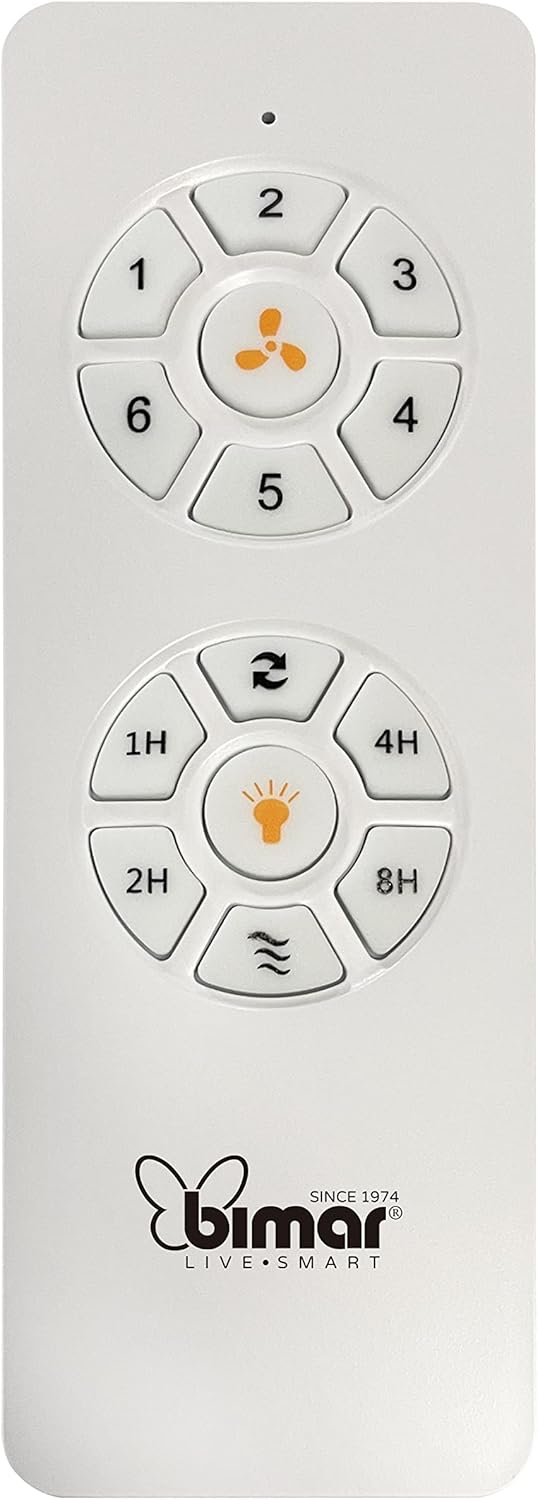
Image: The white remote control for the bimar ceiling fan, showing buttons for fan speed (1-6), fan on/off, timer (1H, 2H, 4H, 8H), mode selection, and reverse function.
- Power On / Off: Ji bo vekirina an girtina fanê, bişkoja îkona fanê bikirtînin.
- Rêzkirinên Lezgîn: Use buttons 1-6 to select one of the six available fan speeds.
- Fonksiyona Timer: Press 1H, 2H, 4H, or 8H to set the fan to automatically turn off after the selected duration.
- Hilbijartina Modê: Use the mode button (often represented by waves or arrows) to cycle through Normal, Natural, Sleep, and Breeze modes.
- Moda Havîn/Zivistan: The reverse button (often two arrows forming a circle) changes the blade rotation direction.
2. App Control (Bimar Live Smart)
Once connected to the Bimar Live Smart app, you can access enhanced features:
- Operasyona Dûr: Control all fan functions from anywhere with an internet connection.
- Bername: Program daily and weekly on/off times for automated operation.
- Demjimêr: Adjust the timer from 1 to 8 hours.
- Mode and Speed Selection: Easily switch between the 6 speeds and 4 operating modes.
3. Kontrola Deng
The bimar Wi-Fi Ceiling Fan is compatible with popular voice assistants like Amazon Alexa and Google Assistant. After connecting the fan to the Bimar Live Smart app, link your Bimar account to your voice assistant app (e.g., Alexa app or Google Home app).
ExampFermanên Deng:
- "Alexa, turn on the ceiling fan."
- "Hey Google, set ceiling fan speed to 3."
- "Alexa, turn off the ceiling fan in 1 hour."
4. Operating Modes and Speeds
- 6 Ventilation Speeds: Adjust the airflow intensity to your preference.
- Moda Normal: Consistent airflow at the selected speed.
- Moda Xwezayî: Simulates natural breezes by varying fan speed.
- Modeya Xewê: Operates at a lower, quieter speed for undisturbed rest.
- Moda Breeze: Provides a gentle, intermittent airflow.
5. Summer/Winter Function
The reversible blade function allows for year-round use:
- Moda Havînê (Zivistana li dijî saetê): Herikîna hewayê ber bi jêr ve diafirîne, û bayekî sar çêdike.
- Moda Zivistanê (Bizivirîna saetê): Creates an upward airflow, circulating warm air trapped near the ceiling, improving heating efficiency.

Image: A diagram illustrating the airflow patterns for summer (indirect ventilation, pushing air upwards) and winter (direct ventilation, pulling air downwards) modes of a ceiling fan.
Lênerrînî
Parastina birêkûpêk performansa çêtirîn û temendirêjiya fanosa banê we garantî dike.
- Paqijî: Before cleaning, ensure the fan is turned off and power is disconnected at the circuit breaker. Use a soft, damp cloth to wipe down the blades and motor housing. Do not use abrasive cleaners or solvents.
- Teftîşa Blade: Periodically check the blades for any signs of damage or warping. Ensure all blade screws are tight.
- Lubrication Motor: The fan's DC motor is designed for maintenance-free operation and does not require lubrication.
- Girêdan hişk bikin: Over time, some fasteners may become loose. Check and tighten all screws and connections annually.

Wêne: Nêzîkbûn view of the bimar ceiling fan's brushed metal motor housing and the attachment points for the light wood blades, highlighting areas for cleaning and inspection.
Çareserkirina pirsgirêkan
| Pirsegirêk | Sedema gengaz | Çare |
|---|---|---|
| Fan dest pê nake | No power supply; Remote control battery low; Incorrect wiring. | Check circuit breaker and wall switch. Replace remote batteries. Verify wiring connections (consult electrician). |
| Fan dihejîne | Tîjên sist an alavên montajê; Tîjên nehevseng. | Ensure all blade screws and mounting screws are tight. Use a balancing kit (not included) if necessary. |
| Kontrola ji dûr ve naxebite | Low battery; Obstruction between remote and receiver; Remote not paired. | Replace remote batteries. Ensure clear line of sight. Refer to pairing instructions in the full manual. |
| Pirsgirêkên girêdana Wi-Fi | Incorrect Wi-Fi password; Router too far; 5GHz network selected. | Verify Wi-Fi password. Move router closer or use a Wi-Fi extender. Ensure you are connecting to a 2.4GHz network. Reset fan and re-attempt pairing. |
| Fan bi deng e | Loose screws; Blades hitting an obstruction; Motor issue. | Check and tighten all screws. Ensure nothing is obstructing the blades. If noise persists, contact customer support. |
Specifications
| Taybetî | Hûrî |
|---|---|
| Nîşan | bimar |
| Hejmara Model | 1 |
| Mezinahiya Hilberê | 132 x 132 x 27.5 cm (Diameter x Diameter x Height) |
| Pîvan | 6.2 kg |
| Hejmara Blades | 3 |
| Mal | Text |
| Reng | Black (Note: Blades are light wood finish as shown in images) |
| Type Motor | DC (Brushless, energy-saving) |
| Vexwarina Hêzê | 35W |
| Rêbazên Kontrolê | Remote Control, Bimar Live Smart App, Voice Control (Amazon Alexa, Google Assistant) |
| Leza Fan | 6 |
| Modes Operating | Normal, Natural, Sleep, Breeze |
| Timer | 1 heta 8 saetan |
| Taybetmendiyên Additional | Silent operation, Summer/Winter mode (reversible blades) |
| Çavkaniya Hêzê | Elatrîkî |
| Cureyê Sazkirinê | Ceiling Mount |

Image: The three light wood fan blades, detached and laid flat, showcasinsêwiran û tevnvîsa wan.


Wêne: Du views of the bimar ceiling fan, illustrating different downrod lengths: one with a 25 cm downrod and another with a 13 cm downrod, affecting the overall height of the fan.
Garantî û Piştgirî
For warranty information, technical support, or service inquiries, please refer to the warranty card included with your product or visit the official bimar webmalper. Delîla kirîna xwe ji bo îdiayên garantiyê biparêzin.
Çêker: Bimar S.r.l.
Têkelî: Ji kerema xwe biçin the bimar store on Amazon or the official bimar webmalpera ji bo hûrguliyên têkiliyê.