1. Destpêk
This manual provides essential instructions for the proper setup, operation, and maintenance of your TODO Under Desk Treadmill Remote Control. This remote is designed as a replacement for the original remote control of the TODO Under Desk Treadmill, specifically compatible with Model AD-4000.
Please read this manual thoroughly before using the remote control to ensure safe and efficient operation.
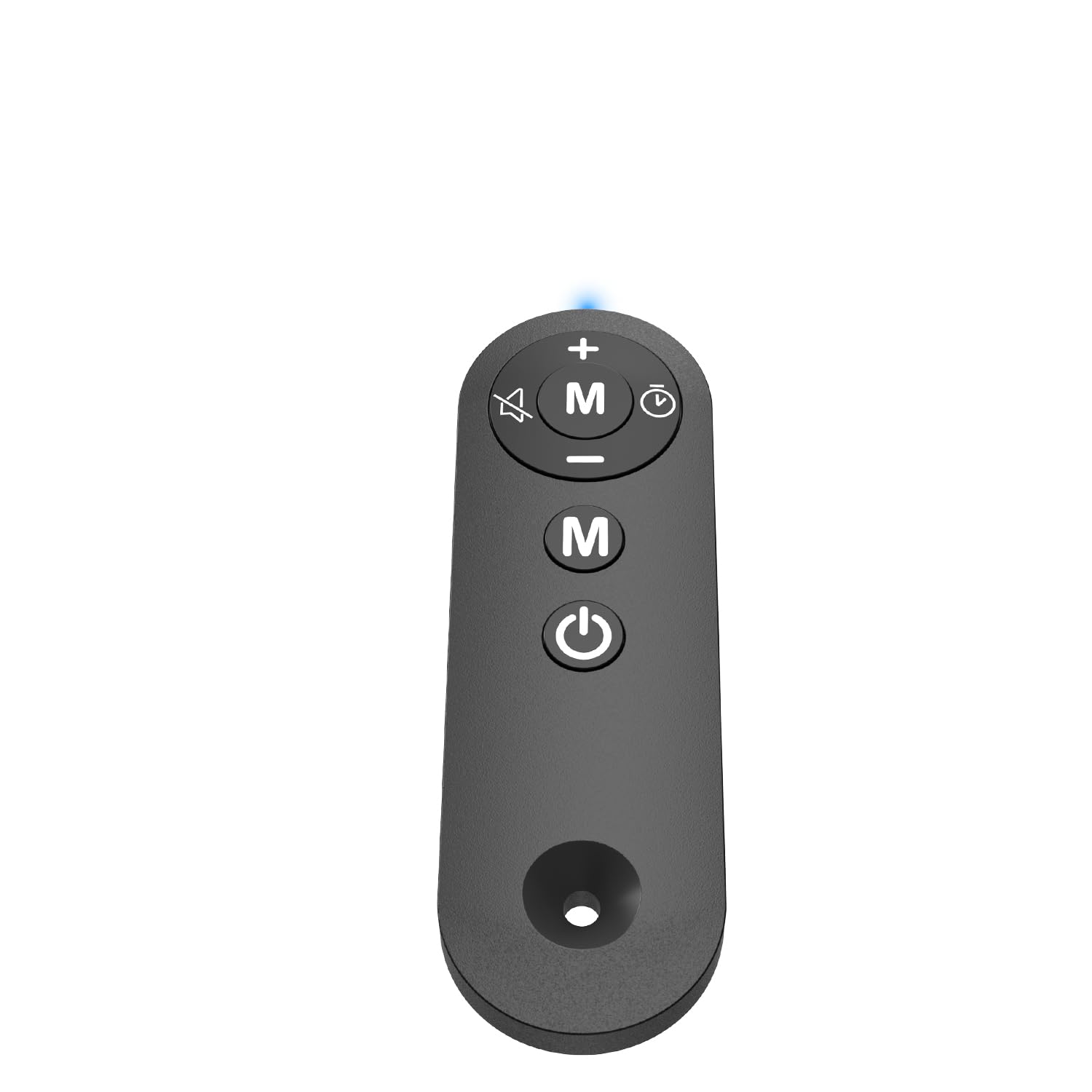
Figure 1: TODO Under Desk Treadmill Remote Control
2. Hilbera Serîview
The TODO Remote Control is a compact and portable device designed for convenient operation of your compatible under-desk treadmill. It features intuitive buttons for speed adjustment, mode selection, and power control.
2.1. Remote Control Features
- Mal: Acrylonitrile Butadiene Styrene (ABS) for durability.
- Têkilî: Infrared (IR) technology for reliable communication with the treadmill.
- Sensitive Buttons: Responsive controls for precise adjustments.
- Sêwirana Portable: Sivik û hêsan bi dest xistin.
Vîdyoya 1: Serview of the Treadmill Remote Control. This video demonstrates the physical features and button layout of the remote control.
3. Sazkirin
3.1. Sazkirina Pîl
Ji bo kontrolkirina dûr du pîlên AAA hewce ne (ne di nav de ne). Ji bo sazkirina pîlan:
- Li ser pişta kontrolê ya ji dûr ve qapa beşa pîlê bibînin.
- Serpêlê vekin.
- Du bataryayên AAA têxinê, û piştrast bin ku polarîteya rast (+ û -) e.
- Qapaxa beşa pîlê bi ewlehî bigire.
Video 2: Treadmill Remote Control Replacement. This video illustrates the process of opening the battery compartment and inserting batteries.
3.2. Bikaranîna Destpêkê
Before first use, remove the insulating plastic sheet located on the side of the remote control. Once removed, the indicator light in front of the remote should illuminate with a blue light, confirming the remote is ready for use.
Video 3: Treadmill Remote Control Replacement. This video demonstrates the removal of the insulating plastic sheet and the remote's activation.
4. Telîmatên Operating
Point the remote control directly at the treadmill's receiver for optimal performance. The remote allows you to control various functions of your TODO Under Desk Treadmill.
4.1. Fonksiyon Bişkojk
- Bişkoka Hêzê (Vekirî/Girtî): Press to turn the treadmill on or off.
- Bişkoka '+': Increases the treadmill speed.
- Bişkoka '-': Decreases the treadmill speed.
- 'M' Button (Mode): Cycles through different operating modes or programs on the treadmill.
Video 4: Walking Pad Remote Replacement. This video demonstrates the functionality of the remote control buttons with a compatible treadmill.
5. Specifications
| Nîşan | KIRIN |
| Navê Model | DÛR |
| Mezinahiya Hilberê | 1.97"D x 0.79"W x 0.28"B |
| Babetê Weight | 0.07 Pound |
| Mal | Acrylonitrile Butadiene Styrene (ABS) |
| Teknolojiya Girêdanê | Infrared |
| Çavkaniya Hêzê | Battery Powered (2x AAA, not included) |
| Pêkhateyên Tê de | Remote Control |
6. Destpêkirin
6.1. Remote Not Responding
- Pîlê kontrol bikin: Piştrast bike ku pîl bi rêkûpêk hatine sazkirin û têra xwe şarjkirî ne. Ger pêwîst be biguherînin.
- Remove Insulating Strip: Verify that the plastic insulating strip has been completely removed from the battery compartment.
- Xeta Dîtinê: Ensure there is a clear line of sight between the remote control and the treadmill's receiver. Obstructions can block the infrared signal.
- Lihevhatî: Confirm that your treadmill is a TODO brand, specifically Model AD-4000. This remote is designed for this specific model.
6.2. Indicator Light Not On
- Check battery installation and charge.
- Ensure the insulating plastic sheet is removed.
7. Maintenance
Ji bo ku hûn temendirêj û karê rast ê kontrola dûr a xwe misoger bikin:
- Keep the remote clean and dry. Wipe with a soft, damp cil ger pêwîst be.
- Ji avêtina dûrve an jî xistina wê di bin bandorên dijwar de dûr bisekinin.
- Li cîhek sar û zuwa dûr ji tîrêja tavê û germahiya zêde hilînin.
- Ger dûrveger demek dirêj neyê bikaranîn, ji bo rêgirtina li rijandinê pîlan derxînin.
8. Garantî û Piştgirî
For warranty information or technical support, please refer to the documentation provided with your TODO Under Desk Treadmill or contact TODO customer service directly. Contact information can typically be found on the manufacturer's webmalper an jî li ser pakêta hilberê ya orîjînal.

Figure 2: TODO Brand Logo