
1. Destpêk
Thank you for choosing the Weeylite RB08P RGB LED Video Light. This compact and versatile lighting solution is designed for photographers and videographers seeking portable, high-quality illumination with extensive color control. This manual provides essential information for safe and effective operation of your device.
2. Agahiyên Ewlekariyê
- Do not disassemble or modify the product. Unauthorized modifications may cause damage or injury.
- Keep the device away from water, moisture, and flammable gases or liquids.
- Avoid direct eye exposure to the LED light, as it may cause discomfort or damage.
- Do not operate the device in extreme temperatures or high humidity.
- Tenê kabloya şarjê û adaptora hêzê ya diyarkirî bikar bînin.
- Dûr negihêjin zarokan.
3. Naveroka pakêtê
Ji kerema xwe kontrol bikin ka hemû tişt di pakêta we de hene:
- Weeylite RB08P RGB LED Video Light
- Portable Tripod Holder
- Cable Charging USB
- Double Swivel Stand
- Manual Instruction
4. Hilbera Serîview
The Weeylite RB08P is a compact and lightweight RGB LED video light featuring a built-in rechargeable battery, adjustable color temperature, full RGB color control, and various scene effects. It is designed for ease of use and portability.
4.1. Pêkhateyên û Kontrol

Wêne 1: Paş view of the Weeylite RB08P with labeled controls.
- Power Switch: Amûrê vedike an vedike.
- Bişkojka Modê (M): Cycles through different lighting modes (CCT, HSI, Scene Effects).
- Setting Button (SET): Selects parameters within a mode for adjustment.
- Increase Button (+): Increases the value of the selected parameter.
- Decrease Button (-): Nirxa pîvana hilbijartî kêm dike.
- OLED Display Screen: Shows current settings such as mode, brightness, color temperature, hue, saturation, and battery level.
- 1/4-inch Screw Hole: For mounting on tripods, light stands, or other accessories.
- Porta Barkirina Micro USB: For charging the built-in battery.

Wêne 2: Berfireh view of the control buttons.

Figure 3: Close-up of the OLED display showing mode, brightness, and color temperature.
5. Sazkirin
5.1. Barkirina Pîl
The RB08P has a built-in DC3.7V/3000mAh lithium battery. Before first use, fully charge the device.
- Connect the provided USB charging cable to the Micro USB port on the light.
- Serê din ê kabloya USB bi adaptora hêzê ya USB ya 5V/2A (ne di nav de ye) an jî bi porta USB ya komputerê ve girêbide.
- The battery icon on the OLED screen will indicate charging status. A full charge typically takes about 3 hours.

Figure 4: Micro USB charging port.
5.2. Sazkirina Ronahîyê
The RB08P offers flexible mounting options:
- Tripod/Light Stand: Use the 1/4-inch screw hole at the bottom or side of the light to attach it to a compatible tripod or light stand.
- Camera Hot Shoe: Attach the included double swivel stand to the 1/4-inch screw hole, then slide the swivel stand's hot shoe adapter into your camera's hot shoe mount.
- Xwediyê Smartphone: The portable tripod holder includes a smartphone clamp. Mount your smartphone into the clamp, and then attach the RB08P light to the tripod for mobile video setups.

Wêne 5: Mînakamples of mounting the RB08P with a tripod and smartphone.
6. Telîmatên Operating
6.1. Power On / Off
Bişkojk û bigire Switch Power button (top button on the side) for approximately 2 seconds to turn the light on or off.
6.2 Hilbijartina Modeyê
Bitikîne Bişkojka Modê (M) to cycle through the main operating modes:
- CCT Mode (Correlated Color Temperature): For white light adjustment.
- HSI Mode (Hue, Saturation, Intensity): For full RGB color control.
- Scene Effects Mode: For various pre-programmed lighting effects.
6.3. CCT Mode (White Light)
In CCT Mode, you can adjust brightness and color temperature.
- Bitikîne Bişkojka Modê (M) until 'CCT' is displayed on the OLED screen.
- Bitikîne Setting Button (SET) to toggle between adjusting Brightness û Germahiya Rengê.
- Bi kar tînin Zêdekirin (+) û Kêmkirin (-) bişkokên ji bo eyar parametre hilbijartî.
- Ronahî: Adjustable from 10% to 100%.
- Germahiya Rengê: Ji 2500K (germ) heta 8500K (sar) verastbar dibe.

Figure 6: Brightness and Bi-color mode adjustments.
6.4. HSI Mode (Full Color)
In HSI Mode, you have full control over hue, saturation, and intensity (brightness).
- Bitikîne Bişkojka Modê (M) until 'HSI' is displayed on the OLED screen.
- Bitikîne Setting Button (SET) to toggle between adjusting Hue (0-360°), Têrbûn (0-100%), û Ronahî (10-100%).
- Bi kar tînin Zêdekirin (+) û Kêmkirin (-) bişkokên ji bo eyar parametre hilbijartî.

Figure 7: HSI Full Color control interface.
6.5. Scene Effects Mode
The RB08P includes 9 pre-programmed scene effects to simulate various lighting environments.
- Bitikîne Bişkojka Modê (M) until 'Scene' is displayed on the OLED screen.
- Bi kar tînin Zêdekirin (+) û Kêmkirin (-) buttons to cycle through the 9 available scene effects.
- Some effects may have adjustable parameters (e.g., speed or intensity), which can be selected using the Setting Button (SET) and adjusted with (+) û (-) bişkokên.

Wêne 8: Serview of 9 Scene Light Effects.
Video 1: Demonstration of Weeylite RB08P Full Color RGB Video Light features and various modes.
7. Maintenance
- Paqijî: Use a soft, dry cloth to clean the light. Do not use harsh chemicals or abrasive materials.
- Embarkirinî: Dema ku amûrê nayê bikaranîn, li cîhekî sar û hişk hilînin. Ji germahiyên zêde dûr bisekinin.
- Lênêrîna Pîl: For optimal battery life, charge the device at least once every three months if not used regularly.
8. Destpêkirin
- Ronahî naçe: Piştrast bike ku pîl şarj bûye. Bi çavkaniyek hêzê ve girêbide û dîsa biceribîne.
- Ronahî nayê şarj kirin: Check the USB cable and power adapter for damage. Ensure the connection is secure.
- Controls unresponsive: Biceribînin ku cîhazê vemirînin û dîsa vekin. Ger pirsgirêk berdewam bike, bi piştgiriya xerîdar re têkilî daynin.
9. Specifications
| Taybetî | Specification |
|---|---|
| Mezinahiya Hilberê | 5.16 x 3.78 x 2.36 inches |
| Babetê Weight | 16 onsan |
| Cureyê Pîl | 1 Lithium Ion battery required (Built-in) |
| Kapasîteya Pîl | 3000 mAh |
| Battery Life (100% power) | Approx. 1.2 saetan |
| Time Charging | Approx. 3 saetan |
| Teknolojiya Girêdanê | USB |
| Navrûya Alavê | USB |
| Rêzeya Germahiya Rengê | 2500K-8500K |
| Rêzkirina Ronahî | 10%-100% |
| CRI | ≥95 |
| TLCI | ≥97 |
| Max Power | 8W |
| Luminance | 630LM |
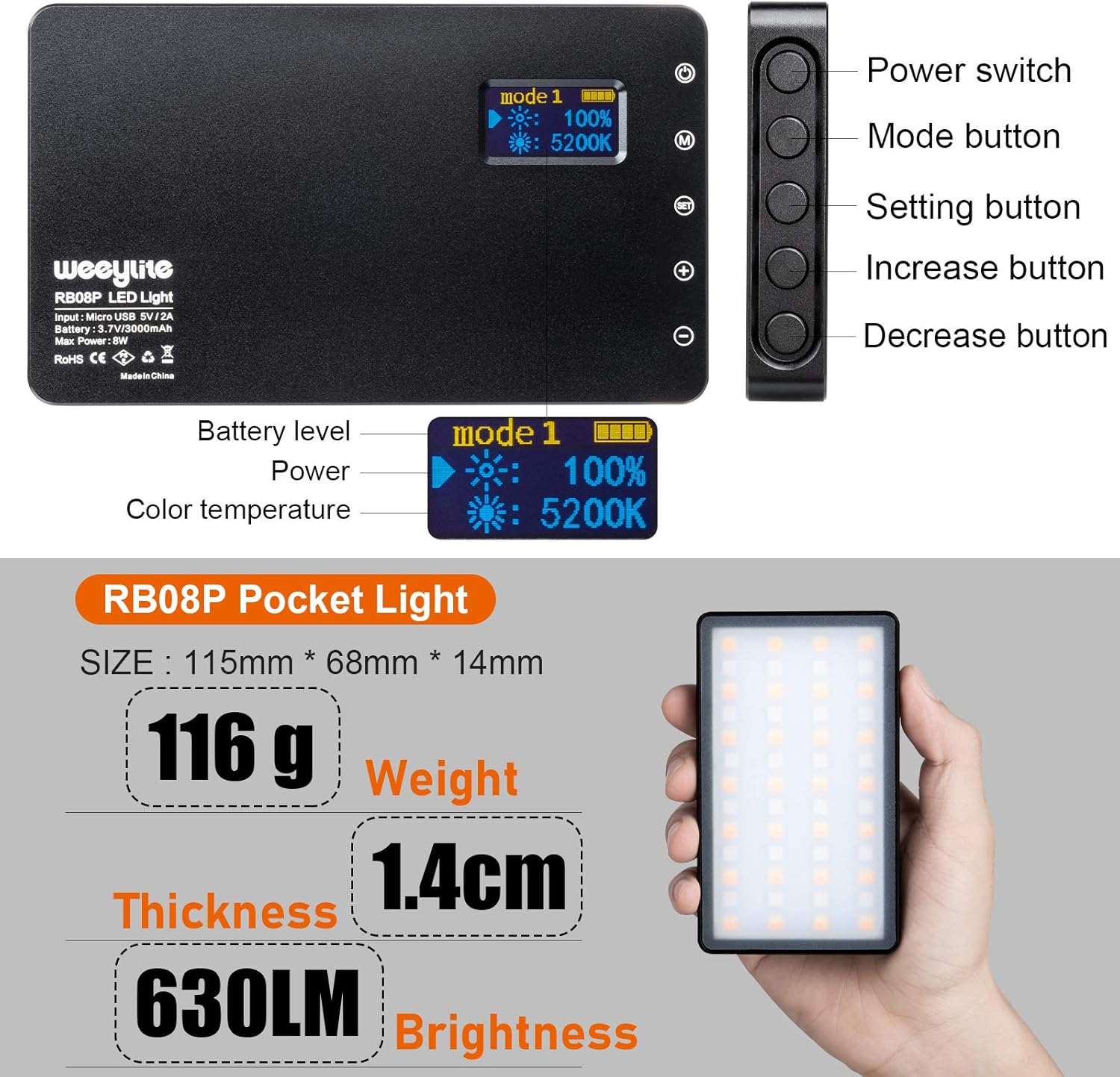
Figure 9: Key physical specifications and brightness.
10. Garantî û Piştgirî
For warranty information or technical support, please refer to the official Weeylite webmalperê an jî bi firoşkarê xwe re têkilî daynin. Fatûra kirînê wekî delîla kirînê biparêzin.