
1. Destpêk
This manual provides detailed instructions for the setup, operation, and maintenance of your WISE TIGER LED Digital Alarm Clock (Model CK-LED1302). Please read this manual thoroughly before use to ensure proper functionality and to maximize your product experience.

Image 1.1: WISE TIGER LED Digital Alarm Clock and its remote control.
2. Naveroka pakêtê
Ji kerema xwe piştrast bikin ku hemî tişt di pakêta we de hene:
- WISE TIGER LED Digital Alarm Clock (Model CK-LED1302)
- Remote Control
- Kabloya Hêza USB
- Manual Bikarhêner (ev belge)
- Fixed Bracket (for desk placement)
3. Hilbera Serîview
The WISE TIGER LED Digital Alarm Clock features a modern 3D design, offering clear time display and multiple functions for various environments.
3.1 Taybetmendiyên sereke
- Nîşandana Demjimêr: 12-hour or 24-hour format.
- Nîşandana Salnameyê: Shows date.
- Demjimara şîyarker: With snooze function.
- Nîşandana germahiyê: Germahiya hawîrdorê nîşan dide.
- Ronahîya Birêkûpêk: Automatic brightness sensor and manual adjustment via remote control.
- Fonksiyona Ronahiya Şevê: Provides soft illumination.
- Fonksiyona Bîrê: Built-in battery retains time settings for 4-8 hours during power disconnection.
- Bicîhkirina Piralî: Suitable for desk or wall mounting.

Image 3.1: Visual representation of the clock's main functions.
3.2 Components
Ji bo zêdetir agahdarî li diyagrama jêrîn binêreview of the clock's components and connection points.
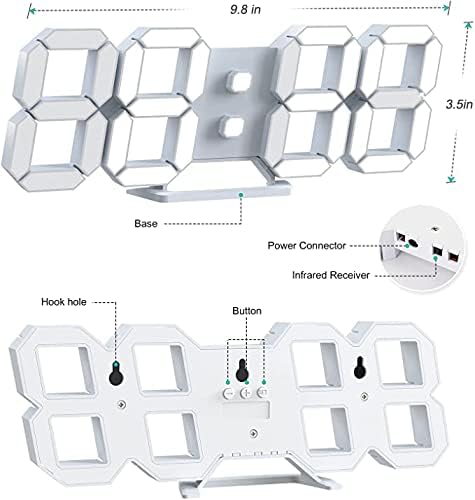
Wêne 3.2: Paşve view and dimensions of the clock, highlighting the power connector, infrared receiver, and mounting options.
- Pêşkêşî: Large 3D LED digits for time, date, and temperature.
- Bingeh: Removable stand for desk placement.
- Têkiliya Hêzê: USB port for power input.
- Wergirtina Infrared: Ji bo sînyalên kontrola dûr.
- Hook Holes: Ji bo lêkirina dîwar.
- Bişkokên Kontrolê: Located on the back for basic settings (Power, Up, Down, Set).
4. Sazkirin
4.1 Girêdana Hêzê
- Connect the provided USB power cable to the power connector on the back of the clock.
- Serê din ê kabloya USB-ê bi adapterek hêzê ya USB-ya standard (ne tê de ye) an jî bi porta USB-ya komputerê ve girêdin.
- The clock will power on and display the time.
The clock is powered by the USB cable only. A built-in battery serves to record time settings when power is disconnected, ensuring settings are retained for 4-8 hours.

Image 4.1: Explanation of the clock's power and memory function.
4.2 Vebijarkên Cihgirtinê
The clock can be used as a desk clock or a wall clock.
- Cihê maseyê: Attach the fixed bracket to the bottom of the clock. The angle of the bracket can be adjusted for optimal viewing.
- Çêkirina dîwar: Remove the fixed bracket if attached. Use the installation slots (hook holes) on the back of the clock to hang it securely on a wall using appropriate fasteners (not included).

Image 4.2: The clock configured for wall mounting and desk placement.
5. Telîmatên Operating
The clock's functions are primarily controlled using the included remote control. Basic settings can also be adjusted via the buttons on the back of the clock.
5.1 Sazkirina Dem û Dîrokê
- Bitikîne DEM button on the remote control to enter time setting mode.
- Bi kar tînin UP û JÊR arrows to adjust the hour.
- Rojnamevanî DEM again to move to minute setting, then use UP û JÊR eyar kirin.
- Bi zextê berdewam bikin DEM ji bo çerxerêkirinê di nav mîhengên sal, meh û rojê de, her yekê bi xwe ve biguherîne UP û JÊR.
- Rojnamevanî DEM one last time or wait a few seconds for the settings to save automatically.
5.2 12/24 Saet Format
Ji bo guhertina di navbera formatên demê yên 12-saetî û 24-saetî de, pêl bişkoka 12/24H bişkojka li ser kontrola dûr.

Wêne 5.1: Berêample of 12-hour and 24-hour time display.
5.3 Danîna Alarmê
- Bitikîne HAWAR button on the remote control to enter alarm setting mode.
- Bi kar tînin UP û JÊR arrows to set the desired alarm hour.
- Rojnamevanî HAWAR again to move to minute setting, then use UP û JÊR eyar kirin.
- Rojnamevanî HAWAR one last time or wait for the settings to save.
- Ji bo çalakkirin/neçalakkirina alarmê, bişkojka HAWAR button briefly outside of setting mode. An alarm icon will appear/disappear on the display.
5.4 Fonksiyona Snooze
Dema ku alerjê dixuye, pêl pê bikin XWARIN button on the remote control to temporarily silence the alarm. The alarm will sound again after a set interval (typically 5-10 minutes).

Image 5.2: The snooze alarm function in use.
5.5 Rêzkirina Ronahîyê
The clock features both automatic and manual brightness control.
- Ronahiya otomatîk: The built-in sensor automatically adjusts the display brightness based on ambient light conditions.
- Ronahiya Destî: Bitikîne RONÎ button on the remote control to cycle through different brightness levels (e.g., high, medium, low).

Image 5.3: Automatic brightness adjustment based on ambient light.

Image 5.4: Manual adjustment through three brightness levels.
5.6 Display Temperature
The clock automatically displays the ambient temperature. No manual adjustment is typically required for this function.
6. Maintenance
To ensure the longevity and optimal performance of your WISE TIGER LED Digital Alarm Clock, follow these maintenance guidelines:
- Paqijî: Use a soft, dry cloth to wipe the display and casing. Avoid abrasive cleaners, solvents, or spray cleaners directly on the clock.
- Erk: Always use the provided USB cable for power. Ensure the power source is stable.
- Dor: Saetê ji germahiyên zêde, tîrêjên rojê yên rasterast û şilbûna zêde dûr bigirin.
- Kontrola dûr: Store the remote control in a safe place to prevent loss or damage. Ensure batteries are replaced when needed (typically 2 Lithium Ion batteries, included).
7. Destpêkirin
If you encounter issues with your clock, refer to the following common problems and solutions:
| Pirsegirêk | Sedema gengaz | Çare |
|---|---|---|
| Saet naçe | Tu hêz an girêdana winda | Ensure USB cable is securely connected and power source is active. Try a different USB port or adapter. |
| Kontrola ji dûr ve naxebite | Remote batteries are dead or remote is out of range/blocked | Replace remote control batteries. Ensure remote is pointed at the clock's infrared receiver (refer to Image 3.2) and within 8 meters. Remove any obstructions. |
| Dem nerast e | Time was not set precisely | Reset the time carefully, ensuring you set it at the exact second of the desired time. |
| Nîşandan pir tarî an jî pir geş e | Pêdivî ye ku mîhenga geşiyê were sererastkirin | Bitikîne RONÎ button on the remote to cycle through manual brightness levels. Check if automatic brightness is functioning correctly in different light conditions. |
| Alarm nayê | Alarm is not activated or set incorrectly | Ensure the alarm is set and activated (alarm icon visible). Verify the alarm time is correct. |
8. Specifications
| Taybetî | Hûrî |
|---|---|
| Nîşan | PILÊ AHIŞK |
| Hejmara Model | CK-LED1302 |
| Type Display | Digital |
| Reng | Spî |
| Mezinahiya Hilberê | 9.7"Firehî x 3.5"Bilindahî |
| Çavkaniya Hêzê | Corded Electric (USB) |
| Memory Battery | 2 Lithium Ion batteries (included), retains settings for 4-8 hours |
| Mounting Type | Wall Mount, Desk Mount |
| Taybetmendiyên Taybet | Adjustable Brightness, Alarm Clock, Temperature Display, Date Display, 12/24 Hour Format |
| Mal | Acrylonitrile Butadiene Styrene |
| Babetê Weight | 0.317 onsan (nêzîkî 9 gram) |
| UPC | 728990655931 |
9. Garantî û Piştgirî
For warranty information or technical support, please refer to the product packaging or contact the retailer where the product was purchased. Keep your purchase receipt as proof of purchase.