
1. Destpêk
This user manual provides essential information for the safe and efficient installation, operation, and maintenance of your TOA Electronics PC-1860 5-Inch Ceiling Mount Speaker. Please read this manual thoroughly before using the product and retain it for future reference.
The PC-1860 is designed for clear audio reproduction in various indoor environments, featuring a compact design suitable for ceiling installation.
2. Tedbîrên Ewlekariyê
GAZÎ:
- Ensure all electrical connections are made by qualified personnel and comply with local electrical codes.
- Do not install the speaker in locations exposed to direct water spray or excessive humidity, as the product is not waterproof.
- Berî ku hûn sazkirin, lênêrîn, an çareserkirina pirsgirêkan bikin, her gav elektrîkê ji hev veqetînin.
- Use appropriate mounting hardware and ensure the ceiling structure can support the speaker's weight (approximately 10 pounds).
- Avoid placing heavy objects on the speaker or subjecting it to strong impacts.
BALDAYNÎ:
- Do not attempt to modify or repair the speaker yourself. Refer all servicing to qualified service personnel.
- Keep the speaker away from heat sources and direct sunlight to prevent damage.
- Ji bo rêgirtina li germbûna zêde, li dora axaftvanê hewakirina guncaw peyda bikin.
3. Naveroka pakêtê
Piştrast bike ku hemû tiştên ku li jêr hatine navnîş kirin di pakêta te de hene:
- 1 x TOA Electronics PC-1860 5-Inch Ceiling Mount Speaker
- 1 x Mesh Filter
- Ev Manual Bikarhêner
4. Sazkirin û Sazkirin
Sazkirina rast ji bo performans û ewlehiya çêtirîn pir girîng e. Tête pêşniyar kirin ku sazkirin ji hêla teknîsyenek pispor ve were kirin.
4.1 Vekirin
Carefully remove the speaker and all accessories from the packaging. Inspect for any signs of damage during transit. If damage is found, contact your supplier immediately.
4.2 Hilbijartina Cihê Montajkirinê
Choose a suitable location in the ceiling that can structurally support the speaker's weight. Ensure there are no obstructions such as electrical conduits, water pipes, or structural beams in the chosen area. Maintain adequate clearance for wiring and ventilation.
4.3 Gavên Sazkirinê
- Vekirina banê amade bikin: Cut a circular hole in the ceiling at the selected location, ensuring the diameter matches the speaker's mounting requirements. Refer to the speaker's physical dimensions for precise measurements.
- Têlê girêdan: Kabloya axaftvanê ji ya xwe ve rê bike amplifier or audio source to the ceiling opening. Connect the wires to the speaker terminals, observing correct polarity (+ to + and - to -). Ensure connections are secure.
- Insert Speaker into Opening: Carefully insert the speaker into the prepared ceiling opening. The mounting clips (visible in the image) are designed to secure the speaker in place.
- Axaftvan ewle bikin: Engage the mounting clips by tightening the screws (if applicable) or by pushing them outwards until they firmly grip the ceiling material. Ensure the speaker is flush with the ceiling surface and securely held.
- Attach Mesh Filter: If not pre-installed, attach the included mesh filter to the speaker grille. This helps protect the speaker from dust and debris.
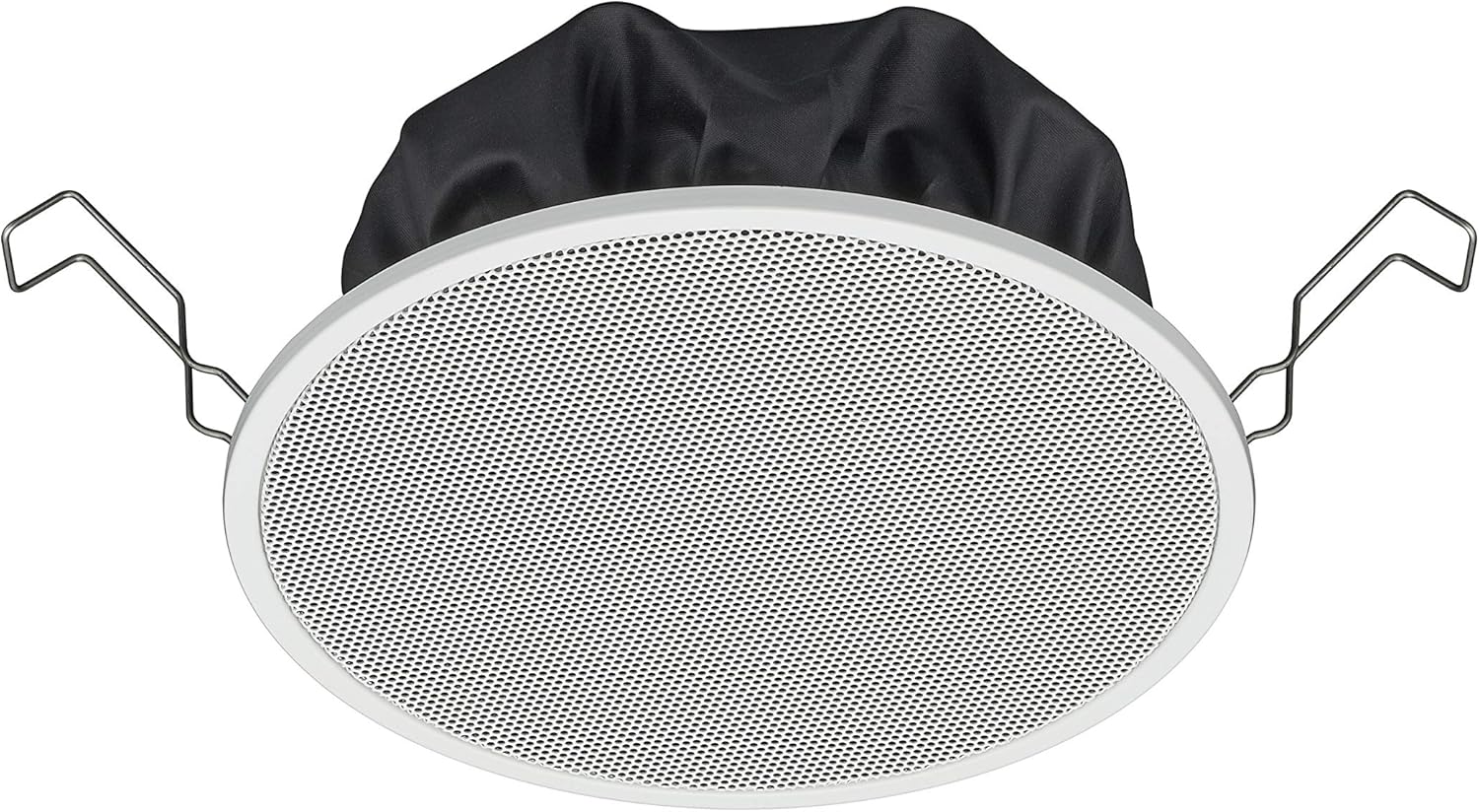
Figure 1: TOA Electronics PC-1860 5-Inch Ceiling Mount Speaker, showing the white grille, black rear enclosure, and metal mounting clips. This image illustrates the speaker's design for flush ceiling installation.
5. Telîmatên Operating
The TOA Electronics PC-1860 is a passive speaker designed to reproduce audio from an external amplifier or audio source. It does not require direct power or complex controls.
5.1 Lêxistina Dengî ya Bingehîn
- Power On Ampzindîtir: Dengê xwe piştrast bikin amplifier or receiver is powered on and connected to your audio source (e.g., MP3 player, desktop, projector, television).
- Volume eyar bikin: Use the volume controls on your amplifier or audio source to set the desired listening level.
- Kontrolkirina Deng (eger hebe): If your connected audio system supports voice control, you may be able to manage playback and volume through voice commands directed at your audio source device. The speaker itself does not have integrated voice control functionality but can reproduce audio from devices that do.
- Radio Functionality (if applicable): If your connected audio source is a radio receiver, the speaker will reproduce the radio broadcast. The speaker itself does not contain a radio tuner.
The PC-1860 is designed for straightforward audio output. All primary controls for audio source selection, volume, and equalization will be managed through your connected amplifier an pergala deng.
6. Maintenance
Regular maintenance ensures the longevity and optimal performance of your speaker.
- Paqijî: Gently wipe the speaker grille and frame with a soft, dry cloth. For stubborn dirt, a slightly damp cloth can be used, followed by a dry cloth. Avoid using harsh chemicals, solvents, or abrasive cleaners.
- Rakirina tozê: Periodically use a soft brush or a vacuum cleaner with a brush attachment to remove dust from the grille, especially the mesh filter.
- Berçavderbasî: Occasionally inspect the speaker for any visible damage or loose connections. If any issues are found, refer to the troubleshooting section or contact support.
- Dor: Ensure the installation environment remains within recommended temperature and humidity levels.
7. Destpêkirin
If you encounter issues with your PC-1860 speaker, refer to the following common problems and solutions:
| Pirsegirêk | Sedema gengaz | Çare |
|---|---|---|
| Deng ji dengbêjê nayê |
|
|
| Dengê çewt an nezelal |
|
|
| Speaker not securely mounted |
|
|
If the problem persists after attempting these solutions, please contact TOA Electronics customer support.
8. Specifications
Below are the key technical specifications for the TOA Electronics PC-1860 5-Inch Ceiling Mount Speaker:
| Taybetî | Hûrî |
|---|---|
| Navê Model | PC-1860 |
| Nîşan | TOA Electronics |
| Type Speaker | Li Ceiling |
| Mounting Type | Ceiling Mount |
| Mezinahiya Speaker | 5 Inches |
| Type Driver Audio | Ajokera dînamîk |
| Mode Output Audio | Stereo (when paired with another speaker) |
| Reng | Spî |
| Pêkhateyên Tê de | 1 x Mesh Filter |
| Waterproof e | ŞAŞ |
| Babetê Weight | 10 pound (nêzîkî) |
| Çavkaniya Hêzê | Elektrîkê ya bi kabloyê (bi rêya ampzindîtir) |
| Rêbaza Kontrolê | Voice (via compatible external devices) |
| Bikaranîna Pêşniyar kirin | Construction, Industrial |
| Amûrên Lihevhatî | Desktop, MP3 Player, Projector, Television (via ampzindîtir) |
9. Agahdariya Garantiyê
The TOA Electronics PC-1860 speaker comes with a Limited Warranty. Specific terms and conditions of the warranty, including coverage period and claim procedures, are subject to the policies of TOA Electronics.
For detailed warranty information, please refer to the official TOA Electronics webmalperê an rasterast bi karûbarê xerîdar a wan re têkilî daynin. Ji bo îdîayên garantiyê delîla kirîna xwe biparêzin.
10. Piştgiriya Mişterî
If you require further assistance, have questions not covered in this manual, or need technical support, please contact TOA Electronics customer service.
- Piştgiriya Serhêl: Visit the official TOA Electronics webmalperek ji bo FAQs, belgekirina hilberê, û formên têkiliyê.
- Agahiyên Têkilî: Refer to the TOA Electronics website for current phone numbers and email addresses for your region.
When contacting support, please have your product model (PC-1860) and purchase information readily available.