
1. Telîmatên Ewlekariya Girîng
Please read all safety and operating instructions carefully before using this television. Keep these instructions for future reference.
- Çavkaniya hêzê: Connect the TV only to the power supply indicated on the label.
- Perwanekirin: Hewakirina guncaw misoger bikin. Deriyên hewakirinê negirin.
- Paqijî: Berî paqijkirinê, TV-yê ji priza dîwêr veqetînin. Qumaşek nerm û hişk bikar bînin. Paqijkerên şile an jî paqijkerên aerosol bikar neynin.
- Av û Nem: Do not use this TV near water, such as a bathtub, washbowl, kitchen sink, laundry tub, swimming pool, or in a wet basement.
- Germa: Position the TV away from heat sources such as radiators, heat registers, stoves, or other products (including ampgiyandar) ku germê çêdikin.
- Kablo: Protect the power cord from being walked on or pinched, particularly at plugs, convenience receptacles, and the point where they exit from the TV.
- Brûsk: Vê TV-yê di dema bahozên birûskê de an dema ku ji bo demên dirêj nayên bikar anîn vekin.
- Xizmetkirin: Do not attempt to service this TV yourself. Refer all servicing to qualified service personnel.
2. Hilbera Serîview
The CHIQ L40H7N is a 40-inch Full HD Smart TV designed to provide an immersive viewing experience with integrated smart features. It offers a resolution of 1080p and includes connectivity options such as Wi-Fi and Bluetooth.
Taybetmendiyên sereke:
- Full HD (1080p) Resolution: Delivers clear and detailed images.
- Fonksiyona Smart TV: Access popular streaming services like Netflix, YouTube, and Prime Video.
- Integrated Wi-Fi and Bluetooth: For wireless connectivity and device pairing.
- Multiple Connectivity Ports: Includes 3 HDMI and 2 USB ports for various external devices.
- Ahenga sêalî: Supports DVB-T/T2/C/S/S2 for versatile broadcast reception.
- Dolby Audio: Enhanced sound experience.
- Piştgiriya HDR10: Provides improved contrast and color reproduction.
- Quad Core CPU: Ensures smooth performance for smart features and applications.

Wêne: Pêşî view of the CHIQ L40H7N Smart TV, showcasing çarçove û dîmendera wê ya zirav.
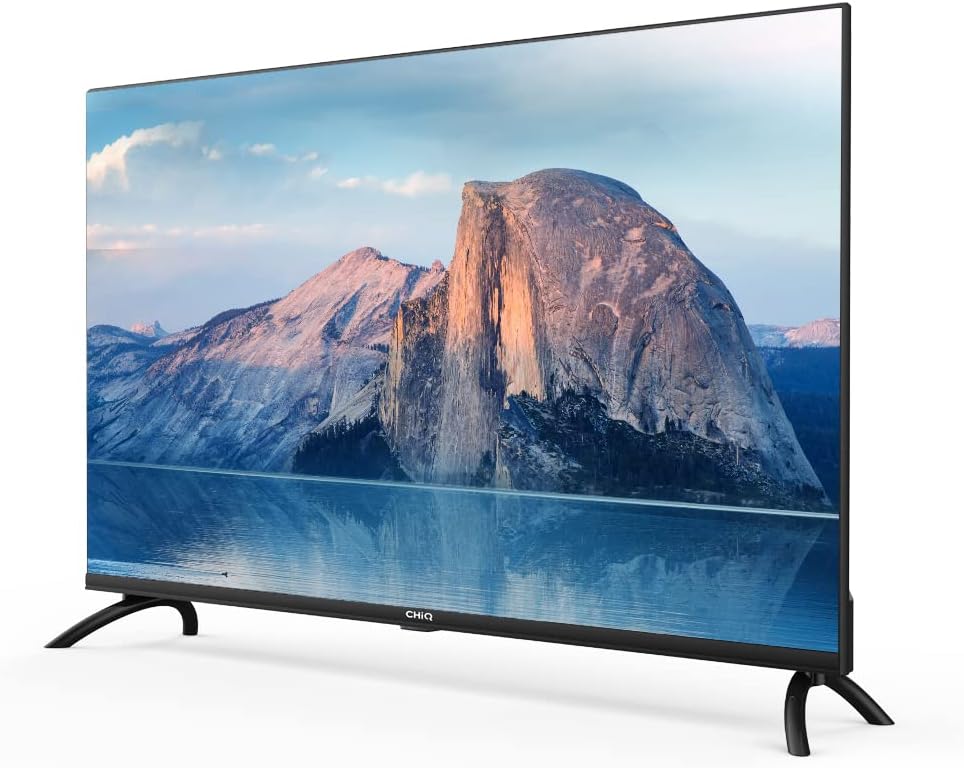
Wêne: Alî view of the CHIQ L40H7N Smart TV, highlighting its thin profile.
3. Sazkirin
3.1 Vekirin
- Carefully open the packaging and remove the TV and all accessories.
- Ensure all components are present: TV unit, remote control, batteries, power cord, stand components, and user manual.
- Retain the packaging materials for future transport or servicing.
3.2 Sazkirina Stand
Ji bo sazkirina standa TV-yê:
- Ji bo ku zirarê negihîne ekranê, TV-yê bi rûyê xwe ber bi jêr ve li ser rûyekî nerm û dûz (mînak, betanî an kef) deynin.
- Lingên standê bi qulên têkildar ên li binê TV-yê re hevrêz bikin.
- Secure the stand legs using the provided screws. Ensure they are tightened firmly.

Image: Diagram showing the dimensions of the CHIQ L40H7N TV, including height with stand (568.9mm), width (900.3mm), and depth with stand (178.9mm).
3.3 Çêkirina Dîwar (Vebijarkî)
If you choose to wall mount your TV, please consult a professional installer and refer to the specific instructions provided with your wall mount bracket. Ensure the wall mount is compatible with the TV's VESA mounting pattern.
3.4 Girêdana Peripherals
Connect your external devices to the TV's ports:
- HDMI: Connect Blu-ray players, game consoles, or set-top boxes to the HDMI ports (HDMI1, HDMI2, HDMI3).
- USB: Insert USB drives for media playback into the USB ports (USB1, USB2).
- Antenna/Cable: Connect your antenna or cable TV signal to the appropriate input.
- Ethernet: Ji bo girêdana înternetê ya bi kabloyî ya sabît, kabloyek Ethernet bi porta LAN ve girêdin.
3.5 Girêdana Hêzê
After connecting all necessary cables, plug the power cord into the TV's power input, then into a wall outlet.
3.6 Hêza Destpêkê Li ser
Press the power button on the remote control or on the TV. Follow the on-screen instructions to complete the initial setup, including language selection, network connection, and channel scanning.
4. Bixebitandina TV-yê
4.1 Fonksiyonên Kontrola Dûr
The remote control allows you to navigate the TV's features:
- Bişkojka Hêzê: Televizyonê vedike an qut dike.
- Cild +/-: Asta dengdanê eyar dike.
- Kanal +/-: Kanalên TV-yê diguherîne.
- Ketin/Çavkanî: Çavkaniya têketinê (HDMI, USB, TV) hildibijêre.
- Bişkokên Navîgasyonê (Jor/Jêr/Çep/Rast/Temam): Di menuyan de digere û hilbijartinan piştrast dike.
- Home/Smart Hub: Accesses the Smart TV interface.
- Bişkokên Serlêdanê: Dedicated buttons for Netflix, YouTube, Prime Video, etc.
4.2 Taybetmendiyên TV-ya Jîr
Your CHIQ L40H7N TV provides access to a range of smart features and applications:
- Gihîştina Serlêdanan: Press the Home button or dedicated app buttons to launch applications like Netflix, YouTube, and Prime Video.
- App Store: Download and install additional applications from the integrated app store.
- Mirroring Screen: Cast content from compatible smartphones or tablets to your TV.

Image: The CHIQ Smart TV displaying the Netflix application interface, along with other streaming apps like YouTube and Prime Video.

Image: A CHIQ Smart TV screen showing a variety of content from streaming services, indicating a rich media experience.
4.3 Girêdana Torê
To use Smart TV features, connect your TV to the internet:
- Wi-Fi: Go to Settings > Network > Wi-Fi, select your network, and enter the password.
- Ethernet: Kabloyek Ethernet ji routera xwe bi porta LAN ya TV-yê ve girêbide. TV dê bixweber girêdana bi têl tesbît bike.
4.4 Girêdana Bluetoothê
Pair Bluetooth devices like headphones or speakers:
- Enable Bluetooth on your external device and set it to pairing mode.
- On the TV, go to Settings > Remotes & Accessories > Bluetooth.
- Select your device from the list and follow the on-screen prompts to pair.
4.5 Hilbijartina Input
Press the 'Input' or 'Source' button on your remote to switch between connected devices (HDMI1, HDMI2, HDMI3, USB, TV Tuner).
4.6 Mîhengên Wêne û Deng
Adjust display and audio preferences via the Settings menu:
- Moda Wêne: Choose from standard, dynamic, movie, or custom settings.
- Ronahî / Berevajî / Reng: Qalîteya wêneyê bi baldarî sererast bikin.
- Moda Deng: Select audio presets like standard, music, movie, or custom.
- Dolby Audio: The TV supports Dolby Audio for enhanced sound.
- HDR10: Experience improved contrast and color with HDR10 content.

Image: The CHIQ L40H7N TV displaying a scene with the Dolby Audio logo, indicating support for enhanced sound.

Image: A split-screen comparison on the CHIQ L40H7N TV, demonstrating the visual improvement with HDR10 technology, showing richer colors and contrast.

Image: An illustration of a Quad Core CPU, representing the processing power within the CHIQ L40H7N TV for smooth operation.

Image: The CHIQ L40H7N TV positioned on a media console in a living room, showcasinentegrekirina wê ya estetîk bi jîngeha malê re.
5. Maintenance
5.1 Paqijkirina TV-yê
Ji bo parastina xuyang û performansa TV-yê:
- Parêzî: Ekranê bi qumaşek nerm û bê lîf bi nermî paqij bikin. Ji bo şopên serhişk, bi sivikî paqij bikin.ampqumaşê bi av an jî paqijkerek taybetî ya ekranê bişon (rasterast li ser ekranê nepişkînin).
- Şêwr: Kabîneya TV-yê bi qumaşek nerm û hişk paqij bikin. Ji bikaranîna paqijkerên aşınker an çareserkeran dûr bisekinin.
- Berî paqijkirinê, her tim TV-yê ji ceryanê veqetînin.
5.2 Nûvekirinên Nermalavê
Regular software updates can improve performance and add new features:
- Nûvekirinên Xweser: Ensure your TV is connected to the internet for automatic updates.
- Kontrolkirina Destî: You can manually check for updates in the Settings menu (e.g., Settings > About > System Update).
6. Destpêkirin
Eger hûn bi TV-ya xwe re rastî pirsgirêkan werin, li pirsgirêk û çareseriyên hevpar ên jêrîn binêrin:
- Hêz tune:
- Check if the power cord is securely plugged into the TV and the wall outlet.
- Ensure the wall outlet is functioning by testing it with another device.
- Try pressing the power button on the TV itself, not just the remote. - Wêne tune ye, lê deng heye :
- Check the input source. Ensure it matches the device you are trying to view (e.g., HDMI1 for a Blu-ray player).
- Verify that the external device is powered on and functioning correctly.
- Try a different HDMI cable or port. - Deng tune ye lê wêne heye :
- Check the volume level and ensure the TV is not muted.
- Verify audio output settings in the TV menu (e.g., internal speakers, external audio system).
- If using an external device, check its volume and audio settings. - Kontrola Dûr nexebite:
- Pîlên di dûrveyê de biguherînin.
- Ensure there are no obstructions between the remote and the TV's IR sensor.
- Point the remote directly at the TV. - Pirsgirêkên Girêdana Torê:
- Restart your router and modem.
- Check Wi-Fi password if connecting wirelessly.
- If using a wired connection, ensure the Ethernet cable is properly connected.
If the problem persists, consult the CHiQ customer support or a qualified technician.
7. Specifications
Below are the technical specifications for the CHIQ L40H7N Smart TV:
| Taybetî | Specification |
|---|---|
| Nîşan | CHiQ |
| Navê Model | L40H7N |
| Mezinahiya Screen | 40 Inches |
| Display Technology | LCD |
| Resolution | 1080p (Full HD) |
| Refresh Rate | 60 Hz |
| Taybetmendiya Taybet | Full HD, Smart TV, HDR10, Dolby Audio |
| Teknolojiya Girêdanê | Bluetooth, Ethernet, HDMI (3 ports), USB (2 ports), Wi-Fi |
| Karûbarên Înternetê piştgirî kirin | Vîdyoya Tavilê ya Amazonê, Netflix, YouTube |
| Amûrên Lihevhatî | Laptop, Smart Speaker, Smart Watch, Tablet, Car Audio System, Cellphone |
| Xerckirina Hêzê (SDR) | 47.0 W |
| Dersa Karbidestiya Enerjiyê (SDR) | G |
| Screen Diagonal (cm) | 100.3 cm |
| Screen Resolution (pixels) | 1920 x 1080 |
| Minimum Guaranteed Software Updates Until | 20-01-2030 |
| Minimum Guaranteed Spare Parts Until | 20-01-2029 |
Ji bo agahdariya berfireh a enerjiyê, ji kerema xwe li databasa EPREL binêrin: https://eprel.ec.europa.eu/qr/454406

Image: The EU Energy Label for the CHIQ L40H7N TV, showing an energy efficiency class G and consumption of 47 kWh/1000h.
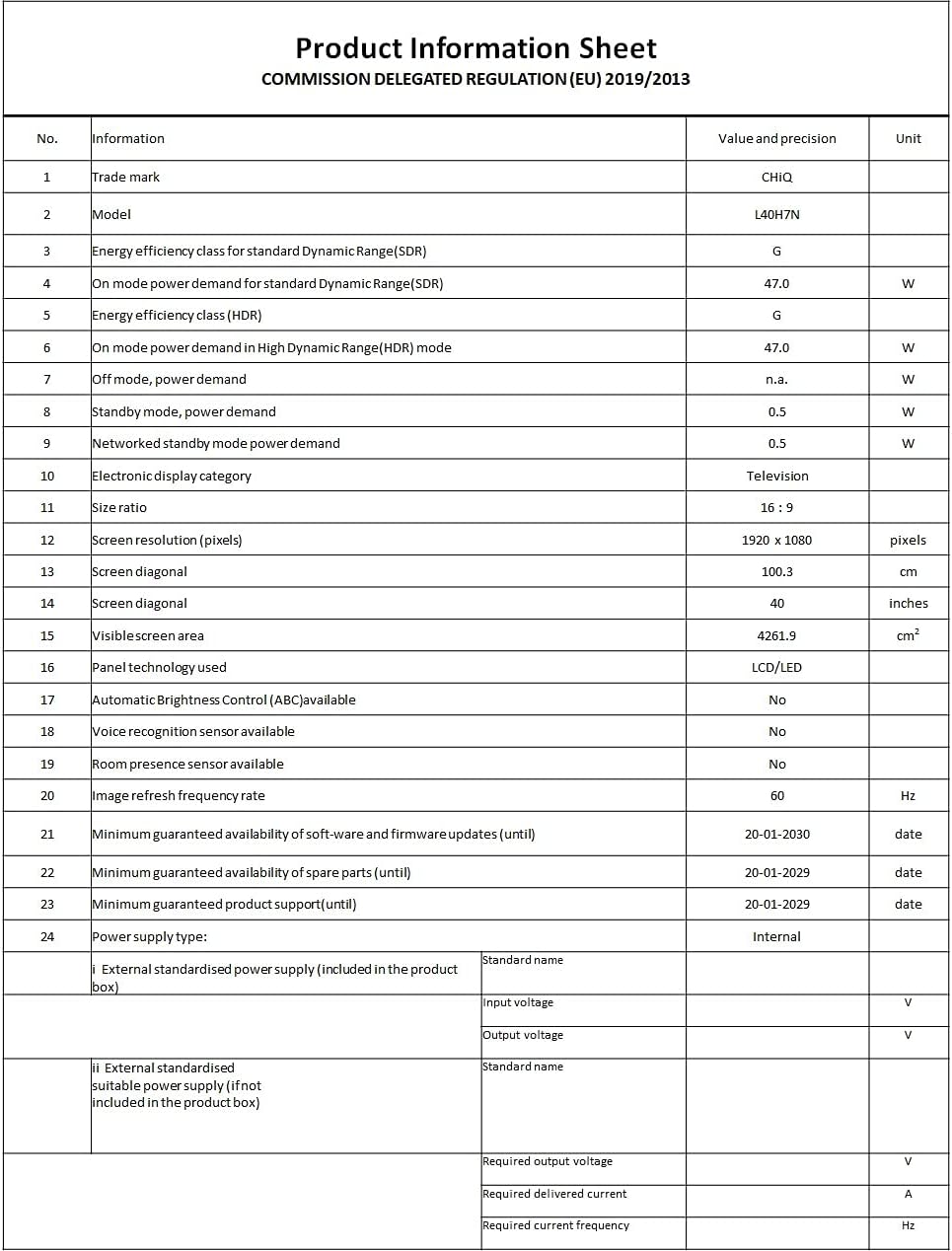
Image: A Product Information Sheet for the CHIQ L40H7N, detailing various specifications and compliance with COMMISSION DELEGATED REGULATION (EU) 2019/2013.
8. Garantî û Piştgirî
Your CHIQ L40H7N Smart TV comes with a manufacturer's warranty. Please refer to the warranty card included in your product packaging for specific terms and conditions, including warranty period and coverage details.
Piştgiriya Xerîdar:
For technical assistance, troubleshooting, or warranty claims, please contact CHiQ customer support. Contact information can typically be found on the CHiQ official webmalper an di belgekirina hilberê we de.