
1. Destpêk
The Dual DAB 3A Digital Radio Adapter is designed to upgrade your existing audio system with modern digital radio reception and Bluetooth streaming capabilities. This adapter allows you to enjoy DAB+ and FM radio broadcasts with clear digital quality and stream audio wirelessly from compatible devices. Its user-friendly interface and remote control ensure convenient operation.
2. Agahiyên Ewlekariyê
- Navê min: Use only the provided AC power adapter. Ensure the voltage matches the requirements specified on the adapter.
- Av û Nem: Do not expose the device to rain, moisture, or dripping/splashing liquids. Keep it away from water sources.
- Perwanekirin: Ensure adequate ventilation around the unit. Do not block ventilation openings. Avoid placing the device on soft surfaces that may obstruct airflow.
- Çavkaniyên germê: Amûrê ji çavkaniyên germê yên wekî radyator, tomarên germê, sobe, an amûrên din ên ku germê çêdikin dûr bigirin.
- Paqijî: Disconnect the power before cleaning. Use a soft, dry cloth. Do not use liquid cleaners or aerosol sprays.
- Xizmetkirin: Hewl nedin ku hûn vê hilberê bixwe xizmet bikin. Hemî servîskirinê bişînin karmendên karûbarê jêhatî.
3. Naveroka pakêtê
Ji kerema xwe, piştrast bikin ku hemî tiştên ku li jêr hatine navnîş kirin di pakêta we de hene:
- Dual DAB 3A Digital Radio Adapter
- Adapterê Hêza AC
- Remote Control
- Owner's Manual
- External Wire Antenna
4. Hilbera Serîview
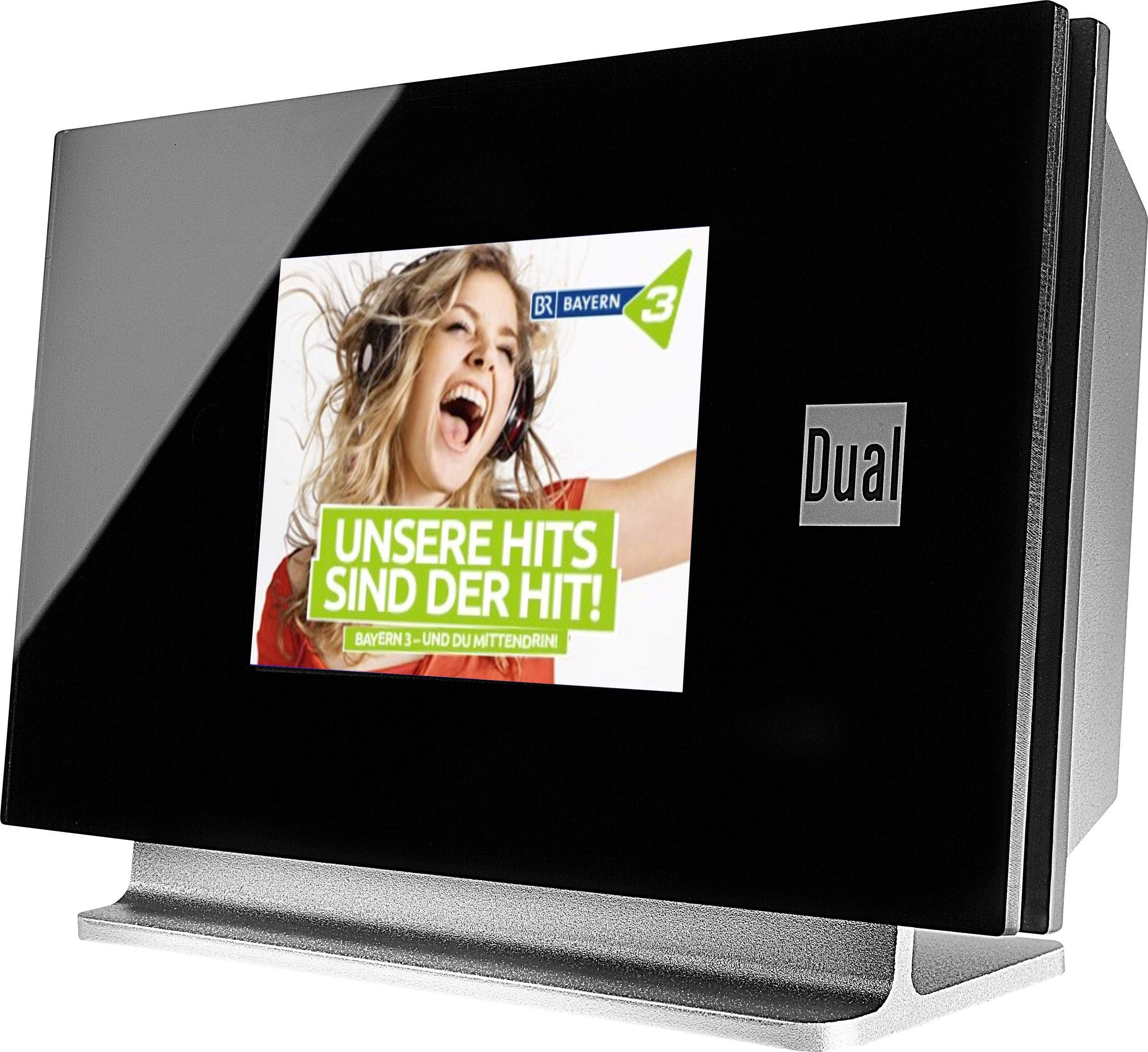
This image displays the Dual DAB 3A Digital Radio Adapter from a front-side angle. The front features a large, black TFT color display showing a radio station's album art and text. The side view indicates the product dimensions: 15 cm (width), 6 cm (depth), and 10.49 cm (height).
Panela Eniyê
- Dîmendera Rengîn a TFT: Shows station information, track details, album art, and menu options.
Têkiliyên Panela Paşê
- Ketina antenna: For connecting the external wire antenna or a commercially available antenna.
- AUX-DERKET: Audio output for connecting to an external amplifier an pergala deng.
- Ketina Hêzê: Ji bo girêdana adaptera hêza AC.
Remote Control
The included remote control provides full functionality for navigating menus, changing stations, adjusting volume, and selecting input modes.
5. Sazkirin
- Girêdana Antenê: Connect the supplied external wire antenna to the antenna input on the rear panel of the DAB 3A adapter. For optimal reception, extend the antenna fully.
- Girêdana Pergala Dengê: Use an appropriate audio cable (not included) to connect the AUX-OUT port on the rear of the DAB 3A to an available audio input (e.g., AUX-IN, Line-IN) on your existing amplifier an sîstema stereo.
- Hêza girêdanê: Plug the AC power adapter into the power input on the rear of the DAB 3A, then plug the adapter into a wall outlet.
- Hêzdarkirin: Press the Power button on the unit or the remote control to turn on the adapter. The display will illuminate.
- Initial Scan (DAB+): Upon first power-on, the unit may automatically perform a scan for available DAB+ stations. Allow this process to complete.
6. Operasyon
Power On / Off
- Bitikîne Erk button on the unit or remote control to turn the device on or off.
DAB+ Radio Mode
- Bitikîne Awa button on the remote control until DAB+ mode is selected.
- If no stations are found or you wish to rescan, navigate to the 'Full Scan' option in the menu and confirm. The adapter will search for available DAB+ stations.
- Bi kar tînin Jor jêr navigation buttons on the remote to browse through the list of available stations.
- Rojnamevanî OK / Enter ku qereqolek hilbijêrin.
- The TFT display will show station name, program information, and potentially album art or weather data.
Moda Radyoya FM
- Bitikîne Awa button on the remote control until FM mode is selected.
- Ji bo lêgerîna otomatîk a stasyonan, pêl bikin û bigirin Scan button (or equivalent on remote). The adapter will tune to the next strong station.
- Ji bo ku hûn bi destan verast bikin, bi kar bînin Jor jêr navigation buttons to adjust the frequency.
Mode Bluetooth
- Bitikîne Awa button on the remote control until Bluetooth mode is selected. The display will show 'Bluetooth Pairing' or similar.
- Li ser smartphone an tableta xwe, Bluetooth-ê çalak bikin û li cîhazên berdest bigerin.
- Select 'Dual DAB 3A' from the list of devices to pair.
- Once paired, you can stream audio from your device to the DAB 3A adapter.
Moda AUX-IN
- Connect an external audio source (e.g., MP3 player, CD player) to the AUX-IN port on the rear of the DAB 3A using a 3.5mm audio cable (not included).
- Bitikîne Awa button on the remote control until AUX-IN mode is selected.
- Audio from the connected external device will now play through your audio system.
7. Maintenance
- Paqijkirina yekîneyê: Disconnect the power adapter before cleaning. Use a soft, dry, lint-free cloth to wipe the surface of the unit. Do not use abrasive cleaners, waxes, or solvents.
- Paqijkirina Dîmenderê: Gently wipe the TFT display with a soft, dry microfiber cloth. Avoid pressing hard on the screen.
- Embarkirinî: If storing the unit for an extended period, disconnect it from the power supply and store it in a cool, dry place away from direct sunlight and extreme temperatures.
8. Destpêkirin
| Pirsegirêk | Sedema gengaz | Çare |
|---|---|---|
| Hêz tune | Adaptora hêzê ne girêdayî ye an jî priza elektrîkê xera ye. | Ensure the power adapter is securely connected to the unit and a working power outlet. |
| Poor DAB+/FM reception | Antenna not properly connected or poor signal strength. | Ensure the antenna is fully extended and properly connected. Try repositioning the antenna or the unit. Consider using a stronger external antenna if available. |
| Hevberdana Bluetooth têk diçe | Bluetooth not enabled on source device or adapter is not in pairing mode. | Ensure Bluetooth is enabled on your smartphone/tablet and the DAB 3A is in Bluetooth mode. Try restarting both devices. |
| Deng tune | Volume too low, incorrect input selected on amplifier, or audio cable issue. | Increase the volume on both the DAB 3A and your amprizgarker. Piştrast bike ku te amplifier is set to the correct input (e.g., AUX-IN). Check the audio cable connections. |
9. Specifications
- Cins: 75862
- Teknolojiya Tuner: DAB Plus, FM
- Têkilî: Bluetooth
- Bendên Radyoya Piştevanî: FM, DAB+
- Tîpa Nîşandanê: Display Color
- Çavkaniya hêzê: AC Adapter
- Navbera Hardware: Bluetooth
- Amûrên Lihevhatî: Smartphone, Laptop
- Taybetmendiyên Taybet: Bluetooth, Remote Control
- Mezinahiyên hilberê: 15 x 6 x 10.5 cm
- Giraniya Babetê: 540 g
10. Garantî û Piştgirî
This product comes with a standard manufacturer's warranty. For detailed warranty information, please refer to the warranty card included in your package or visit the official Dual website. For technical support, troubleshooting assistance, or service inquiries, please contact Dual customer support through their official channels.